

Advice and answers from the Advanced Web Ranking Team
Search for articles
AI Overviews Tracking: The Complete Guide
Learn how to track AI Overviews, monitor citations, rankings and visibility and understand how AI Overviews impact your website's performance in Google Search.

AI Overview tracking helps you understand when AI Overviews appear for your keywords, whether your website is cited, which pages and competitors are featured and how your visibility changes over time.
With Advanced Web Ranking, you can track AI Overviews on Desktop and Mobile, monitor your citations and AI visibility and analyze the sources appearing in each AI Overview.
In this guide, you'll learn how to set up AIO tracking with Google Search + AIO, understand the data AWR collects and analyze your AI Overview visibility, so you can use Advanced Web Ranking as your AI Overviews tracker.
What this article covers
To track AI Overviews effectively, it helps to first understand what they are and how they work.
What are AI Overviews and how do they work?
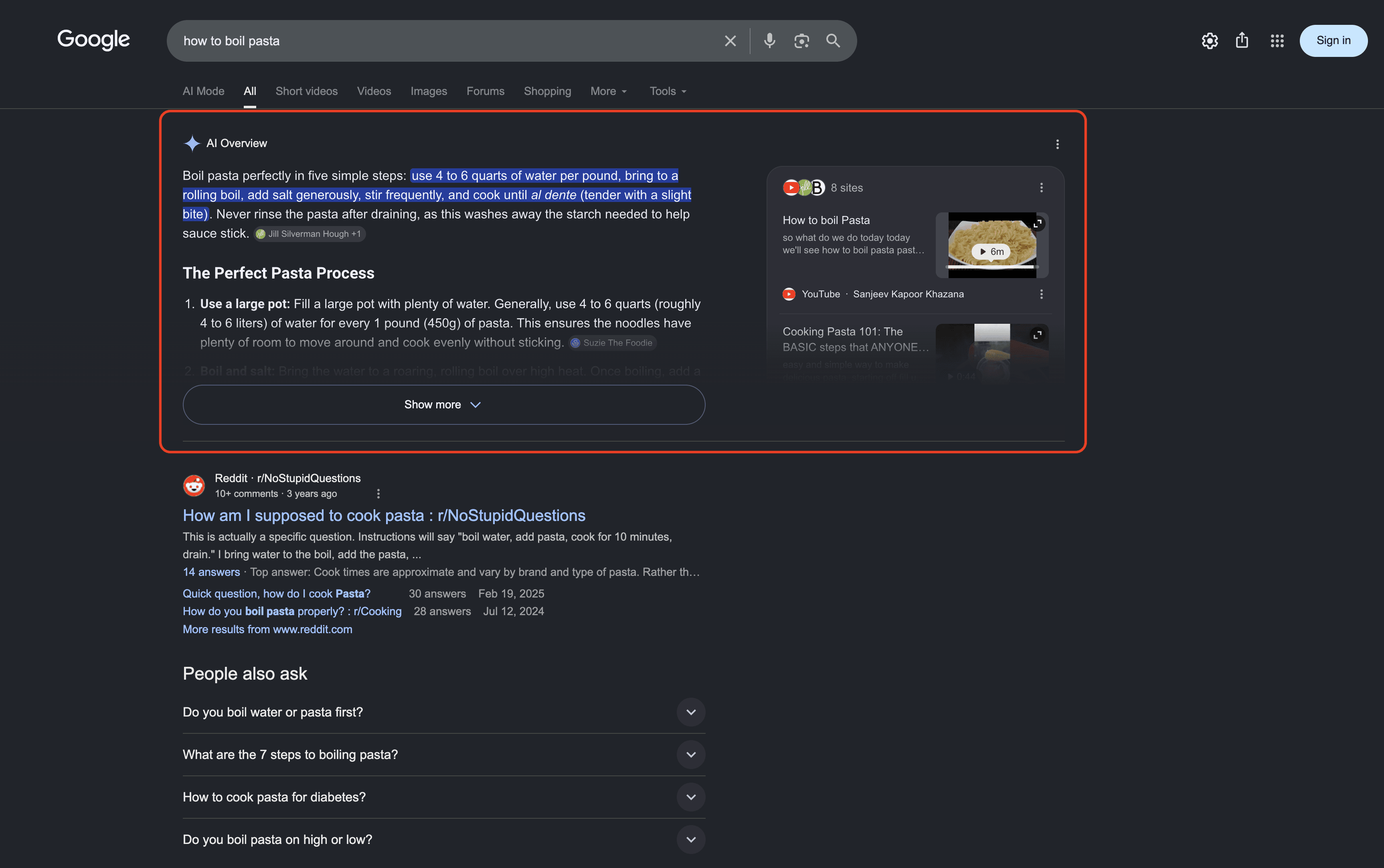
AI Overviews are AI-generated summaries that Google typically displays at the top of some search results, providing a direct answer to a user's query along with links to supporting web pages. They can also appear below sponsored results or, in some cases, below organic listings.
AI Overviews on Desktop
AI Overviews on Mobile
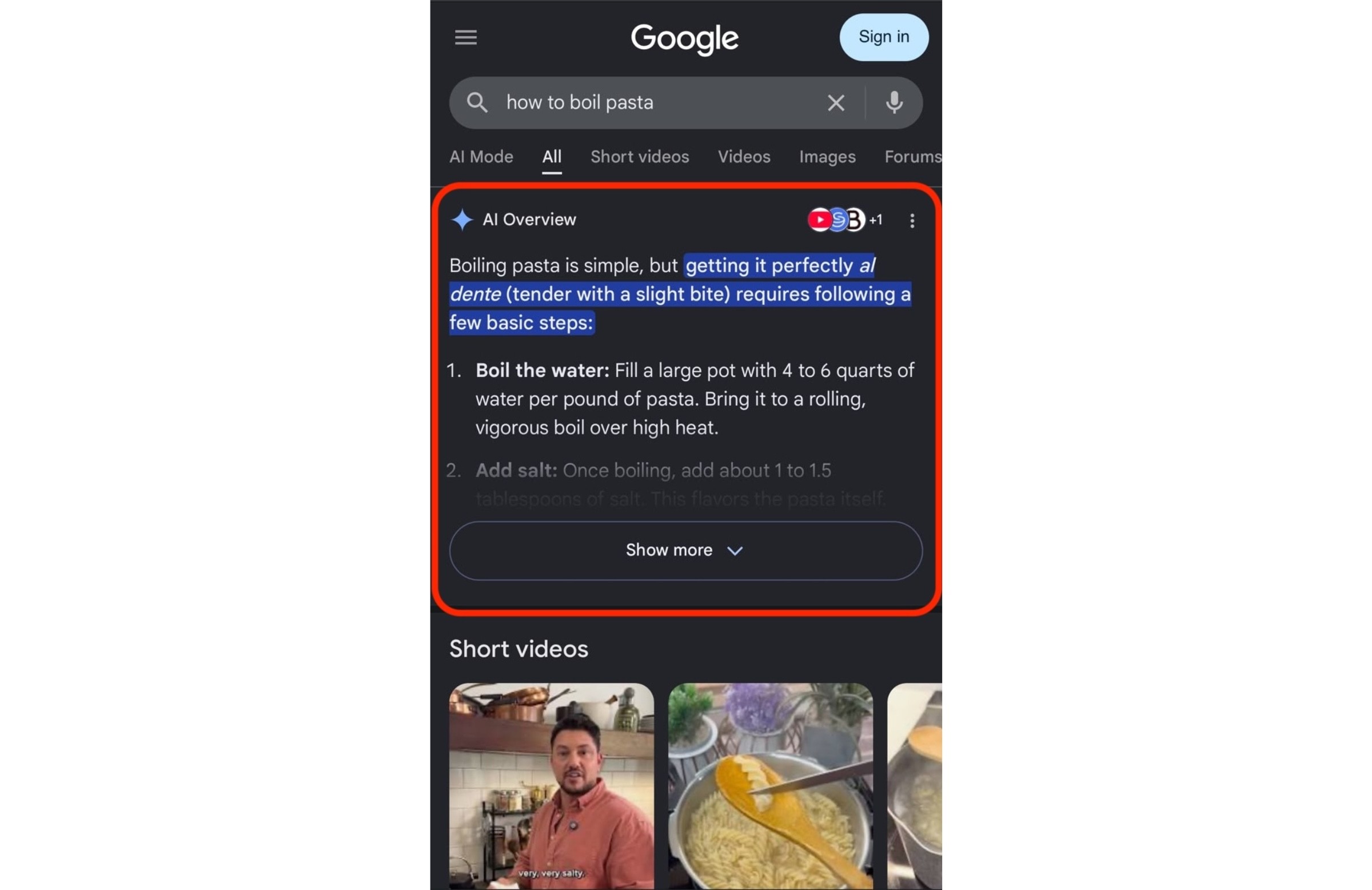
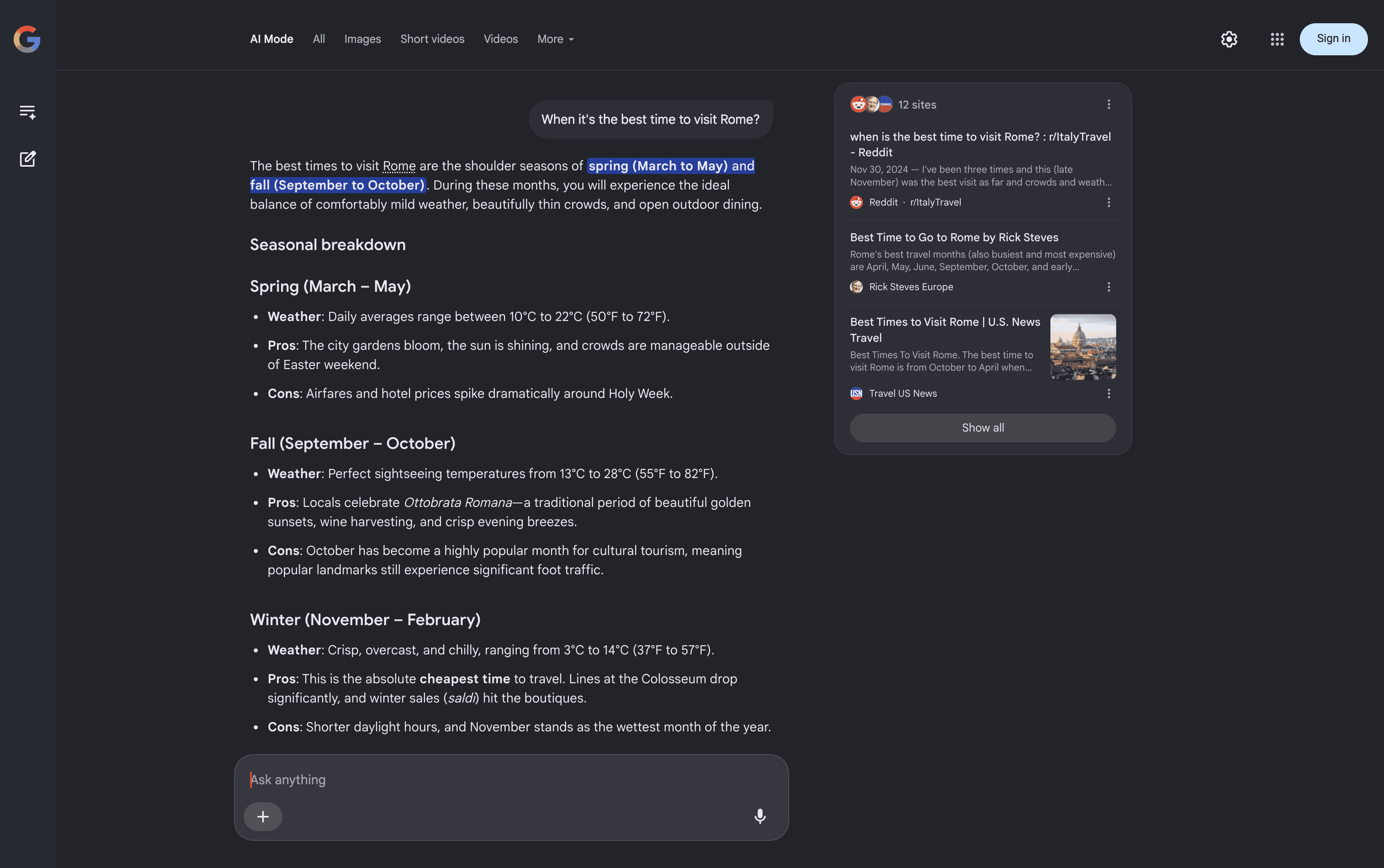
Users can expand an AI Overview by clicking Show more, which reveals an Ask anything box where they can enter a follow-up question.

From there, Google takes them directly to AI Mode, a conversational interface where they can explore the topic in more depth
AI Overviews don't appear for every search. Google primarily shows them for more complex queries that may require multiple searches to answer, such as research-heavy topics, multi-part questions, or searches where additional context is helpful.
Unlike Featured Snippets, which typically surface an answer from a single page, AI Overviews can combine information from multiple sources and display cited pages as links within the AI-generated response. Their presence and content can vary depending on the search query, location, device, and other factors.
For SEO, this creates another opportunity for your website to gain visibility in Google beyond traditional organic rankings. Tracking AI Overviews lets you monitor when they appear for your keywords, whether your pages are cited, and which competitors and sources appear alongside you.
How AI Overviews impact the SERPs
AI Overviews change the way users interact with search results. Instead of scanning multiple links, users can get an AI-generated summary with links to supporting sources directly on the SERP.
According to BrightEdge's February 2026 tracker, AI Overviews appeared for around 48% of tracked Google queries, up from roughly 30% a year earlier. The exact prevalence varies by query set, industry and measurement methodology.
AI Overviews can affect the SERP and how users discover websites in several ways:
Reduced clicks on traditional results: When an AI Overview appears, traditional organic results receive fewer clicks. Pew Research Center found that users clicked a traditional search result in 8% of visits when an AI summary was present, compared with 15% when it wasn't. Links within the AI summary itself were clicked in just 1% of visits.
Visibility beyond your ranking position: An AI Overview can give your website visibility even when it isn't the top organic result, sometimes even if you're not in the top 10. This makes AI Overview citations a separate visibility signal to monitor alongside traditional rankings.
A different set of cited sources: AI Overview citations don't necessarily match the pages ranking in the organic top 10. BrightEdge found that only about 17% of sources cited in AI Overviews also ranked in the organic top 10, showing that traditional rankings alone don't capture all of the pages Google surfaces in AI Overviews.
Uneven impact across queries and industries: AI Overviews don't appear for every keyword, and their presence varies by query type and industry. This means the impact on your visibility depends on the keywords you track and the type of searches your audience performs.
Still evolving: AI Overviews can appear and disappear for the same keywords over time, and their position, content and cited sources can change. This makes AI Overview visibility a dynamic metric that is worth monitoring over time.
As a result, traditional organic rankings alone don't tell the whole story. Tracking AI Overviews alongside organic rankings gives you a more complete view of how your website appears in Google Search.
How to track AI Overviews in Advanced Web Ranking
In Advanced Web Ranking, you can track AI Overviews and your website's rankings within them in non-personalized Google search results on both Desktop and Mobile using the Google Search+ AIO or Google Universal (All Results) search engines.

Both search engines are available in 170+ countries, including important markets such as the US, UK, Canada, Australia, Japan, Germany, France or Netherlands. You can also track rankings in custom locations down to the region, state, city or ZIP code level.
If you aren't already tracking either of these search engines, you can add one to your project from the Search engines drop-down available in most reports (such as Keyword Ranking)
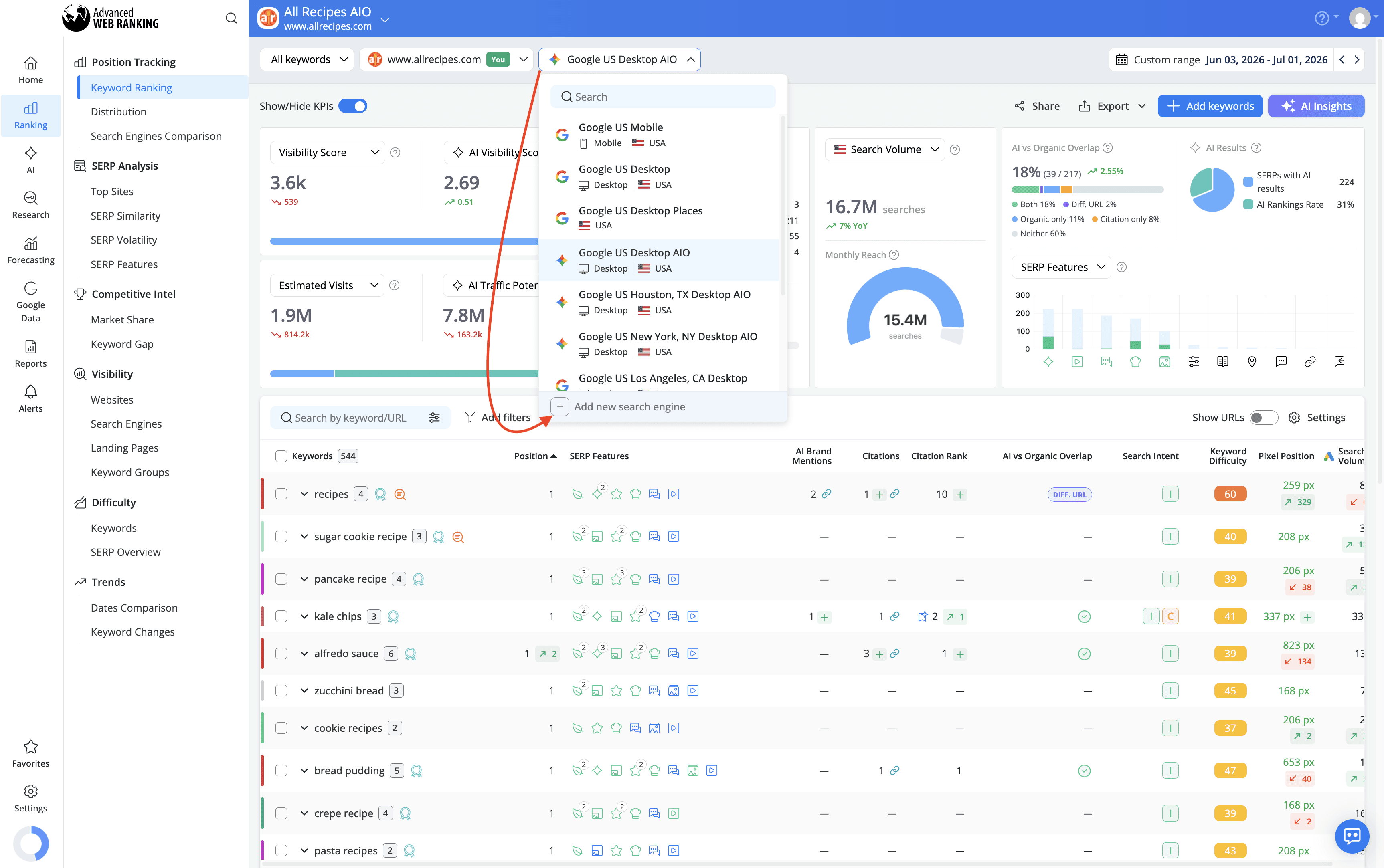
or from Project Settings > Search Engines.
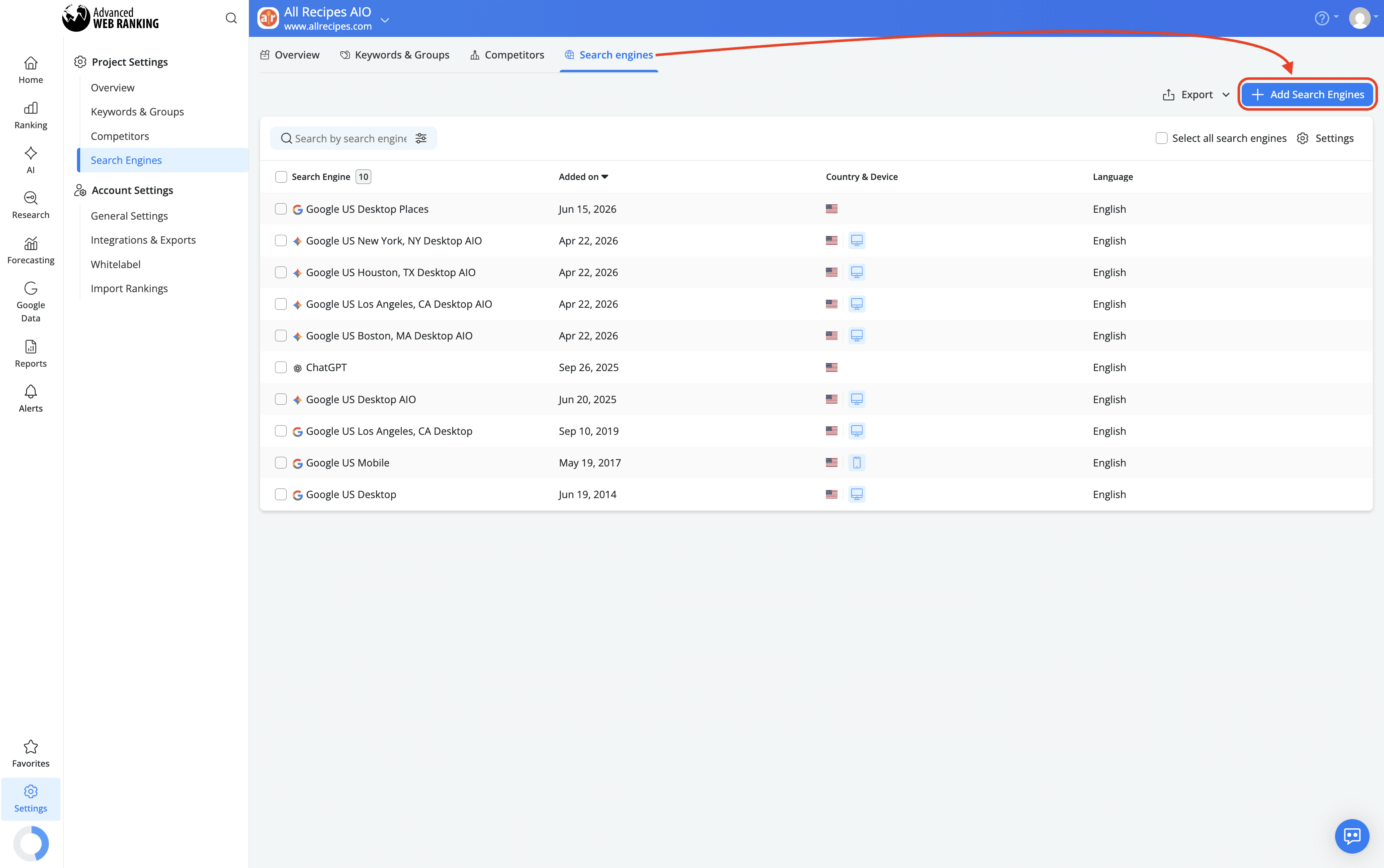
Google Universal vs. Google Search + AIO: What’s the Difference?
Both Google Universal and Google Search + AIO track all web search results, excluding Ads, across Desktop and Mobile. Any clickable URL on the page counts as a competitor when calculating ranking positions.
The difference is in how AI Overview data is retrieved. Google Universal picks up AI Overviews as part of a standard SERP crawl, which works well in most cases but can occasionally return incomplete or missing source URLs for that feature specifically. Google Search + AIO was built to close that gap, using a dedicated mechanism that retrieves AI Overview content more consistently and accurately.
Because AI Overviews load dynamically and require an additional query to capture reliably, Google Search + AIO uses twice the keyword units of a standard engine.
If you're interested in general SERP tracking and AI Overviews are just one of the features you want to monitor, Google Universal is enough. If accurate AI Overview tracking is your priority, Google Search + AIO is the recommended option. It provides more consistent citation data and source URLs, making it better suited for reliable AI Overview monitoring and client-facing reporting.
Google Universal | Google Search + AIO | |
|---|---|---|
AI Overview data retrieval | Can occasionally return incomplete or missing sources URLs | Retrieves AI Overview content more consistently and accurately |
Other SERP features | Tracked alongside AI Overviews | Tracked alongside AI Overviews |
Keyword units consumption | Standard | 2 x Standard |
How AI Overview Results Are Reported in AWR
When AWR finds an AI Overview in the SERP, it reports all websites included in that overview at the same ranking position, since they belong to the same search result element, the same logic AWR applies to other multi-source features like People Also Ask or Top Stories.
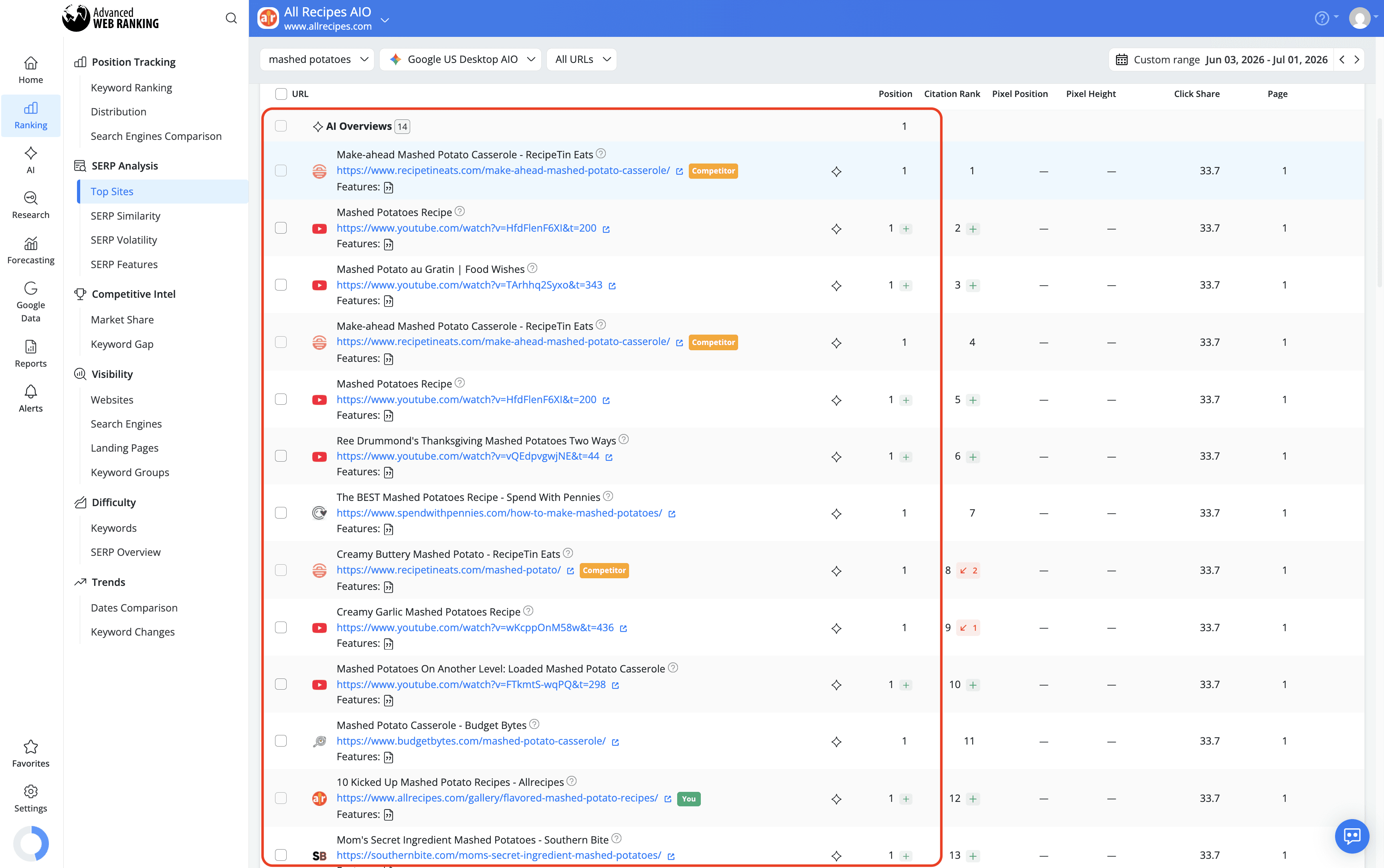
To explore what's behind those positions, the Top Sites report shows a breakdown of all the websites and URLs cited in the AI Overviews retrieved for your tracked keywords. You can use it to see which pages are consistently being pulled into AI-generated answers, spot competitors showing up in citations you're missing from and identify the type of content Google tends to favor as a source.
The SERP Snapshot lets you see exactly how the search results page looked for a given keyword at the time of the update. Rather than working from data alone, you can check out the actual SERP and see where the AI Overview sits on the page, what the summary says and which sources are visible in the main block.

How to Identify Keywords That Trigger AI Overviews
Not all keywords trigger AI Overviews and knowing which ones do is the first step toward understanding your AI search presence. In AWR, you can find and filter these keywords directly from the Keyword Ranking report using the SERP Features filter.
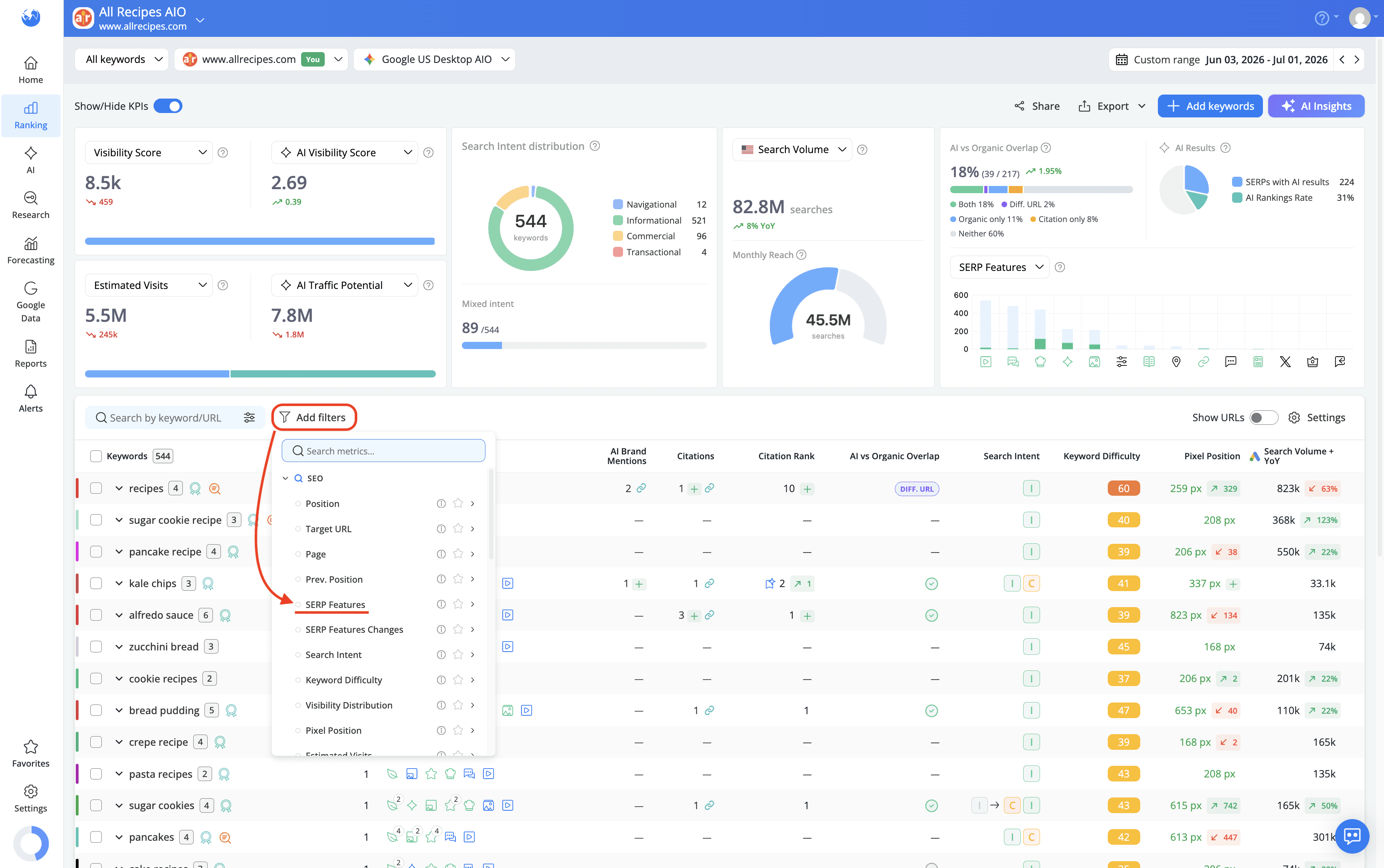
The filter gives you three different ways to look at your keywords, depending on what you need to find:
Keywords that trigger AI Overviews
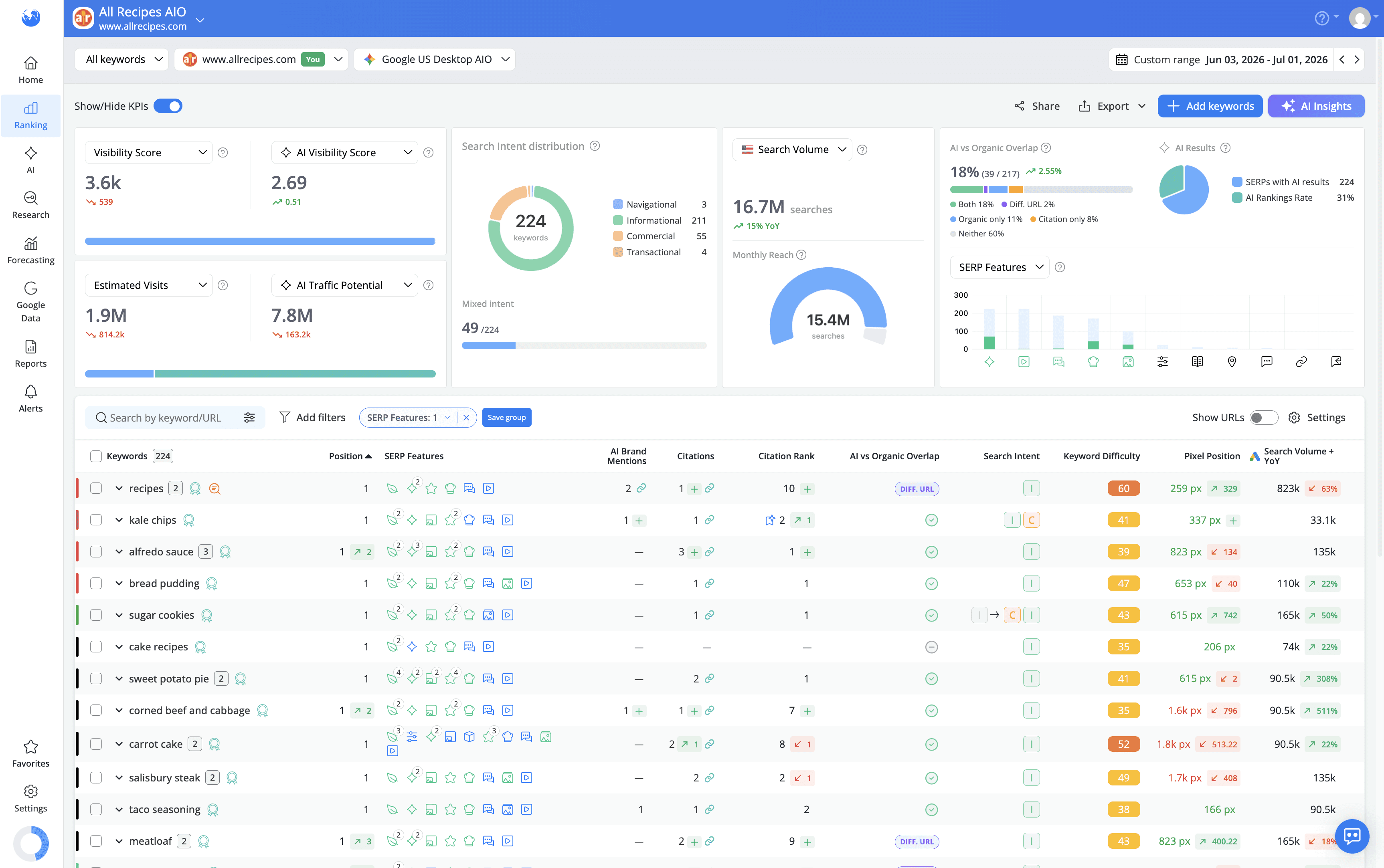
To see all the keywords in your project that trigger an AI Overview, apply the SERP Features filter and select "Feature on SERP."
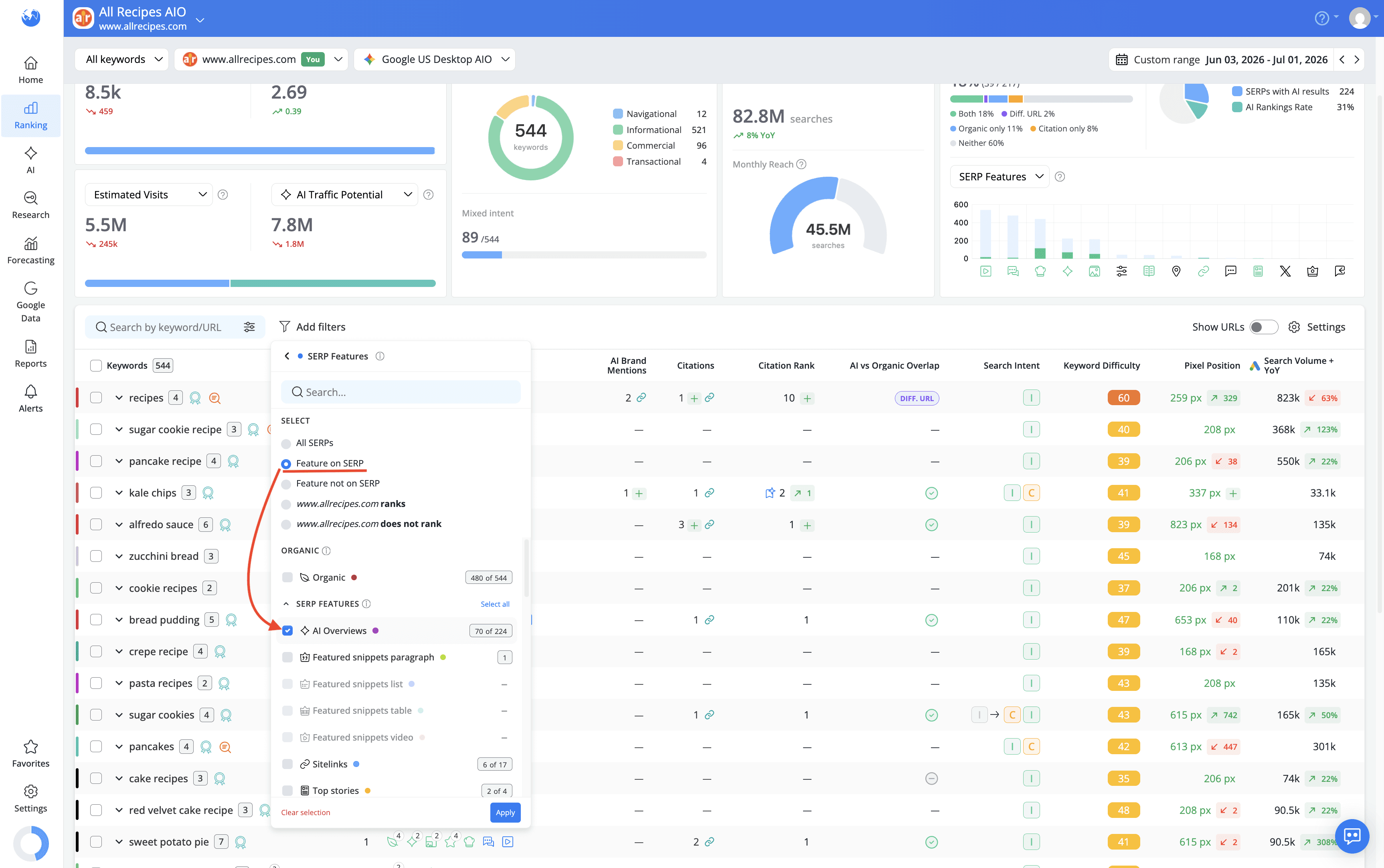
This gives you a full list of keywords where Google is showing an AI Overview, regardless of whether your website appears in it or not.
Keywords for which your website ranks in AI Overviews
To narrow the list down to keywords where your website is actually cited inside the AI Overview, select "example.com ranks" from the SERP Features filter.

If your site appears in the AI Overview for a given keyword, the corresponding icon in the SERP Features column will also be highlighted in green.

Keywords for which your website doesn't rank in AI Overviews
To find keywords where an AI Overview is present but your website isn't part of it, select "example.com does not rank."
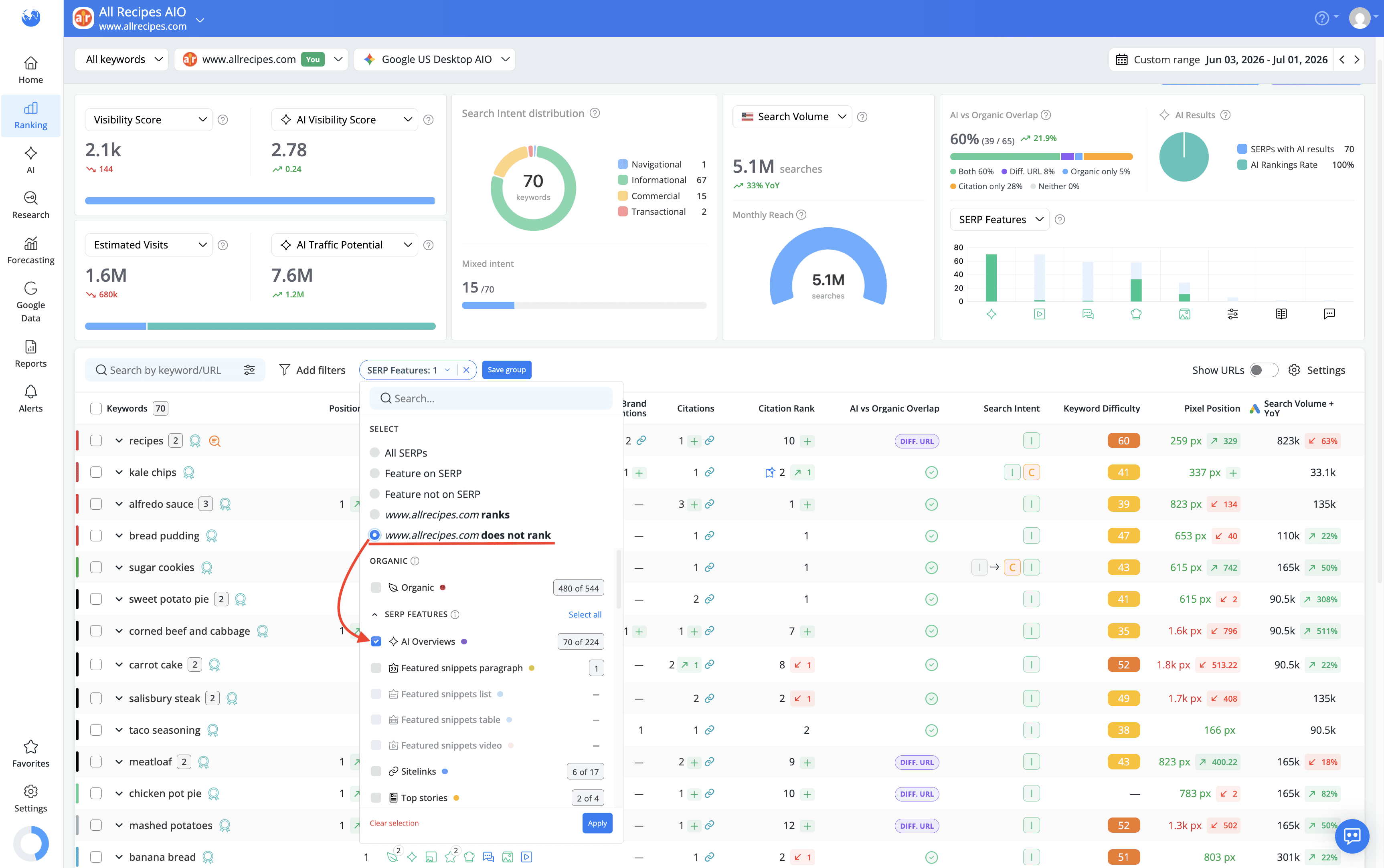
These are your gap keywords, the ones where a competitor is getting cited and you're not and they're a good starting point for identifying where to focus your optimization efforts.
Why am I not seeing AI Overviews for my keywords?
If you've set up tracking and AI Overviews still aren't showing up where you expect them, the cause is usually one of a few things. Some depend on Google's search results, while others are worth double-checking in your AWR setup.
The query doesn't trigger an AI Overview. AI Overviews don't appear for every search. Google is more likely to show them for some types of queries than others, and they're generally more common for informational searches than transactional ones. A keyword can rank well organically without triggering an AI Overview.
AI Overview visibility changes over time. AI Overviews can appear and disappear for the same keyword as Google's search results change. If a keyword triggered an AI Overview in a previous update but doesn't trigger one now, this doesn't necessarily indicate a tracking issue.
You're tracking the wrong search engine. If you're using Google Universal, AI Overviews are captured as part of the standard SERP crawl. For more reliable AI Overview data, Google Search + AIO is the engine built specifically for tracking this feature. If accurate AIO tracking is your priority, check that Google Search + AIO is added to your project.
Your location or device settings don't match. AI Overview availability can vary by country, region and device. If you're tracking a location or device combination where Google isn't currently showing an AI Overview for that keyword, you won't see one in your reports even if it appears elsewhere.
Your keywords are in areas where AI Overviews are less common. AI Overview presence varies across query types and industries. If your keyword set contains mostly queries that don't commonly trigger AI Overviews, a lower AIO presence in your reports may simply reflect the SERPs for those keywords.
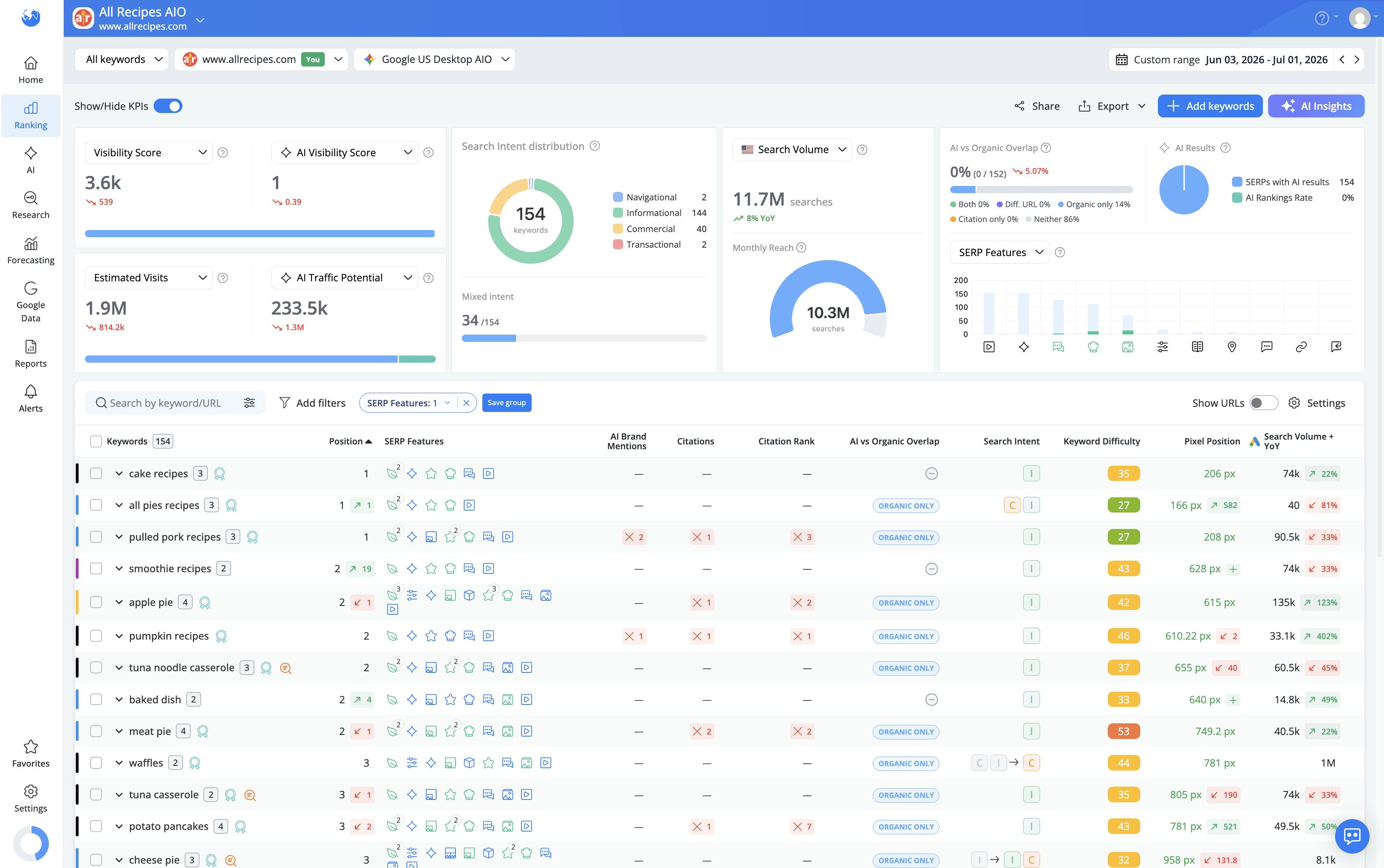
To check whether a keyword is triggering an AI Overview at all, regardless of whether your site is cited, use the SERP Features filter in the Keyword Ranking report and select Feature on SERP, as covered above. If no AI Overview is shown for the keyword, it isn't currently triggering the feature in the tracked SERP.
How To Analyze Your AI Overview Performance
Once you know AI Overviews are appearing for your tracked keywords, the next questions are the ones that actually matter for your strategy: Is your brand showing up inside them? Are you being cited as a source or just mentioned in passing? Where do you rank within the citation block? And does your organic performance translate into AI visibility at all?
AWR gives you dedicated metrics to answer those questions that take you from a keyword-level view of your AI Overview presence all the way to broader visibility trends and competitive standing.
Ranking position is only the starting point. The Keyword Ranking report goes deeper with four metrics that show how your brand actually appears within AI Overviews at keyword-level:
AI Brand Mentions
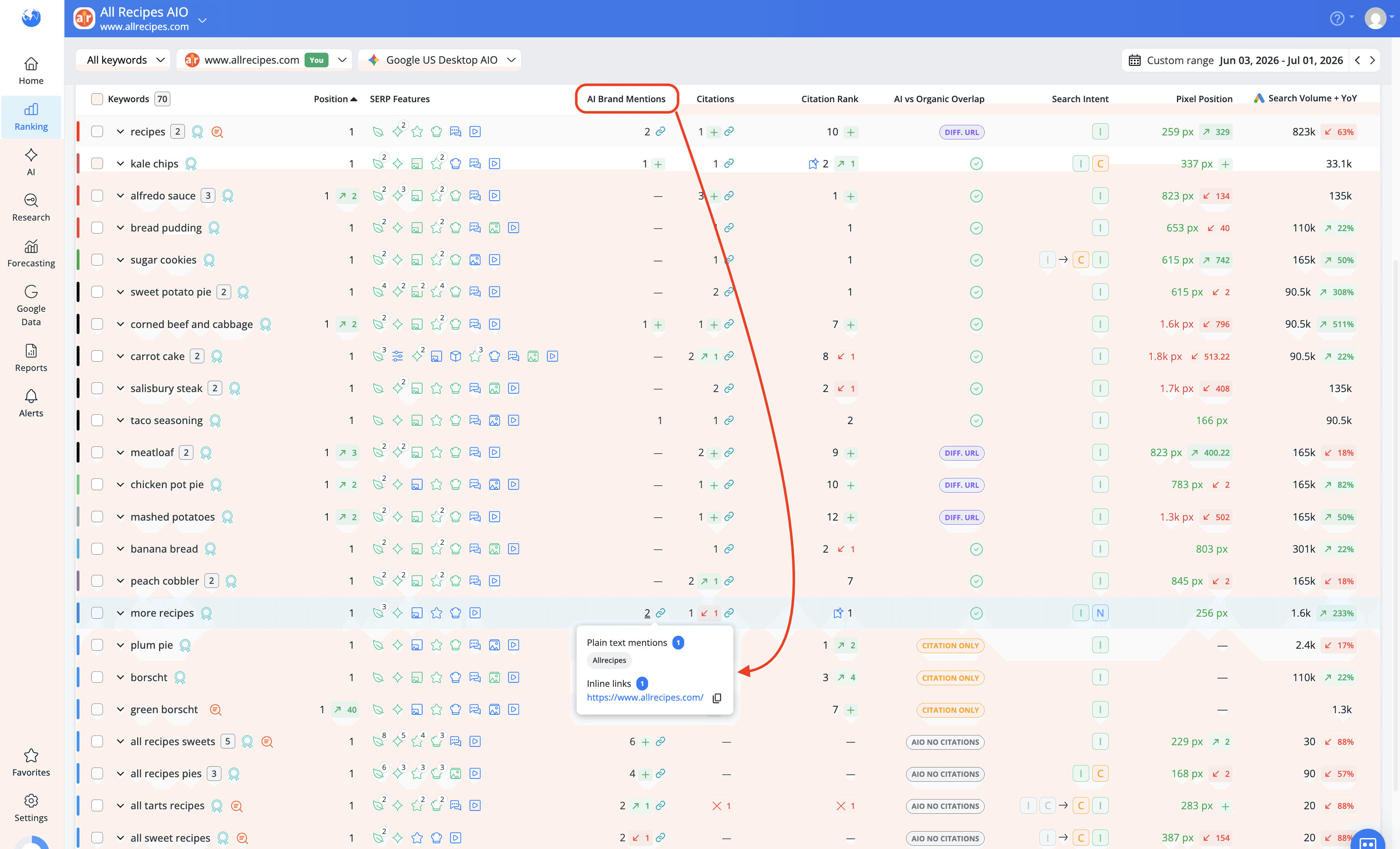
AI Brand Mentions counts how often your brand or website is referenced in the AI-generated answer snippet, either as a plain text mention or an inline link. It's a brand visibility metric that tells you how frequently your brand is part of the conversation in AI results, even when your website isn't listed as a cited source.
A mention happens when your brand name appears in the AI-generated summary itself, whether as plain text or as an inline link. A mention shows Google considers your brand relevant to the topic, even if it doesn't link to your site as a source.
Citations
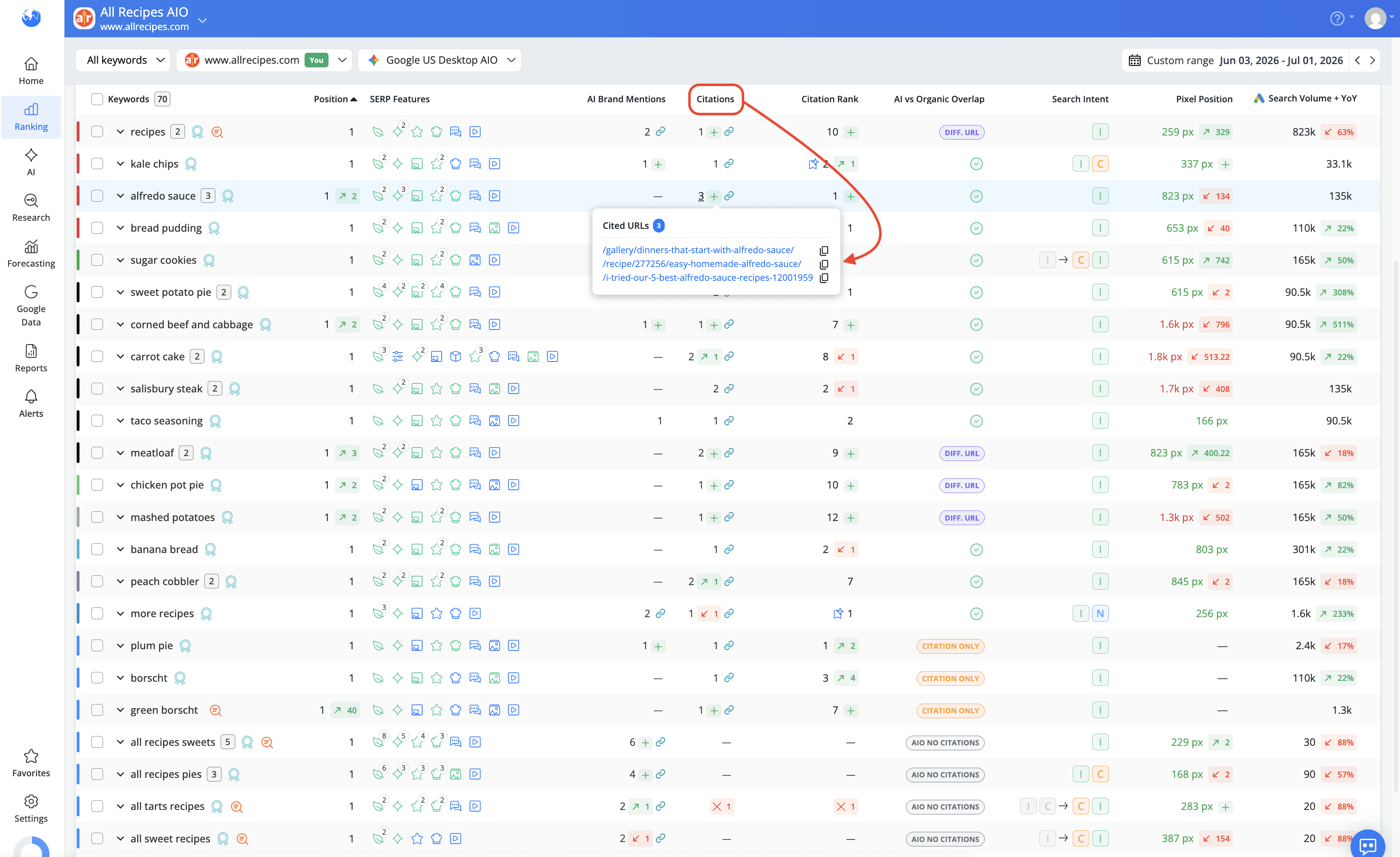
Citations count how often your website is listed as a cited source for the AI answer snippet. Where Mentions track whether your brand name appears in the summary, Citations track whether your actual pages are being used as sources behind it.
A citation happens when one of your actual webpages is listed as a source behind the AI Overview, either as a sidebar source or as an inline clickable link within the summary. A citation means the AI Overview used your content to generate part of the answer, which carries more SEO weight than a plain mention because it comes with a direct path back to your site.
Mentions and citations aren't the same thing; analyzing both gives you a more accurate picture of how your brand appears in AI-generated responses. Full breakdown here: Citations vs. Mentions in AI Search.
Citation Rank
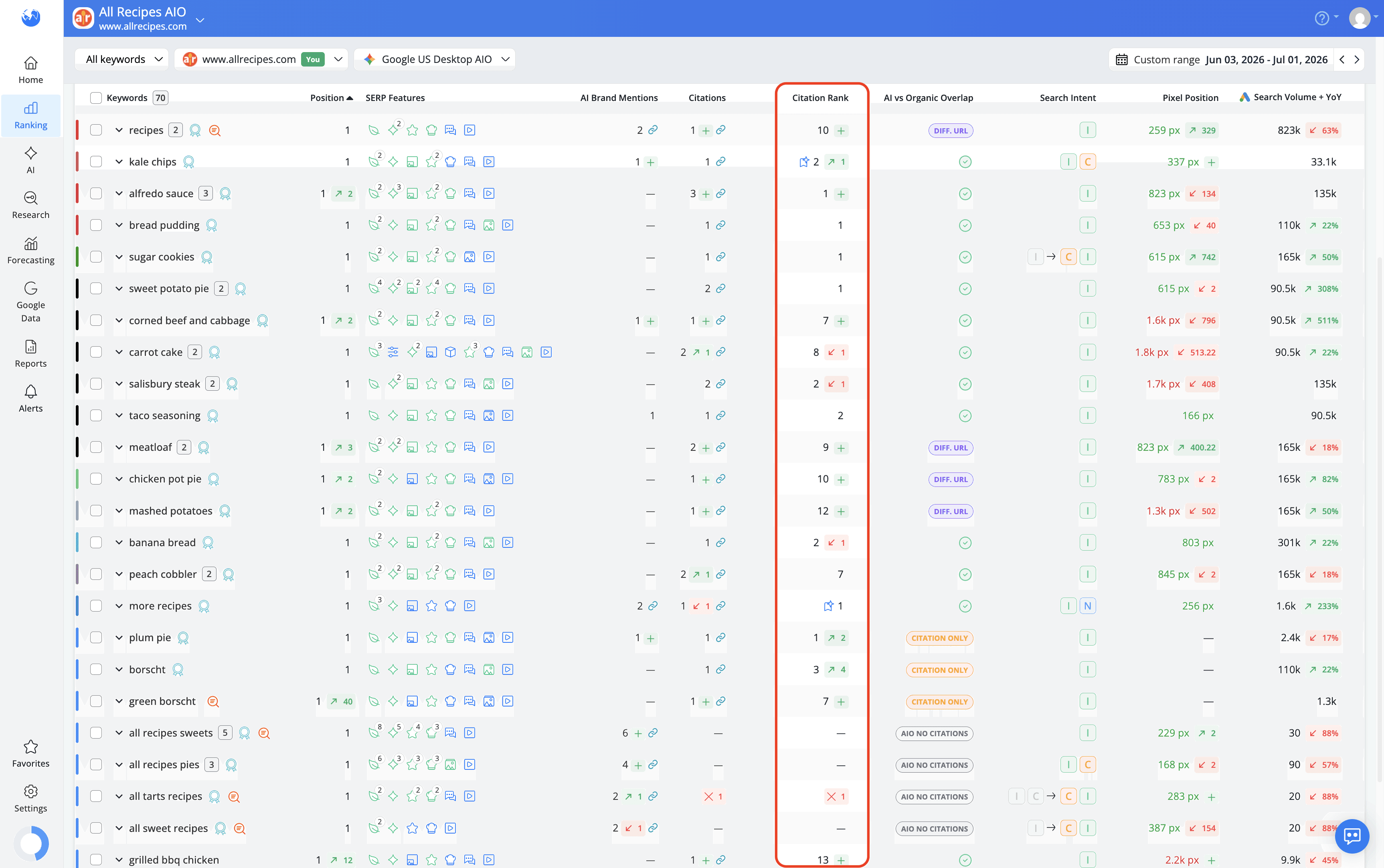
Citation Rank shows the position your website holds within the citation group of an AI Overview.
Citations marked with the Top AIO Sources icon are the ones visible in the main AI block without clicking "Show more," meaning they get the most exposure.

AI vs Organic Overlap
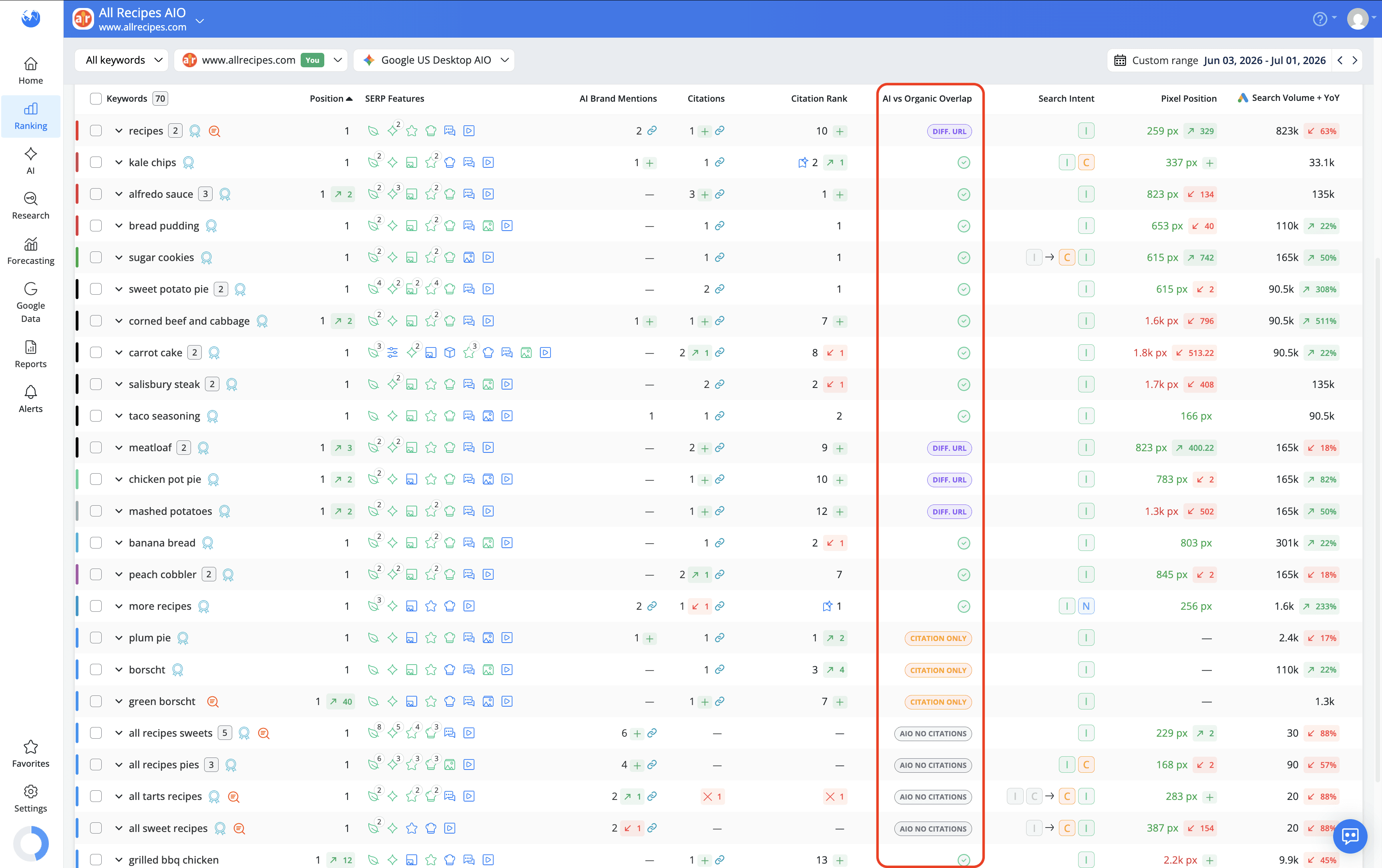
AI vs Organic Overlap answers a strategic question for every keyword you track: does your URL appear in both the organic top 10 and as a citation inside the AI Overview?
The metric shows the overlap status per keyword, whether the associated ranking URL appears organically, as an AIO citation, both, or neither.
It's available when tracking a Google AIO or Google Universal search engine.
AI Search Keyword Performance report
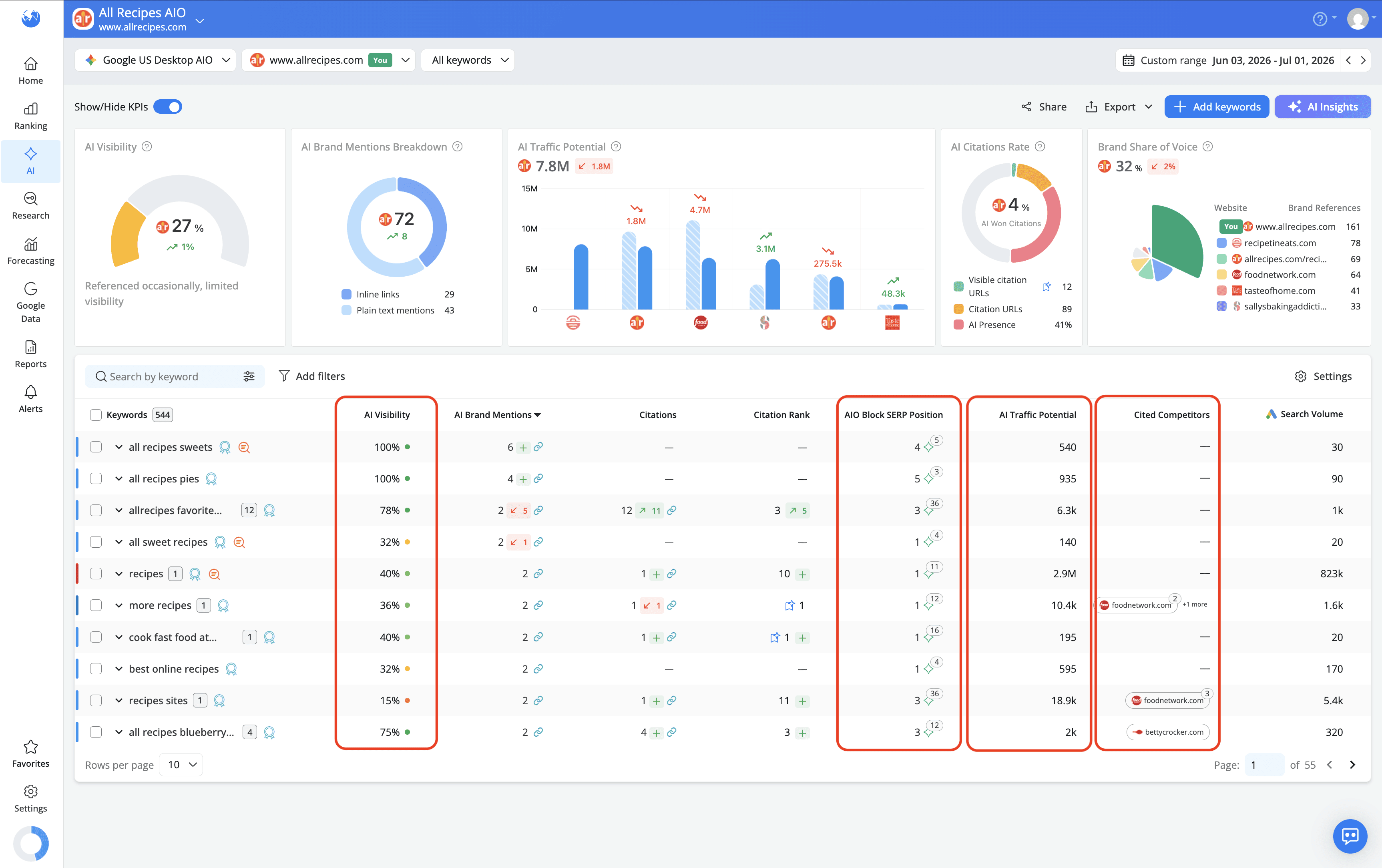
For a more thorough analysis of your AI Overview performance, the AI Search Keyword Performance report brings all the Keyword Ranking metrics together in one place and adds a dedicated set of KPIs that give you a broader view of your brand's AI visibility, traffic potential, and competitive standing. Here's what you can track:
AI Visibility
AI Visibility measures your brand's overall AI footprint based on its mentions by type and citations by rank. It's scored on a scale with four levels: Poor (below 20%), Fair (20-35%), Good (35-60%), and Excellent (above 60%), giving you a quick read on where your brand stands in AI results overall.
AIO Block SERP Position
AIO Block SERP Position shows the position of the AI Overview block in Google, along with an overview of the citation URLs listed as AI sources. Multiple appearances of the same URL are counted separately, so you get an accurate picture of how often and where your pages show up within the block.
AI Traffic Potential
AI Traffic Potential estimates the potential visits your brand could receive from AI-generated responses. It's calculated using the keyword's average monthly search volume and your AI Visibility score, with close keyword variants deduplicated where found. It gives you a sense of the traffic opportunity your AI presence represents, not just whether you appear, but how much that appearance could be worth.
Cited Competitors
Cited Competitors shows the tracked competitor domains that appear as cited sources in the same AI Overview as your website. It's a quick way to see who you're sharing the citation space with for each keyword, and to spot which competitors are consistently showing up alongside you in AI-generated answers.
At the top of the report, five KPIs give you an at-a-glance summary of your overall AI performance:
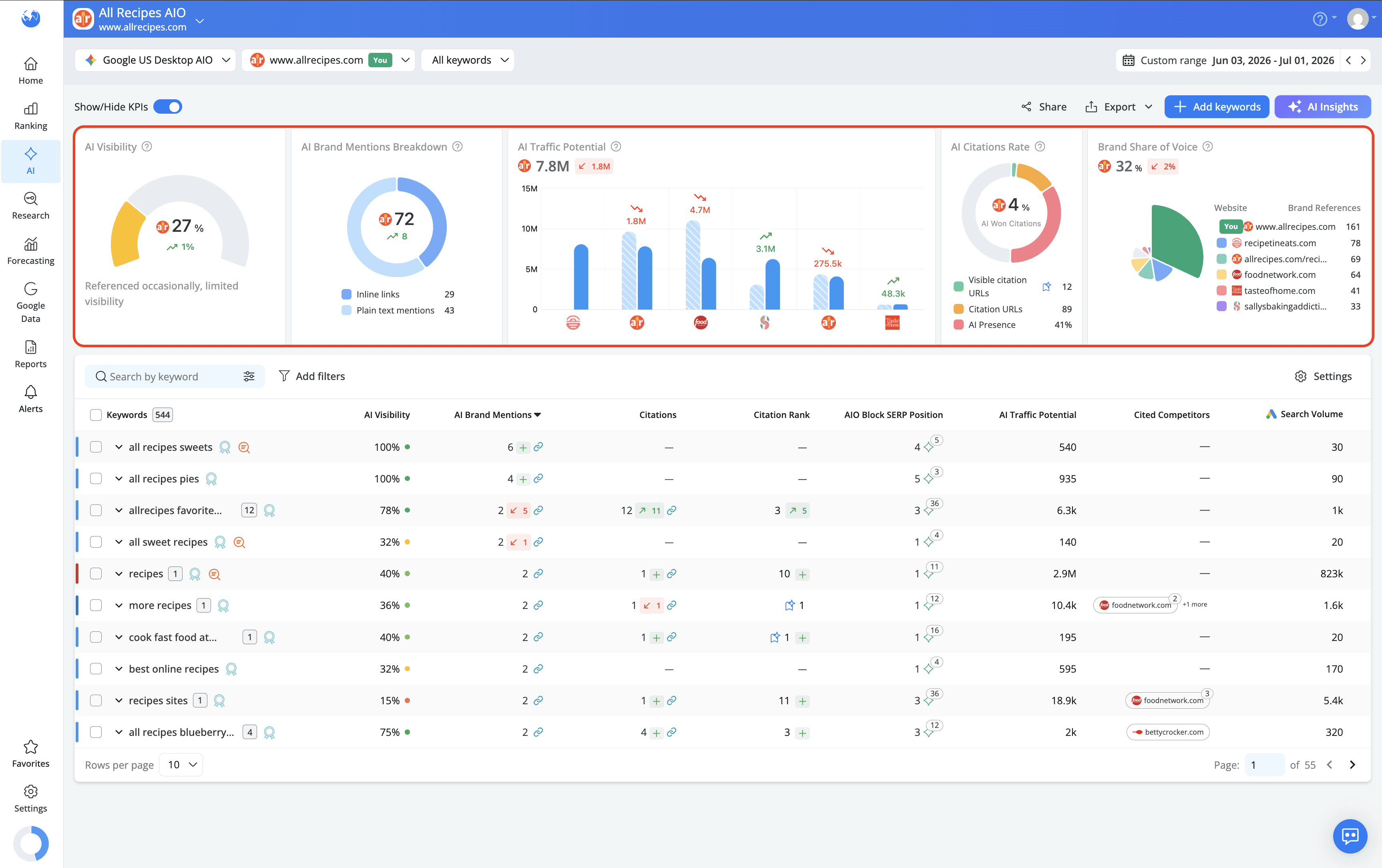
AI Visibility — your overall AI footprint score
AI Brand Mentions Breakdown — your mentions split between inline links and plain text
AI Traffic Potential — the estimated visit opportunity your AI presence represents
AI Citations Rate — the percentage of AI Overviews where your website is cited
Brand Share of Voice — your AI presence benchmarked against tracked competitors
Together, the Keyword Ranking and AI Search Keyword Performance reports provide both a high-level overview and keyword-level insights, helping you understand your AI Overview presence, identify opportunities and keep an eye on the competition.
Not sure which report to start with? This article can help you decide.
How can your website get featured in AI Overviews?
There's no guaranteed formula for getting your website cited in an AI Overview. Google generates them dynamically, which means the sources can change between searches even when nothing on your end has changed. That said, a few practices can improve your chances:
Create authoritative content
Google prioritizes reliable, trustworthy sources in AI-generated answers, so content that demonstrates real expertise has a better shot at being pulled in.
Structure your content around questions
AI Overviews are designed to answer queries directly. Pages that address specific questions clearly and early tend to perform better as citation sources.
Target informational keywords
Informational queries are more likely to trigger AI Overviews than transactional ones, so if growing your AIO presence is a goal, informational content is where to focus.
Write clearly and simply
The easier your content is to read and extract from, the easier it is for Google's systems to use it.
Use structured data
Marking up your content with schema helps Google understand what your page is about and how the information is organized, which can make it easier to pull into a summary.
Keep your content up to date
AI Overviews tend to favor fresh, accurate information. Regularly reviewing and updating your pages signals that your content is current and reliable.
Optimize for E-E-A-T
Experience, expertise, authoritativeness, and trustworthiness are the signals Google uses to evaluate content quality. The stronger your content scores on these, the more likely it is to be considered a credible source for AI-generated answers.
AI Overviews are still evolving, and so is the way SEOs track and optimize for them. The good news is that AWR gives you the data to stay on top of both, from identifying which keywords trigger them to understanding exactly how your brand shows up inside them and where the opportunities are.
Do you have any other questions? Don’t hesitate to get in touch and we will keep building the FAQ.
Frequently Asked Questions
What is AI Overview tracking?
Can I track AI Overview citations?
Do AI Overviews affect my organic traffic?
Why did an AI Overview disappear for a keyword?
Why does an AI Overview appear for some keywords but not others?
What's the difference between a mention and a citation in an AI Overview?
Does ranking high organically guarantee being cited in an AI Overview?
Does ranking in the top 10 guarantee an AI Overview citation?
Can I track AI Overviews for a specific city or region?
stay in the loop