

Advice and answers from the Advanced Web Ranking Team
Search for articles
The Complete Guide to Keyword Units: Everything You Need to Know
How AWR calculates unit consumption for Ranking, Difficulty & Brand Intelligence, what's included at no extra unit cost on every plan, and how to get the most out of your monthly quota.

If you've ever wondered why your unit count looks higher than expected, or you're trying to figure out how many keywords you can actually track on your Advanced Web Ranking subscription, this guide is the place to start.
What this article covers
What keyword units are and what the default tracking setup looks like
How unit consumption is calculated for scheduled ranking updates, based on four factors: keywords, search engines, frequency, and search depth
How unit consumption is calculated for other update types (on-demand, difficulty, Brand Intelligence)
How to check your current usage and when used keyword units reset
What's included at no cost on every AWR subscription and how that compares to competitors
A full breakdown of AWR's available plans and how many keywords you can track with each of them
Smart ways to reduce consumption without losing valuable insights
Real-world unit planning scenarios: a 24-client agency and an 8-market in-house team
AWR Keyword Units in 60 Seconds
In AWR, all rank tracking activity is measured in keyword units. One keyword unit, which is the baseline, equals one keyword, tracked on one search engine (one location + one device), updated weekly, at a search depth of up to 5 pages.
Unit consumption scales based on four factors: keywords, search engines, update frequency, and search depth.
E.g.: Daily updates cost 7x more than weekly. AIO and AI Mode engines cost 2x per keyword. A depth of 10 pages doubles the base cost.
Unlike SEMrush (which charges $45–$100 per additional user seat) or Ahrefs (which uses a credit system that limits certain actions each month), AWR keeps it simple: you pay for keyword units only. No per-seat fees, no action limits, no surprises. Your entire team can access reporting, competitor data, and historical trends without it affecting your bill.
✓ What's included free on every AWR plan: no hidden fees, no per-seat pricing
Unlimited projects • Unlimited users • Up to 50 competitors per project • White-label reports • Data exports (CSV, XLSX, PDF) • Historical data access • AI Visibility tracking • Local & mobile rankings • Full SERP features analysis • MCP Server access • 30-day money-back guarantee
What Is a Keyword Unit
Before anything else, a quick clarification: a keyword and a keyword unit are not the same thing. A keyword is the search term you add to your project for tracking. A keyword unit is the resource consumed to update it, and how many units that takes depends entirely on how your project is configured.
A keyword unit is the basic resource currency in Advanced Web Ranking. Every subscription plan includes a predefined number of keyword units, allocated on a monthly billing cycle. The simplest way to think about it:
1 keyword unit = 1 keyword, tracked on 1 search engine (one location + one device), updated once per week, with a search depth of up to 5 pages.
From this baseline, each project's unit consumption scales based on four factors: the number of keywords you track, the number and type of search engines added, how frequently the updates run, and the search depth selected.
⚙️ Full visibility and control over your tracking costs
With AWR's unit system, you see exactly how many resources each project configuration consumes and why. Add or delete a search engine, adjust your update frequency, or pause a project and your unit count updates instantly, so you can scale up or down without hidden costs.
How Scheduled Ranking Updates Consume Keyword Units
The formula for calculating keyword units consumed by scheduled ranking updates is:
Units = Keywords × Search Engines × Frequency Multiplier × Depth Multiplier
Here is a breakdown of each factor.
Factor 1: Keywords
Keywords represent the number of search terms added to an AWR project that you want to track. The more keywords you add, the more units your project consumes. Everything else scales from this number.
Factor 2: Search Engines
Each unique combination of search engine, location, and device counts as one search engine unit. For example, if you track Google Desktop US + Google Mobile US, that's 2 search engine units. Add Google Desktop UK, and you're at 3.
Search Engine Type | Unit Consumption per Keyword | Details |
|---|---|---|
Google, Bing, Yahoo, Baidu, Naver, YouTube, Amazon | 1 unit | Standard engines |
Google Search + AIO (AI Overviews) | 2 units | Advanced AIO scraping requires 2 queries per keyword |
Google AI Mode | 2 units | Similar to AIO, these dynamic AI results require extra queries |
ChatGPT, Perplexity | 1 unit | Standard LLM tracking |
⚠️ Plan before you switch: AIO and AI Mode tracking cost 2x units
If you switch from standard search to AI tracking (e.g. Google Universal to Google Search + AIO or AI Mode), your unit consumption doubles. A project with 1,000 keywords on Universal at 1,000 unit usage jumps to 2,000 units on AIO or AI Mode. You can check your remaining resources in Account Settings → Resources before migrating.
Factor 3: Update Frequency
For scheduled ranking updates, AWR automatically reserves the required keyword units upfront for the full billing month based on the frequency you select. These units remain reserved for as long as the project stays on the scheduler.
Here's how many updates each frequency option includes per month, along with the corresponding multiplier and a quick example calculated for 100 keywords, 1 standard search engine, and a search depth of up to 5 pages.
Frequency | Updates per Month | Update Multiplier | Depth Multiplier | Example: |
|---|---|---|---|---|
Monthly | 1 | 0.25x | 1x | 25 units |
Biweekly | 2 | 0.5x | 1x | 50 units |
Weekly | 4 | 1x (baseline) | 1x | 100 units |
Daily | 30 | 7x | 1x | 700 units |
🎯 Weekly is the sweet spot for most SEO teams
Weekly updates give you enough data to spot trends, report to clients, and catch algorithm shifts without burning through your unit allocation. Daily updates make sense when you really need to stay on top of things in real time: think product launches, site migrations, competitive markets where rankings shift overnight, or news and e-commerce sites where positions change daily. Switching from daily to weekly frees up 7x more units, which you can put toward tracking more keywords or adding search engines.
Factor 4: Search Depth
Search depth controls how many pages of search results AWR retrieves per keyword per update. Each page corresponds to 10 results, so a depth of 1 page gives you the first 10 results, 2 pages the top 20, and so on.
Depths of 1 to 5 pages cost 1 unit per keyword-SE combination, while 10 pages costs 2 units. In practice, most actionable SEO insights live in the first 2 to 3 pages, so going deeper usually means paying more for data you won't act on.
Search Depth | Results Retrieved | Update Multiplier | Depth Multiplier | Example: |
|---|---|---|---|---|
1 page | Top 10 results | 1x | 1x | 100 units |
2 pages | Top 20 results | 1x | 1x | 100 units |
3 pages | Top 30 results | 1x | 1x | 100 units |
5 pages | Top 50 results | 1x | 1x | 100 units |
10 pages | Top 100 results | 1x | 2x | 200 units |
⚡ Save depth 10 for when you really need it
For day-to-day rank tracking, 2 to 3 pages covers everything you need. Depth 10 makes sense for specific situations like onboarding a new client and wanting a full SERP landscape snapshot, or deep competitive research where you need to see every player across all result pages.
Other Update Types That Consume Units
In addition to scheduled ranking updates, there are three other types of updates that consume keyword units from your monthly allocation.
1. On-Demand Ranking Updates
Sometimes you need fresh ranking data outside your predefined schedule. This could be because you've just added new keywords and want only their rankings using the partial update option, or you want to refresh the entire project using one of the on-demand update options. In both cases, the units are consumed immediately rather than reserved upfront as it happens for scheduled ranking updates, and are replenished on the day the billing cycle renews.
There are two types of on-demand updates: manual on-demand updates that you trigger yourself, and scheduled on-demand updates that run automatically at a time you define.
On-demand Update Type | Unit Cost | Availability |
|---|---|---|
Partial | 0.5 units per keyword-SE pair | All plans |
1 Hour | 1x (same as weekly scheduled update, up to 2,000 units/day) | Starting with Agency monthly or any yearly plan |
12 Hours | 0.5x of weekly scheduled update | All plans |
48 Hours | 0.25x of weekly scheduled update | All plans |
Scheduled | 12-hour cost, up to 5,000 units per update | Enterprise and higher-tier plans |
🚀 Fresh data for client pitches in 60 minutes
Need live rankings before a pitch or client meeting? Trigger a 1-hour on-demand update and get fresh data fast. It costs the same as the weekly scheduled update, and it's available starting with Agency monthly plus all yearly plans.
2. Difficulty Updates
Difficulty updates tell you how competitive a keyword is. The unit cost is calculated separately from ranking updates and uses its own formula:
Keywords × Search Engines × Update Type Multiplier × 2
Update Type | Difficulty Runs | Update Type Multiplier | Example: |
|---|---|---|---|
On-demand | 1 | 1x | 100 × 1 × 1 × 2 = 200 units |
Weekly | 4 | 1x | 100 × 1 × 1 × 2 = 200 units |
Monthly | 1 | 0.25x | 100 × 1 × 0.25 × 2 = 50 units |
Every keyword tracked and search engine (single device) combination counts as 2 keyword units, regardless of search depth, which has no impact on the unit cost here. Each search engine location and device combination counts as a separate unit.
Example: Running weekly difficulty updates for 14 keywords on 4 search engines (2 mobile + 2 desktop) = 14 × 4 × 1 × 2 = 112 keyword units.
Scheduled difficulty units are reserved upfront for the full billing month, while manually triggered ones are consumed immediately and replenished when the billing cycle renews. Learn more about keyword difficulty in AWR.
💡 When to run difficulty updates
Difficulty updates are most useful when you're building a new keyword list and want to prioritize where to focus your efforts first, or when a client asks why certain keywords are harder to rank for than others. You don't need to run them as frequently as ranking updates. Once a month is usually enough to keep your data fresh.
3. Brand Intelligence Updates
Brand Intelligence tells how your brand is perceived by ChatGPT, Perplexity, Claude, and Gemini. Unlike ranking updates, consumption is topic-based and depends on four factors: the number of LLMs and the number of topics tracked, the update frequency, and whether Web Search Mode* is enabled:
Units Multiplier × Number of LLMs × Number of Topics × Number of Updates
*Web Search Mode tells the LLM to validate its responses using live web search data rather than pre-trained knowledge only. It's enabled by default and recommended for accuracy.
Update Type | Web Search Mode | Units Multiplier | Brand Intelligence Runs | Example: |
|---|---|---|---|---|
On-demand | On | 50 units | 1 | 50 × 1 × 10 × 1 = 500 units |
Daily | On | 50 units | 30 | 50 × 1 × 10 × 30 = 15,000 units |
Weekly | On | 50 units 3 units | 4 | 50 × 1 × 10 × 4 = 2,000 units |
Biweekly | On | 50 units | 2 | 50 × 1 × 10 × 2 = 1,000 units |
Monthly | Off | 50 units 3 units | 1 | 50 × 1 × 10 × 1 = 500 units |
💡 Keep Web Search Mode enabled for accurate results
Web Search Mode tells each LLM to validate its responses using live web data rather than relying on pre-trained knowledge, which can be months or even years old. Disabling it significantly reduces unit consumption, but the tradeoff is real: brand mentions may be outdated, recent references could be missing, and topic associations may no longer reflect your current market position.
What Doesn't Consume Keyword Units: What's Included at No Extra Cost
Keyword units cover your tracking activity. Beyond that, AWR includes a wide range of free features, some available on all plans, others unlocked starting with a specific plan tier. Here's how that compares to what competitors charge extra for.
Feature | AWR (All Plans) | SEMrush | Ahrefs |
|---|---|---|---|
Additional user seats | Unlimited (free) | $45–$100/seat/month | Per-seat pricing varies by plan |
Projects | Unlimited (free) | 5–40 (plan-dependent) | 5–50 (plan-dependent) |
Competitors per project | Up to 50 (free) | Limited by project caps | Limited by credit system |
White-label reports | Free | Business plan ($499/mo) | Not available natively |
Data exports (CSV, XLSX, PDF) | Free, unlimited | Daily report caps apply | Credit-based |
Historical data access | Free, unlimited | Guru+ plan only ($249/mo) | Varies by plan tier |
Looker Studio connector | All yearly plans + monthly starting with Agency | Separate add-on | Not available |
API access | All yearly plans + monthly starting with Agency | Business plan only ($499/mo) | Advanced plan ($449/mo) |
💰 AWR's biggest differentiator: scale without hidden fees
Unlimited projects, unlimited users, and up to 50 competitors per project, all included on every plan. A 12-person agency can share one AWR subscription with zero per-seat charges. With SEMrush, that same team on a Guru plan would pay an additional $800+/month in seat fees alone. With AWR, you pay for keyword units only; everything else scales for free.
And this is just a snapshot. AWR includes a lot more out of the box, from SEO forecasting and market share insights to SERP features analysis, integrations with Looker Studio, a Developer API, and exports to BigQuery. For a full breakdown of what's included on each plan, check out How to choose the right AWR plan for your SEO needs.
Competitor tracking: Track up to 50 competitors per project at no extra cost. When AWR retrieves your keyword rankings, it automatically pulls where your competitors appear in the same search results, so you get competitive intelligence without spending a single extra unit.
Unlimited projects: Create as many projects as you need, for multi-brand and multi-market clients, with no per-project fees, ever.
Unlimited users: Your whole team can get personalized access to designated projects. Bring in account managers, analysts, or clients without worrying about extra charges.
Reports and white-label reporting: Creating, scheduling, and sharing reports does not consume units. White-label reporting is included on all plans.
Data exports: CSV, XLSX, and PDF exports are free and unlimited.
Historical data: Access your full ranking history, visibility trends, and market share data at any time, without spending units.
SERP features analysis: See which SERP features (featured snippets, knowledge panels, local packs, image carousels, etc) appear for your keywords, at no additional cost.
MCP Server: Query your live ranking data directly inside ChatGPT, Claude, or any MCP-compatible AI tool, without leaving your workflow. Available starting with Agency plus higher plans.
Looker Studio integration: Connect your AWR data to Looker Studio for custom dashboards and reporting. Available for all yearly plans plus monthly starting with Agency.
Developer API: Access your ranking data programmatically at no extra cost. Available for all yearly plans plus monthly starting with Agency.
BigQuery connector: Export your AWR data directly to BigQuery for advanced analysis. Available for all yearly plans plus Enterprise monthly and above.
How to Check Your Unit Usage
Want to know exactly where your keyword units are going? Head to Settings → Resources for a full breakdown of unit consumption per project, split by ranking, difficulty, and Brand Intelligence updates. Expand any project to see the exact formula behind each number.
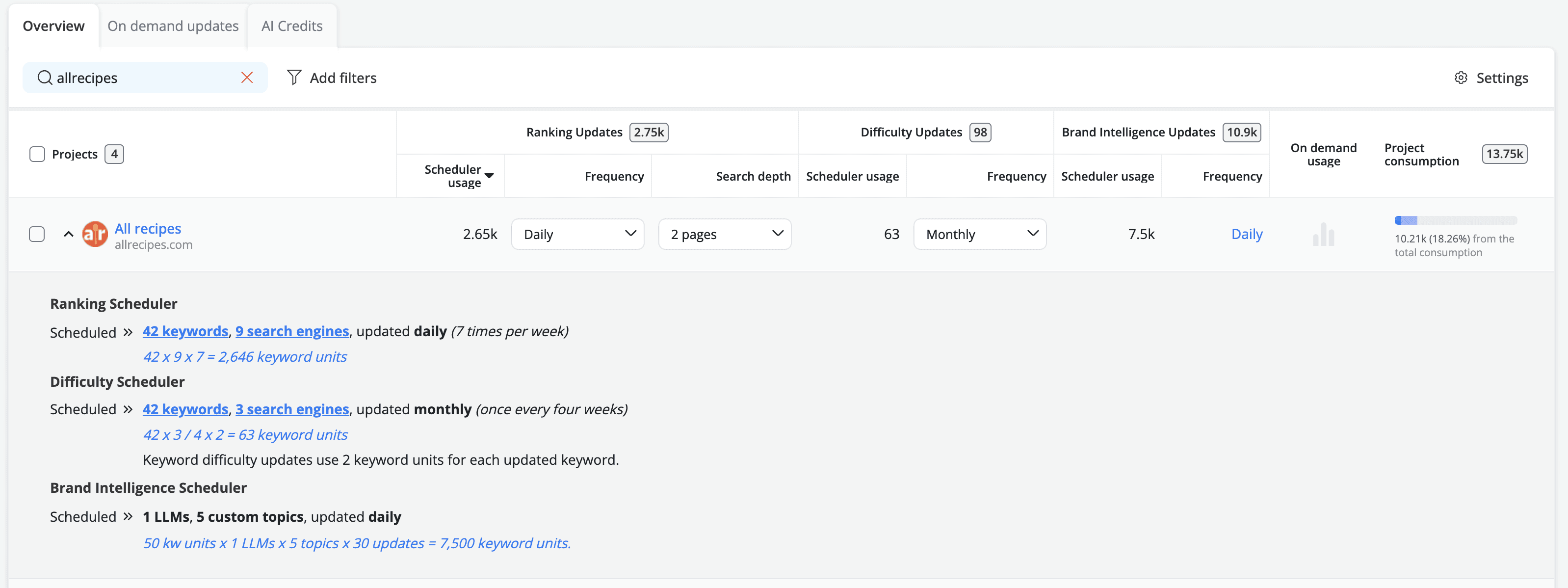
And if you're running low, AWR has you covered: you'll get an automatic email notification when your consumption hits 90% of your monthly allocation, giving you enough time to adjust your setup before hitting the limit.
When Do Used Keyword Units Reset
It depends on the type of update. Units reserved for scheduled updates stay reserved for as long as that update frequency is active on the project. If you remove a project from the scheduler, those reserved units are freed up immediately.
Units consumed by partial updates and on-demand updates work differently: they get added back to your quota on the day your new billing month starts. For monthly plans, that's the same calendar day each month as your original subscription date. For yearly plans, the reset happens on the same day of the month as when the subscription was purchased, every month throughout the year.
You can check your next renewal date in Account Settings → Billing.
❗ Common misconception: yearly plans do NOT allocate units for the whole year
If your yearly plan includes 7,000 keyword units, that's a fresh 7,000-unit budget each month, not 7,000 spread across 12 months. You do not need to ration your units.
How to Get Started with AWR or Scale Up Your Current Plan
New to AWR or looking to unlock more units? Check out the AWR pricing page and this plan comparison guide to find the right fit for your needs.
Quick-Calc Examples: How Many Keywords Can You Track
Trying to figure out how many keywords you can actually track on your plan? Here are three real-world configurations to give you a sense of what's possible.
Scenario A: Freelancer on the Pro Plan (7,000 units)
Setup: 5,000 keywords, Google Mobile US (1 SE), weekly, 3-page depth
Calculation: 5,000 × 1 × 1 × 1 = 5,000 units
Remaining: 2,000 units. Enough room for a second search engine or a few on-demand updates.
Scenario B: Agency on the Agency Plan (14,500 units)
Setup: 8 client projects, 500 keywords each (4,000 total), 2 SEs (Desktop + Mobile), weekly, 3-page depth
Calculation: 4,000 × 2 × 1 × 1 = 8,000 units
Remaining: 6,500 units. Room to add more clients, increase frequency on priority projects, or run on-demand updates.
Scenario C: Enterprise Team (35,500 units)
Setup: 8,500 keywords, 3 SEs (Desktop + Mobile + AIO), weekly, 5-page depth
Calculation: 8,500 × (1+1+2) × 1 × 1 = 34,000 units
Remaining: 1,500 units. Tight but workable. Since AIO counts as 2 SE units, one way to free up more room is to use AIO tracking only for your highest-priority keywords and switch the rest to standard Google search.
Smart Ways to Reduce Your Keyword Unit Consumption
1. Switch from daily to weekly updates. This single change cuts your consumption by 7x. Unless you're in the middle of a product launch, a site migration, or tracking a highly competitive market where rankings shift overnight, weekly is more than enough to stay on top of your data.
2. Drop your search depth to 2 or 3 pages. If you're currently tracking at 10 pages, switching to anything between 1 and 5 pages cuts your depth cost in half. Most actionable insights live in the first 30 results anyway.
3. Consolidate your search engine configurations. Do you really need both Desktop and Mobile for every project? If mobile is your priority, track mobile only and free up 50% of your SE-based consumption.
4. Use on-demand updates instead of daily scheduling. For projects that only need fresh data occasionally, keep them on weekly scheduling and trigger a 1-hour on-demand update when you need live data, for example before a client presentation or a pitch.
5. Pause inactive projects. Projects on the scheduler reserve units for the entire month. If a client is on hold or a campaign has ended, remove the project from the scheduler to free those reserved units immediately.
Planning Your AWR Keyword Unit Budget: Two Scenarios from the Field
Keyword unit planning is where strategy meets arithmetic. Get it right and you'll always have the data you need at a predictable cost. Get it wrong and you'll either run out of units mid-month or end up paying for capacity you're not using. To make this concrete, here are two planning examples based on real configurations we see across our customer base: a multi-client agency and a multi-country in-house team.
Scenario 1: A 24-Client Agency on a Single AWR Account
The situation is familiar to most SEO agencies: a growing roster of clients, each with different tracking needs, a finite monthly budget, and the constant question of whether the current plan still fits.
In this example, the agency manages 24 active SEO clients across three service tiers. The top-tier accounts (four national e-commerce brands) need deep competitive intelligence with AI Overview tracking. Eight mid-market accounts need solid organic visibility monitoring. And twelve local businesses need reliable, low-frequency position checks to keep their monthly reports on track.
Service Tier | Projects | Keywords per Project | S. Engines | Frequency per project | Total Units |
|---|---|---|---|---|---|
Enterprise accounts | 4 | 2,000 | 3 (Desktop, Mobile, AIO) | Weekly | 8,000 |
Mid-market accounts | 8 | 800 | 2 (Desktop + Mobile) | Weekly | 1,600 |
Local accounts | 12 | 200 | 1 (Mobile only) | Biweekly | 100 |
The math: 4 enterprise accounts = 32,000 units, the mid-market tier adds 12,800, and local accounts contribute 1,200. Grand total: 46,000 units per month.
That fits comfortably within AWR's Enterprise Plus 50k plan at $980/month, with 4,000 units to spare for growth or on-demand updates.
What makes this cost-effective
Unlimited projects: All 24 clients live in their own dedicated project with no per-project fees. An agency with 5 clients and an agency with 50 clients pay the same base rate; only keyword unit consumption differs.
Unlimited users: Your whole team gets access. No per-seat pricing, no tiered permissions. Whether the team is 3 people or 30, the cost is the same.
Up to 50 competitors per project at zero cost: Across 24 projects, that's potentially 1,200 competitor websites tracked without consuming a single additional unit. AWR pulls competitor data from the same SERP queries it runs for your keywords, so there's no incremental cost. For agencies selling competitive intelligence as part of their retainer, this is pure margin.
💵 The unit economics of a 24-client agency on AWR: $980/month for comprehensive rank tracking, AI Overview monitoring, competitive intelligence across 1,200 potential competitors, and the infrastructure to run new business pitches with same-day data. Per client, that's roughly $41/month.
Smart configuration tips for agencies
Once your client roster grows, small configuration choices start adding up. Here are a few tips experienced AWR agency users apply to get more out of their unit allocation without compromising on data quality.
Tier your update frequencies. Not every client needs weekly data. Local businesses with stable SERPs and monthly reporting cycles can run biweekly or monthly, cutting their unit consumption by 50–75%.
Be selective with search engine combinations. Desktop + Mobile + AIO is the premium configuration. Reserve it for accounts where AI Overview positioning is a strategic priority. For many clients, Google Mobile alone covers the majority of the ranking picture.
Keep search depth at 2 or 3 pages. Unless you're doing deep SERP research, positions beyond the top 30 results rarely influence reporting or decisions. At 10-page depth, unit cost doubles.
Pause inactive projects immediately. Removing a project from the scheduler frees its reserved units right away. There's no penalty for pausing and resuming.
How agencies use on-demand updates to win new clients
One of the most effective uses of on-demand updates in an agency context is the pre-pitch data pull. Before a sales meeting, create a temporary project with the prospect's domain and core keywords, then trigger a 1-hour on-demand update. Within sixty minutes, you have live ranking data, competitor benchmarks, and visibility metrics ready to present.
The cost is modest, typically a few hundred units for a focused keyword set, and those units are replenished when the billing cycle renews. It's a small, recoverable investment for a meeting that could close a multi-thousand-dollar retainer.
Scenario 2: In-House Team Tracking 8 Markets with Varied Priorities
A single brand, eight countries, and each market at a different stage of maturity. The resource planning challenge here isn't total keyword volume. It's about allocating the right level of tracking intensity to each market without overprovisioning the ones that don't need it yet.
Consider an international e-commerce operation selling in the US, UK, Germany, France, Japan, Australia, Brazil, and India. The US and UK are established, revenue-critical markets. Germany and Japan are growing steadily. France and Australia are in a maintenance phase. Brazil and India are early-stage, with SEO programmes still being built.
Market | KWs | S.E Type | Device | Frequency | Units/mo | Rationale |
|---|---|---|---|---|---|---|
US | 5,000 | Google Search + AIO | Desktop + Mobile | Weekly | 20,000 | Primary revenue market. AIO tracking essential (2x per SE). Desktop + Mobile = 4 SE units. |
UK | 2,500 | Google Search + AIO | Mobile only | Weekly | 5,000 | High-value market. Mobile-first index, AIO tracking for competitive edge. |
Germany | 1,500 | Google Search (Universal) | Desktop + Mobile | Weekly | 3,000 | Strong market, standard tracking sufficient. AIO available as future upgrade. |
Japan | 1,000 | Google Search (Organic) | Mobile only | Weekly | 1,000 | Organic mobile. Niche market, focused keyword set. |
France | 1,000 | Google Search (Universal) | Mobile only | Biweekly | 500 | Maintenance phase. Biweekly provides trend visibility without premium cost. |
Australia | 800 | Google Search (Universal) | Mobile only | Biweekly | 400 | Smaller footprint. Monthly reporting, biweekly data is more than adequate. |
Brazil | 500 | Google Search (Universal) | Mobile only | Monthly | 125 | Early-stage programme. Monthly checks to establish baseline. |
India | 500 | Google Search (Universal) | Mobile only | Monthly | 125 | Same rationale as Brazil. Frequency can increase as the programme matures. |
Ranking tracking total: 30,150 units/month.
At 12,800 keywords across 8 countries, this setup fits comfortably within the Enterprise plan ($699/month for 35,500 units), while leaving enough units to spare for Brand Intelligence, difficulty updates, or on-demand refreshes.
What makes this cost-effective
Unlimited projects: All 8 markets live in their own dedicated project with no per-project fees. You can organize, report, and manage each market independently without any additional cost.
Modular setup: Each country's configuration can be adjusted independently. Upgrading Brazil from monthly to weekly, or adding AIO tracking to Germany, has no impact on the other markets in the account.
Frequency flexibility: You only pay for the tracking intensity each market actually needs. Mature markets run weekly, maintenance markets run biweekly, and early-stage markets run monthly, so your unit allocation mirrors your business priorities.
Going beyond rankings: monitor your brand presence on LLMs
Knowing where you rank on Google is only part of the picture. For a brand operating across 8 markets, there's another question worth asking: what do ChatGPT, Perplexity, Gemini, and Claude say about you when someone searches for a recommendation in your niche?
As AI-generated answers become a common entry point for product research, your presence (or absence) in those responses can directly influence purchasing decisions. AWR's Brand Intelligence feature lets you track your brand's market share, mention frequency, and average rank across LLMs, so you know exactly how visible your brand is in AI search, not just traditional search.
The unit consumption for AI Visibility is topic-based rather than keyword-based. With Web Search Mode enabled (recommended for accuracy), the formula is 50 units × number of LLMs × number of topics × updates per month.
Therefore, tracking 15 topics across 4 LLMs on a weekly basis with Web Search Mode enabled = 50 × 4 × 15 × 4 = 12,000 units/month. Combined with the 30,150 from ranking updates, the total reaches 42,150, exceeding the Enterprise plan's 35,500 ceiling. The natural next step is the Enterprise Plus 50k plan at $980/month.
📋 Plan your Brand Intelligence budget separately
Brand Intelligence can be a significant line item, particularly when Web Search Mode is enabled across multiple LLMs. Run the numbers before committing to a plan tier. Two practical levers: reduce the number of tracked LLMs (start with 2 instead of 4), or disable Web Search Mode for exploratory topics where accuracy is less critical.
How to keep your data fresh for presentations
Quarterly business reviews rarely align with scheduled update windows. For an in-house team reporting to leadership across 8 markets, a practical approach is to trigger a 1-hour on-demand update on your priority markets the morning of the presentation, so the data reflects the most current SERP landscape.
Those units are consumed immediately but fully replenished at the next billing cycle renewal, so they don't permanently reduce your monthly capacity. It's a small, low-risk way to make sure your data is always fresh when it matters most.
How the tracking setup can scale as markets mature
This setup is built to grow with you. As Brazil and India mature, their frequency can shift from monthly to biweekly. When AIO tracking becomes a priority in additional markets, Germany and Japan can be upgraded from Google Search (Universal) to Google Search + AIO at the 2x unit cost. Each market can be adjusted independently without affecting the others.
Resource planning isn't a one-time exercise in AWR. It's worth revisiting quarterly alongside your SEO strategy review, to make sure your tracking intensity still matches your business priorities.
Ready to put this into practice?
If you're already an AWR customer, use this guide as your go-to reference. Review your current project configurations, check your Resources page, and see where small adjustments could free up units or give you better coverage across your tracked markets.
If you're still evaluating tools, start a free 7-day trial as no credit card is needed. Set up your projects, configure your markets, and see exactly how units are consumed with your real data before committing to a plan.
Frequently Asked Questions
How many keywords can I track with the Pro plan?
The Pro plan includes 7,000 keyword units. How many keywords you can actually track depends on the configuration you choose. With the default setup (1 search engine e.g., Google Mobile US, weekly frequency, and a search depth of up to 5 pages) you can track up to 7,000 keywords. Add a second search engine (e.g., Google Desktop US) and that number drops to 3,500, since each SE combination counts as a separate unit. Switch to daily frequency and you're looking at around 1,000 keywords (7,000 ÷ 7). The same logic applies to other plans: Agency with 14,500 units and Enterprise plans follow the same calculation.
Which pricing plan is right for me?
Do competitor rankings consume keyword units?
I switched from Google Universal to Google Search + AIO. Why did my usage double?
When do my keyword units reset?
I changed my update frequency from weekly to daily. How does this affect my units?
What happens when I exceed my keyword unit limit?
Is there a difference in cost between on-demand and scheduled updates?
Do Brand Intelligence updates use keyword units?
Can I buy extra units without upgrading my entire plan?
I have a yearly plan. Are my units allocated for the whole year?
How many units does a search depth of 10 pages use?
Are projects charged separately?
Does exporting data or generating reports use keyword units?
stay in the loop