

Advice and answers from the Advanced Web Ranking Team
Search for articles
How to track Sponsored and Shopping search results
Learn how to successfully monitor Sponsored and Shopping results with AWR.

In AWR, the type of ranking results retrieved from SERPs depends on the definition selected for the search engine.
In this article, I will talk about the difference between Google’s Sponsored (Text & Shop Ads) and Shopping results and how these search results can be tracked with AWR.
In addition to Sponsored and Shopping results, e-commerce businesses can also monitor Products listings from Amazon. More information on how to successfully monitor Amazon keyword rankings can be found in the article here.
Text Ads
Text ads are paid placements that resemble organic results, their characteristic being a small label containing the “Ad” word. They can be spotted at the top or/and bottom of a SERP.
In AWR, the paid text results appearing above the organic listings are called Ads Top, while those appearing beneath are called Ads Bottom.
Shop Ads
Shop ads are paid placements that appear at the top or to the right of a SERP, regularly displayed as a carousel of products. In AWR, they are called Ads Shop.
See below how the Text and Shop ads appear in a real SERP. The query was made from a Desktop device:

See below how Text and Shop ads can be identified in AWR:

How to track Sponsored results with AWR
The ranking positions of Text and Shop ads appearing in searches made on Google from both Desktop or Mobile devices can be tracked with the help of Google Desktop Ads respectively Google Mobile Ads search engines.
Please check the screenshot below to see how a Google search engine meant to track both Text and Shop Ads results should be configured:

Besides Google, with the AWR you can also monitor the ranking position of Sponsored results originating from Desktop searches performed on Yahoo, Bing, AOL, and YouTube.
Shopping results
These are the search results that can be accessed via the “Shopping” tab on Google search. Google Shopping is a vertical search engine that surfaces both Product ads as well as organic Product listings.
Paid Product listings are usually displayed in a carousel above the organic listings.
Please see below how a Shopping page featuring both paid and free Product results looks like:
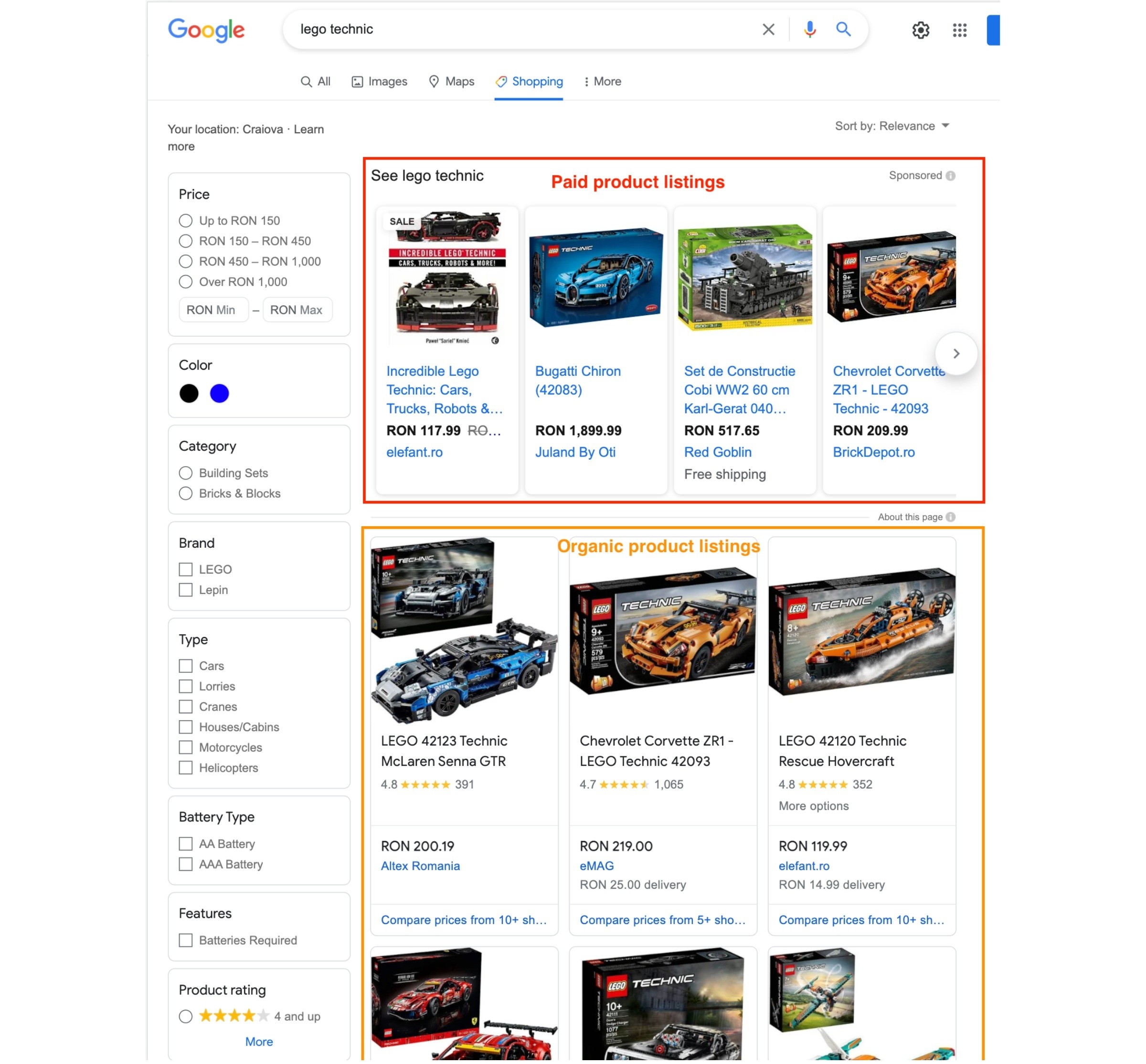
On Google Shopping search results pages filtering options are available but AWR reports the unfiltered Product listings.
The Google Shopping search engine in AWR is meant to report only the organic Product listings. Also, for now, we have support for reporting only the Shopping results originating from Desktop devices.
How to track Shopping results with AWR
Please check the screenshot below to see how a Google search engine meant to track Desktop Shopping results should be configured:

Do you have any other questions? Don’t hesitate to get in touch and we will keep building the FAQ.
stay in the loop