

Advice and answers from the Advanced Web Ranking Team
Search for articles
>
>
Your Client Appeared in AI Answers Yesterday but Disappeared Today. Here’s How to Explain What Changed
Your client’s website visibility keeps changing across AI responses. Learn what these shifts mean for performance and how to explain them.

You’ve been working with your client for the past month to improve their performance in AI responses.
So far, things have been going well. After doing your research and adding the right prompts to track, you noticed that their website was frequently mentioned and cited in AI answers, giving you confidence that it had built some authority.
But today’s ranking update tells a different story. For some of their keywords, the website is no longer showing up in AI responses.
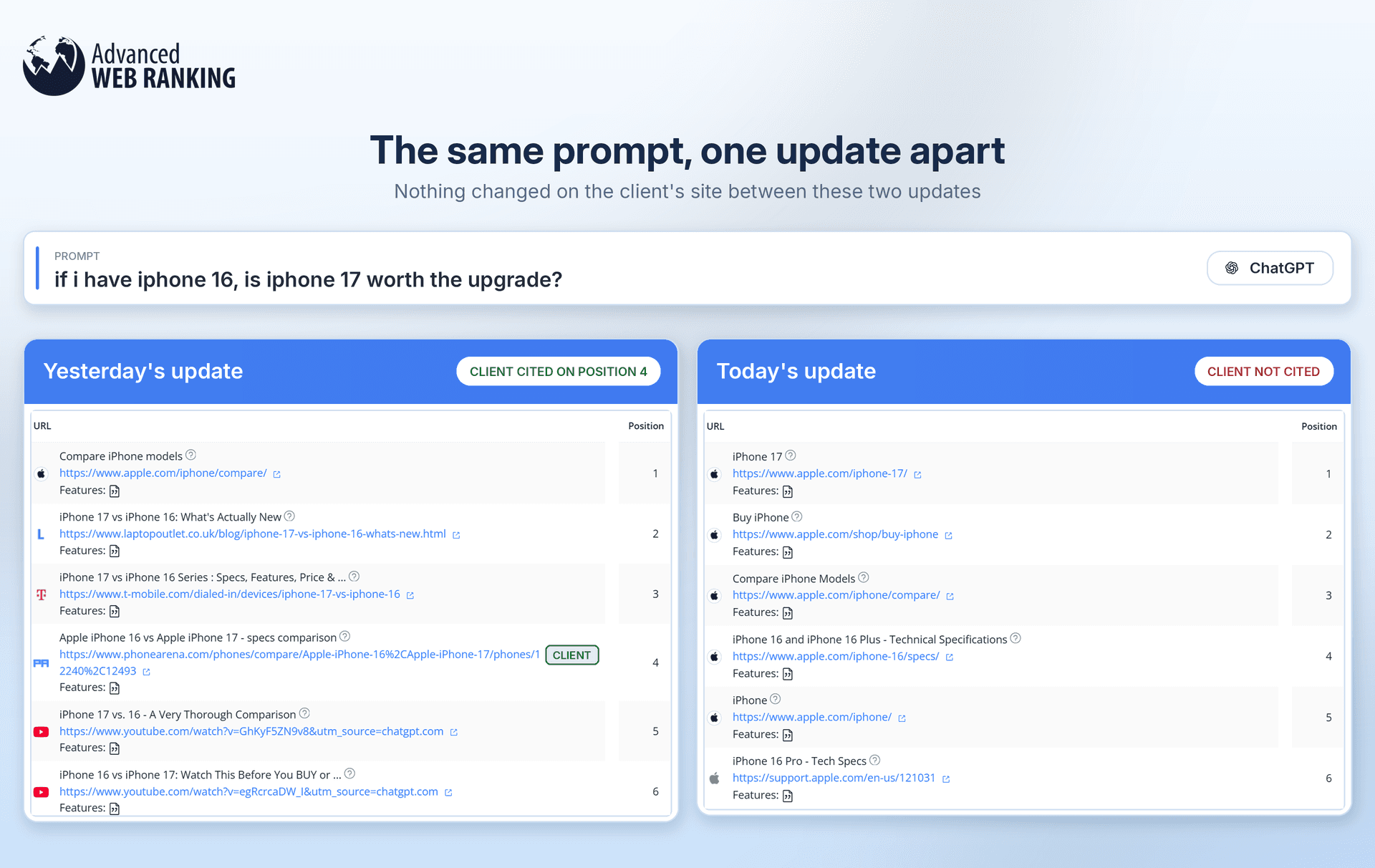
When you share the update with your client, they’re not happy. They pull up a screenshot showing that their website is still appearing in the responses they’re seeing. So, why does your report say otherwise?
TL;DR: Base your AI Search reporting on multiple checks
AI responses change, so seeing your client rank one day and disappear the next doesn’t necessarily mean their performance has dropped. First, make sure you and your client are checking under the same conditions, then look at several ranking updates to see the bigger picture.
Use the Dates Comparison report to see how often your client appears over time and the SERP Similarity report to see which of their pages are being cited and what other sources are showing up for the same prompts.
The main thing to watch is consistency. Track the prompts that actually matter to your client and their audience, then use the patterns you find to see where they’re already doing well and where they could improve.
Are you and your client running the same search?
You ask for the screenshot and immediately spot one issue: the environment they’re searching from doesn’t match the one you agreed to track.

The results your client needs depend on the tracking setup you agreed at the start. For example, if you’re tracking AI responses on Desktop in the US, but your client is running the same prompt on Mobile from the UK, the results may not always match.
Before assuming there’s an issue with your report, check the location and device your client is using. Then, run the same search yourself using the correct location and device to see whether the results match what you’re tracking.
If your client still wants to check results manually, make sure they’re doing so from the same environment you’re tracking. Otherwise, they may be comparing two different sets of results.
The search environment explains the difference. But what happened to their rankings?
LLMs can change their responses and cited sources even when the same search is repeated just minutes later. But that doesn’t make your reporting unreliable.
Your client doesn’t need to appear in every single response. What matters is consistency: they should show up regularly across repeated searches and drop out of the results as rarely as possible.
With the Dates Comparison report, you can show your client how their visibility changes across different ranking updates instead of focusing on a single response. You can compare the same keywords across several dates and see when the website ranked, where it ranked and when it dropped out of the results.
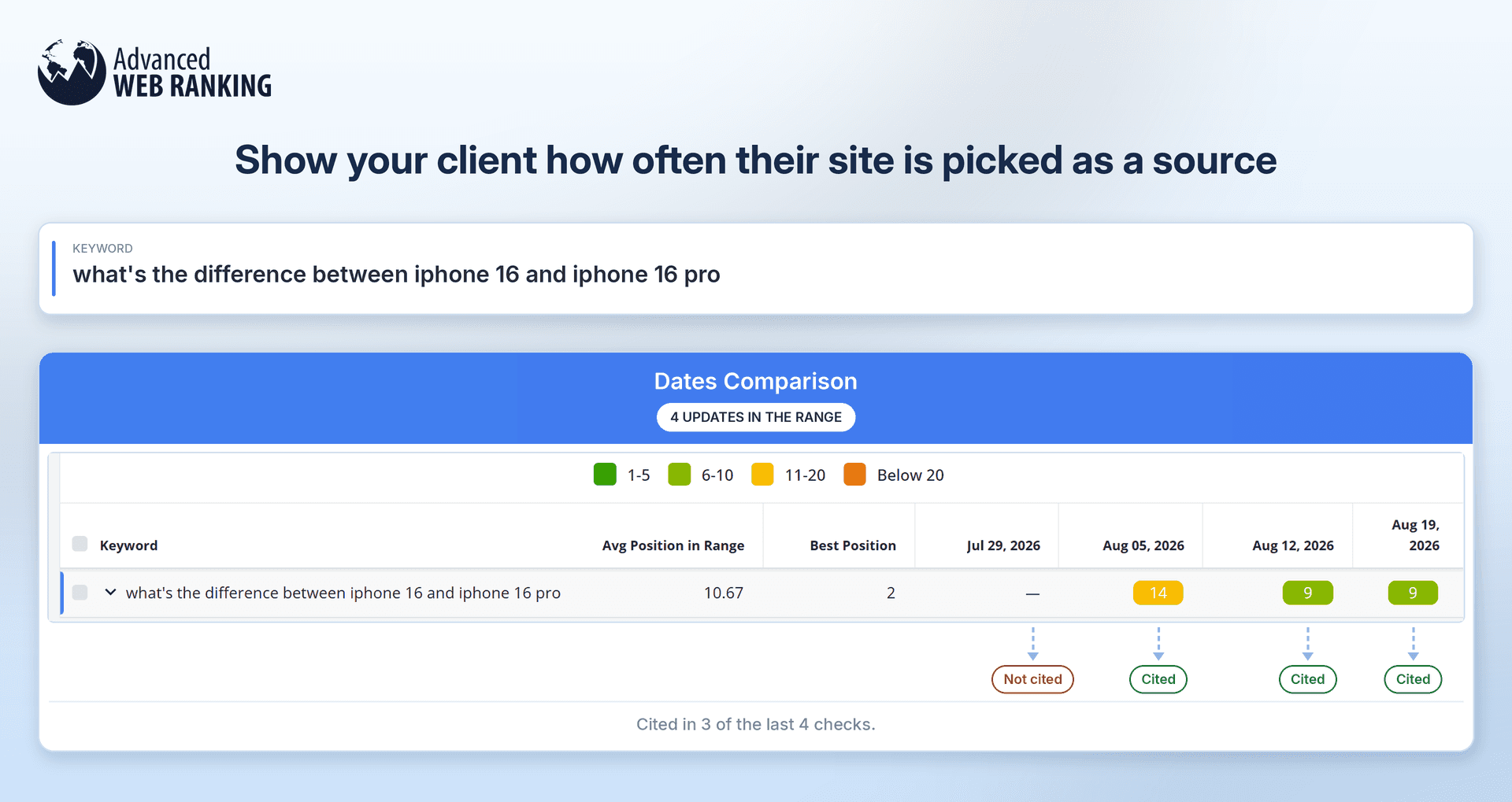
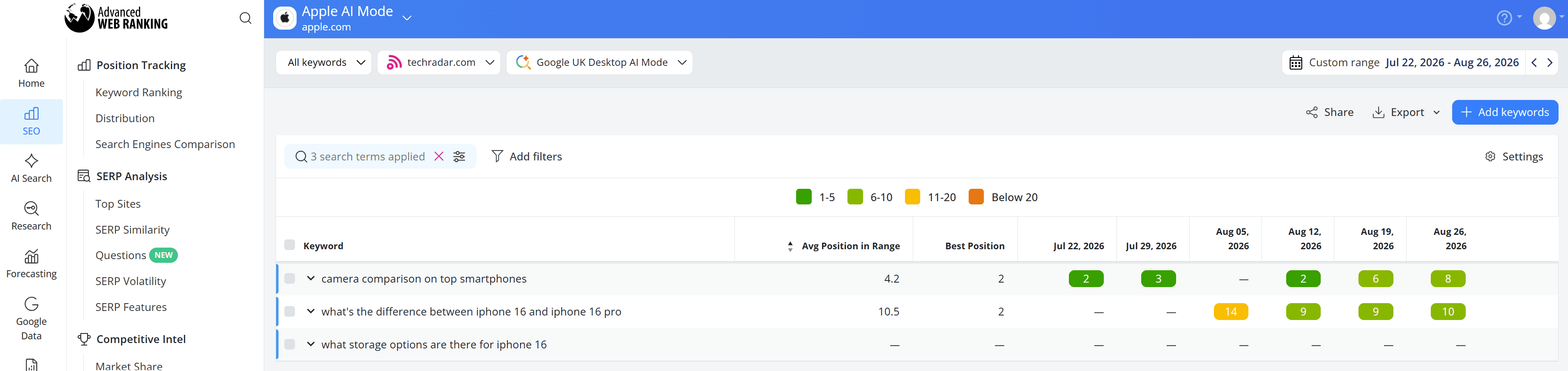
For example, techradar.com doesn’t rank for “what's the difference between iphone 16 and iphone 16 pro” on July 29. A week later, it appears on Position 14, then improves to Position 9 on August 12 and remains there on August 19.
That consistency matters more than any single check. Rather than focusing on the day the website was missing, you can show your client that it was selected repeatedly in later AI responses.
Consistent appearances can indicate that the LLM is repeatedly treating the website as a relevant source for that prompt, giving you a more meaningful view of its visibility over time.
Instead of asking, “Are we ranking today?”, you can shift the conversation to “How consistently are we appearing over time?”
When their website eventually gets cited, are the same landing pages always being shown?
No, not necessarily. AI responses can cite different URLs from the same website for the same prompt.
Using the SERP Similarity report across different ranking updates, you can see which specific URLs from your client’s website are being selected as sources.
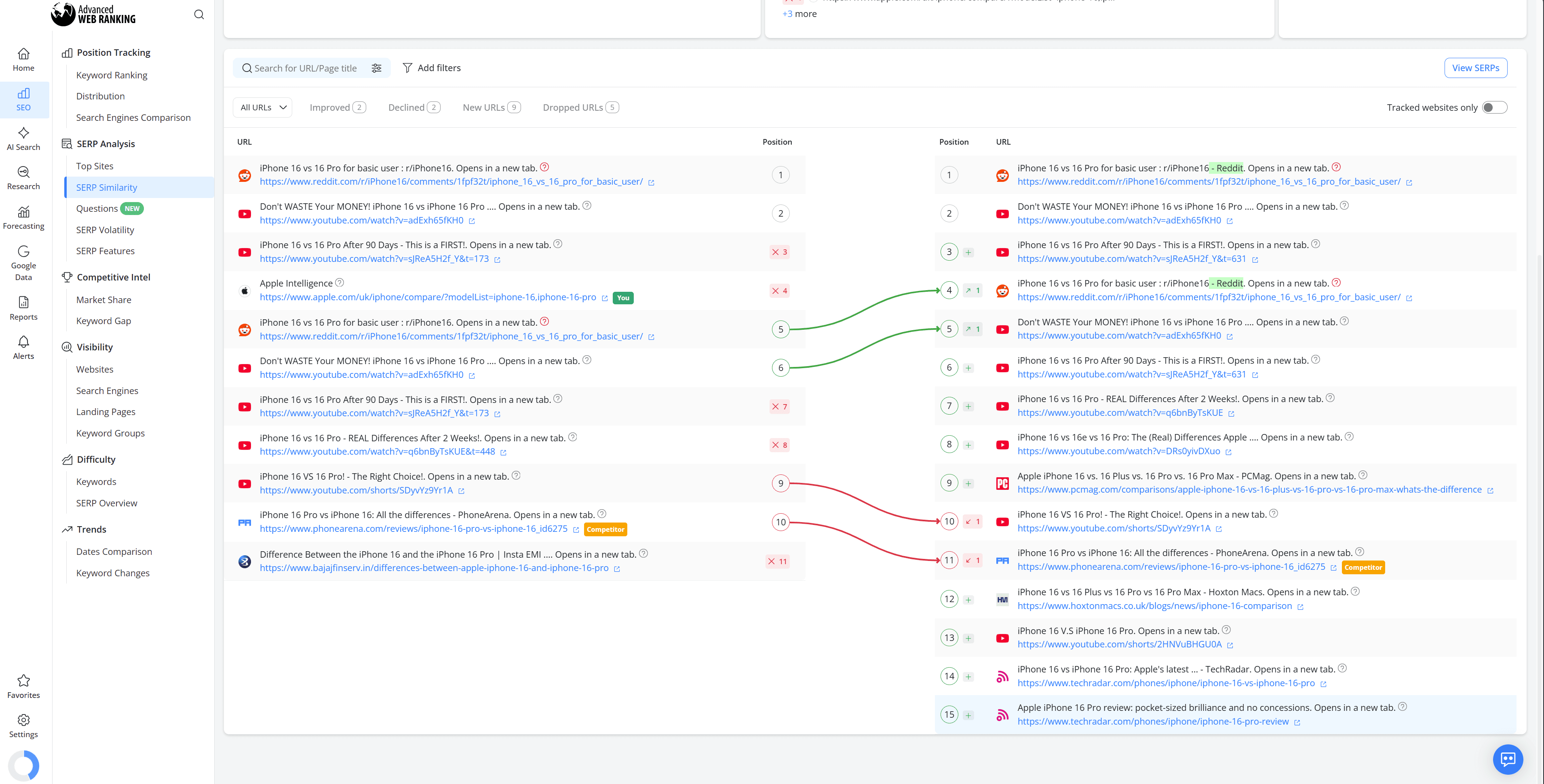
By comparing results between updates, you can identify whether the same pages continue to earn citations, move to different positions or drop out while other URLs from the website take their place.
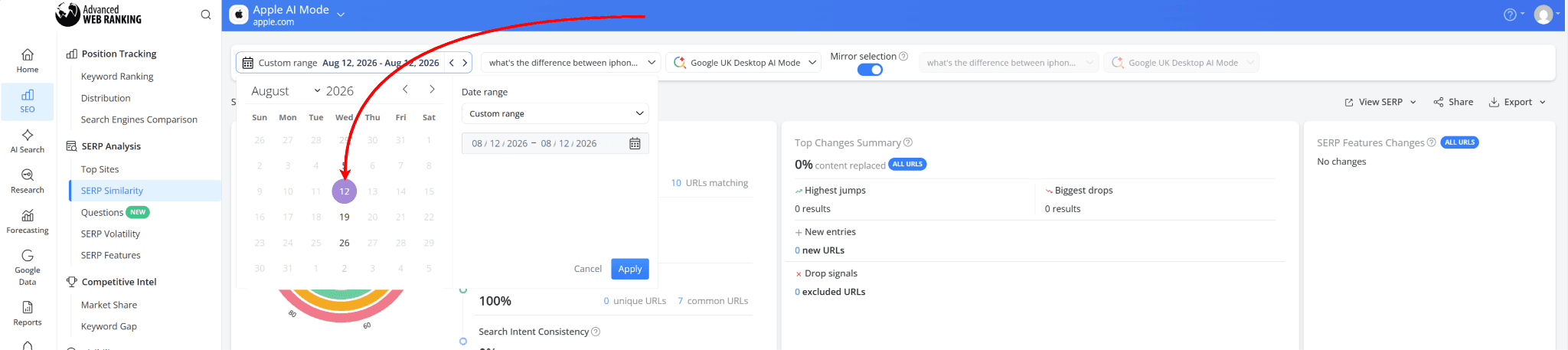
Follow this workflow: earlier, using the Dates Comparison report, we saw that techradar.com wasn’t ranking on July 29 but appeared on August 5. Let’s see what changed between those two updates and what may have contributed to the website being included in the AI response.
In the comparison, two different techradar.com pages appear in the results. This shows that the website’s visibility isn’t necessarily tied to a single URL. Instead, different pages can be selected as relevant sources for the same prompt.
You can also look at the broader mix of sources being cited.
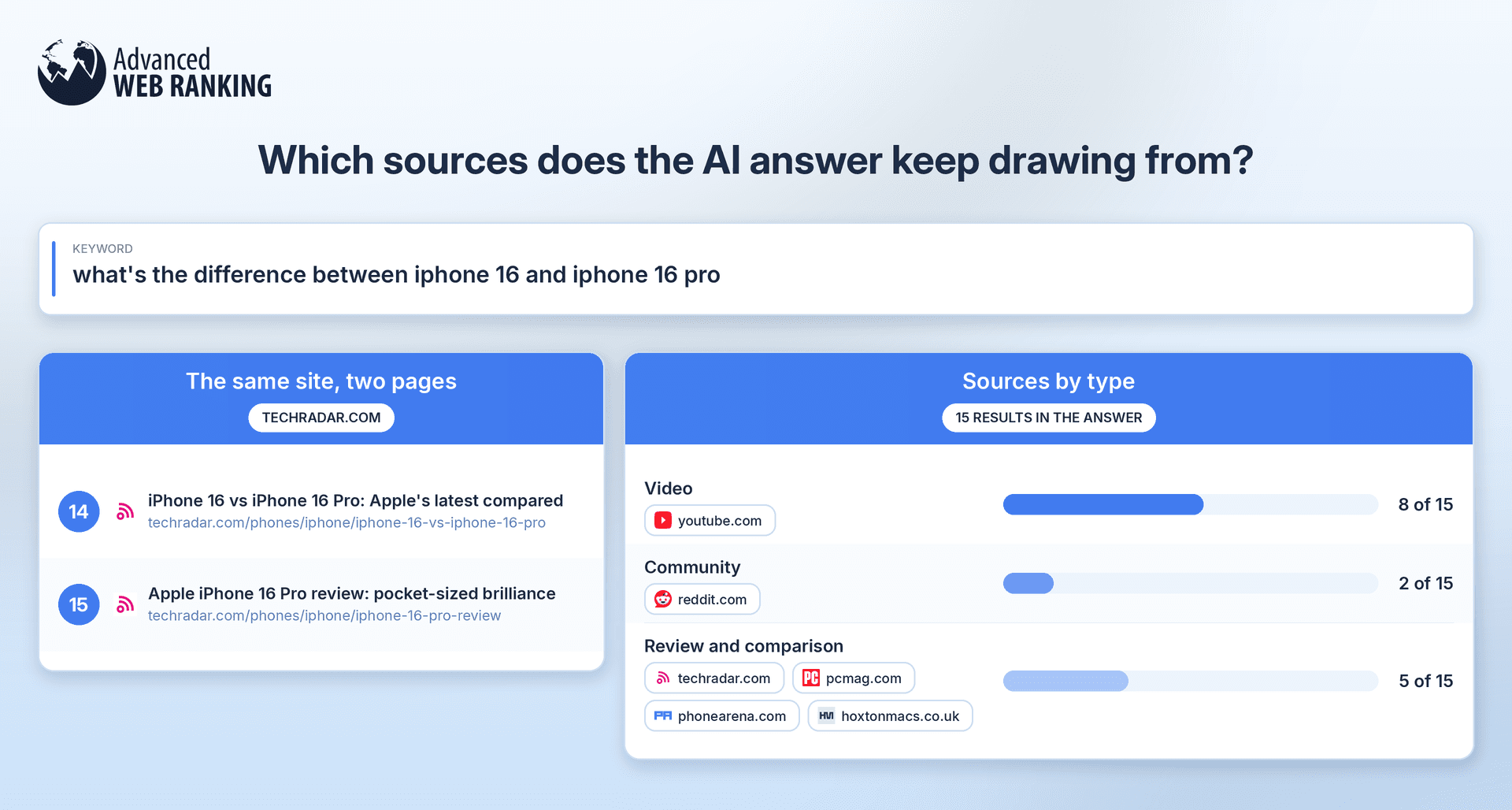
For this prompt, the AI response draws heavily on YouTube videos, Reddit discussions and review or comparison websites. That gives you a better idea of the types of content being selected and where your client’s pages fit within that source mix.
Rather than only seeing that techradar.com started ranking, you can use this comparison to investigate which URLs gained visibility, which sources disappeared or remained and how the overall citation landscape changed.
Are you tracking the right prompts for your client?
Now, take a closer look at the prompts you’ve already added to the project. Are they giving you a clear picture of your client’s AI performance?
In the example above, the website shows up consistently for “camera comparison on top smartphones”, ranking on five of the six ranking updates shown.
For “what’s the difference between iPhone 16 and iPhone 16 Pro” it starts appearing on August 5 and continues to rank in the next three updates. Meanwhile, prompts like “what storage options are there for iPhone 16” don’t show the website at all during this period.
This is where you should start looking for patterns. In the SERP Similarity report, select a single date and compare the prompts where the website appears with those where it doesn’t.
For prompts where your client doesn’t appear, check which websites and pages are being cited instead. This can help you understand what the AI response is looking for and whether your client has content that serves the same intent.
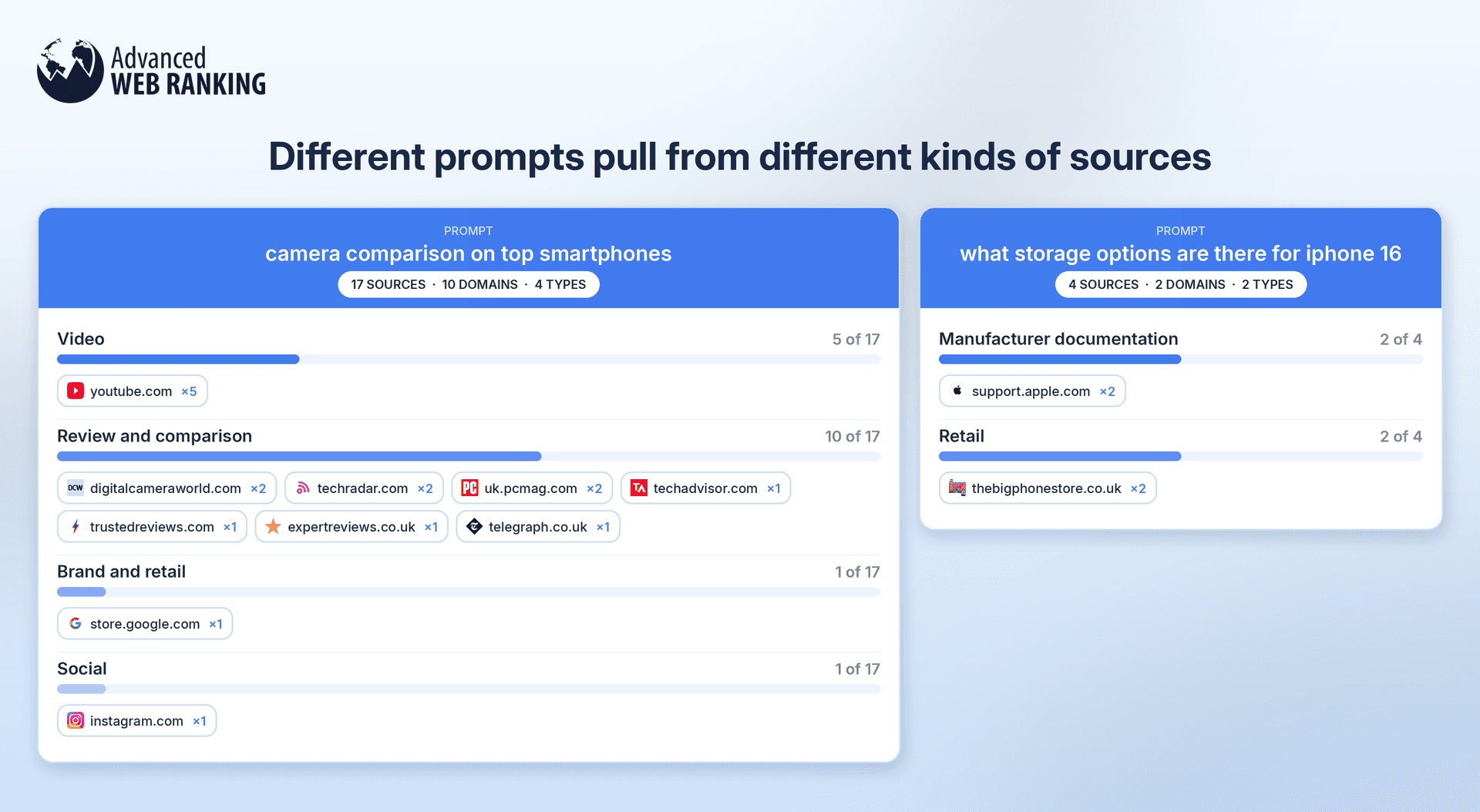
The goal isn’t to add as many prompts as possible. It’s to track a relevant set of prompts that shows where your client already has visibility, where competitors or other sources are being preferred and where there may be opportunities to improve.
Not happy with your prompts? Find better ones with the Questions report
If the prompts you’re tracking aren’t telling you much about your client’s AI performance, the Questions report can help you find better ones to add.
SEOs often use Google’s People Also Ask questions to understand what people are searching for and uncover relevant questions worth tracking in AI search.
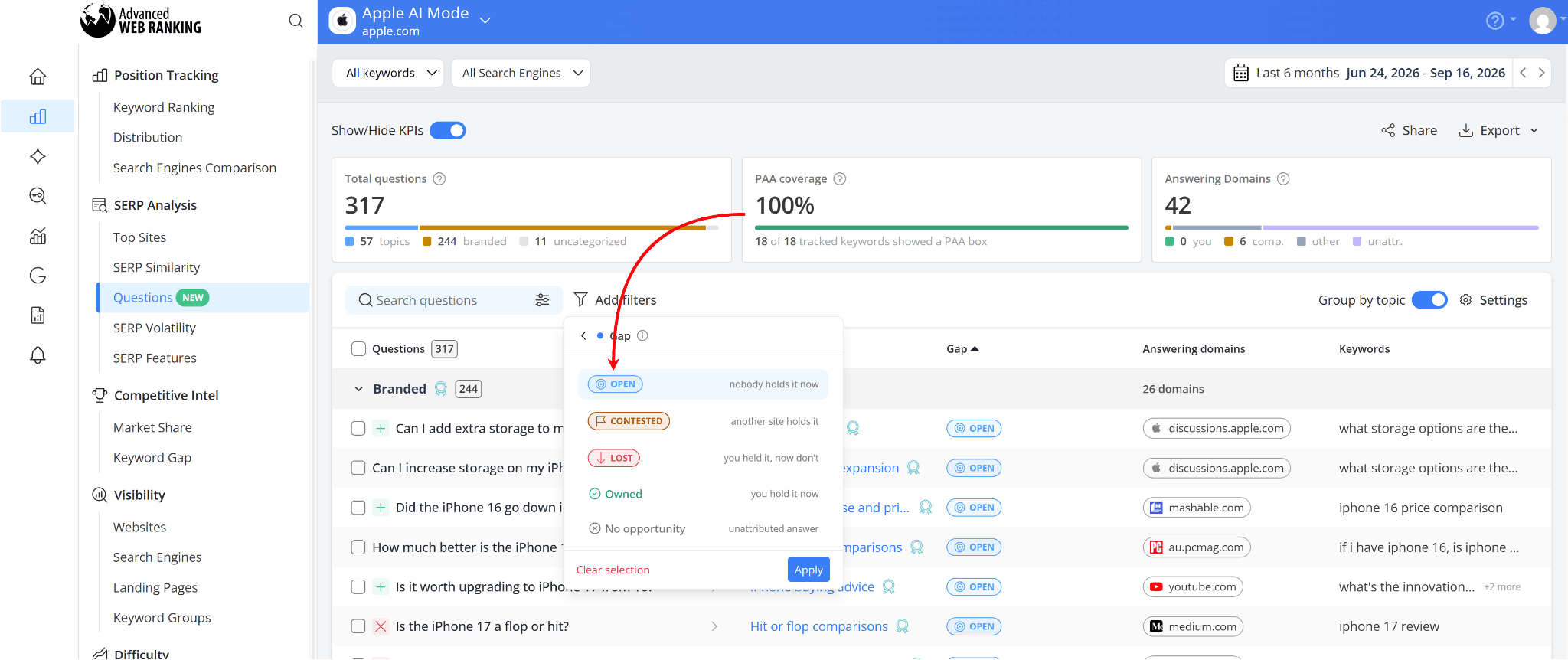
To find these opportunities, click “Add Filters” and choose “Gap”:
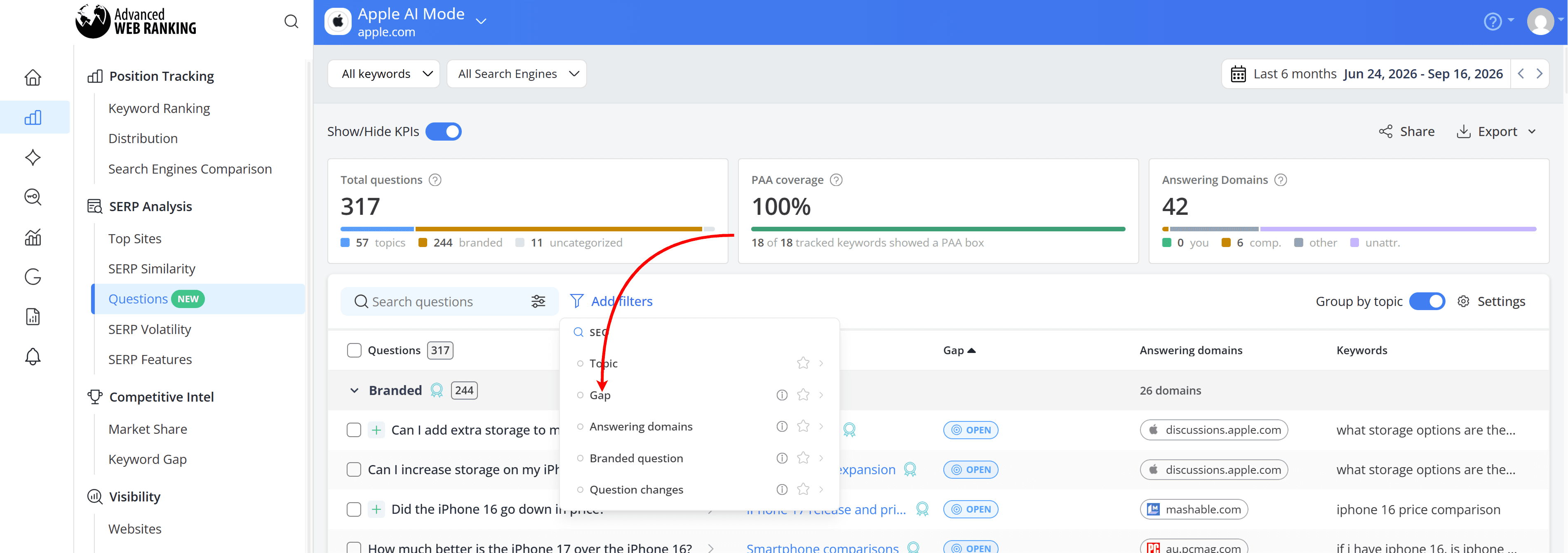
Then, select “Open” to find questions where no website currently holds the answer and Google answers the question directly. These can highlight opportunities where your client could become a cited source.
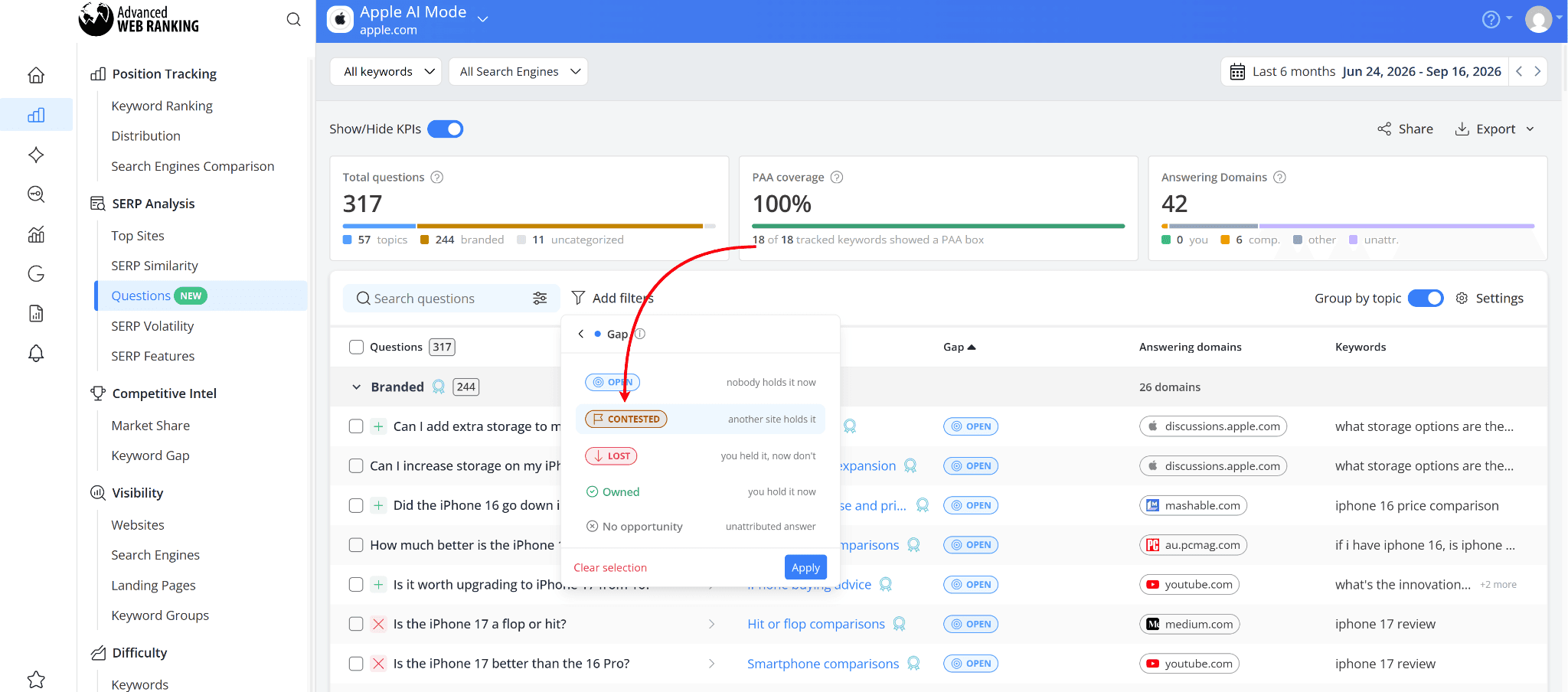
You can also select “Contested” to find questions that other websites are already answering, but your client isn’t. These can give you ideas for new prompts to track in AI search and opportunities your client can work toward winning.
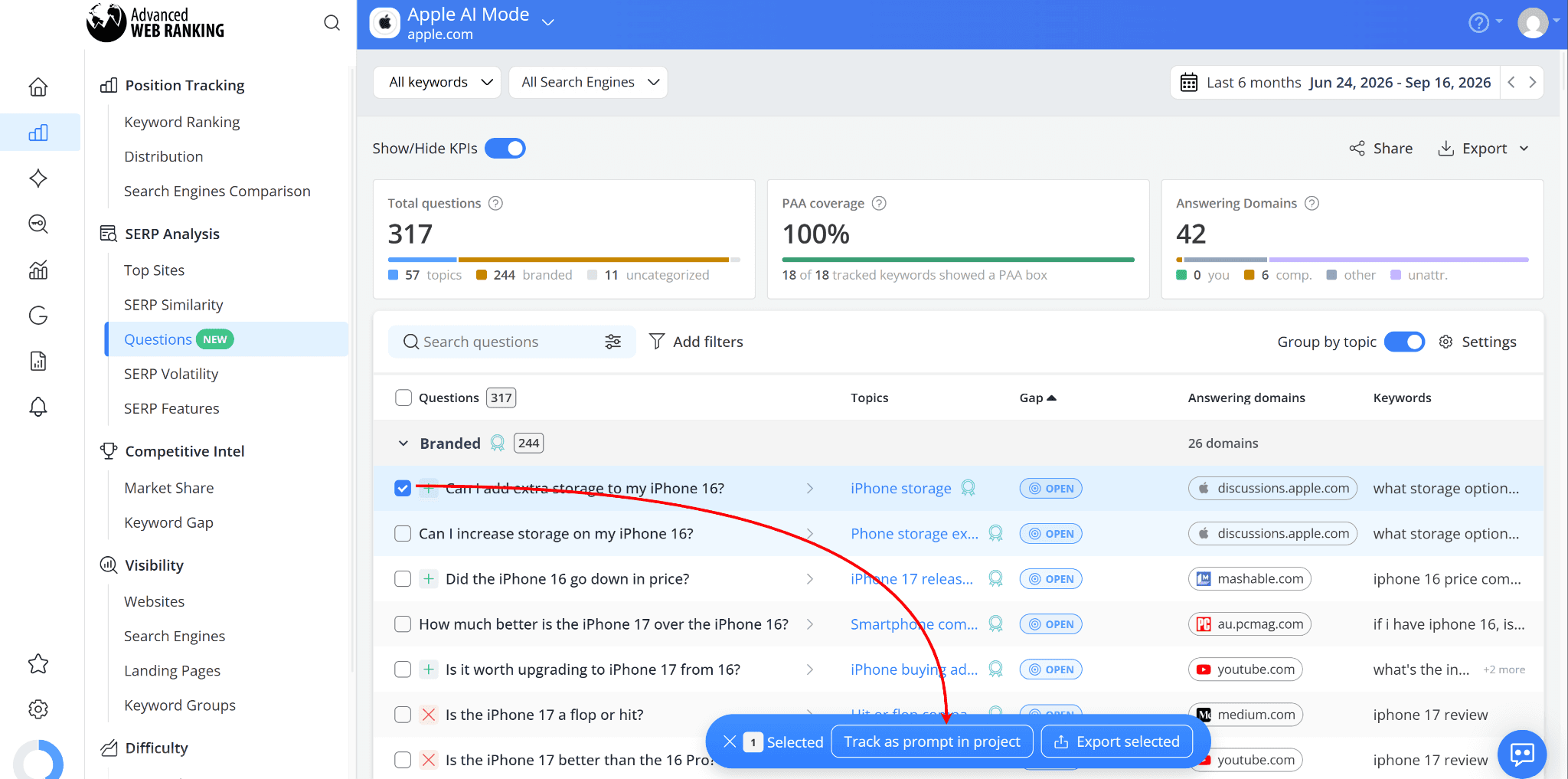
Go through the questions and choose the ones that are relevant to your client. To add several at once, select them using the checkboxes, then click the “Track as prompt in project” button that appears at the bottom of the report.
Or, click on a question to see more details, including the domains answering it, the keywords that trigger it and more. If it looks relevant, click “Track as prompt” to add it to your project.

Once added, you can track these prompts over time to see whether your client starts showing up for them.
You don’t need to track every question you find. Focus on the ones that matter to your client and can help you uncover new opportunities to improve their AI visibility.
Want to learn more? Check out our full guide on how to use the Questions report.
Do you have any questions? Don’t hesitate to get in touch and we will keep building the FAQ.
Frequently Asked Questions
My client checks in ChatGPT while logged into their own account. Does that change what they see?
Can I add a prompt I’ve seen a competitor win, even if my client has no content for it?
How long should I track a prompt before deciding whether performance is improving?
stay in the loop