

Advice and answers from the Advanced Web Ranking Team
Search for articles
How to Analyze Your Competitors in AI Search with AWR
See how your competitors perform in AI search, which keywords they're getting cited for, and where the gaps are. A step-by-step guide using AWR

Want to understand how your competitors perform in AI-generated search results and how your brand stacks up against them? Here's how to break down their AI search performance using AWR and turn what they're doing into insights you can act on.
What this article covers
How to switch the display mode in AWR to see competitor's search performance
How to compare AI performance across competitors side by side
How to find the specific keywords and pages where competitors are getting cited
How to use the SERP Features report to see who dominates AI Overview results
How to use the Keyword Gap report to find overlap and opportunities
What to do with what you find
In the previous article, we walked through how to diagnose why your brand might not be showing up in AI-generated answers. That was all about looking inward, checking your own AI presence, finding the gaps, and understanding what's going on with your data.
This article flips the perspective. Instead of asking "why am I not there?", we're asking "why are THEY there?" Because sometimes the fastest way to figure out what's working in AI search is to look at the brands that are already winning it.
We'll be using Google US Desktop AI Mode as the search engine throughout this article, but the same analysis works for any search engine meant to track AI results that you have added to your AWR project, whether that's Google Search with AIO, ChatGPT, or Perplexity.
Step 1: Switch the display mode to a competitor
Both the Keyword Ranking and the AI Keyword Performance reports in AWR let you switch which website you're viewing data for. By default, you'll see your own site which is the main website of the project (marked as "You"), but the dropdown at the top lets you select any competitor that's been added for tracking to the Settings > Competitors section.
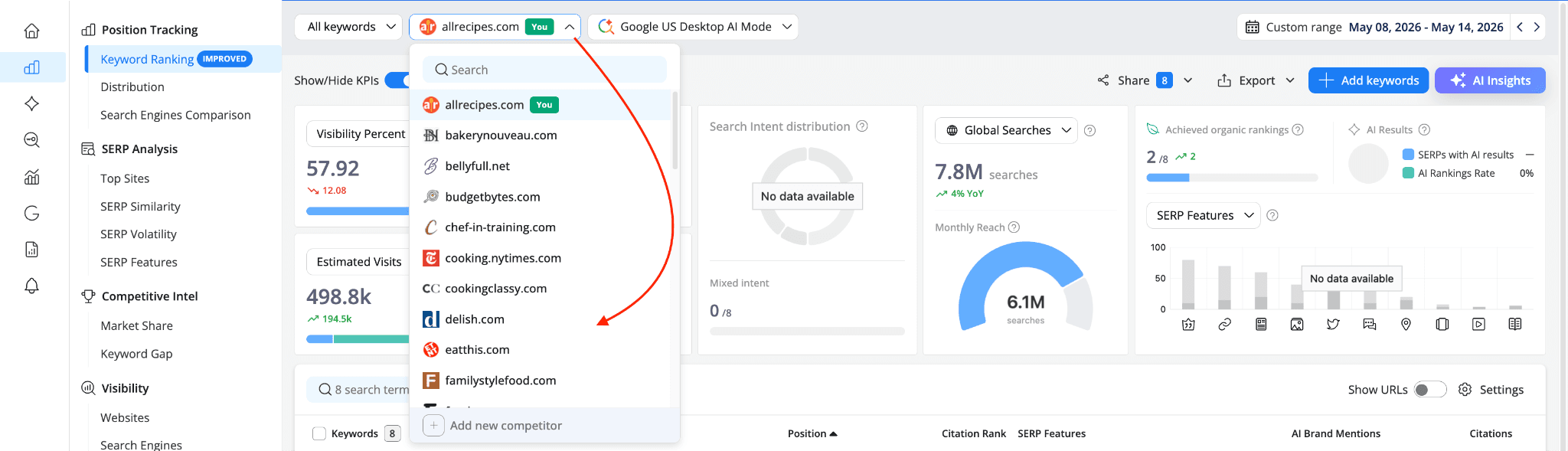
This is the starting point for any competitor analysis. Instead of looking at your own KPIs, you're now seeing the exact same metrics from the perspective of another brand.
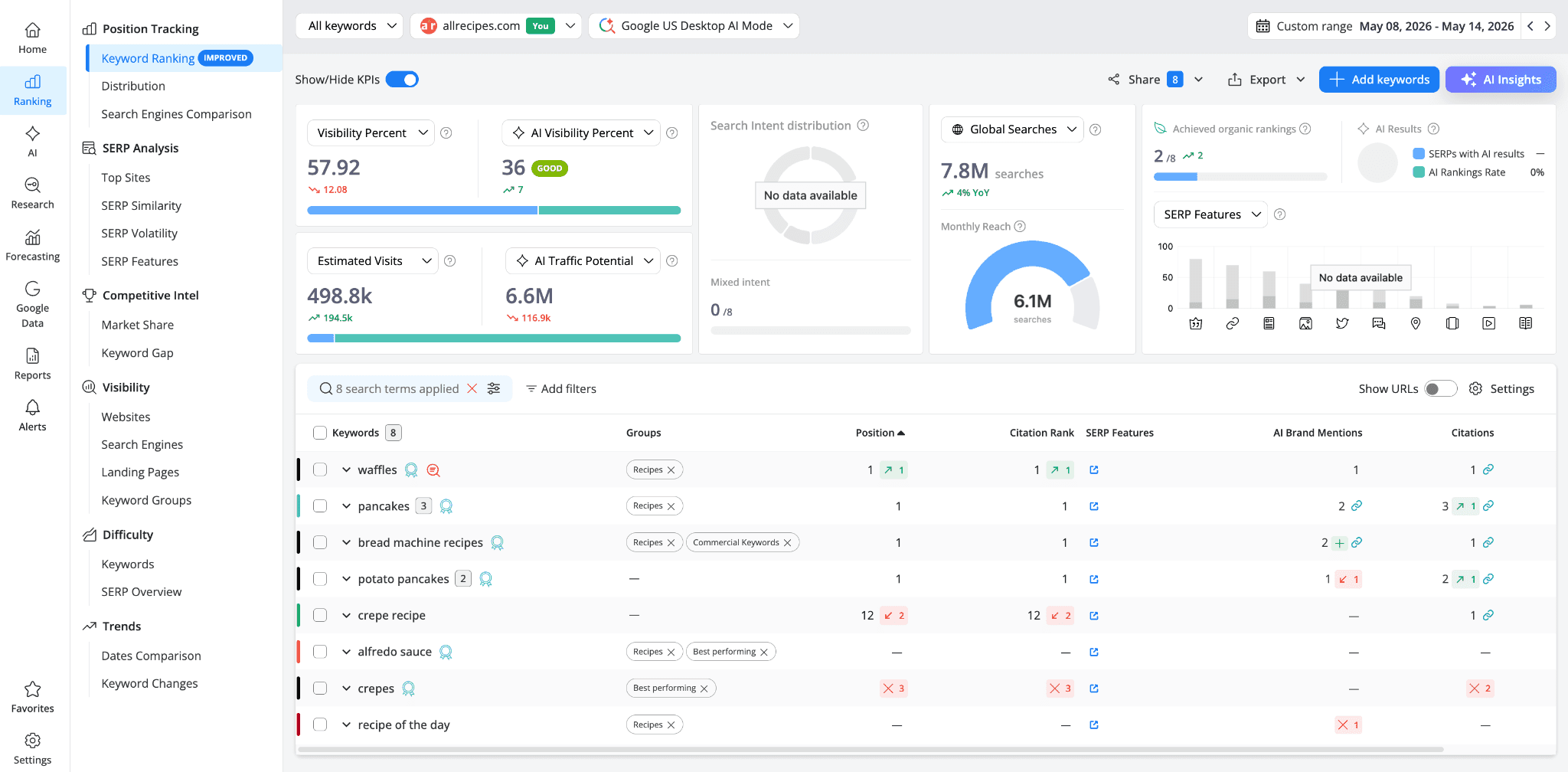
Let's start with the Keyword Ranking report on Google US Desktop AI Mode. For allrecipes.com, the numbers look strong: Visibility Percent of 57.92, AI Visibility Percent of 36 (GOOD), Estimated Visits of 498.8k, and an AI Traffic Potential of 6.6M.
Keywords like "waffles," "pancakes," and "bread machine recipes" have a Citation Rank 1, while "alfredo sauce," "crepes," and "recipe of the day" show no presence in AI results.
Now let's switch to cooking.nytimes.com.
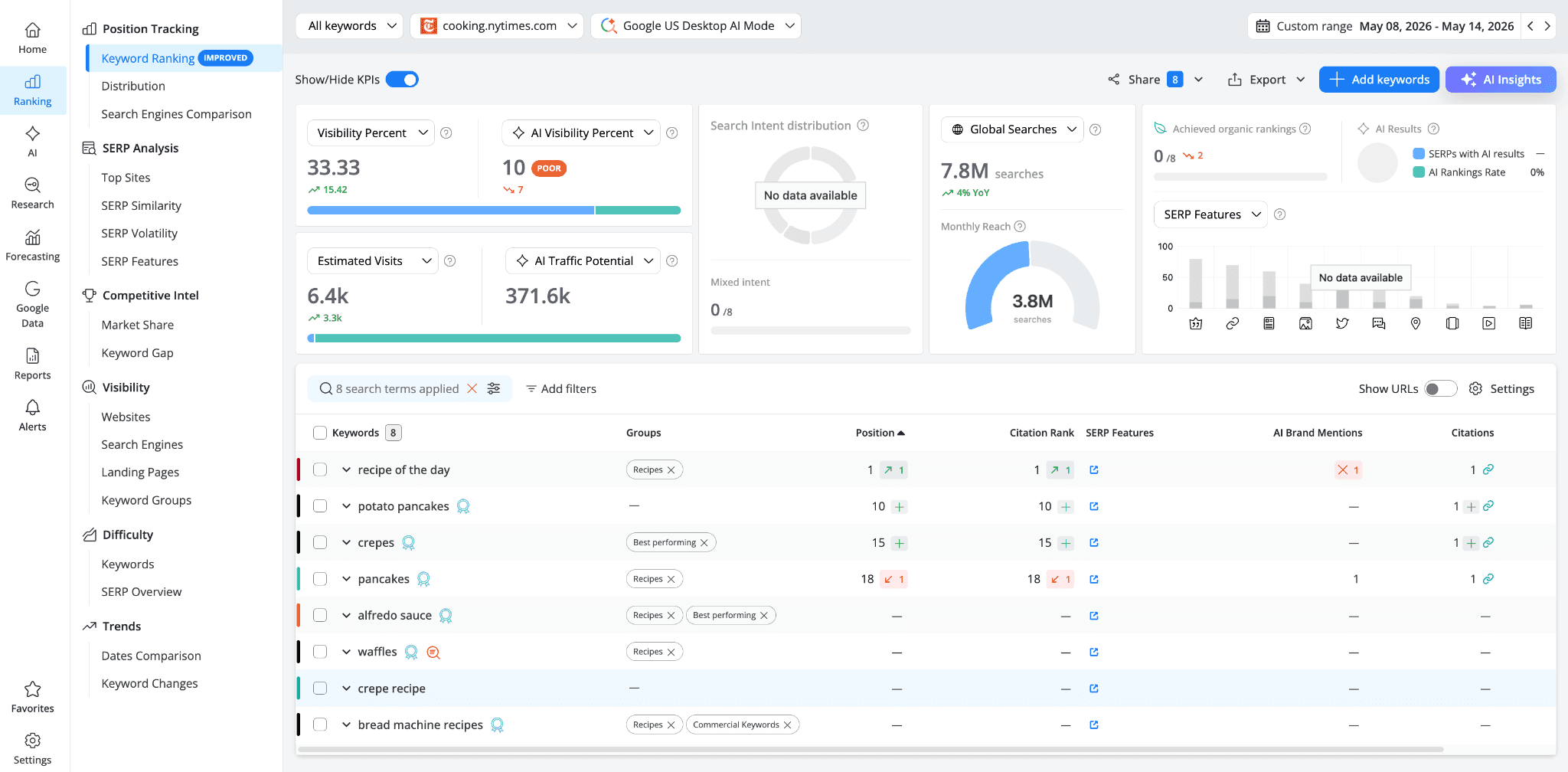
The picture changes completely. Visibility Percent drops to 33.33, AI Visibility Percent falls to just 10 (POOR), and Estimated Visits sit at only 6.4k.
cooking.nytimes.com is cited for a handful of keywords in AI Mode, with 'recipe of the day' at Citation Rank 1 being its strongest showing. 'Potato pancakes,' 'crepes,' and 'pancakes' are also cited but deeper in the citation list (Citation Rank 10, 15, and 18), while for 'waffles,' 'alfredo sauce,' 'crepe recipe,' and 'bread machine recipes' this competitor isn't cited at all.
Let's switch again to foodnetwork.com.
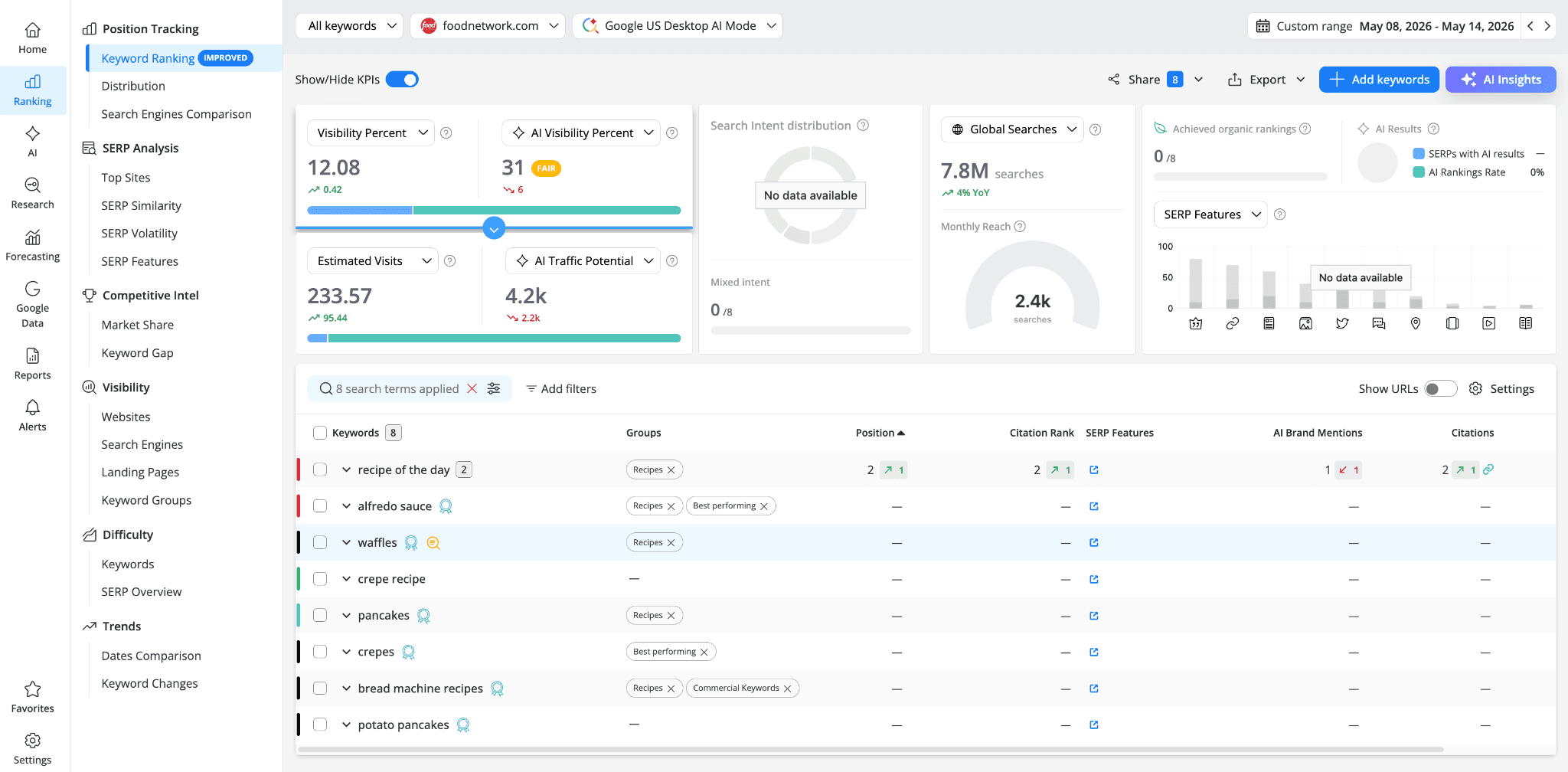
Another story altogether. foodnetwork.com has a Visibility Percent of 12.08, AI Visibility Percent of 31 (FAIR), Estimated Visits of 233.57, and an AI Traffic Potential of just 4.2k.
The only keyword where it shows real presence is "recipe of the day" at Citation Rank 2, with 1 AI Brand Mention and 2 Citations. Everything else, "alfredo sauce," "waffles," "crepe recipe," "pancakes," "crepes," "bread machine recipes," "potato pancakes," shows no Citation Rank and no Citations at all.
Already from these three views you can see a pattern: allrecipes.com dominates on volume and breadth, cooking.nytimes.com is cited occasionally but deep in the citation list, and foodnetwork.com only shows up for a single keyword. Each competitor has a different profile, and understanding those profiles is what this analysis is about.
A quick note: the examples in this article are based on a small set of keywords used for demonstration purposes. They don't reflect the real-world AI performance of the sites shown. In your own project, the more keywords you track, the more complete and accurate the competitive picture will be.
Step 2: Review AI performance across competitors
Now let's move to the AI Keyword Performance report, which gives you the AI-specific KPIs and a keyword-level breakdown of citations, mentions, and visibility.
Start with your own site. For allrecipes.com on AI Mode:
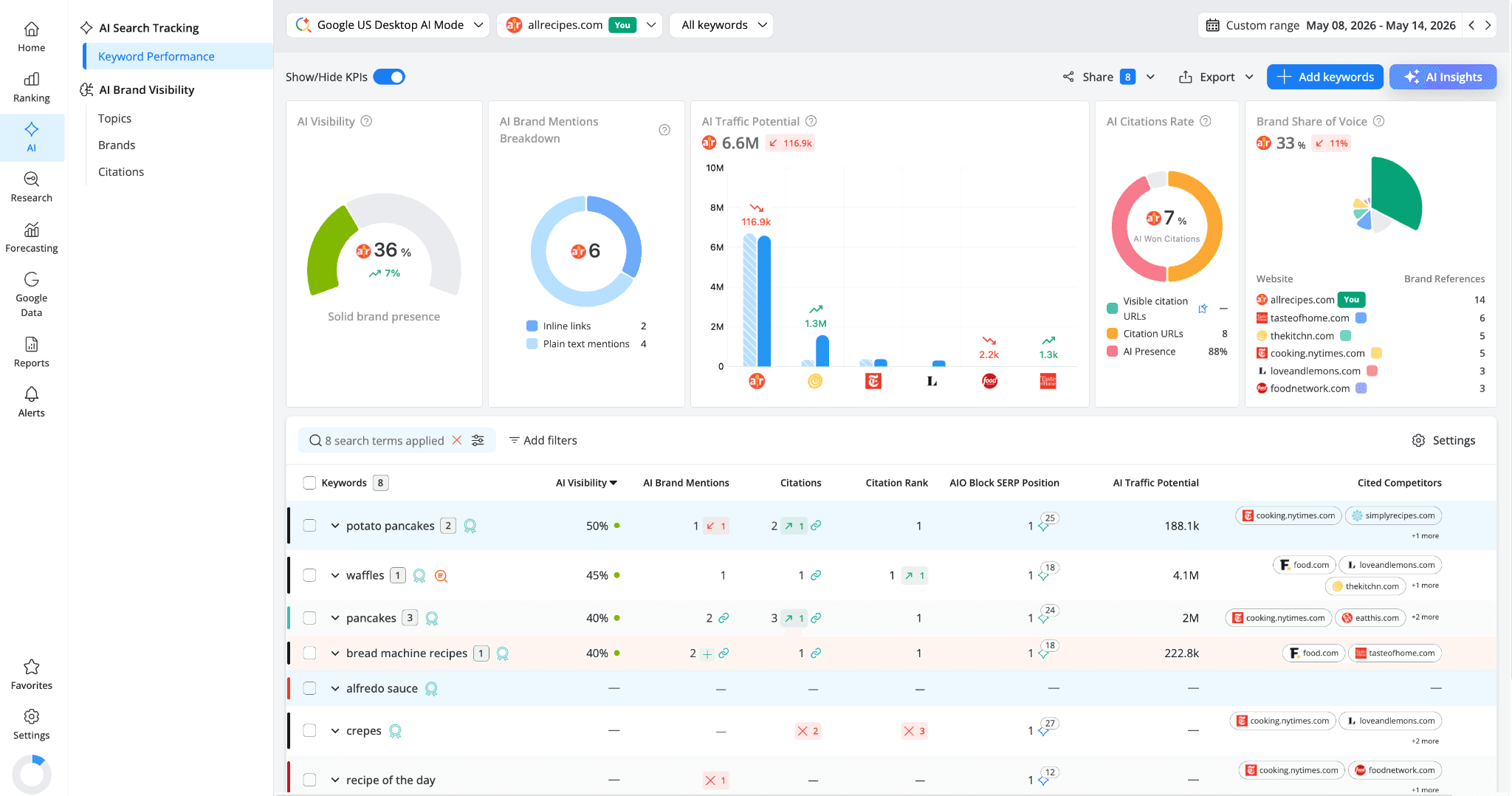
AI Visibility sits at 36% ("Solid brand presence"), with 6 AI Brand Mentions (2 inline links + 4 plain text mentions), an AI Traffic Potential of 6.6M, and a Brand Share of Voice of 33%. The AI Citations Rate shows 7% AI Won Citations with 8 Citation URLs and an AI Presence of 88%, meaning that almost all keywords in the set being analyzed triggered an AI response.
allrecipes.com leads the Brand Share of Voice chart with 14 brand references, followed by tasteofhome.com (6), thekitchn.com (5), cooking.nytimes.com (5), loveandlemons.com (3), and foodnetwork.com (3).
In the keyword table, you can see where allrecipes.com is performing well: "potato pancakes" at 50% AI Visibility with Citation Rank 1, "waffles" at 45% with Citation Rank 1, "pancakes" at 40% with Citation Rank 1 and 3 Citations, and "bread machine recipes" at 40% with Citation Rank 1. But also where it's absent: "alfredo sauce" shows no AI Visibility at all, and "crepes" has lost 2 Citations and dropped from Citation Rank 1.
Now let's switch to cooking.nytimes.com:
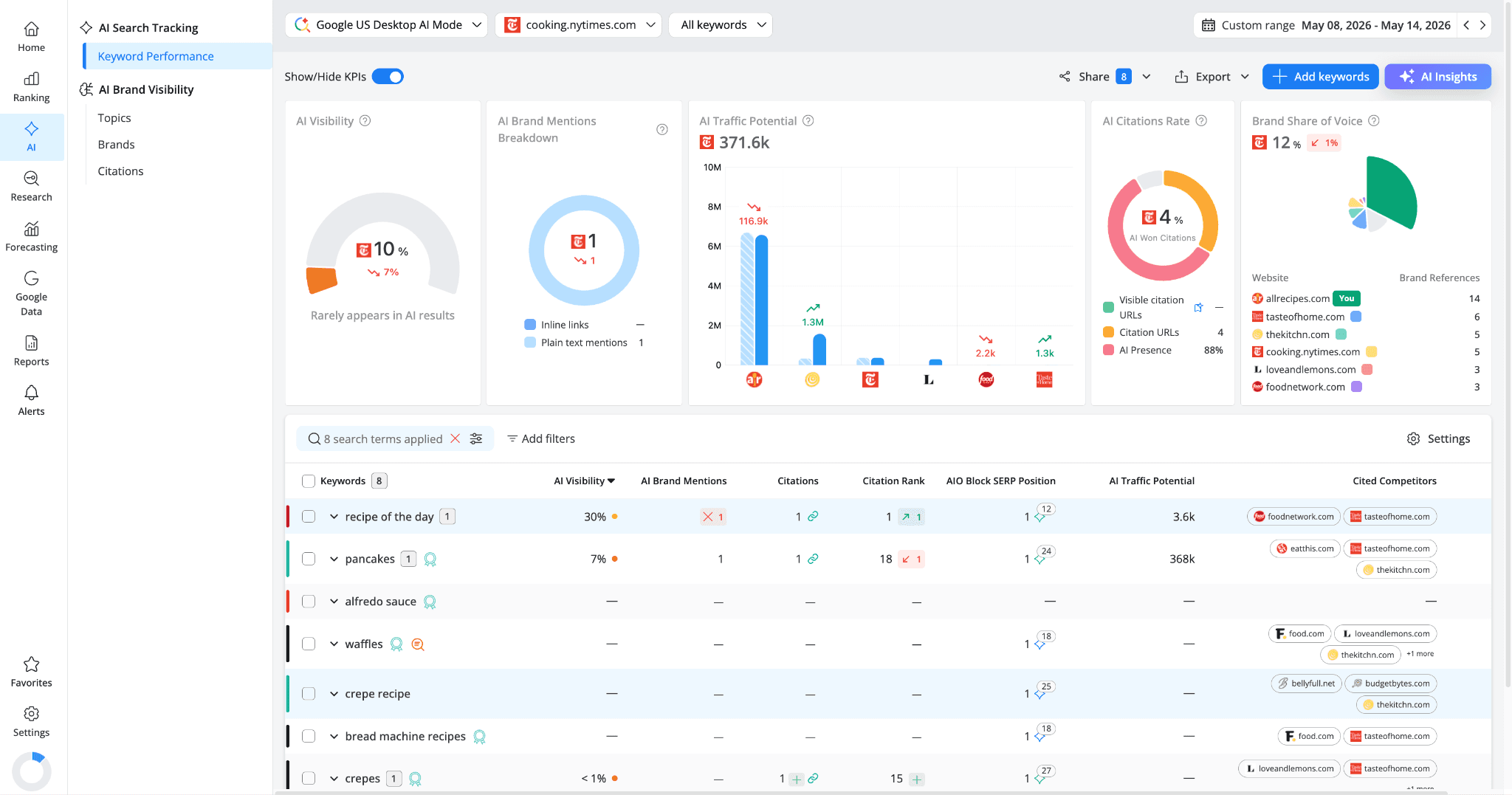
AI Visibility drops to 10% ("Rarely appears in AI results"). Brand Share of Voice is 12%, AI Traffic Potential is just 371.6k, and the AI Brand Mentions Breakdown shows only 1 plain text mention with zero inline links.
In the keyword table, most rows are empty. "Recipe of the day" has 30% AI Visibility with Citation Rank 1, "Pancakes" has 7% AI Visibility with Citation Rank 18, AND "crepes" shows less than 1% with Citation Rank 15. For "waffles" or "crepe recipe," cooking.nytimes.com is completely absent.
This is a competitor that gets cited occasionally but has almost no consistent AI presence across the keyword set. The one keyword where it performs well ("recipe of the day") might be worth investigating further to see what that content looks like.
Now let's switch to foodnetwork.com:
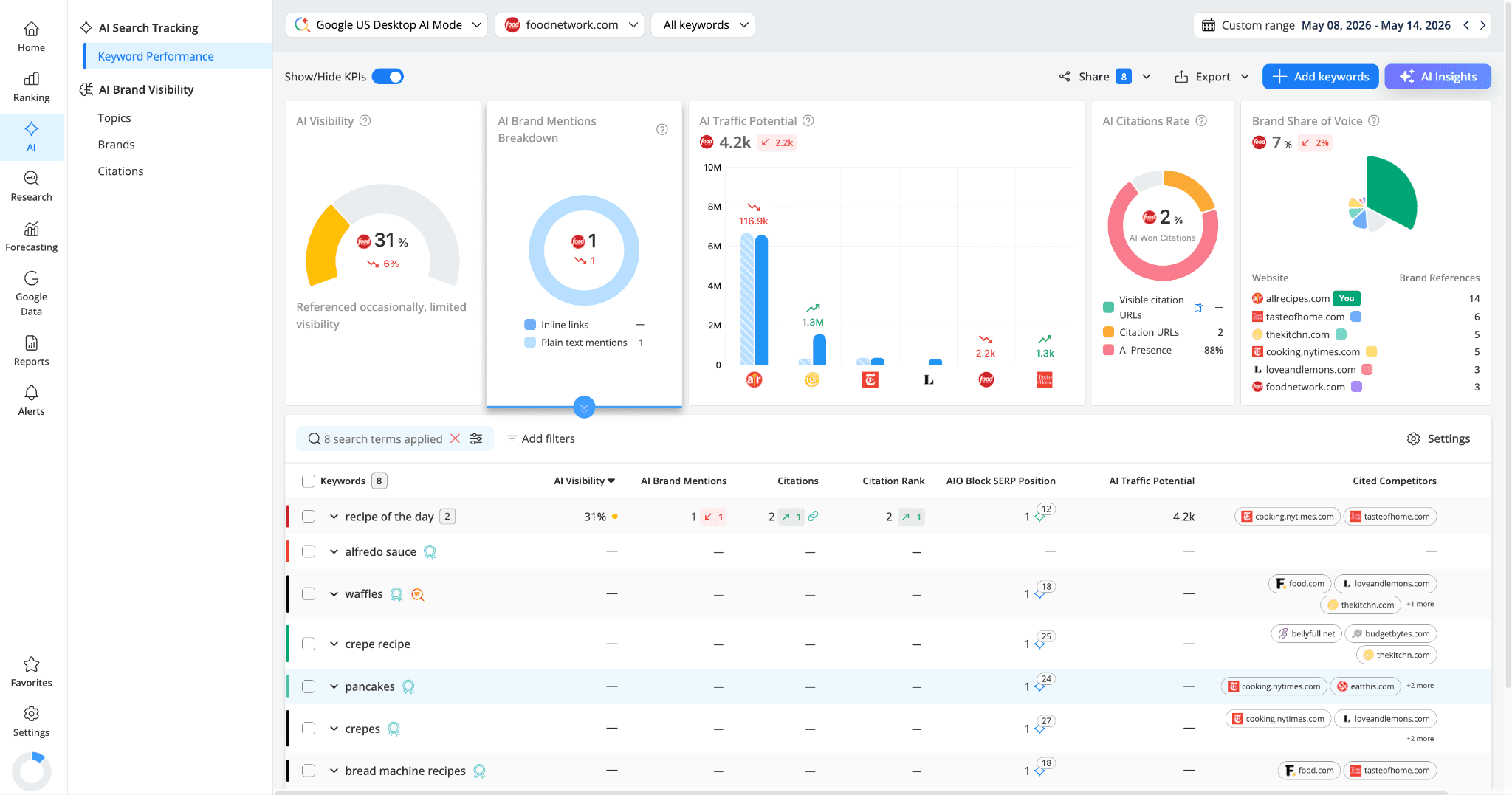
AI Visibility is 31% ("Referenced occasionally, limited visibility"), which might sound close to allrecipes' 36%, but look at the Brand Share of Voice: just 7%, with only 2% AI Won Citations and 2 Citation URLs.
In the keyword table, almost everything is blank. "Recipe of the day" is the one keyword where foodnetwork.com shows meaningful AI presence (31% AI Visibility, 2 Citations, 1 AI Brand Mention). For everything else, including "waffles," "crepe recipe," "pancakes," or "bread machine recipes," the brand simply isn't part of the AI results.
What this tells us: foodnetwork.com has a focused AI presence on a very narrow set of keywords, while allrecipes.com has broader coverage but isn't maxing out its potential. cooking.nytimes.com falls somewhere in between, with scattered low-level citations that don't add up to real visibility.
Step 3: Find which competitors are winning which keywords
The Cited Competitors column in the AI Keyword Performance report is where you go from "who's performing well overall" to "who's competing with me on this specific keyword."
Go back to your own view (allrecipes.com) and look at the Cited Competitors column for each keyword:
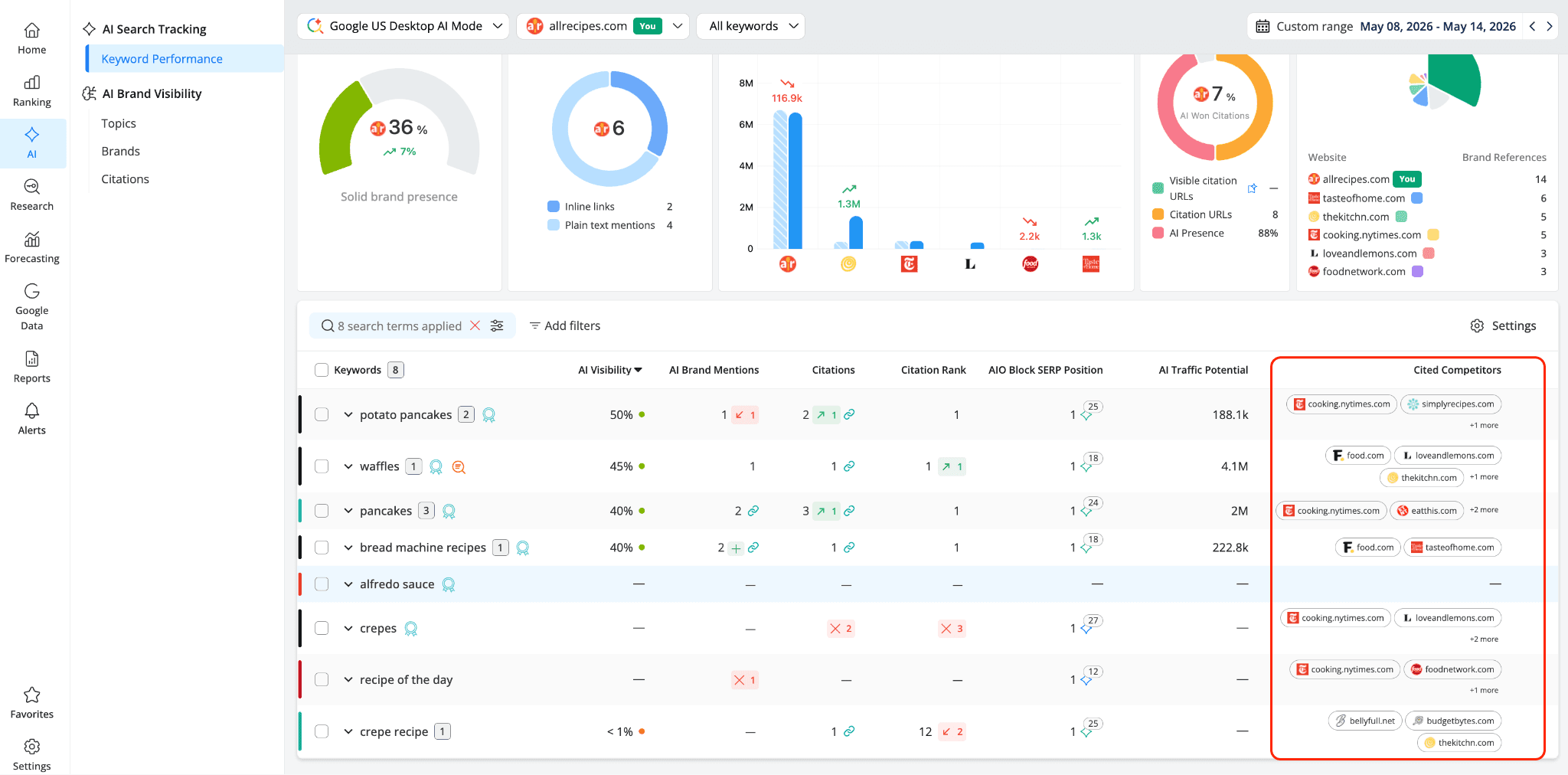
For "potato pancakes," cooking.nytimes.com and simplyrecipes.com (plus 1 more) are cited competitors. For "waffles," it's food.com, loveandlemons.com, and thekitchn.com (plus 1 more), etc.
Each of these is a specific, actionable data point. You now know, for each keyword, exactly which of your tracked competitors are appearing in the AI answer alongside or instead of you.
If you want to see all sources cited in an AI answer (including domains you're not tracking), use the AI URLs tooltip, which shows all the source URLs that appear in the AI response for a given keyword, regardless of whether they're yours or a competitor's. This is where you see the full picture of what the AI answer is built from.
Clicking the icon on the top right of the tooltip opens the SERP HTML, letting you see the AI response in its full context while the "Show all" opens the Top Sites section, where you can see the actual pages being cited in more detail, and study what makes them citation-worthy.
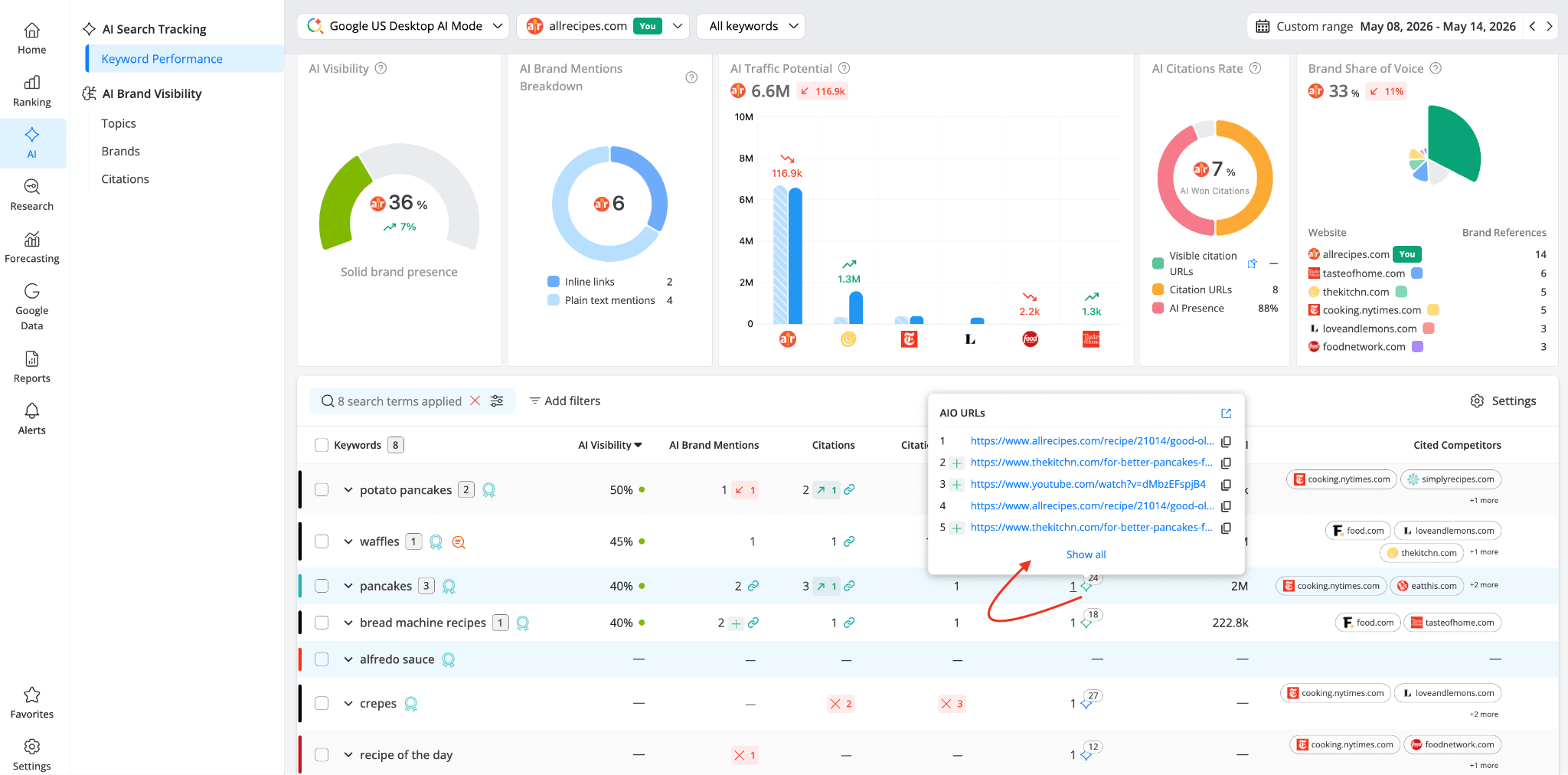
But from a competitor analysis perspective, what matters here is the patterns. If cooking.nytimes.com keeps showing up across multiple keywords with low Citation Ranks (18, 15, 12), that's a competitor with a scattered but growing presence. If food.com appears on several keywords where you're already strong, that's a direct threat to monitor. If loveandlemons.com only shows up on "waffles," that might be a one-off win driven by a single strong page.
Step 4 (complementary): See the AI Overviews competitive landscape at a glance
Note: This step uses the SERP Features report, which is being populated for Universal and Google Search + AIO search engines. If your project tracks Google AI Mode (as we've been using throughout this article), Perplexity, or ChatGPT, this report won't show any data. However, if you also have a Google Search + AIO engine added to your project, this view adds a valuable complementary layer to your competitor analysis.
The SERP Analysis > SERP Features report gives you the widest view of how AI Overviews are distributed across all your tracked competitors.
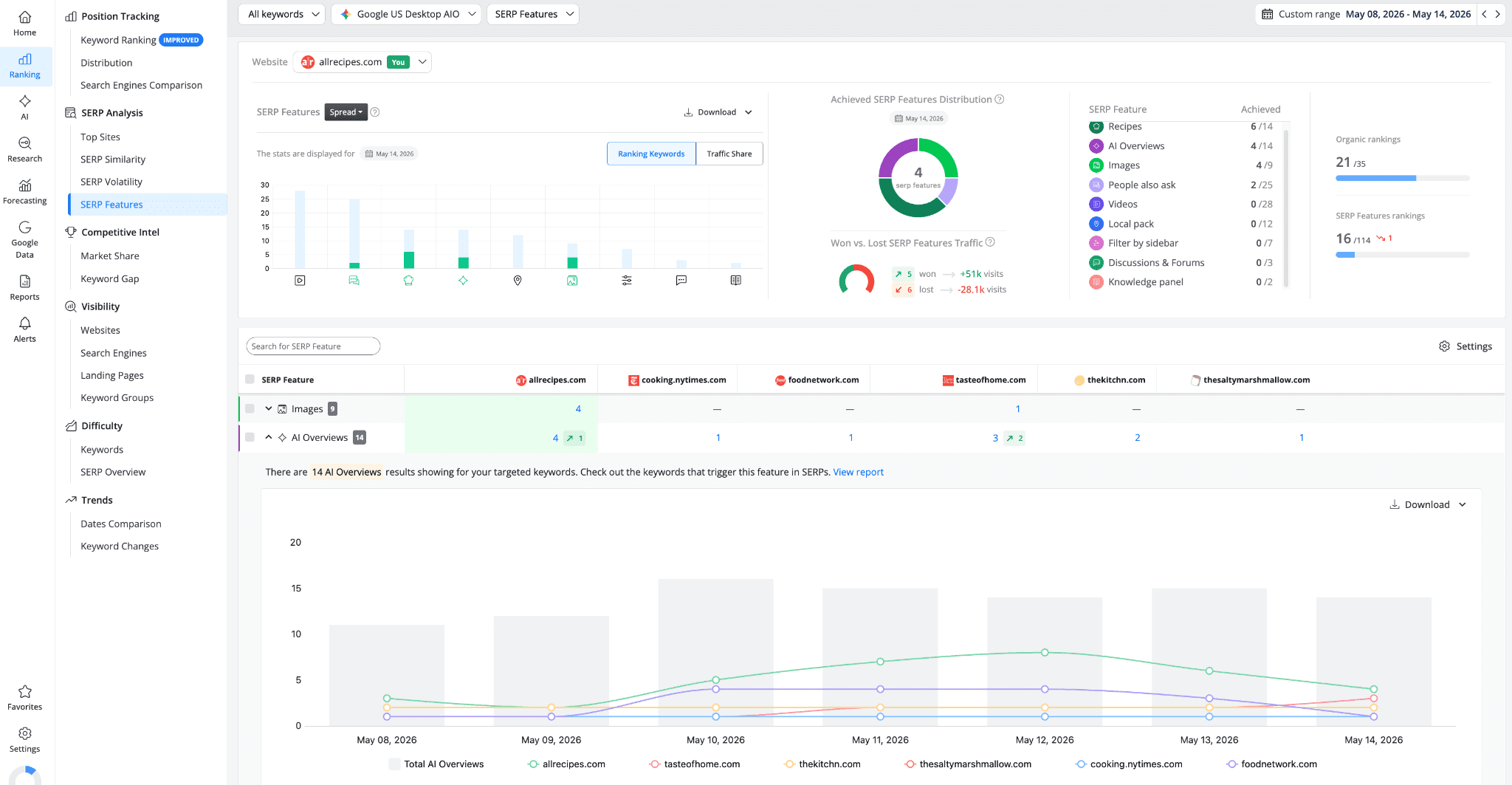
The comparison table shows 14 AI Overviews triggered across the set of keywords being analyzed: allrecipes.com appears for 4 keywords (up 1), while cooking.nytimes.com for 1, foodnetwork.com for 1, tasteofhome.com for 3 (up 2), thekitchn.com in 2, and thesaltymarshmallow.com in 1.
A few things stand out here. First, tasteofhome.com has gained 2 new AI Overview placements, making it the fastest-growing competitor in this period. That's worth watching.
Second, allrecipes.com leads but only appears for 4 keywords out of 14, meaning there are 10 AI Overview opportunities where allrecipes.com isn't present.
Third, the distribution is fairly even across competitors, no single site dominates AI Overviews.
The Won vs. Lost SERP Features Traffic widget adds context: allrecipes.com won 5 placements (+51k visits) but lost 6 (-28.1k visits). The trend chart at the bottom shows how AI Overview presence fluctuates day by day.
Clicking on any competitor's number in the AI Overviews row takes you to the Keyword Ranking report filtered for those specific keywords, so you can dig into exactly which queries each competitor is winning.
Step 5: Understand keyword overlap with competitors
The Competitive Intel → Keyword Gap report is where you find the most actionable competitive insights.
With allrecipes.com, cooking.nytimes.com, food.com, and foodnetwork.com compared on Google US Desktop AI Mode, the top section gives you three visual summaries:
The Keyword Intersection chart shows how many keywords each site appears for in AI Mode: allrecipes.com appears for 14 keywords, cooking.nytimes.com and food.com each for 4, and foodnetwork.com for just 2. Hovering over the circles reveals the keyword count for each site along with the number of shared keywords. The size of each circle reflects that disparity.
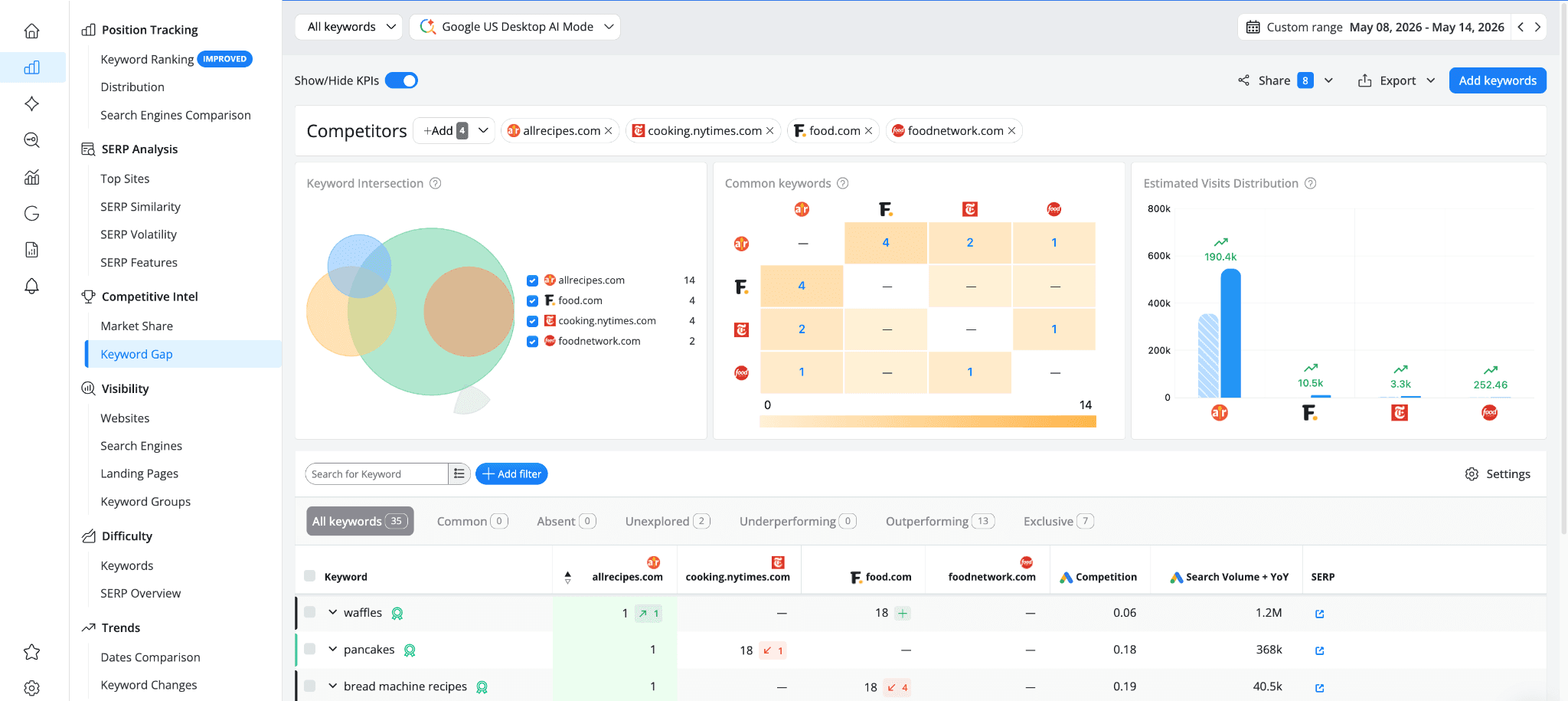
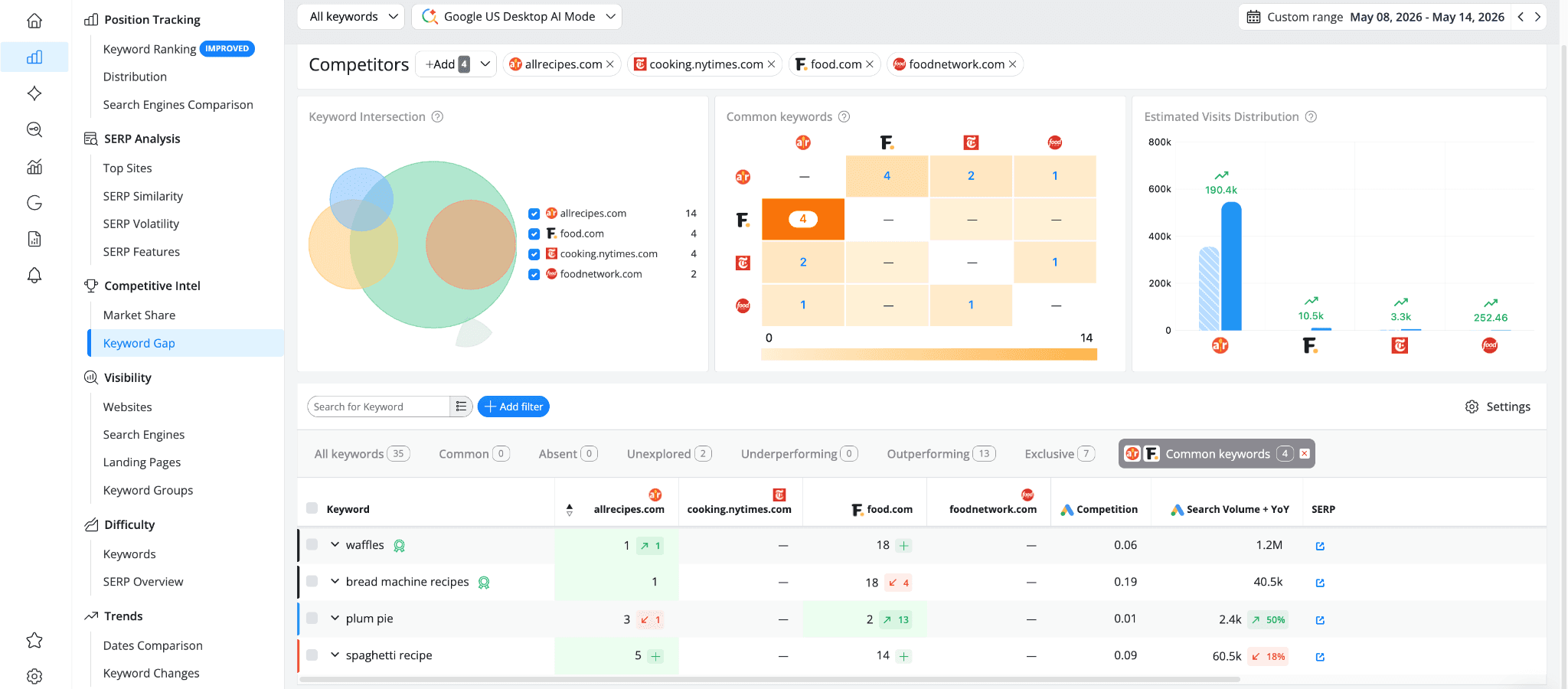
The Common Keywords matrix shows pairwise overlaps between any two sites. Clicking on a number filters the keyword table below to show only those shared keywords. For example, allrecipes.com shares 4 keywords with food.com, 2 with cooking.nytimes.com, and 1 with foodnetwork.com. cooking.nytimes.com and foodnetwork.com also share 1 keyword between them. But the "Common" tab in the table below shows 0, which means there's not a single keyword where all four sites appear in AI results at the same time. That's a useful insight on its own: these competitors aren't all fighting over the same queries in AI Mode, they each have their own pockets of visibility.
The Estimated Visits Distribution chart shows the predicted organic search visits for each competitor. Note that this metric is based on organic search performance (Click Share and Search Volume), not AI-specific traffic. Still, it gives useful context about the overall size difference between competitors: allrecipes.com can generate 190.4k estimated visits, while food.com sits at 10.5k, cooking.nytimes.com at 3.3k, and foodnetwork.com at just 252
Below the KPIs, the keyword table lets you filter by relationship type using the tabs:
All keywords: shows the keyword list selected, regardless of whether the main site or the competitors appear in AI results or not.
Common: shows keywords where you and all selected competitors are cited.
Absent: shows keywords that all your competitors are cited for, but your site isn't.
Unexplored: shows keywords where at least one competitor is cited but your site isn't.
Underperforming: shows keywords where competitors hold a higher Citation Rank than yours.
Outperforming: shows keywords where your site holds a higher Citation Rank than all compared competitors.
Exclusive: shows keywords where only your site is cited and none of the competitors appear.
Depending on your project, any of these could surface valuable insights. In our example, the most relevant ones are:
Outperforming (13) shows keywords where allrecipes.com holds a higher Citation Rank than all compared competitors. These are keywords where you're ahead, but worth monitoring to make sure you stay there.
Exclusive (7) shows keywords where only allrecipes.com is cited and none of the compared competitors appear at all in AI Mode. These are your uncontested queries.
Unexplored (2) shows keywords where competitors are cited but allrecipes.com isn't. These are potential gaps worth investigating.
What makes this report especially useful for AI competitor analysis is that it reflects the ranking landscape specifically for the search engine you've selected. The same keyword set can look completely different on Google Search vs. AI Mode, so running this comparison on your AI-focused search engine gives you insights that a traditional keyword gap analysis would miss.
What to do with what you've found
Competitor analysis in AI search isn't about copying what others are doing. It's about spotting patterns you can learn from. Here's how to make the most of what you've uncovered:
Identify which competitors to watch closely. Not all competitors matter equally in AI search. From this analysis, you might find that a competitor with weak organic rankings is getting consistently cited (like cooking.nytimes.com on "recipe of the day"), while a competitor with strong rankings barely shows up in AI answers. Focus your attention on the ones who are actually gaining AI presence, not just the ones with the best organic positions.
Look for keyword-level patterns. If a specific competitor keeps appearing on a cluster of related keywords, they probably have strong topical coverage on that subject. That's a signal to investigate their content structure and see if you need to build out similar coverage.
Watch for momentum, not just position. The SERP Features report shows you who's gaining and losing. A competitor that just picked up 2 new AI Overview placements (like tasteofhome.com) might be in the middle of a content push that will keep growing. Catching that early gives you time to respond.
Cross-check AI presence against organic strength. Use the Keyword Gap report to understand where competitors are strong in AI Mode, then check whether that strength carries over to other search engines. The gaps between the two are where the real opportunities live.
Use this as input for your content strategy. Every competitor citation you find is a signal about what AI systems consider worth referencing. Collect those signals, find the patterns, and use them to inform what you create or improve next.
This kind of analysis works best as a regular habit rather than a one-time exercise. AI search results shift constantly, and competitors that barely show up today might be everywhere next month. Checking in regularly helps you stay ahead of those shifts instead of reacting to them after the fact.
This article is part of a series on AI search visibility in AWR. You can also check out Why My Brand Doesn't Show Up in AI Answers? How to Fix It with AWR and How to Turn AWR Data into AI SEO Actions.
stay in the loop