

Advice and answers from the Advanced Web Ranking Team
Search for articles
>
>
Google Sheets exports to Drive, for AWR data backups and sharing with third-party platforms
Link Advanced Web Ranking with Google Sheets to automatically export AWR data to your Drive. Perfect for backups and sharing with third-party platforms like TapClicks.

Link Advanced Web Ranking with Google Sheets to export your AWR data automatically or manually to your Google Drive. Beyond easy access and backups, this integration also streamlines data sharing with third-party marketing platforms like TapClicks.
How to enable the Google Sheets sync
Go to Settings → Integrations & Exports in your AWR account. Under the Scheduled Data Exports group, click the Google Sheets card to expand it.
Click on
Sign in with Googleand select the Google account where the AWR data will be exported.
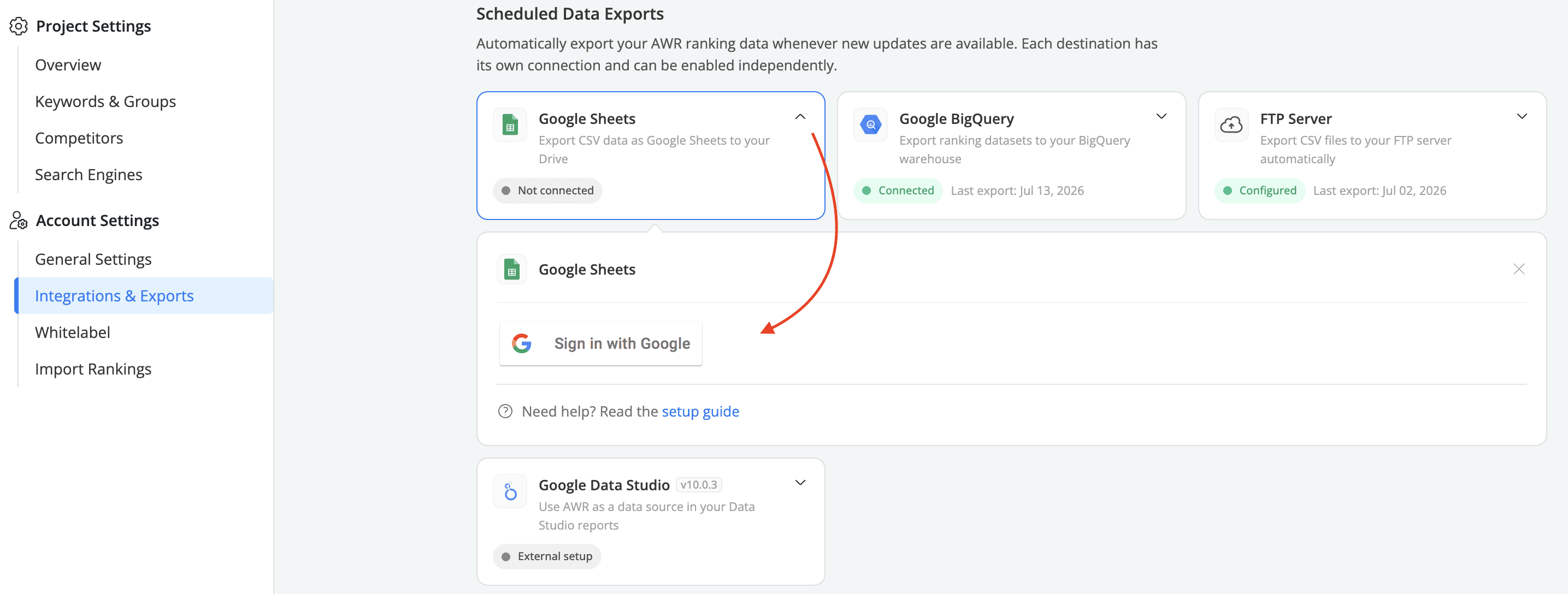
3. Follow the prompts to authorize AWR to access your Google account.
You can manage “Sign in with Google” permissions at any time by accessing the Third-party apps & services page while logged into your Google account.
How to upload AWR data to Drive
Once the connection between Advanced Web Ranking and Google Sheets is established, you can choose from two upload methods: automatic or manual.
1. Automatic exports
Setup of automatic exports
In the Google Sheets card, under Export settings, select the datasets you want to export (Ranking, Visibility, and/or Top Sites) and the AWR projects for which the data should be uploaded.
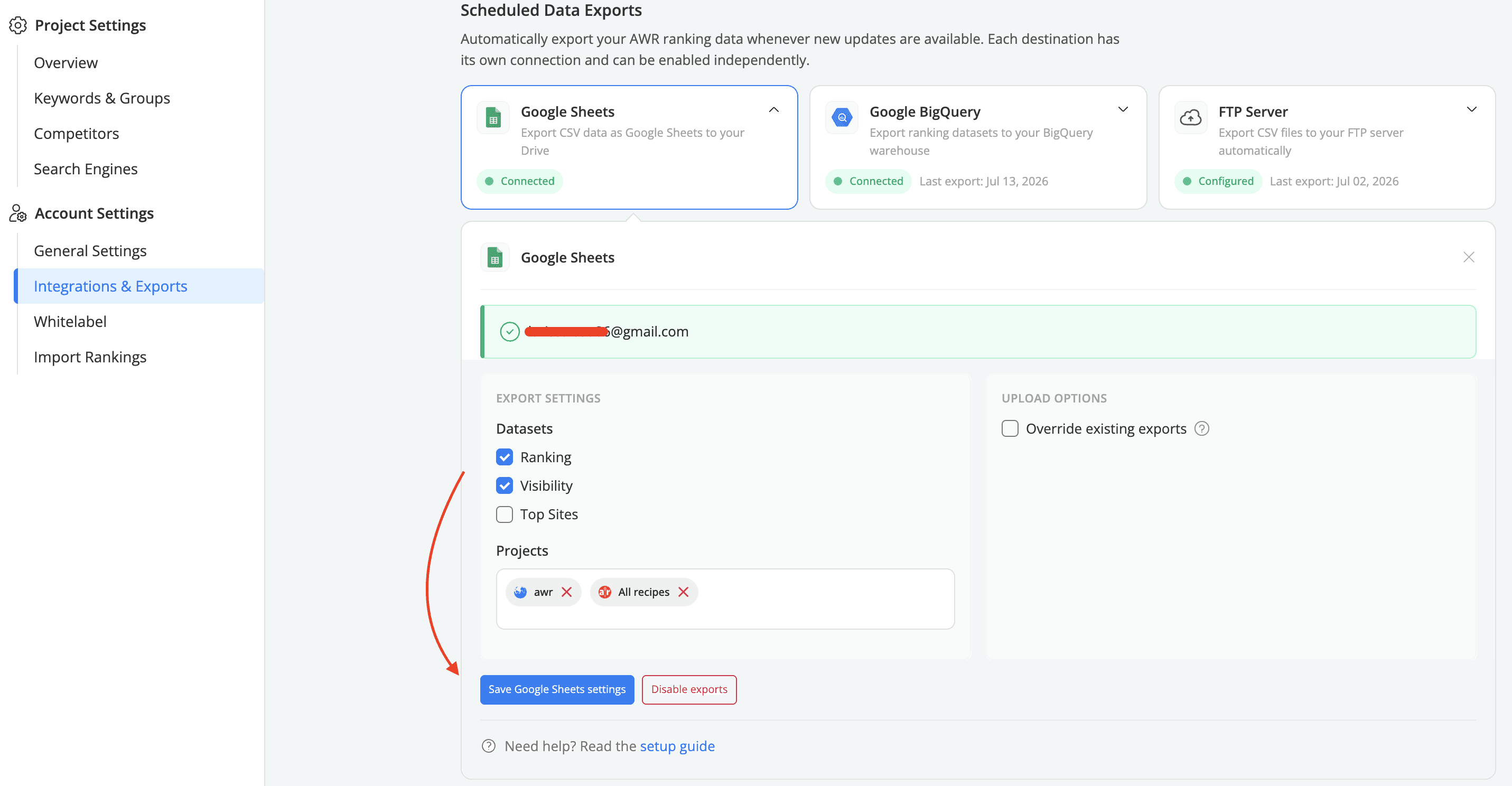
Click Save Google Sheets settings to enable automatic uploads.
On the right side of the card, under Upload options, you can enable Override existing exports if you want each new upload to replace the previous file for the same project. If left unchecked, new files will be added alongside the existing ones on each ranking update.
Frequency of automatic exports
Once automatic uploads are enabled, AWR data will be uploaded to your Drive following the next ranking update that takes place for each of the selected projects. Further uploads will run based on the ranking update frequency chosen for each project. For daily scheduled projects the uploads will run daily, while for weekly scheduled projects the data will be uploaded once a week.
Uploaded data can be accessed from the My Drive > Recent section or the My Drive > Advanced Web Ranking folder, which is automatically created on your Drive with the first upload. Within the Advanced Web Ranking folder, separate folders will be created for each project, containing files for Ranking, Visibility, and/or Top Sites data.
2. Manual exports
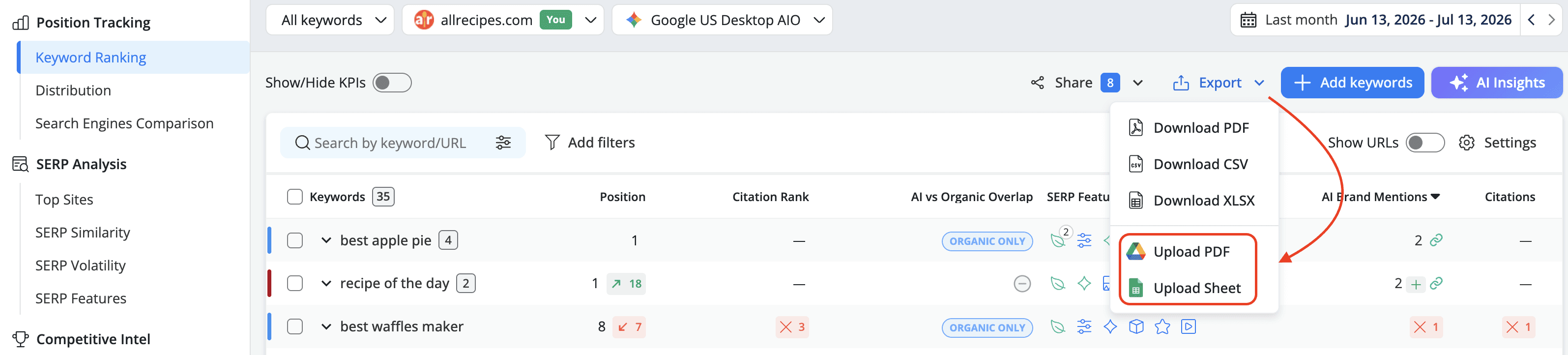
If you prefer not to enable automatic uploads or need to update data on Drive between scheduled exports, you can use the Export menu available in most AWR UI reports. This feature allows you to manually upload the desired data to Drive in either PDF format or as Sheets.
Datasets available for export to Drive
When using automatic uploads the following datasets can be exported to Google Sheets:
Ranking: The uploaded file includes an array of metrics, such as Position, Best Position, Competition, Monthly Searches, Search Intent, and more, offering an in-depth view of your ranking performance.
Learn more about the Ranking dataset
Visibility: The uploaded file provides a comprehensive snapshot of your website's performance, featuring a detailed set of Visibility Evolution, Ranking Distribution, and Ranking Comparison metrics. This enables you to see how your visibility is evolving, where your rankings currently stand, and how keyword positions shift between updates.
Learn more about the Visibility dataset
Top Sites: The uploaded file provides an overview of the top-ranking URLs, featuring key metrics to evaluate their performance. It helps you identify the URLs that excel in search results, providing insights into their ranking positions and result types for strategic analysis.
Learn more about the Top Sites dataset
Manual exports work from any AWR report with an export to Drive option, such as Ranking, Market Share, Difficulty, and more.
If you have any further questions, please feel free to contact our support team.
stay in the loop