

Advice and answers from the Advanced Web Ranking Team
Search for articles
>
>
Visibility Data Sources for Data Studio: Dimensions and Parameters Explained
Learn what each attribute means in AWR's Visibility data sources for Data Studio. Includes definitions for dimensions, and parameters explained.

Data Studio users can connect to two AWR visibility data sources: Visibility Date Comparison and Visibility Evolution In Time. Each surfaces your website's performance across tracked keywords and search engines in a different way, so the right pick depends on the kind of report you're building.`
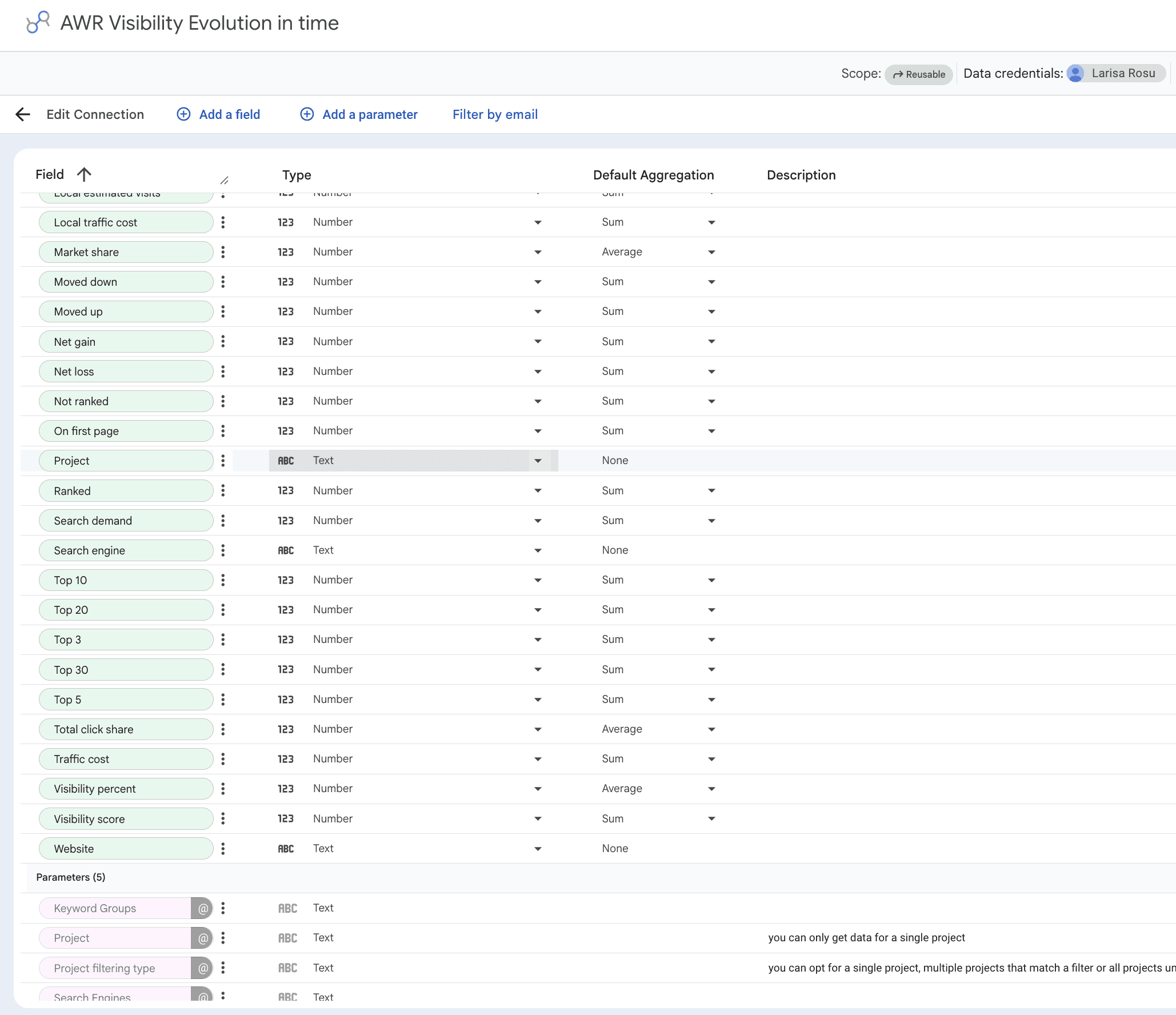
Below, you'll find every dimension and parameter that each data source supports, with definitions ready to use as you design your dashboards.
What this article covers
Both data sources share the same set of dimensions. The main differences are in how project selection works and the extra parameters available in Evolution In Time for narrowing down by website, search engine, and keyword group.
This guide covers the two visibility data sources available for Data Studio:
Visibility Date Comparison: great for comparing visibility data between specific update dates across one or more projects, ideal for snapshot-style scorecards and before/after reports
Visibility Evolution In Time: designed for tracking how visibility evolves over a selected time period, ideal for line charts and trend reports with granular filtering by project, website, search engine, and keyword group
Pick Date Comparison when you need scorecards that compare two points in time. Pick Evolution In Time when you want to chart how visibility moves day by day or update by update across the full range.
Both data sources share the same set of dimensions and the same set of parameters. The difference is in how the data comes out: Date Comparison returns values at specific update dates, while Evolution In Time returns the full series across all updates in the selected range.
💡 For setup instructions, see Google Data Studio Setup.
Dimensions
Data Studio classifies every field in these data sources as a dimension. The full set covers visibility scores, ranking counts, ranking shifts, and the descriptive labels that hold each row together. The list below is grouped by what each field tells you about your website.
⚠️ Every dimension ships with a default aggregation method matched to how AWR calculates the value internally. Override that default on fields like Visibility percent, Average rank, or Market share, and the numbers you see in Data Studio will drift from what AWR shows.
Visibility evolution
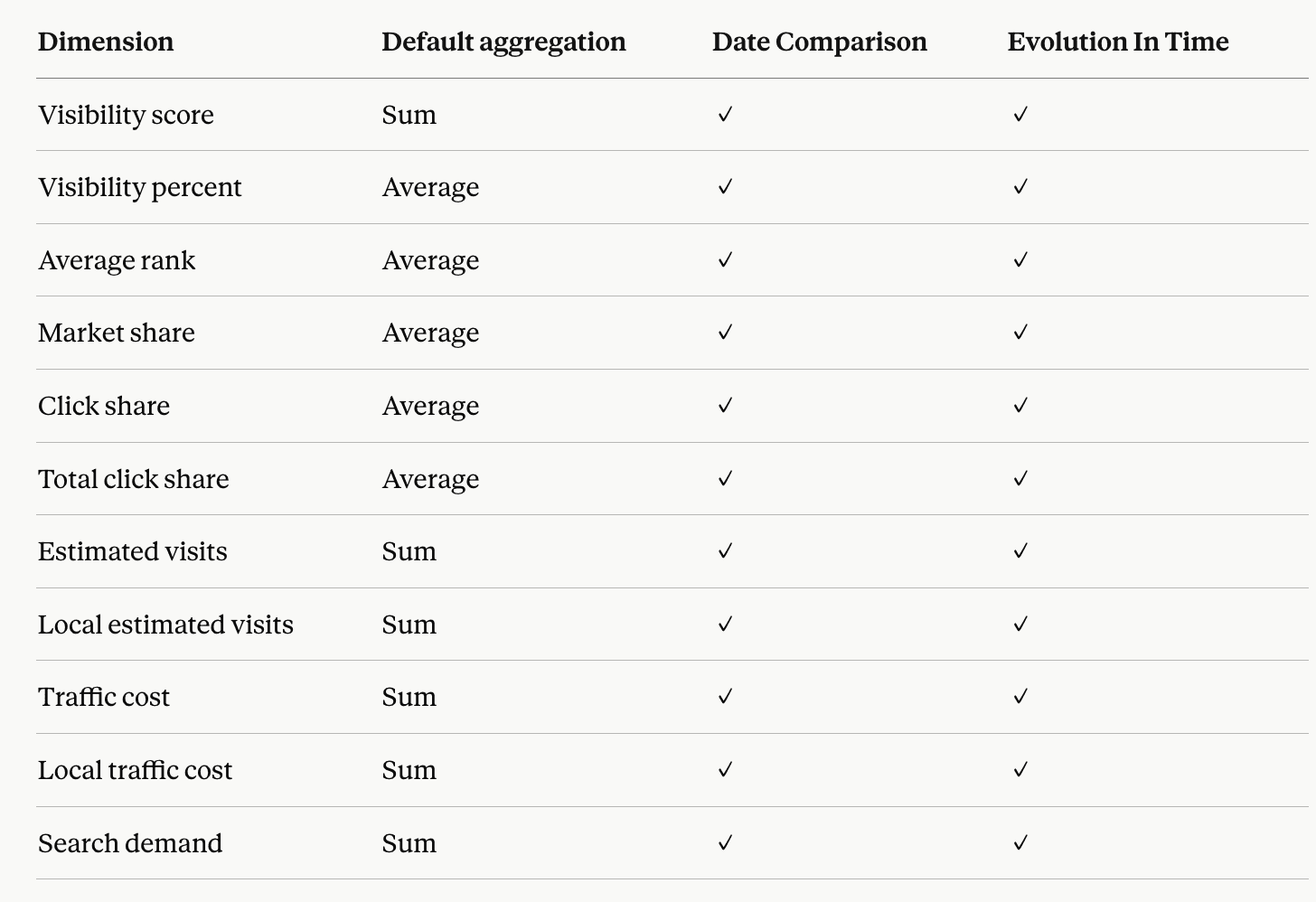
Visibility score: an overall score based on top 30 ranking positions across all tracked keywords and search engines.
Visibility percent: the website's overall visibility expressed as a percentage, calculated from the visibility score.
Average rank: the average ranking position of the website across the full set of tracked keywords.
Market share: the percentage of estimated visits the website gets out of the total estimated visits generated by the top 20 ranking keywords.
Click share: the percentage of clicks the website might get from organic search, based on its keywords ranking in the top 20.
Total click share: the percentage of clicks the website might get from organic search across the entire set of tracked keywords.
Estimated visits: an approximation of how many monthly visits the website might get from its top 20 ranking keywords, based on related search volume and click share.
Local estimated visits: the same idea as Estimated visits, but narrowed down to the custom location set for the search engine.
Traffic cost: an estimate of how much you would need to spend on paid ads to get the same traffic as your organic results. Calculated using the keyword's estimated visits and its CPC at the country level.
Local traffic cost: the same idea as Traffic cost, but using local estimated visits and CPC specific to the custom location set for the search engine.
Search demand: the total number of searches recorded in the last 30 days for the tracked keyword set, as reported by Google Keyword Planner.
Ranking distribution
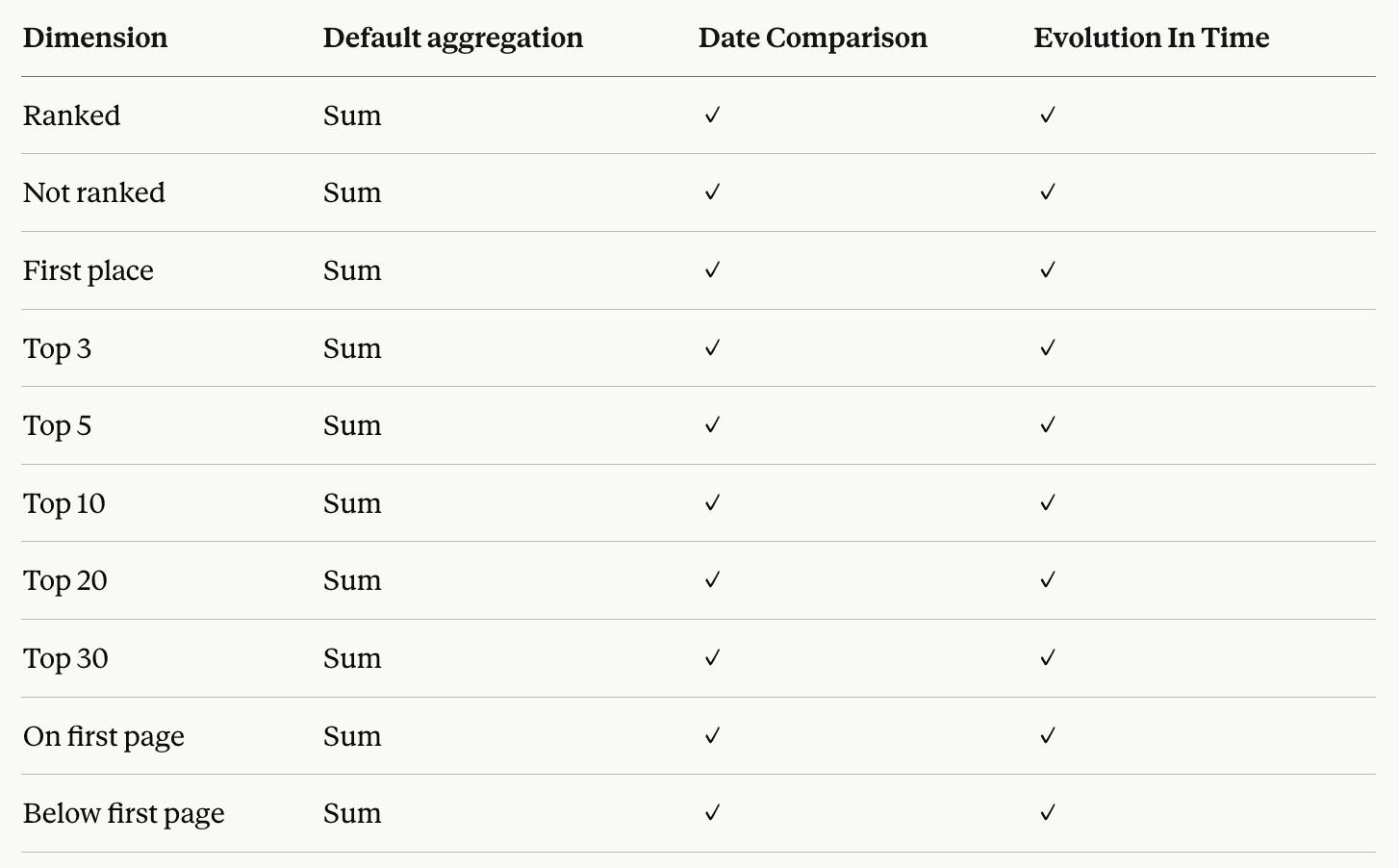
Ranked: the total count of keywords the website holds a position for in the search results.
Not ranked: the total count of keywords the website does not have a position for.
First place: the count of keywords the website appears as the very first result for.
Top 3 / Top 5 / Top 10 / Top 20 / Top 30: the count of keywords the website appears in any of these top ranking positions for.
On first page: the count of keywords the website appears on the first page of search results for.
Below first page: the count of keywords the website appears on pages beyond the first page for.
Ranking comparison
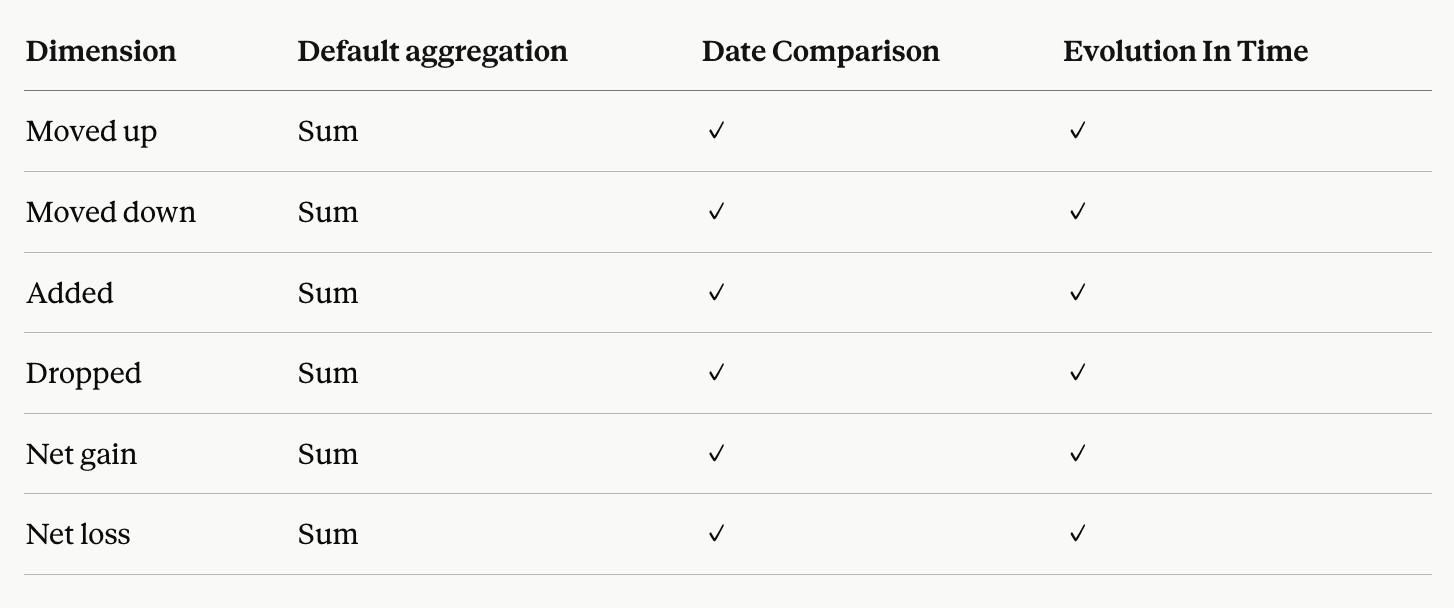
Moved up: the count of keywords that have improved their ranking compared to the previous update.
Moved down: the count of keywords that have declined in their ranking compared to the previous update.
Added: the number of new keywords the website started ranking for compared to the previous update.
Dropped: the number of keywords the website stopped ranking for compared to the previous update.
Net gain: the overall increase in keyword rankings compared to the previous update.
Net loss: the overall decrease in keyword rankings compared to the previous update.
Other
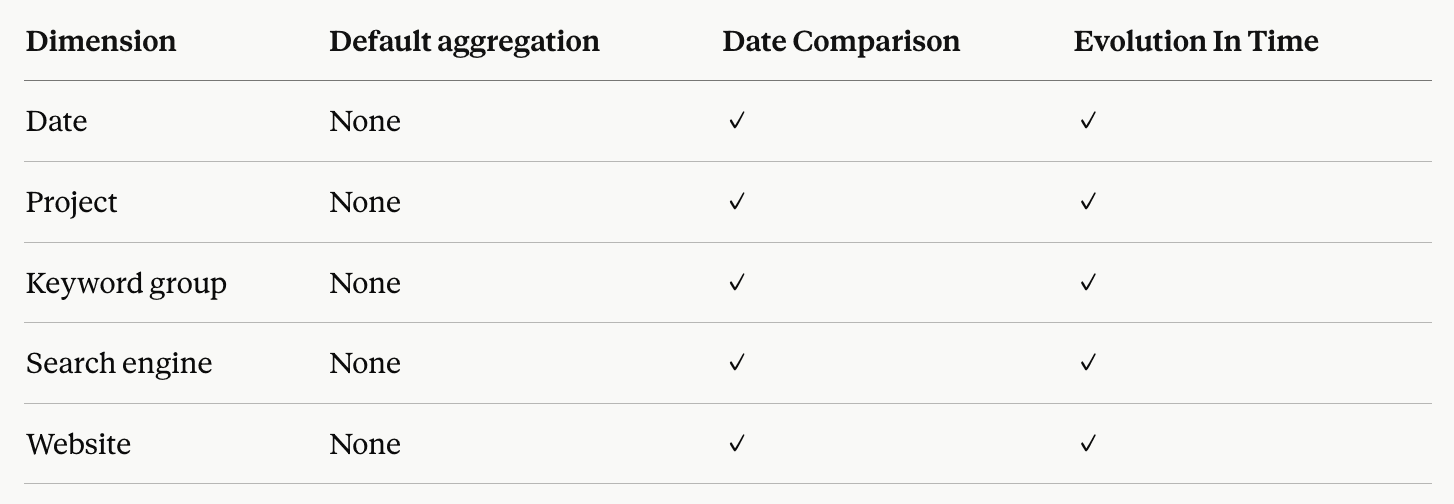
Date: the day the ranking update was completed.
Project: the AWR project the data belongs to.
Keyword group: the keyword groups each tracked keyword is assigned to in AWR.
Search engine: which search engine version the data was tracked on (for example, Google.com Desktop or Google.com Mobile).
Website: the main website or competitor domain tracked in your AWR project.
Parameters
Parameters are configured at connection time and determine the slice of AWR data this data source returns. Each one can be exposed inside the report, letting editors switch filter values without having to reconnect the data source.
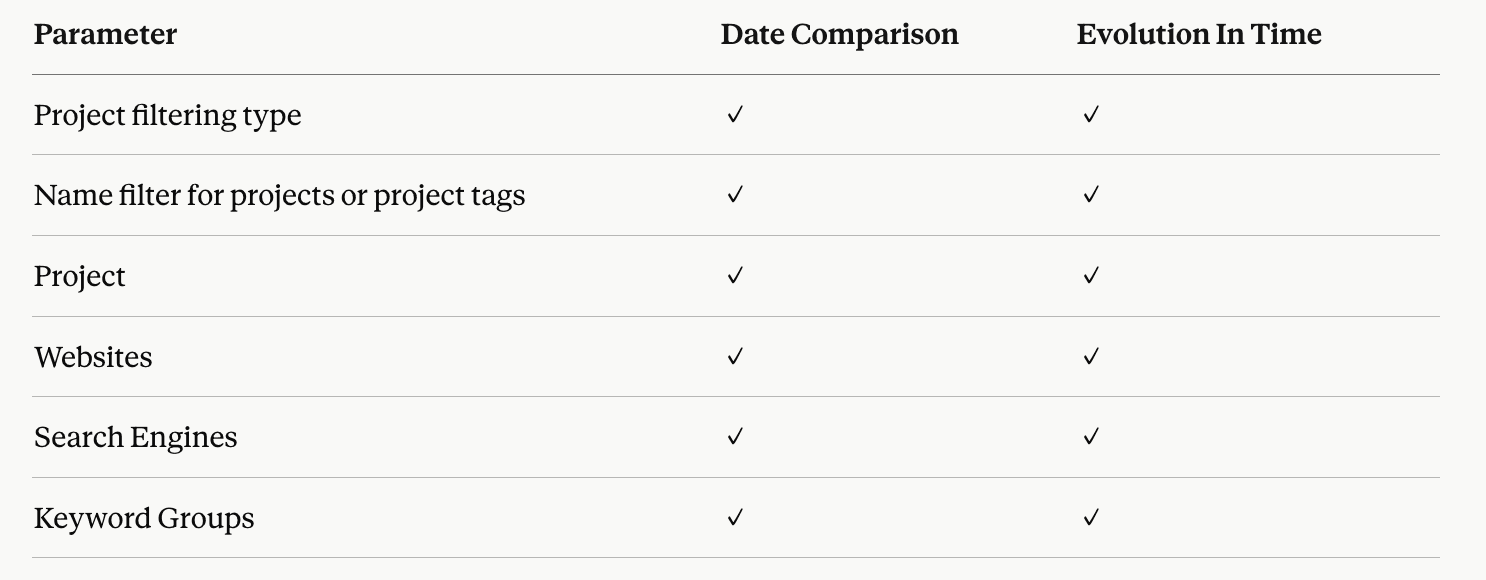
Project filtering type: controls which projects are included in the data source. Choose between exact name (a single project), partial name match (all projects whose name contains a string), or project tag (all projects sharing a tag in AWR).
Name filter for projects or project tags: appears when you select partial name match or project tag. Enter the string or tag to match.
Project: the specific AWR project the data comes from (Evolution In Time only).
Websites: the main website and any competitor domains tracked in the selected project.
Search Engines: the search engines configured in the selected project.
Keyword Groups: the keyword groups defined in the selected project.
To learn how each parameter is configured during connection setup, check the Google Data Studio Source Setup.
Explore metrics and dimensions for other AWR data sources
Do you have any other questions? Don’t hesitate to get in touch and we will keep building the FAQ.
stay in the loop