

Advice and answers from the Advanced Web Ranking Team
Search for articles
>
>
Tracking Rankings for Multi-Location Clients? See How AWR Gets the Right Results
See how AWR retrieves local rankings from different locations you track and why the same keyword can return different results across countries and cities.

You’ve decided to manually check rankings for a few of your UK client’s keywords. But when you compare results with your team, something doesn’t add up.
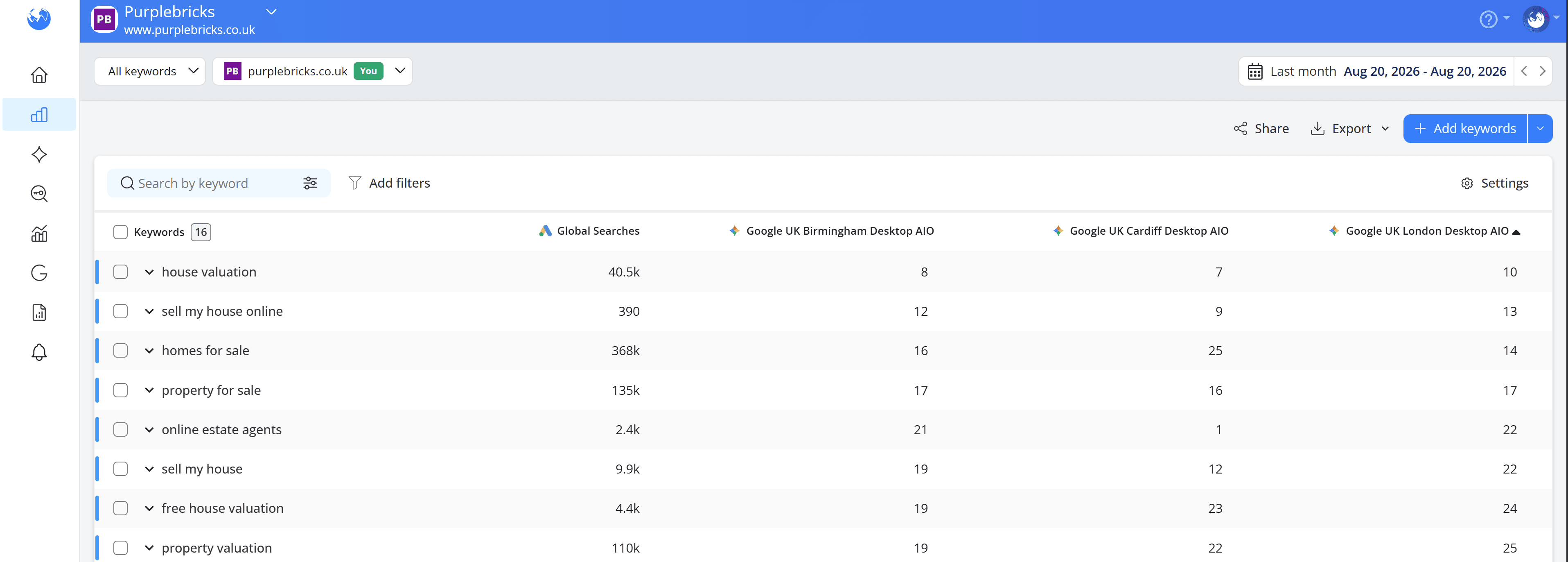
Someone searching from Birmingham sees your client in Position 8. A teammate in Cardiff sees them in Position 7. And someone checking from London gets Position 10.
So, who’s seeing the right ranking?
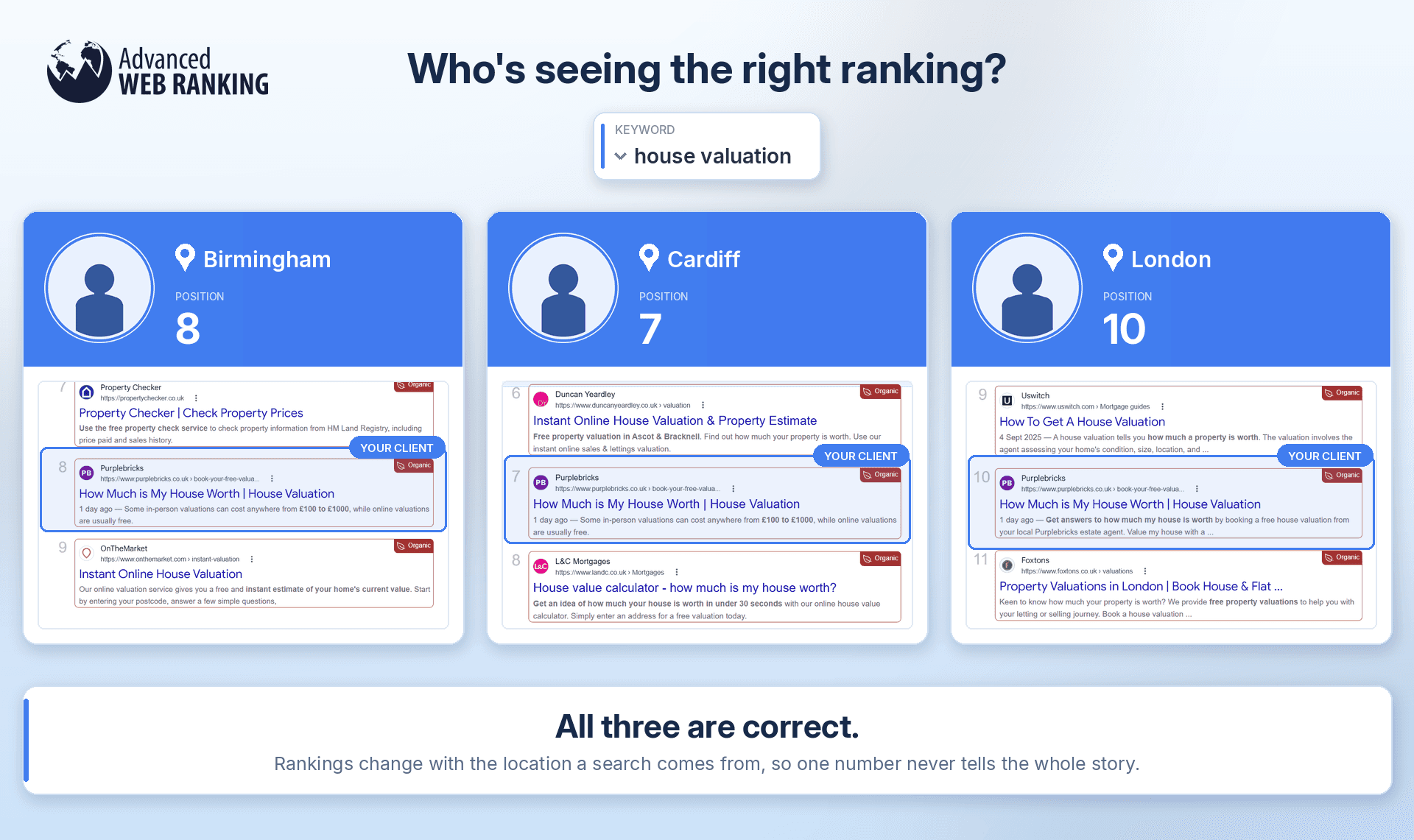
The answer is all of them.
Your client operates across the UK, but their rankings can look very different depending on where the search comes from. Their customers are spread across the country and your SEO strategy should be too.
That’s why the location you choose when setting up a search engine in AWR isn’t just a label on your report. It determines where AWR retrieves your search results from, so the rankings you see are relevant to the market you’re actually tracking.
Good project structure matters just as much, especially if you're managing multiple clients or locations. If you haven't set that up yet, take a look at onboarding best practices for agencies managing multiple clients before diving into location setup.
How does AWR get rankings for the country you’re tracking?
Every time a ranking update runs, AWR collects the results the selected search engine returns for each of your tracked keywords.
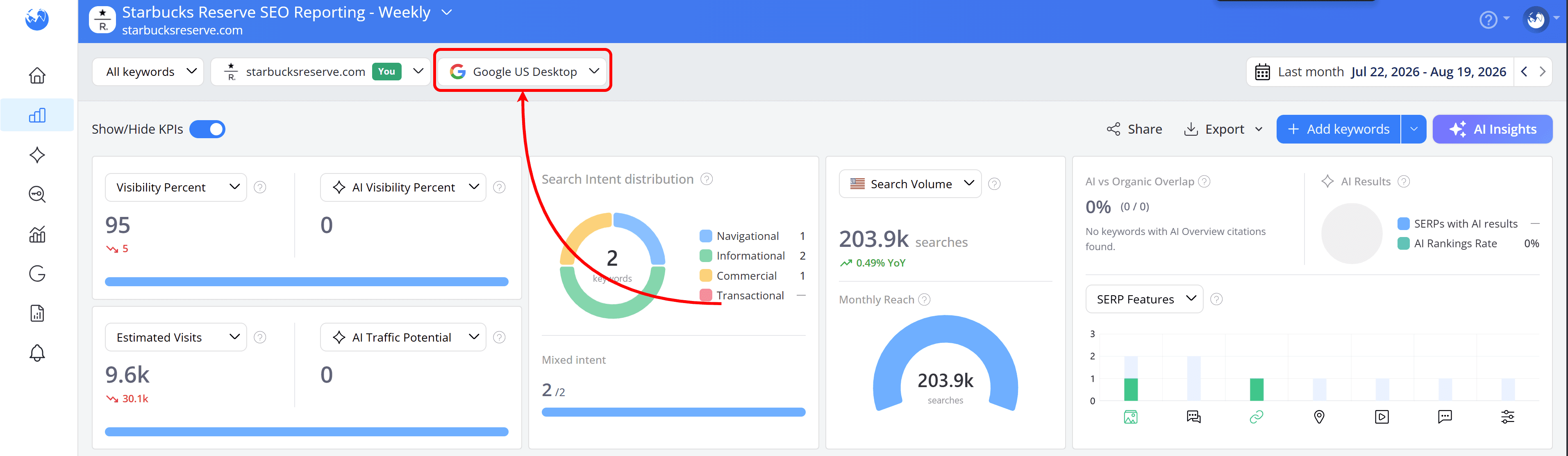
To do that, AWR sends a live query to the search engine using a proxy IP that matches the location you configured for that search engine.
Let's say you're tracking Google US. During the ranking update, AWR selects the first available proxy IP from a large pool of US-based proxies and uses it to query Google.
The results that come back are the ones a general user would see, without personalization influencing them. There's no search history and no logged-in account involved, so the SERP is reported as it would appear in an incognito or non-personalized environment.
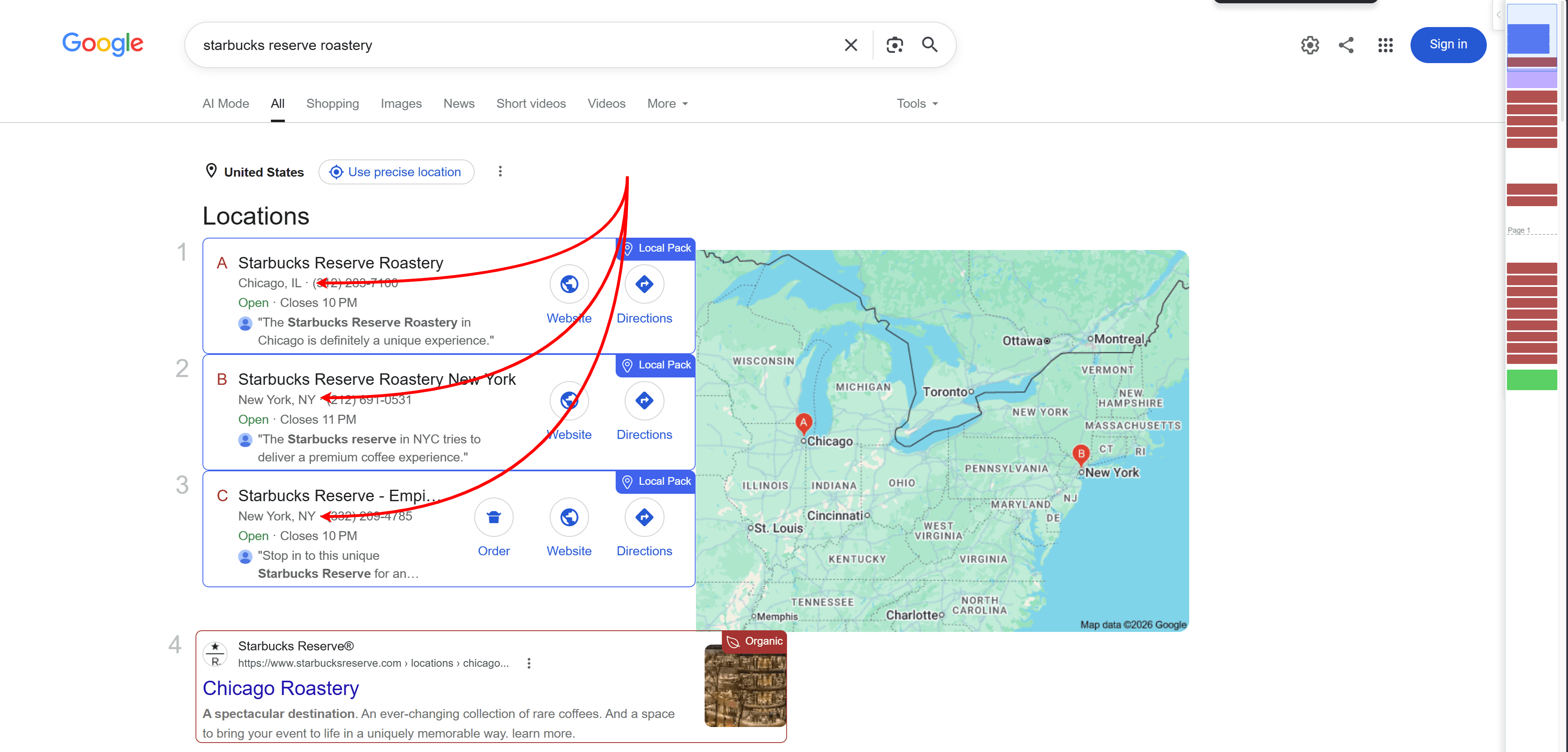
If you’re tracking a business that operates nationwide, this gives you a broader view of how it ranks across the country. But that may not tell the whole story, especially when the searches you’re tracking have local intent.
Someone searching for “starbucks reserve roastery” in Chicago, for example, may see a very different SERP from someone searching for the same keyword in New York.
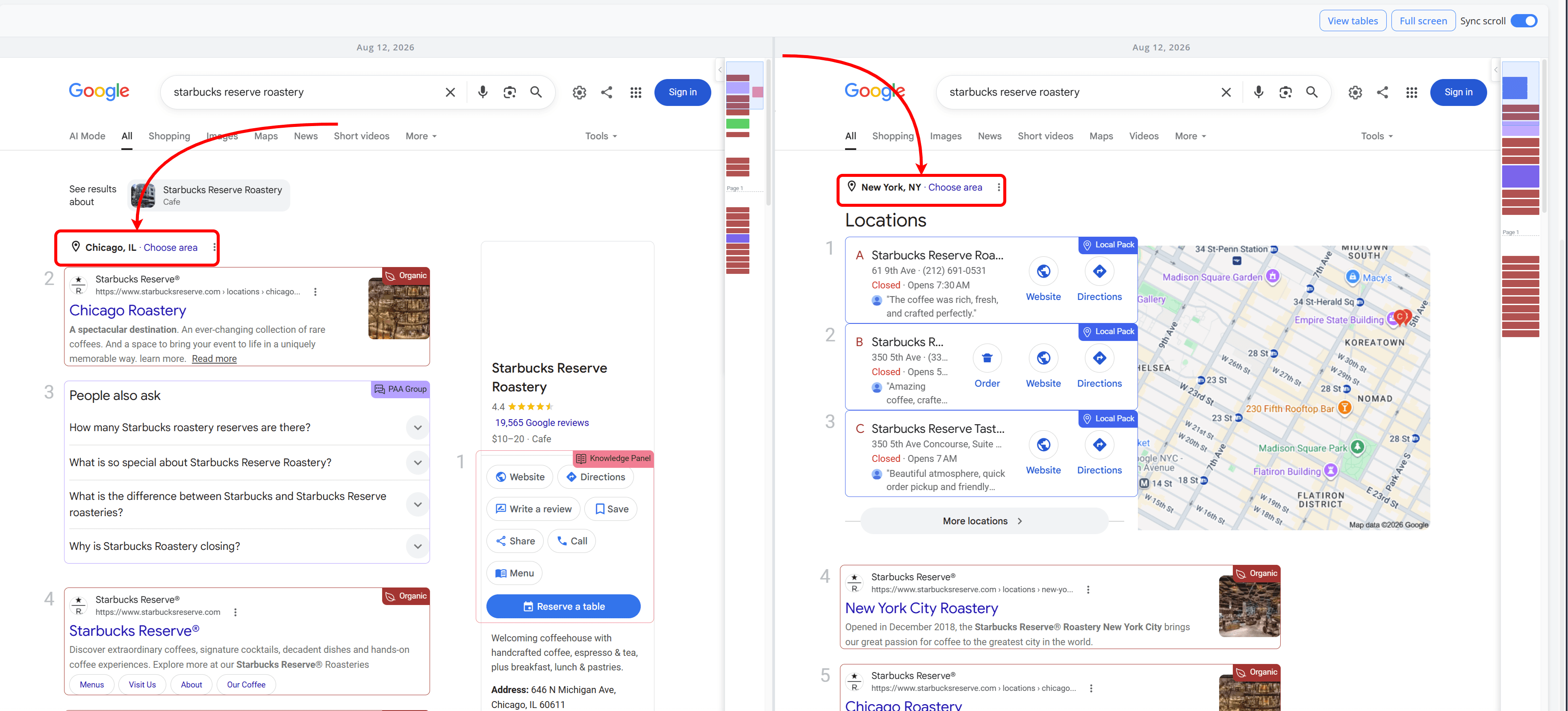
When your client's business really depends on local customers, tracking at the country level alone won't be enough. It'll show you the overall picture, but not necessarily what people in the client's service areas are seeing when they search.
What changes when you track a specific city or area?
The process stays the same on AWR's end. The only change is that the pool of proxy IPs is limited to the area you pick.
So if you set up Google UK with Birmingham as the custom location, AWR pulls from proxy IPs in that area only.
Do the same for Cardiff and London and now you have three separate views of how your client ranks in each local market, instead of one number that doesn't really belong to any of them.
The "Add search engines" wizard makes this easier for multi-location clients: go to Search Engines, click "Add Search engines," select your country and search engine, then enable "Track specific locations".

From there, you can add each location one per line and confirm with the "Add locations" button.
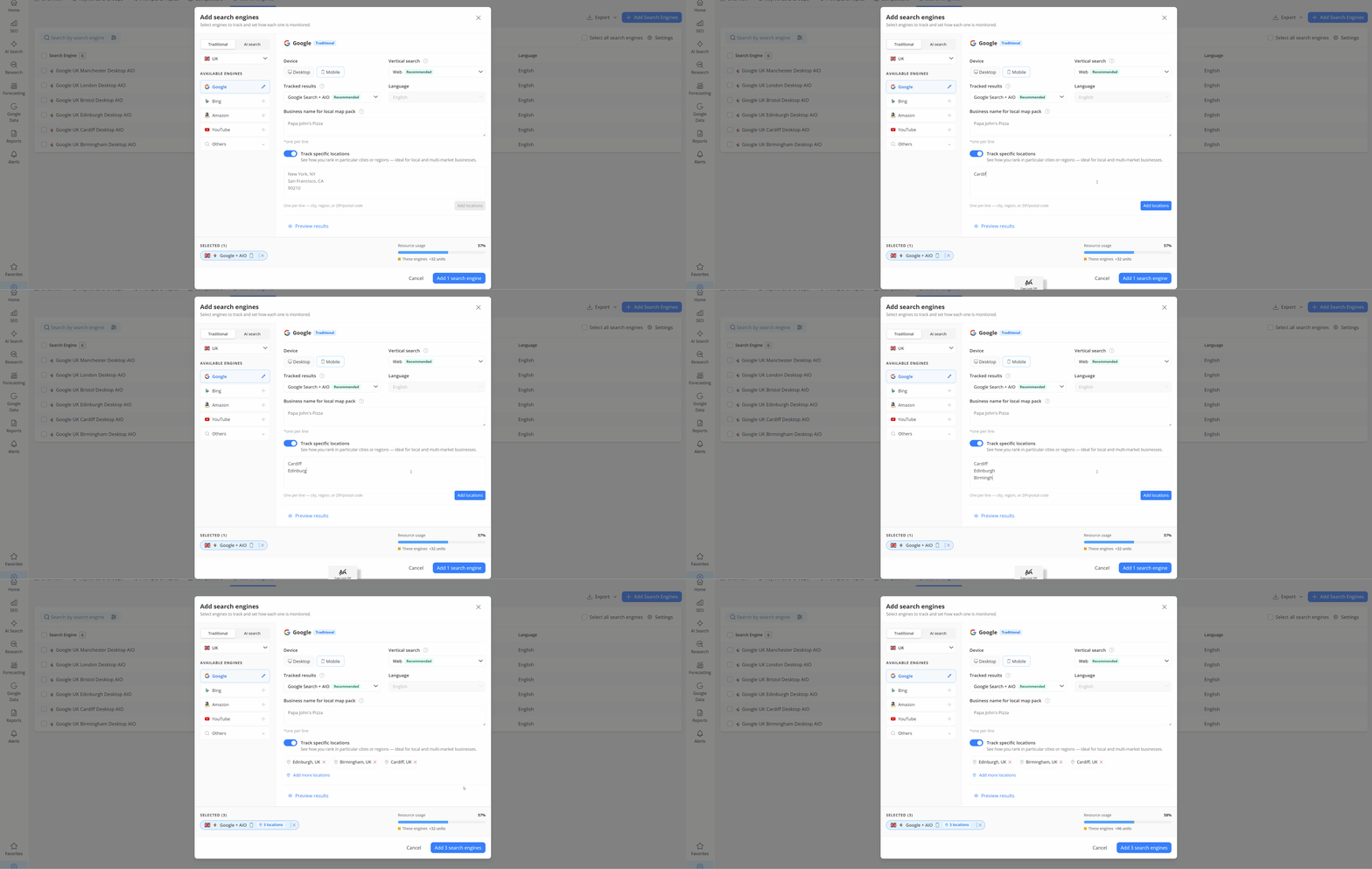
That's the setup that would have shown Position 8 in Birmingham, Position 7 in Cardiff and Position 10 in London, instead of leaving your team with three different numbers and no explanation.
The Search Engine Comparison report is great for exactly this: it helps you see positions for each search engine side by side, so you can compare Birmingham, Cardiff and London at a glance instead of checking each one separately.
How does AWR keep locations separate when tracking multiple markets?
Say you're working with a client with locations in Edinburgh, Birmingham, London, Bristol and Cardiff. You can set up a separate search engine for each city and track the same keyword across all five.
When AWR runs a ranking update, each search goes out through a proxy that matches its own city. The Edinburgh search uses an Edinburgh proxy, the Birmingham search uses a Birmingham proxy and so on.
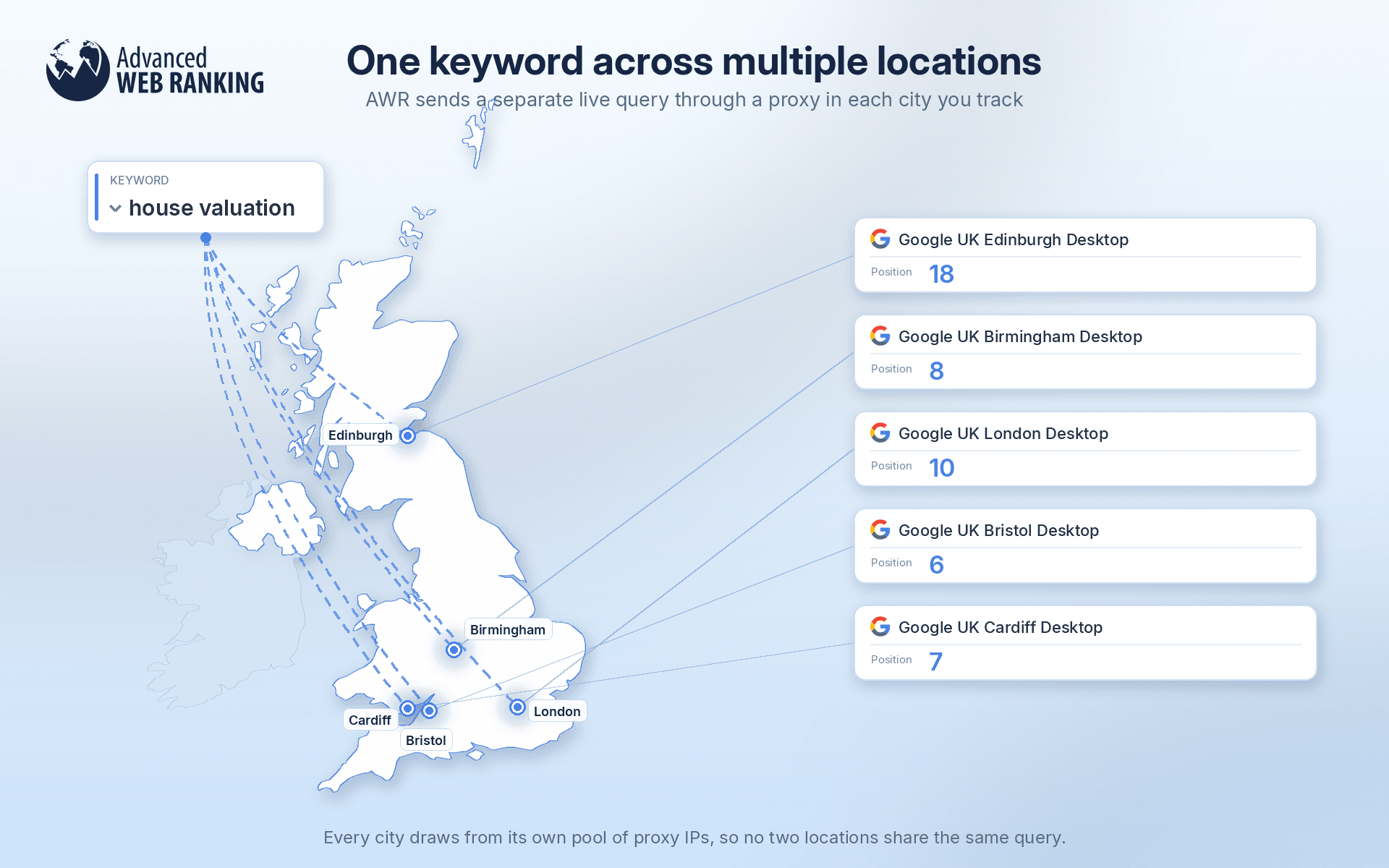
None of them draw from the same pool. You're not just labeling the keyword by city. You're pulling results from five different cities, each through its own dedicated set of proxies.
The one thing to keep in mind here is project setup. If you keep all these search engines within the same project, every keyword you add to that project will be refreshed for all of them. That's fine if you're tracking the same keyword set across all your locations.
But if each search engine needs its own distinct set of keywords, you should set up separate projects instead, one per search engine, so each one only refreshes the keywords that actually belong to it.
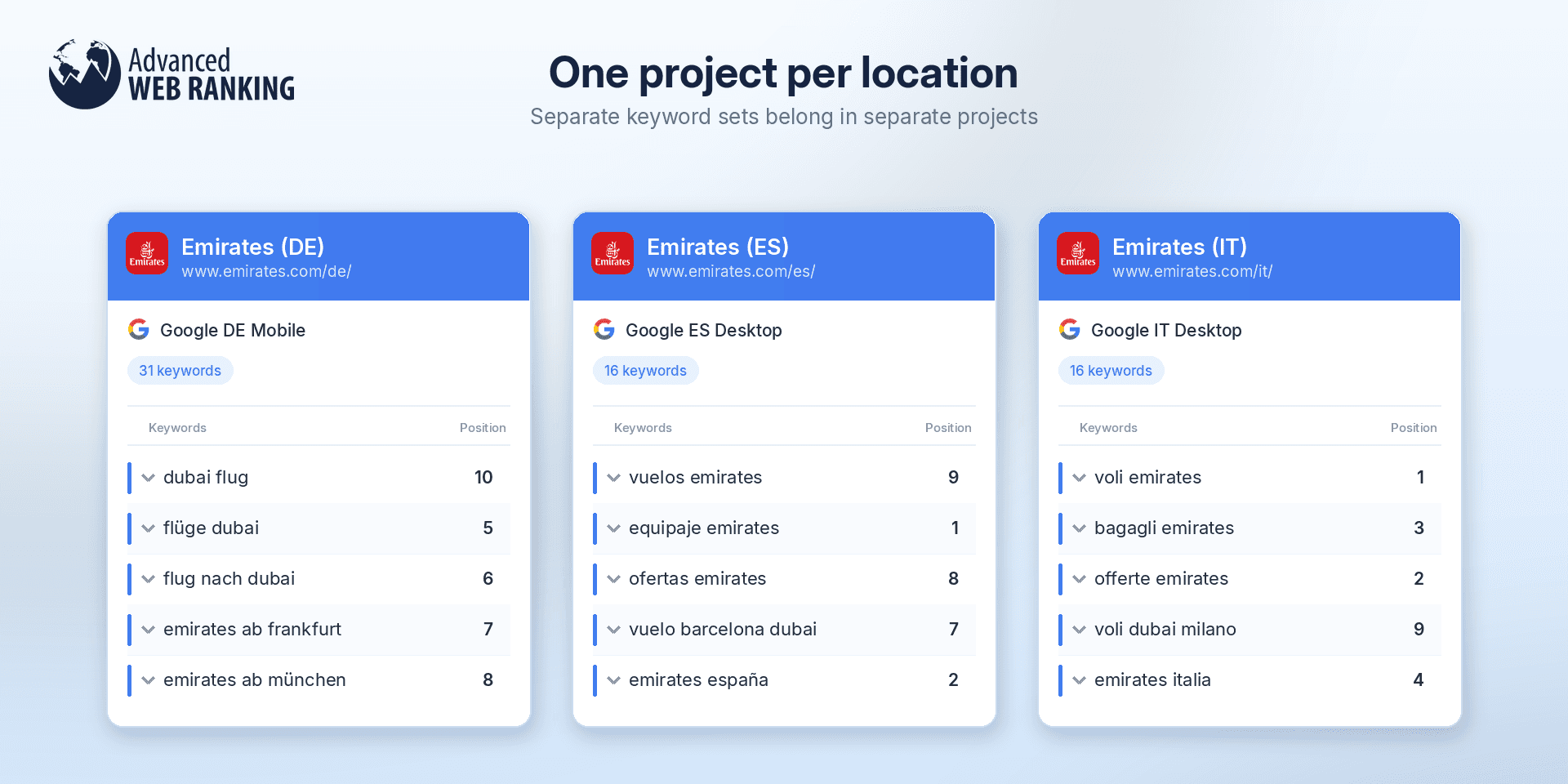
This gives you something you couldn't get from a single search engine: a real comparison of how your client performs across their markets, rather than a guess based on rankings pulled from one location and applied everywhere.
How does AWR handle Desktop and Mobile tracking?
Device works the same way as location. AWR tracks Desktop and Mobile separately, so each one requires its own search engine. Tracking both for a single city means setting up two search engines rather than one.
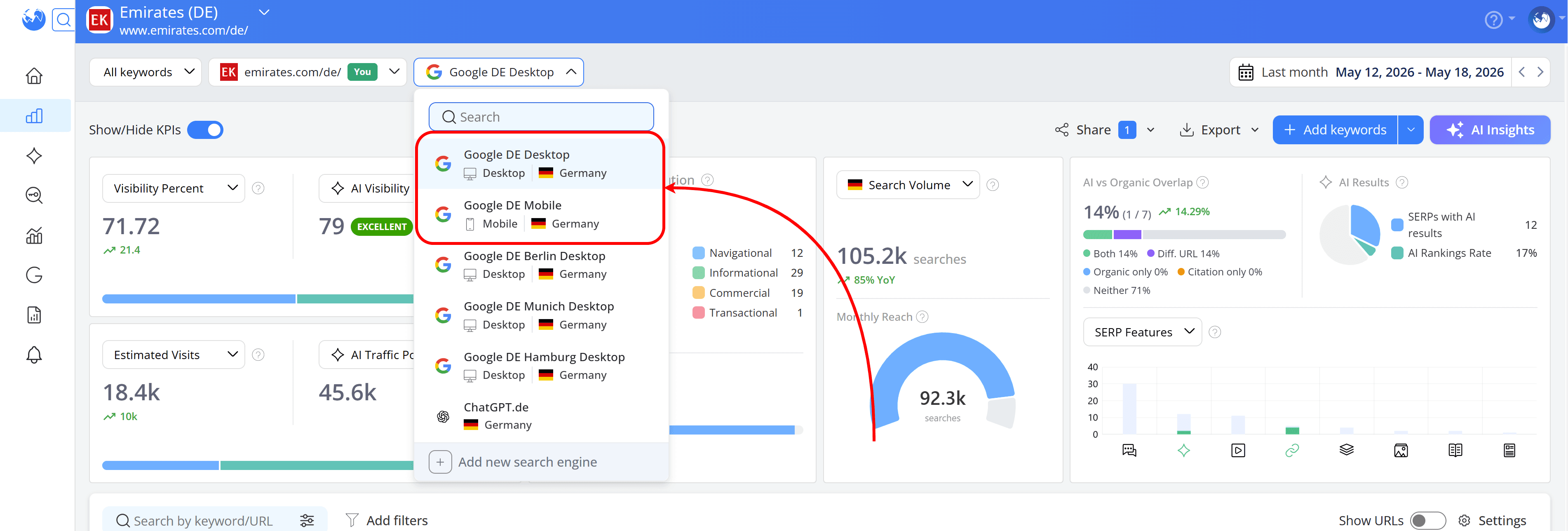
Each engine queries Google through its own proxy. The Desktop engine queries Google through a desktop proxy and the Mobile engine through a mobile one, both matching the location configured for that search engine.
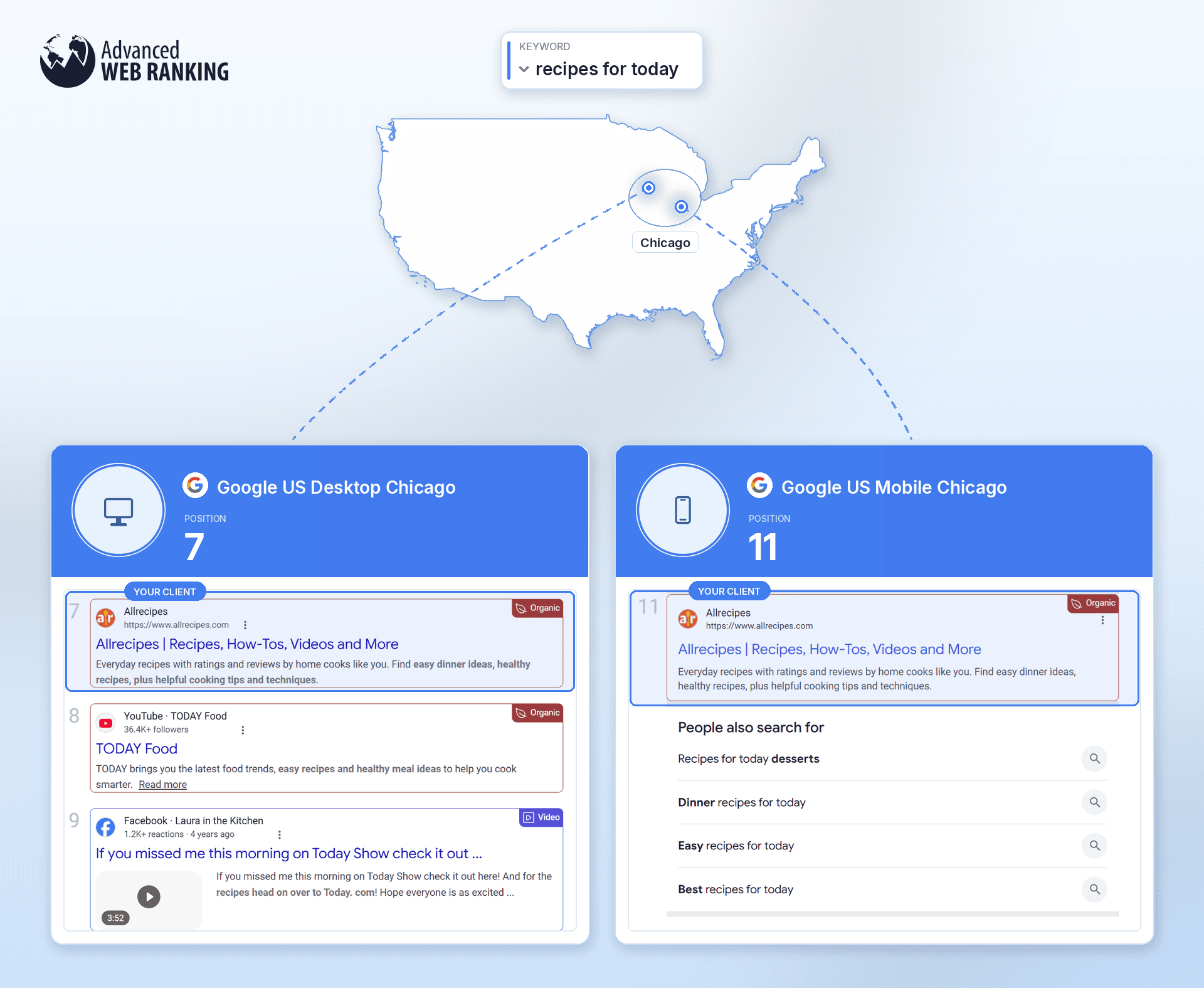
This matters because Google doesn't always return the same SERP on both. Local intent in particular tends to behave differently on Mobile, where results lean more heavily on proximity.
Does device and location precision really matter for my reporting?
It does, but only when that extra precision reflects how your client actually gets customers.
Think about where the business actually competes. If it’s a national ecommerce brand selling the same products across the country or an informational website that isn’t tied to a specific location, country-level tracking will usually give you the insights you need.
For example, since allrecipes.com is a recipe website and its content isn’t location-dependent, rankings are unlikely to change dramatically between nearby locations such as Los Angeles and Beverly Hills.
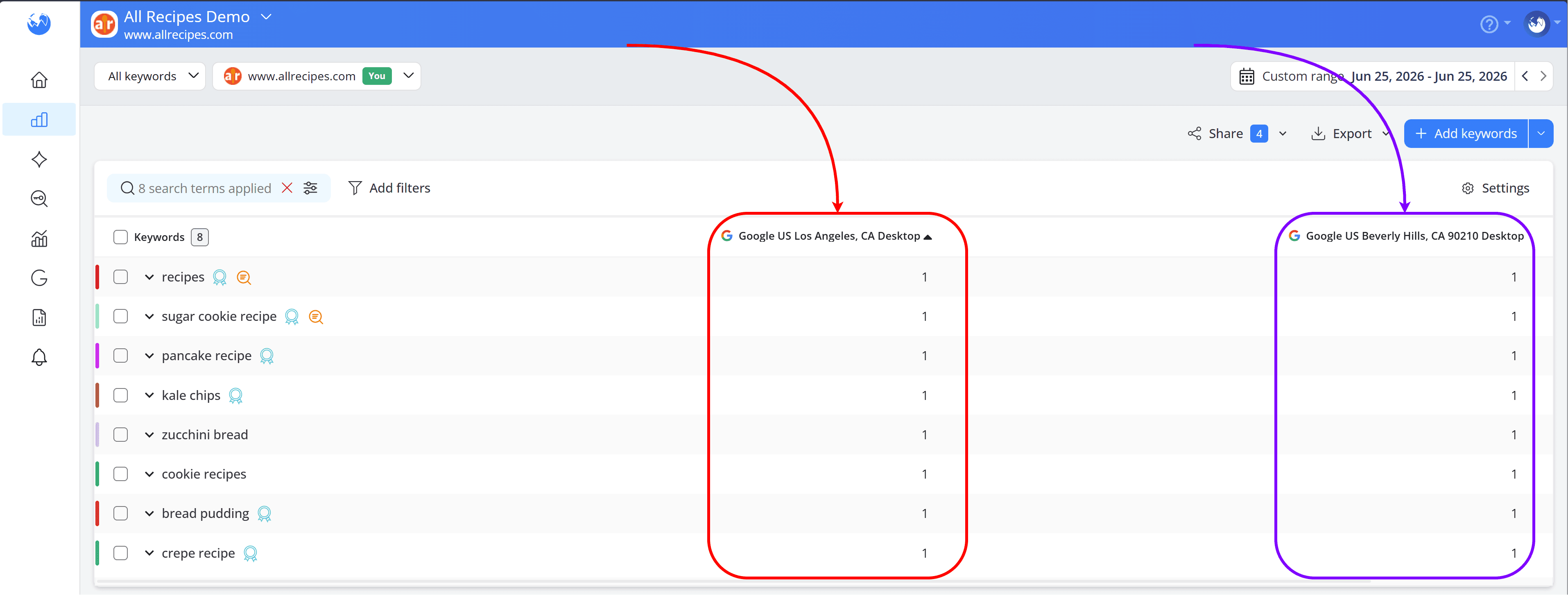
In this case, tracking both locations may not add much value.
But for businesses with physical locations or specific service areas, more precise tracking can show what customers actually see locally. AWR helps you track from country level down to a city, ZIP code or even a street address, depending on what makes sense for the business.
Starbucks Reserve is a good example. It has locations in Chicago and New York, but not in Austin. When tracking "starbucks reserve near me” on Google Mobile, we can see a clear difference: Starbucks Reserve ranks in Position 1 in both Chicago and New York, while in Austin it appears in Position 7.
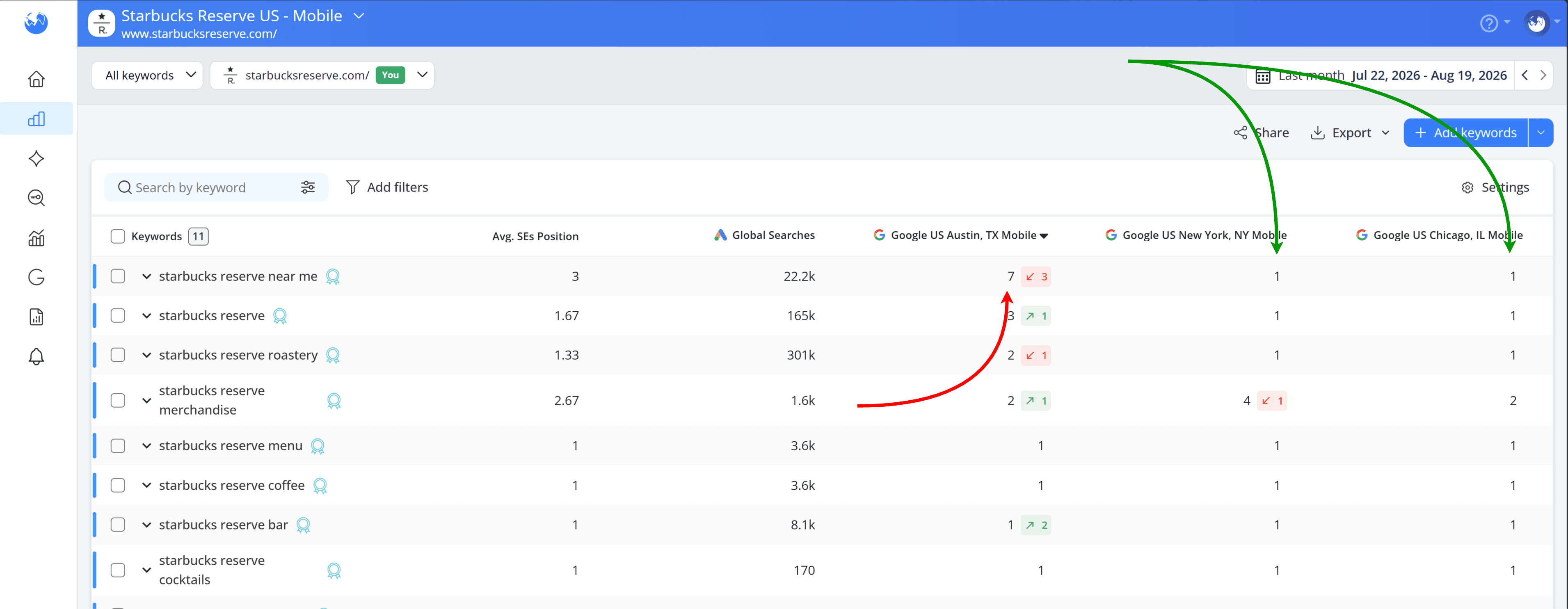
Mobile results are particularly influenced by the searcher’s location, so this difference makes sense.
Looking at the actual SERPs makes the story even clearer. In Chicago, the top result is a Knowledge Panel for the Starbucks Reserve Roastery itself, since there's one specific location the searcher is almost certainly after.
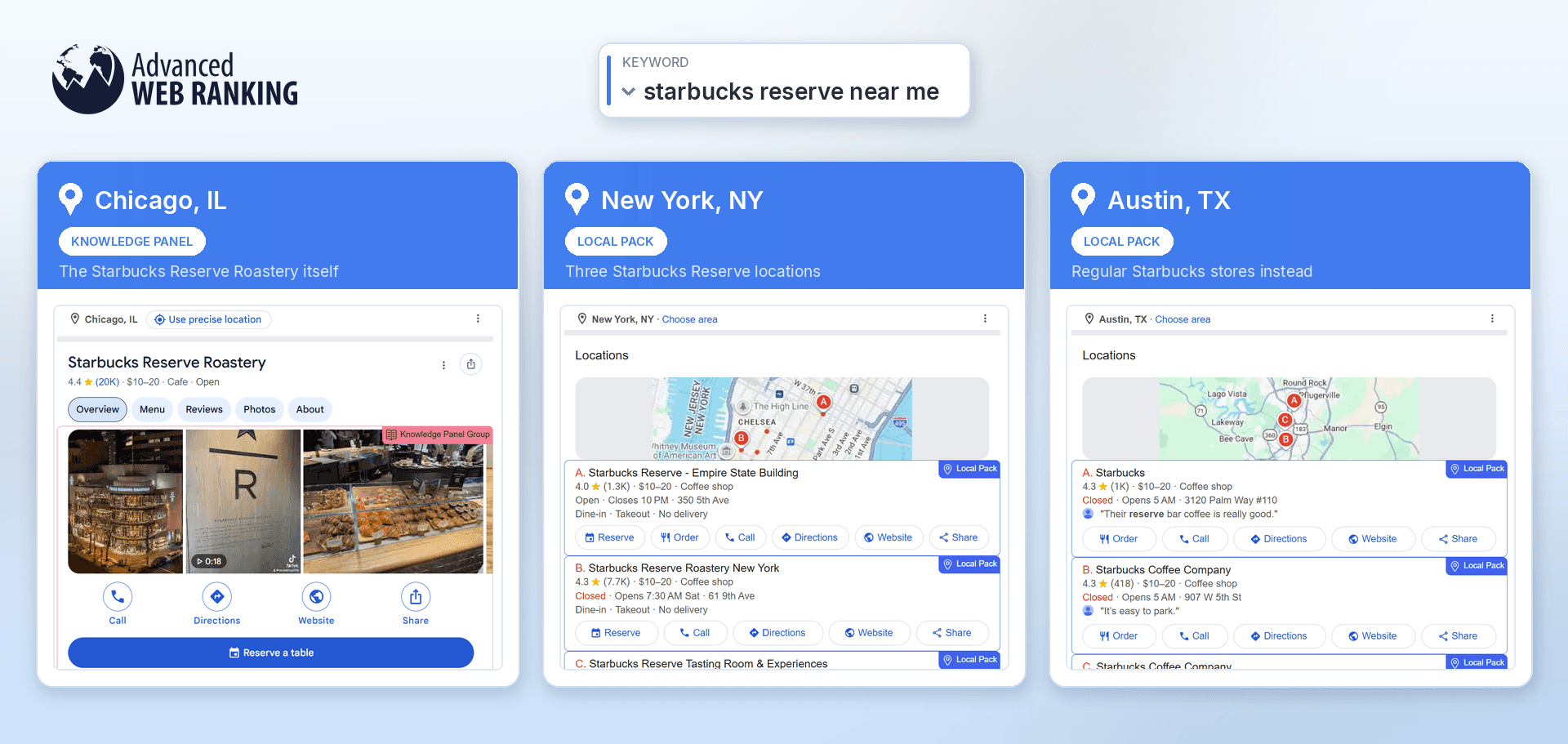
In New York, the top result is a Local Pack listing several Starbucks Reserve locations. But in Austin, where there isn't a Starbucks Reserve, Google fills that Local Pack with regular Starbucks stores instead.
So the ranking position alone only tells part of the story. Tracking at the right location level and looking at the SERP behind that ranking helps you understand what customers in each market are actually finding.
Device matters for much the same reason. Mobile and Desktop can show very different results, even for the same keyword and location.
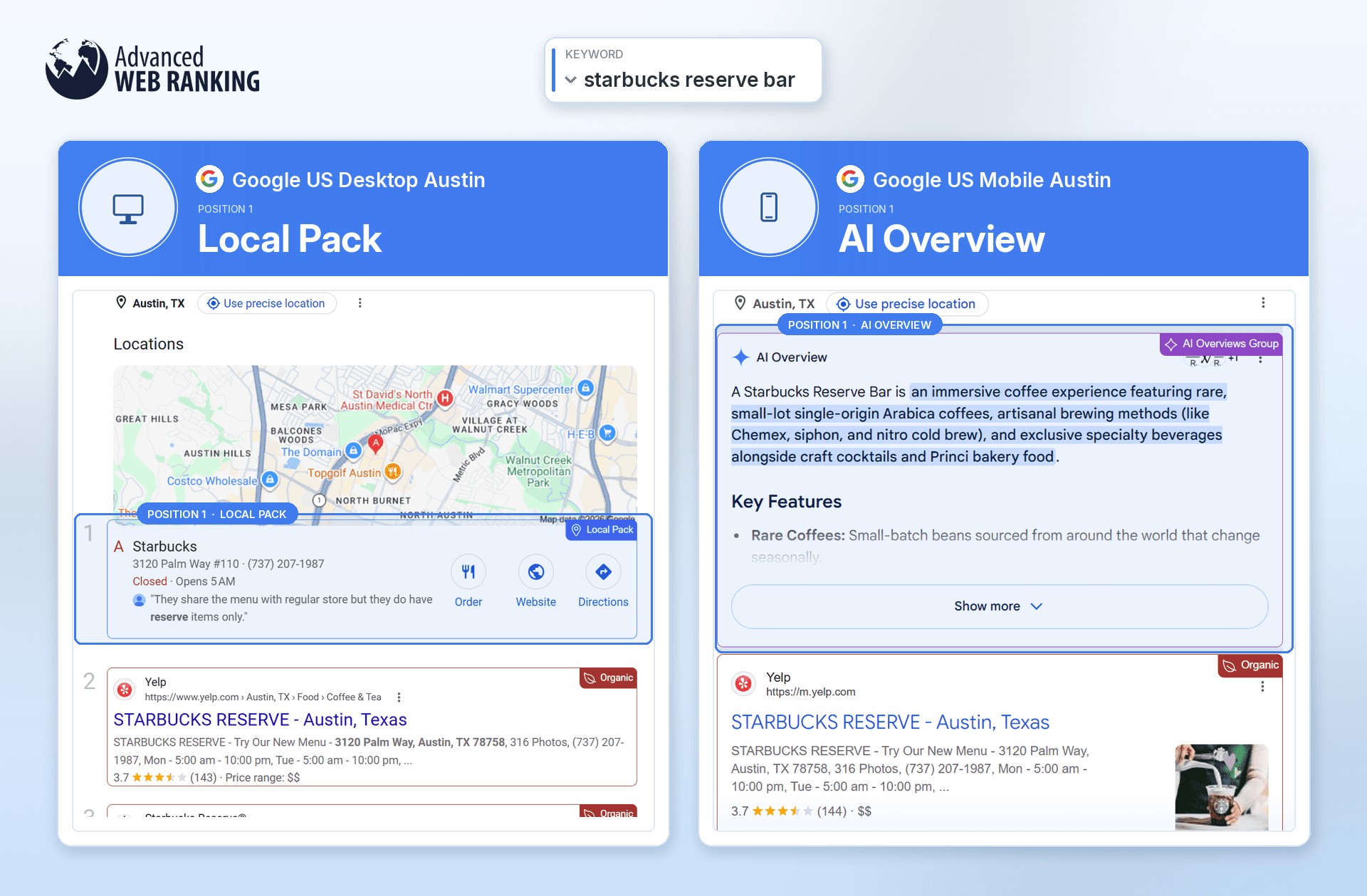
In this example, for “starbucks reserve bar” in Austin, Desktop shows a Local Pack in Position 1, featuring a nearby Starbucks location. On Mobile, however, Position 1 is an AI Overview explaining what a Starbucks Reserve Bar is, while the local result is pushed further down the page.
The goal, then, isn’t to track everything as precisely as possible. It’s to track at the level that matches how the business actually competes.
Do you have any questions? Don’t hesitate to get in touch and we will keep building the FAQ.
Frequently Asked Questions
Does AWR check rankings from my own location or IP address?
I'm tracking the UK, but it's a big market. Is there something between country and city level?
Can I compare rankings across locations if the search engines were added at different times?
stay in the loop