

Advice and answers from the Advanced Web Ranking Team
Search for articles
>
>
AI Brand Visibility Data Sources for Data Studio: Dimensions and Parameters Explained
Learn what each attribute means in AWR's AI Brand Visibility data sources for Data Studio. Includes definitions for dimensions and parameters.

Two AWR data sources feed AI search visibility into Data Studio: AI Brand Visibility - Brands and AI Brand Visibility - Topics. They look at LLM-generated responses from different angles, so the right pick comes down to whether you want to compare brands inside a topic or compare topics inside a brand. The sections below define every dimension and parameter each one exposes, ready to use when you build dashboards that combine AI visibility with the rest of your search performance data.
What this article covers
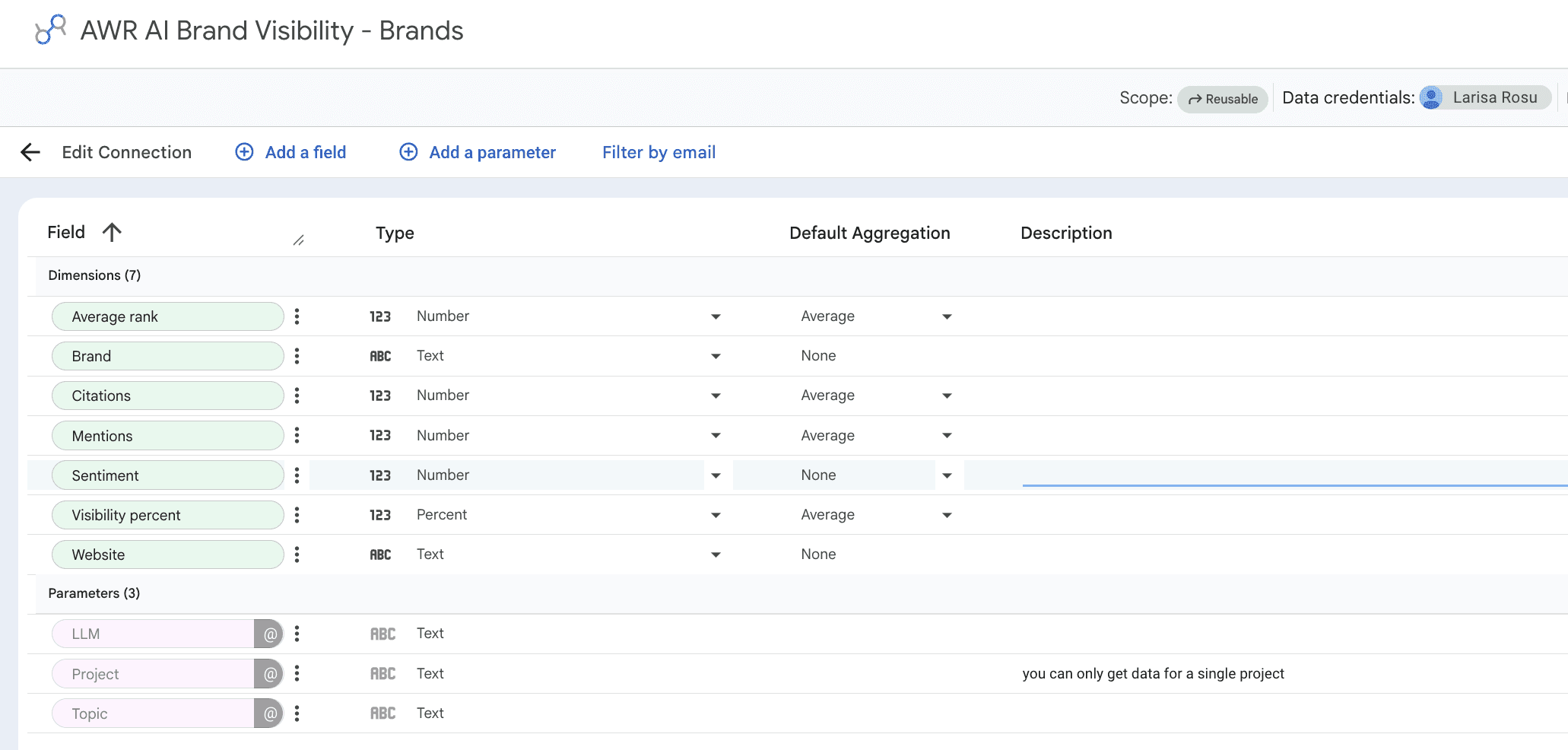
This guide covers the two AI Brand Visibility data sources for Data Studio:
AI Brand Visibility - Brands: great for competitive comparisons inside a single LLM and topic scope, with metrics for mentions, citations, sentiment, and visibility share across all tracked brands
AI Brand Visibility - Topics: designed for analyzing how one specific brand performs across the topics an LLM associates with it, including intent signals per topic
The two data sources share a couple of dimensions (Average rank and a visibility metric) but otherwise serve different angles: Brands compares many brands inside one topic, Topics compares many topics inside one brand.
💡 For setup instructions, see Google Data Studio Setup.
Dimensions
Data Studio reads every field from these two data sources as a dimension. The combined list covers visibility scores, AI-specific signals like mentions and citations, intent labels for topics, and the contextual labels that hold everything together. Below you'll find the full set with default aggregation methods, followed by definitions grouped by what each one tells you.
Visibility and ranking
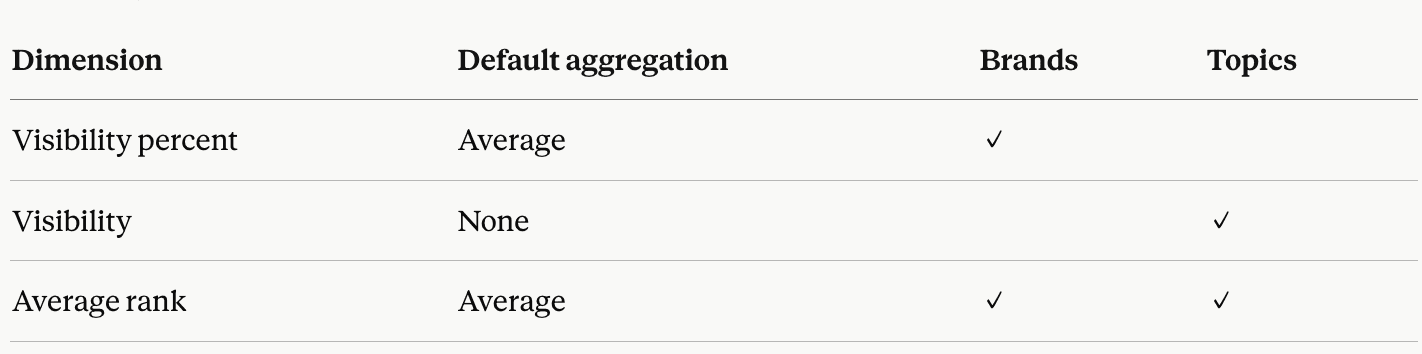
Visibility percent (Brands): how prominently a brand appears in the LLM's responses, expressed as a percentage. Calculated from the brand's placements in the top 10 rankings inside AI answers for the selected topic scope.
Visibility (Topics): how prominently the selected brand appears in the LLM's responses for each tracked topic, expressed as a percentage.
Average rank: the average position the brand holds in the LLM's responses, averaged across all updates inside the connection's data range. In the Brands source it's calculated per brand inside the chosen topic scope; in Topics it's calculated per topic for the chosen brand.
AI-specific signals (Brands)
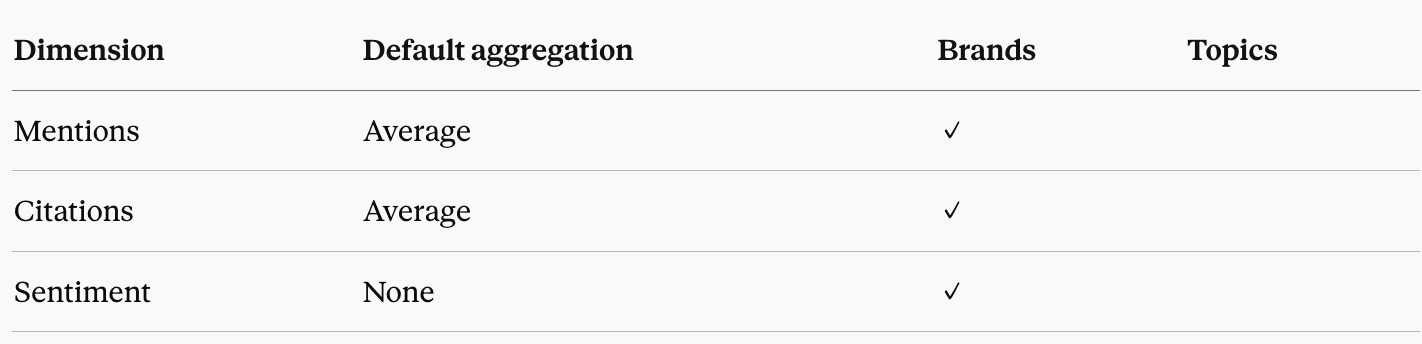
Mentions: the total count of times a brand was named in the LLM's responses across the selected topic scope. AWR deduplicates plain-text mentions (counted once per brand per answer) and inline links (counted once per unique URL).
Citations: the count of times a brand's domain was cited as a source by the LLM, counted once per unique source URL across the answer set.
Sentiment: how the LLM frames the brand in its responses, classified as positive, neutral, or negative. In AWR's interface this shows as a thumbs-up icon (green for positive, grey for neutral, red for negative).
Topic context (Topics)
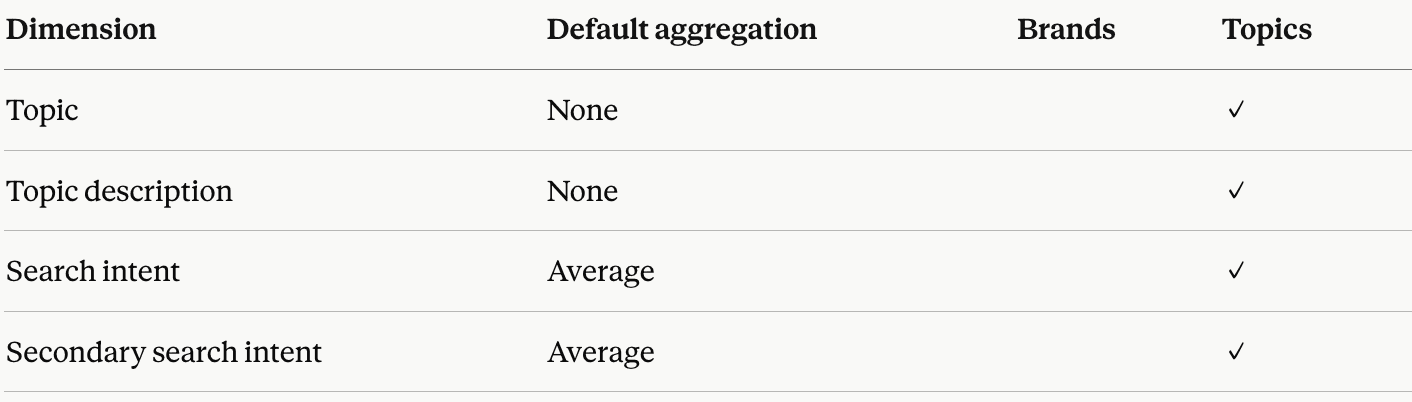
Topic: the topic name as tracked or auto-discovered in your AWR project.
Topic description: the text description AWR generates for the topic, useful for adding context to reports that mix many topics.
Search intent: the dominant user intent for the topic, falling into Informational, Navigational, Commercial, or Transactional.
Secondary search intent: a supporting intent signal alongside the dominant one, useful for topics that sit at the crossover between two intent categories.
Brand and website

Brand (Brands): the brand name as tracked in your AWR project, including your main brand and any competitor brands you've added.
Website (Brands): the domain associated with the brand.
Parameters
Parameters define the slice of AWR data this connection pulls in. You set them at setup, and any of them can be turned into in-report controls so editors can switch between LLMs, topics, or brands without reconnecting the data source.
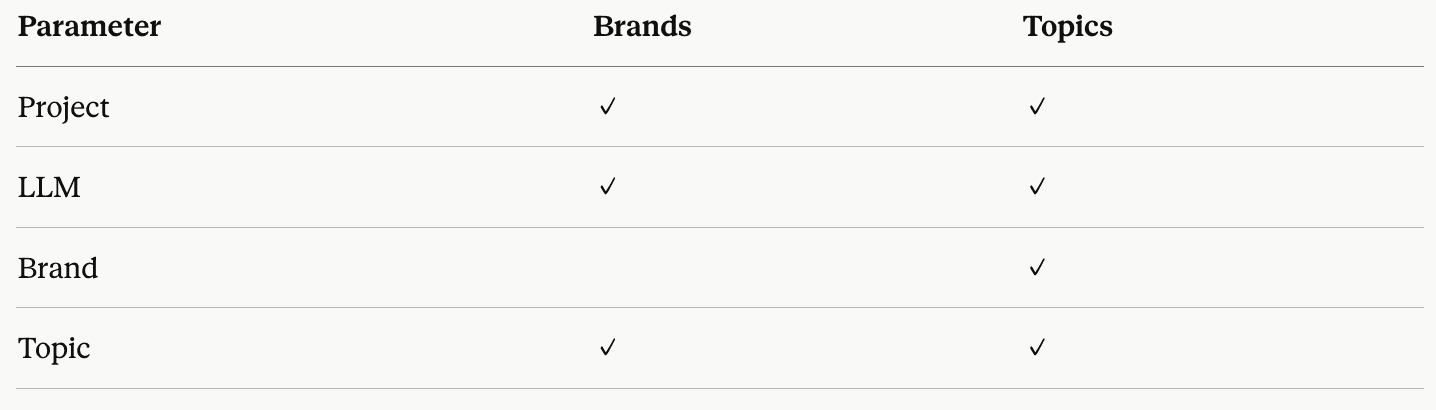
Project: the AWR project supplying the data. Only one project per data source.
LLM: the AI platform you want to pull data from (such as ChatGPT, Gemini, Perplexity, or Claude). Available options depend on what your project tracks.
Brand (Topics only): the brand you want to analyze across topics. The dropdown includes your main brand and any competitor brands tracked in the project. You can also leave this empty to pull data for all tracked brands.
Topic: filters the data by topic. Choose All topics (AI-discovered + your custom topics), AI topics (auto-discovered by AWR), My topics (custom topics you added during update setup), or any specific topic defined in the project.
Connection-level details for every parameter are documented in the Google Data Studio Setup guide.
Explore metrics and dimensions for other AWR data sources
Do you have any other questions? Don’t hesitate to get in touch and we will keep building the FAQ.
stay in the loop