Technical foundations
Structured data declares what an image means. This section covers whether the image can be reached, read, rendered and trusted, aka the layer beneath the markup, where most real-world failures actually occur.
Nothing here is new in kind. What has changed is the consequence of getting it wrong: an image that cannot be crawled is now invisible not just to Google Images but to every AI surface that retrieves through the same index.
Discovery and indexing
Image sitemaps remain supported and remain the most reliable discovery mechanism. The sitemap image extension has survived every deprecation round, and it matters most in exactly the situation most ecommerce sites are in: images served through JavaScript, loaded lazily, or hosted on a separate domain.
Practical points:
The image location element may point to a different domain than the page. If your images sit on a CDN or an asset subdomain, list the CDN URLs directly. Verify ownership of the CDN domain in Search Console so the data is attributed to you.
Nest image data inside your existing sitemaps rather than maintaining a separate file. Crawlers like Screaming Frog and Sitebulb generate this, and most CMS SEO plugins handle it natively.
Exclude boilerplate. Logos, icons and UI furniture in a sitemap dilute it. Cap the number of referencing URLs per image or exclude by path.
Crawlability is binary and unforgiving. Every image URL referenced in structured data must be crawlable and indexable. Google states this explicitly, and the Rich Results Test will not catch a robots.txt rule blocking your image directory.
Check:
robots.txt is not disallowing image paths or the CDN
No noindex via meta robots or X-Robots-Tag on image responses
Images are not behind a login, a paywall, or a hotlink-protection rule that blocks Googlebot
max-image-preview:large is set — there is rarely a reason for an ecommerce site to restrict preview size
Lazy loading is safe if implemented correctly, and silently destructive if not. Native loading="lazy" is fine. Custom JavaScript implementations that place the real URL only in data-src, with no src and no noscript fallback, produce images that render for users and do not exist for crawlers. This remains one of the most common causes of "our product images are not in Google Images", and it is invisible in a browser, because the browser executes the JavaScript.
Never lazy-load the LCP image. This is covered under performance below, but it belongs in both places: the largest above-the-fold image should load eagerly, with priority.
Turn visual search data into actionable insights
Advanced Web Ranking gives you a clearer view of visual search performance, from rankings in Google Images to image results in Universal SERPs and visibility across major AI engines.
Alt text: still the most important attribute, now for two audiences
Google’s current image documentation still describes alt text as the most important attribute for helping it understand an image, used alongside its computer-vision systems. That has not changed, and any advice claiming alt text is obsolete because models can see is wrong on the documentation alone.
What has changed is that alt text now serves two distinct consumers with slightly different needs.
For accessibility, alt text is a functional replacement: what a screen-reader user needs in order to understand what the image contributes. This is the older obligation and the non-negotiable one.
For machine understanding, alt text acts as what Myriam Jessier usefully calls a semantic signpost: grounding that disambiguates. The model may be able to see that the image contains a green garment. Your alt text tells it that this is your olive-green linen shirt, in a specific colorway, from a specific line. It resolves ambiguity rather than substituting for vision.
These two purposes converge more often than they conflict. Good accessibility alt text — specific, natural, descriptive of what matters — is also good grounding. The failure modes are shared:
Don't | Do |
|---|---|
alt="sunglasses sunglasses buy sunglasses cheap" | alt="Oversized square tortoiseshell sunglasses with gradient lenses" |
alt="" on a product image | Describe the product, its distinguishing features and its variant |
Identical alt text on every image on a page | Differentiate: front view, side view, detail, in use, scale reference |
alt="IMG_4471" | Anything at all |
Google warns explicitly against keyword stuffing in alt text, and repeating the same exact-match phrase across every image on a product page is the textbook version of it.
One point specific to ecommerce: alt text is where variant and viewpoint information belongs. A product page with eight photographs should have eight distinct alt attributes describing eight distinct things: the front, the fabric detail, the fastening, the scale, the colorway. That is better accessibility and it gives retrieval systems eight differentiated signals instead of one repeated eight times.
And the caveat from section 2, restated because it is load-bearing: when a user uploads a photograph directly to a multimodal model, your alt text is not consulted at all. It matters in indexing and retrieval. It does not matter in the camera. Both facts are true simultaneously.
File names, captions and surrounding text
Descriptive file names are a minor signal and a free one. primaris-intercessor-squad.jpg gives context that IMG_4471.jpg does not. Keep them concise and descriptive; there is no benefit in stuffing.
On the perennial international SEO question — should we localize image file names? — the answer remains no, and the reasoning is worth understanding because it generalizes well beyond filenames.
The clearest articulation belongs to Cindy Krum, who has argued since 2018 that what Google called mobile-first indexing was better understood as entity-first indexing — a reorganization of the index around entities rather than around pages, domains or languages. Krum’s Entity and Language series at MobileMoxie, written with Denica Masby, develops the consequence: entities are concepts that exist independently of the words used to name them, and language becomes a modifier on entity understanding rather than the primary organizing key.
Applied here: an apple is an apple whether you call it apple, mela or manzana. The entity is stable; the label varies. Google resolves images to entities using the full context in which they appear — page language, surrounding content, structured data, links — not primarily the filename string. Translating filenames across forty locales creates forty maintenance burdens and forty opportunities for divergence, in exchange for a signal already derived from stronger sources.
Krum’s framing has aged well. Her observation that entities can be described not only by keywords but by pictures, sounds and concepts describes precisely the multimodal retrieval this guide covers — an argument made years before the systems arrived to prove it.
The same logic explains why alt text should be localised: it is user-facing, it serves accessibility, and it appears in the language of the page. Filenames are neither.
Captions are more valuable than most implementations reflect. A caption is visible, sits adjacent to the image, and can be used by Google as the description in an image result. In section 3, I showed exactly where that surfaces: the description field in the preview panel. A page with no meta description and no caption leaves that field to be filled from whatever text happens to be nearby.
Surrounding text is the fallback and the context-setter. The classic ecommerce failure remains a product image sitting in a container with no adjacent copy: the machine has the picture and nothing to anchor it to. Product descriptions, specification tables and structured content near the image all contribute.
Formats in 2026: the contradiction is resolved
For years there was a real tension. Performance guidance recommended modern formats; structured data documentation appeared to accept only JPEG, PNG and GIF. Teams reasonably concluded they had to choose between a fast image and an eligible one.
That choice no longer exists. Google Images supports BMP, GIF, JPEG, PNG, WebP, SVG and AVIF, and structured data accepts any format Google Images supports. AVIF was added in August 2024.
Choosing between them:
Format | Use for | Notes |
|---|---|---|
AVIF | Photographic product imagery where size matters most | Best compression; excellent quality at low bitrates; encoding is slower |
WebP | The safe modern default | Broad support, good compression, fast encoding |
JPEG | Fallback | Universal |
PNG | Transparency, flat graphics | Large for photographs |
SVG | Logos, icons, diagrams | Resolution-independent |
The correct implementation is not to pick one. It is to serve modern formats with conventional fallbacks, using a picture element with source entries for AVIF and WebP and a JPEG img fallback carrying the alt text, explicit width and height, and fetchpriority="high" where it is the LCP image.
This matters beyond browsers. Before, I noted that the multimodal models accept narrower format lists than the web does — Gemini takes WebP, GPT and Claude take WebP, but AVIF appears on none of their documented upload lists. Those limits govern uploads rather than crawling, so they are not a reason to avoid AVIF. But a picture element with a JPEG fallback removes the question entirely, and costs nothing.
On compression, the operative principle from section 2 applies: over-compression is not merely an aesthetic loss. Artifacts introduce information that was not in the original scene, degrading OCR reliability and object-detection confidence, and increasing the chance a model misidentifies your product. Compress deliberately. Compare visually at full resolution before committing a preset across a catalogue.
Tooling. The landscape is more stable than it appears:
Squoosh (Google Chrome Labs) remains actively maintained and free — Apache-2.0, browser-based, with a command-line version for batch and CI use. It supports MozJPEG, WebP, AVIF, JPEG XL and OxiPNG, runs entirely client-side via WebAssembly, and works offline. That last property has a specific value: images never leave your browser, so it is safe on unreleased product photography in a way that uploading to a hosted service is not.
Image CDNs — Cloudinary, imgix, ImageEngine, Akamai Image Manager, Uploadcare, and Cloudflare Images for on-the-fly transformation plus Cloudflare Polish for automatic optimization of origin images. Polish is current, not legacy; the two are complementary. Polish optimizes what your origin serves, keeping the same URLs; Images transforms via URL parameters into new URLs.
APIs and services — ShortPixel, TinyPNG, Imagify.
WordPress — the plugin ecosystem changes quickly enough that a named list dates fast; Kinsta’s or Hostinger’s or WP Engine’s platform guides are the most reliable current reference for that stack.
One possible ‘trap’: Cloudflare Polish strips image metadata as part of optimization. So do several other optimization pipelines. That is fine for file size and fatal for everything in the next subsection; IPTC credit data, licensing metadata and C2PA Content Credentials all live in exactly the metadata being discarded. If provenance matters to your business, audit what your CDN does to your metadata before you audit anything else.
Performance: images and Core Web Vitals
The current thresholds:
Metric | Good |
|---|---|
Largest Contentful Paint (LCP) | 2.5s or under |
Interaction to Next Paint (INP) | 200ms or under — replaced FID in March 2024 |
Cumulative Layout Shift (CLS) | 0.1 or under |
LCP is where images live, and the numbers are decisive: per the 2025 Web Almanac, an image is the LCP element on 85% of desktop pages and 76% of mobile pages. On an ecommerce PDP it is almost always the product photograph. Meanwhile only around 48% of mobile pages pass all three Core Web Vitals.
The highest-leverage fixes, in order:
Priorities the LCP image explicitly. fetchpriority="high" on the largest above-the-fold image tells the browser to fetch it ahead of other resources. Per web.dev, only about 15% of eligible pages use it, which makes it one of the few remaining optimizations that is both simple and genuinely differentiating.
Keep the LCP image discoverable by the preload scanner. Roughly 35% of pages with an image LCP hide that image’s URL from the preload scanner, and typically by injecting it via JavaScript or holding it in data-src. The browser cannot begin fetching what it cannot see in the initial HTML. This is the single most common LCP failure on JavaScript-heavy storefronts.
Never lazy-load above the fold. loading="lazy" on the hero image actively delays LCP. Lazy-load below the fold; load the hero eagerly and with priority.
Serve modern formats. AVIF or WebP over JPEG, per the previous subsection. This is often the largest single byte reduction available.
Serve responsive sizes. srcset with sizes, so a phone does not download a 1500px asset to render it at 390px.
Always set `width` and `height`. Explicit dimensions let the browser reserve space before the image loads, which is the primary defence against layout shift.
The tension the old guidance agonized over — Google demands high-quality images and penalizes slow ones — largely dissolves under modern formats and responsive delivery. A well-encoded AVIF at 1500px can be smaller than a carelessly-exported JPEG at 800px. The trade-off is now between careful and careless, not between quality and speed.
Turn visual search data into actionable insights
Advanced Web Ranking gives you a clearer view of visual search performance, from rankings in Google Images to image results in Universal SERPs and visibility across major AI engines.
Provenance: C2PA, IPTC, SynthID and "About this image"
The newest technical requirement in image SEO is not about ranking. It is about being verifiably who you say you are — and it has arrived faster than most ecommerce teams have noticed.
The infrastructure:
C2PA Content Credentials — a cryptographically signed record of how an image was created and edited, travelling with the file. Google joined the C2PA steering committee in February 2024 and contributed to version 2.1 of the specification.
SynthID — Google’s watermarking for AI-generated media, now applied to over 100 billion images and videos.
"About this image" in Google Search surfaces an image’s history, including AI creation or editing information.
At I/O 2026, Google extended this to a direct user question — is this made with AI? — answerable in Lens, AI Mode, Circle to Search and Gemini in Chrome, reading SynthID watermarks and C2PA credentials.
IPTC metadata carries credit, creator, copyright and rights information, and is the long-established embedded standard.
Hardware is arriving: recent phone cameras write C2PA Content Credentials natively.
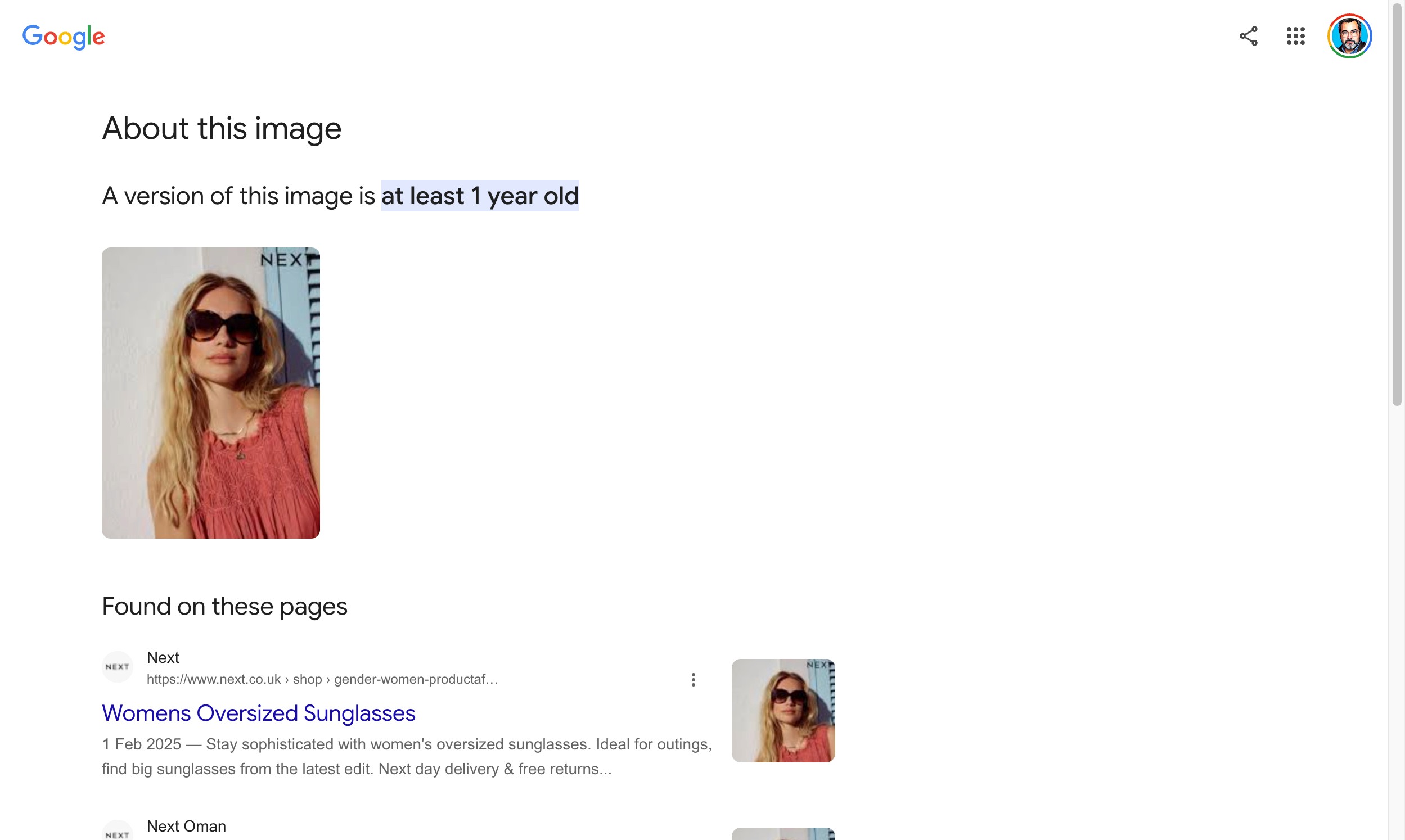
Why an ecommerce team should care, in ascending order of directness:
Trust is becoming a visible SERP attribute. When a shopper can ask whether an image is AI-generated and receive an answer inside search, the provenance of your product photography becomes part of your presentation. This matters most in categories where authenticity is the purchase decision — handmade goods, food, cosmetics, anything where the photograph is a claim about the product.
AI-generated product imagery is now legible as such. Using generative tools to produce or enhance product images is legitimate and widespread — Google’s own Merchant Center tooling does it. But if those images carry SynthID or C2PA markers, that fact is discoverable. Make the choice deliberately rather than discovering it later.
Attribution survives redistribution — if the metadata does. This is the practical core. Embedded IPTC and C2PA data travel with the file when your image is copied, scraped or republished. That is precisely the mechanism that lets you remain identifiable as the source across the web, which section 9 argues is a competitive asset rather than a loss.
Which brings the section full circle to the trap flagged above. Optimisation pipelines strip metadata. Cloudflare Polish does it by design; many CMS upload handlers and build-time compressors do it silently. You can implement C2PA credentials at the point of capture and destroy them at the point of delivery without anyone noticing.
The audit is three questions:
Does your camera, DAM or photo pipeline write IPTC and C2PA data in the first place?
Does your CMS preserve it on upload, or re-encode and discard it?
Does your CDN or optimisation layer preserve it on delivery?
Most sites fail at step two or three. Checking is a matter of running the delivered image — the one Googlebot actually fetches — through a metadata inspector and seeing what survived.
Continue the guide
Image & Product Structured Data ← Previous · Next → The Photography Brief for Machines

Article by
Gianluca Fiorelli
With almost 20 years of experience in web marketing, Gianluca Fiorelli is a Strategic and International SEO Consultant who helps businesses improve their visibility and performance on organic search. Gianluca collaborated with clients from various industries and regions, such as Glassdoor, Idealista, Rastreator.com, Outsystems, Chess.com, SIXT Ride, Vegetables by Bayer, Visit California, Gamepix, James Edition and many others.
A very active member of the SEO community, Gianluca daily shares his insights and best practices on SEO, content, Search marketing strategy and the evolution of Search on social media channels such as X, Bluesky and LinkedIn and through the blog on his website: IloveSEO.net.