
Google Lens and the visual query
Lens is where the inversion described in section 1 becomes literal. There is no text query. A camera, or an image already on screen, is the query, and Google resolves it into products, prices and merchants.

Caption: The Images homepage. The camera icon sits beside the microphone in the search field — a peer of typing and speaking, not a feature buried in a menu.
The scale figures from section 1 bear repeating here, because they set the stakes: nearly 20 billion Lens searches per month, 20% of them shopping-related, matched against 45 billion product listings (Google, October 2024), growing 65% year over year (Pichai, I/O 2025). Lens has also absorbed what used to be "search by image" or reverse image search as a separate feature is effectively gone, folded into Lens.
For ecommerce, the practical question is narrow and answerable: when a shopper points a camera at a product like yours, do your product pages appear, and with what information attached?
Camera-to-commerce: the default path now
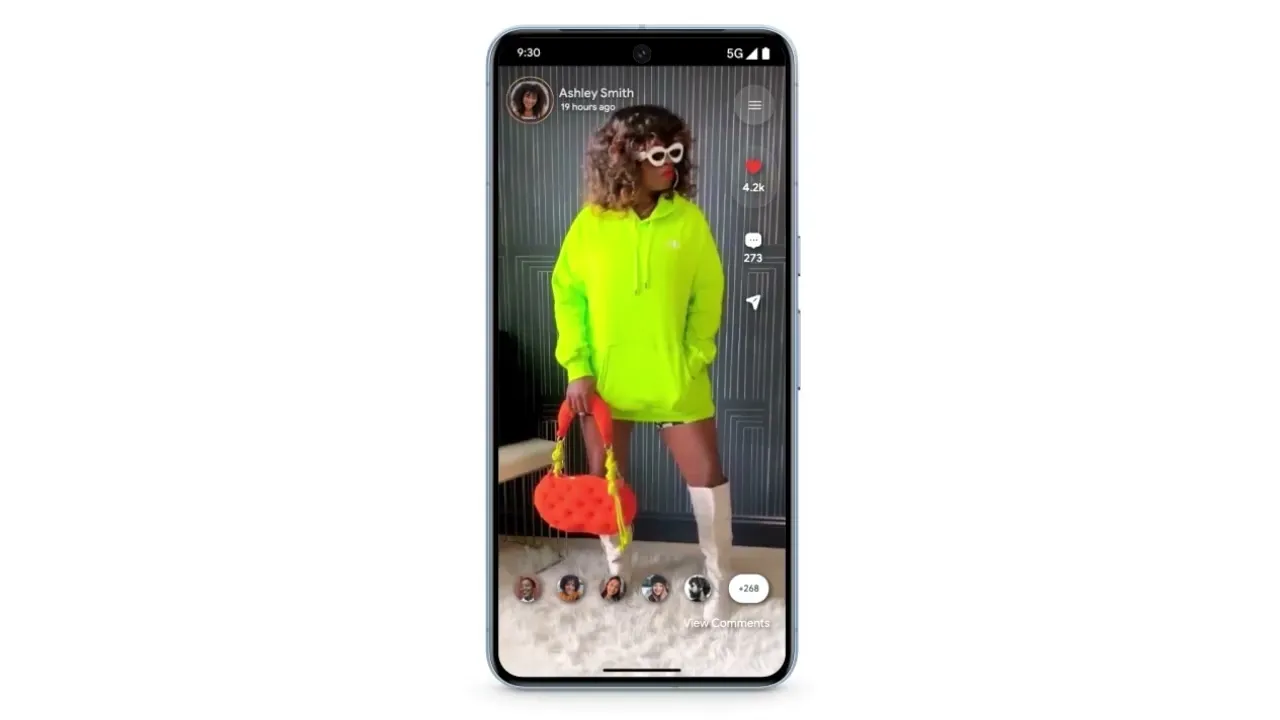
Follow a real journey. It starts, as visual shopping usually does, with no intent to buy anything specific.

Caption: A browsing session on a broad inspirational query. The shopper is looking at rooms, not products. Nothing here is a commercial query in the classic sense.
The shopper is scrolling interiors. There is no product in mind, no brand, no budget — the first of Amazon’s two dilemmas, in its natural habitat. Then something in one image catches their attention: the pendant lamp.
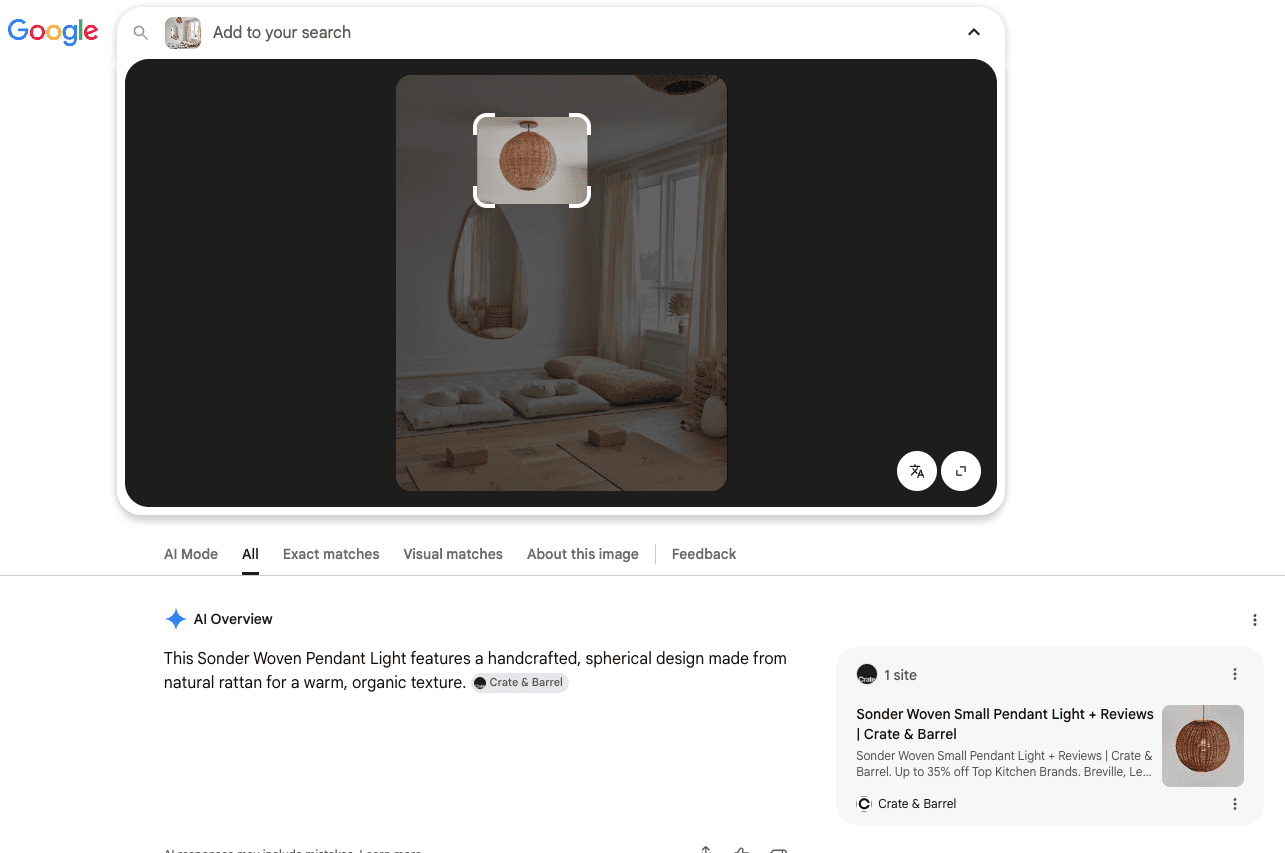
Caption: Lens invoked on the image, with the shopper’s selection framed around a single object. Google returns a filter bar — AI Mode, All, Exact matches, Visual matches, About this image, Feedback — and an AI-generated identification of the object above the results.
Two things just happened that deserve separate attention.
The shopper drew the bounding box themselves. When automatic detection does not isolate what the user cares about, they can frame it manually by dragging a box around one object in a cluttered scene. Your product does not need to be the salient object for the shopper to reach it. It does need to be legible enough inside the box they drew for retrieval to work, which is a lower bar but not a trivial one.
Google identified the object and named it. The panel returns a description of a handcrafted spherical rattan pendant light, attributed to a specific retailer. That naming is doing enormous work: it converts pixels into an entity, and everything downstream — the exact matches, the shopping results, the follow-up queries — flows from that identification.
Then the filter bar, which is where the commercial outcome is decided:
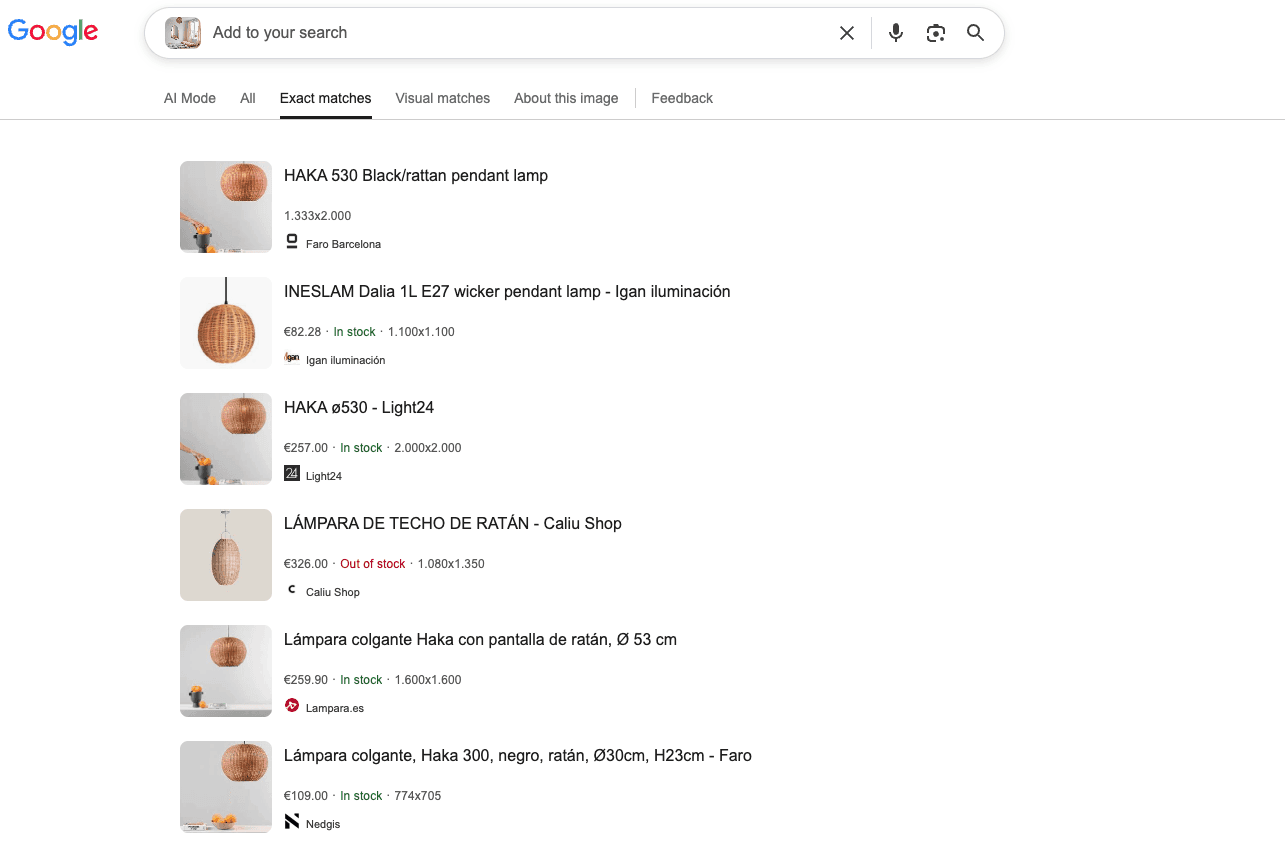
Caption: The Exact matches tab. Six product listings, each with merchant, price, stock status and source image dimensions — €82.28 In stock, €257.00 In stock, €326.00 Out of stock, €259.90 In stock, €109.00 In stock.
That is not an image gallery. It is a price comparison table generated from a photograph, and it is the single most commercially consequential screen in this guide.
The Exact matches / Visual matches distinction is the most important thing to understand about Lens, and it is barely discussed. They are two different retrieval mechanisms rewarding two different things:
Exact matches | Visual matches | |
|---|---|---|
Finds | Instances of this image across the web | Products that look like this |
Powered by | Image fingerprinting / near-duplicate detection | Embedding similarity (section 2) |
You win by | Having your images indexed and crawlable, and by using distinctive imagery | Having clean, well-detected, well-lit product photography |
Typical outcome | Your PDP, with price and stock | A competitor’s product, alongside yours |
Both matter, and they pull in slightly different directions. Exact matches reward images that are yours — which is the strongest argument in this guide against generic supplier photography, and section 9 develops it. Visual matches reward images that are legible — well-detected, cleanly composed, matching the visual cluster of their category.
The stock status in that panel is worth pausing on. In stock and Out of stock appear inline, and one of those six results is showing as unavailable. A shopper comparing six options will skip the out-of-stock one. Availability accuracy in your structured data and feeds is not a hygiene item — on this surface it is the difference between being considered and being visibly skipped.
Turn visual search data into actionable insights
Advanced Web Ranking gives you a clearer view of visual search performance, from rankings in Google Images to image results in Universal SERPs and visibility across major AI engines.
An observation about identification
Look carefully at the sequence above and there is a discrepancy worth naming, because it teaches something no vendor documentation will tell you.
The AI panel identifies the object as a specific named product from one retailer. The Exact matches tab returns lamps from entirely different brands, e.g. a Spanish lighting manufacturer’s model, plus several others.
(I cannot tell you with certainty which of two things is happening here: the identification is wrong, or these are near-identical commodity designs sold under multiple brand names. For woven rattan pendants the second seems more likely, but I have not verified it — and that uncertainty is itself the point. If a specialist looking closely at the screenshot cannot resolve which product this is, an algorithm working at scale certainly cannot either.)
That is the actual lesson. Visual search operates under permanent uncertainty about product identity, and for any product whose form is widely copied, the system is making a probabilistic guess about whose product it is looking at. It resolves that guess toward whichever brand’s imagery and product data give it the most confident entity to attach.
Which turns an observation into a strategy. If you sell products whose shape is not unique to you, your job is to reduce the machine’s uncertainty about you specifically:
Distinctive photography — your own lighting, staging, angles and treatment, so your images do not sit in an undifferentiated cluster with forty competitors
Complete, specific product identifiers — GTIN, MPN, SKU, brand, precise model naming (section 7). These are the strongest disambiguation signals available and the most commonly left blank
Consistent imagery across every surface — the same photograph on your PDP, your feed, your social channels, corroborating one identity rather than fragmenting it
Precise naming — "Haka 530 rattan pendant, Ø53cm, black" resolves; "rattan pendant lamp" does not
You cannot out-design a shape you share with fifty competitors. You can be the brand whose data is unambiguous enough that the machine reaches for your name first.
Multisearch: refining an image with words
The next escalation is the one that closes the gap between visual and text search entirely.
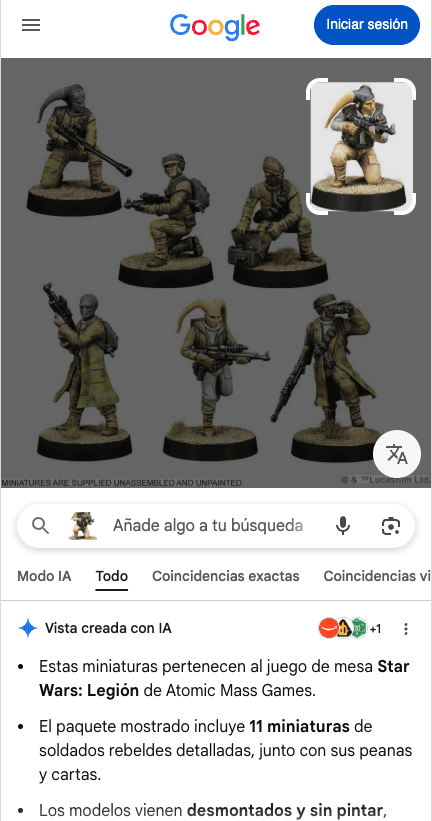
Caption: Lens focused on a single miniature within a group shot. Above the results, a search field invites the user to add words to the image — "Añade algo a tu búsqueda". Below, an AI-generated summary of the identified product, then the filter bar.
That search field is multisearch: the image supplies what is hard to describe, and the text supplies what the image cannot express. This lamp, but in black. This chair, but under €200. These miniatures, but where can I buy them near me, and the last being multisearch’s local variant, which routes visual queries to nearby inventory.
Multisearch is the answer to anyone still arguing that visual search is a novelty. It is not a replacement for text query; it is a compound query in which the image carries the attributes that language handles badly — shape, texture, color, style — and the text carries the attributes images handle badly: price, availability, size, proximity.
For ecommerce this has a direct implication. The refinements shoppers add are almost always attributes you hold in structured data: color, size, material, price, availability. A product catalogue with rich, complete, machine-readable attributes can satisfy multisearch refinements. One with a beautiful photograph and three schema fields cannot.
Also note what sits below the search bar in that capture: an AI-generated summary of the product, above the results, on a mobile screen. That is the bridge into section 6 — the visual query and the AI answer have already merged on this surface.
Circle to Search, Lens in Chrome, Lens everywhere
Lens is no longer a place you go. It is a capability layered over surfaces you are already in:
Circle to Search (Android) — long-press the home button and circle, scribble or tap anything on screen. No app switch, no screenshot. Any image in any app becomes searchable.
Lens in Chrome — select any region of any web page on desktop and search it visually.
Lens in the Google app — the camera in the search bar, for the physical world.
Lens within Images results — as shown throughout section 3, one tap from every result you rank for.
The strategic consequence is this: every image you publish is a potential entry point to your competitors. A shopper on your product page can circle your photograph and be shown five alternatives with prices. This is the showrooming behavior that once required walking into a physical shop, and now available on your own website, on your own imagery.
There is no defence against this and pursuing one would be a mistake. The correct response is the aggressive one: be the destination of other people’s visual searches more often than you are the origin. That means your images need to be indexed, distinctive, well-attributed and attached to complete product data, so that when someone circles a competitor’s lamp, or a magazine’s editorial photograph, or a friend’s screenshot, the exact match that surfaces with a price and a stock status is yours.
Turn visual search data into actionable insights
Advanced Web Ranking gives you a clearer view of visual search performance, from rankings in Google Images to image results in Universal SERPs and visibility across major AI engines.
What makes an image Lens-friendly
Everything above resolves into a short, testable list. These follow from the mechanics in section 2 rather than from folklore, and section 9 turns them into a full photography brief.
For Exact matches:
Images must be crawlable and indexable: no noindex, no robots blocking, no login walls
Use original photography; a supplier image shared across forty retailers cannot resolve to you specifically
Keep image URLs stable, and serve them at a resolution worth matching against
Ensure the image is discoverable in the initial HTML, not only after JavaScript execution
For Visual matches:
The product must be clearly separated from its background; this is what drives detection confidence
Frontal or near-frontal angles match the visual cluster for the category; unusual angles drift away from it
Even, natural lighting; no color-shifting filters, no heavy stylization
Avoid clutter around the primary object; in fact, competing objects suppress confidence across all of them
For the card that appears when you are found:
Complete Product structured data with brand, price, availability at minimum
Accurate, current availability, because it renders inline and shoppers filter on it
A description worth reading, from a meta description or genuine surrounding copy
Rich attribute data, so multisearch refinements can be satisfied
The through-line: Lens does not read your alt text when a user photographs a product. It reads the object. But the moment your page is retrieved, everything conventional image SEO governs — title, description, structured data, availability — determines whether you appear as a product or as a picture.
Both pipelines, again. Neither one alone.
Continue the guide
Google Images: How Image Search Works ← Previous · Next → Images in Universal Search

Article by
Gianluca Fiorelli
With almost 20 years of experience in web marketing, Gianluca Fiorelli is a Strategic and International SEO Consultant who helps businesses improve their visibility and performance on organic search. Gianluca collaborated with clients from various industries and regions, such as Glassdoor, Idealista, Rastreator.com, Outsystems, Chess.com, SIXT Ride, Vegetables by Bayer, Visit California, Gamepix, James Edition and many others.
A very active member of the SEO community, Gianluca daily shares his insights and best practices on SEO, content, Search marketing strategy and the evolution of Search on social media channels such as X, Bluesky and LinkedIn and through the blog on his website: IloveSEO.net.