The Google Images vertical
Google Images is the oldest visual surface and the one most SEOs think they understand. It is also the one that has quietly changed the most, because it stopped being a place where you look at pictures and became a place where you transact. The modern Images result is a product card with an image attached, not an image with some metadata attached.
Understanding what fills each field of that card — and what happens when a field is empty — is the highest-return knowledge in this section.
Anatomy of an Images SERP in 2026

Caption: A desktop Images SERP for a transactional query. Four distinct layers: entity tags, sponsored products, organic image results, and the product metadata carried inside them.
Four elements are in play, top to bottom.
The refinement tags sit immediately below the search bar — Men, Square, Aviator, Round, Designer, Cat eye, Retro, Trendy, Rectangle, Rimless. These are not related searches in the conventional sense. They are entities and attributes related to the query entity, which is why they behave so differently from the "people also search for" block in web results. Some are properties of the product (shape, style), some are audiences (men), some are adjacent entities entirely.
This is the most under-used diagnostic in image SEO. The tag row is Google telling you, for free, how it has decomposed the query entity into attributes. If your product taxonomy, your filter facets and your on-page copy use a different vocabulary than the tag row does, you have a mismatch worth investigating — and the tags also tell you which long-tail image queries actually exist.
The sponsored block is explicitly labelled — Sponsored Products / Productos patrocinados — and carries prices, merchants, shipping and star ratings. Worth being clear-eyed here: paid product listings now occupy the most valuable real estate on a commercial Images SERP, above the organic results. The organic opportunity is real, but it starts lower down the page than it used to.
The organic image results follow, each carrying a source attribution and, where the site has earned it, a product badge and availability.
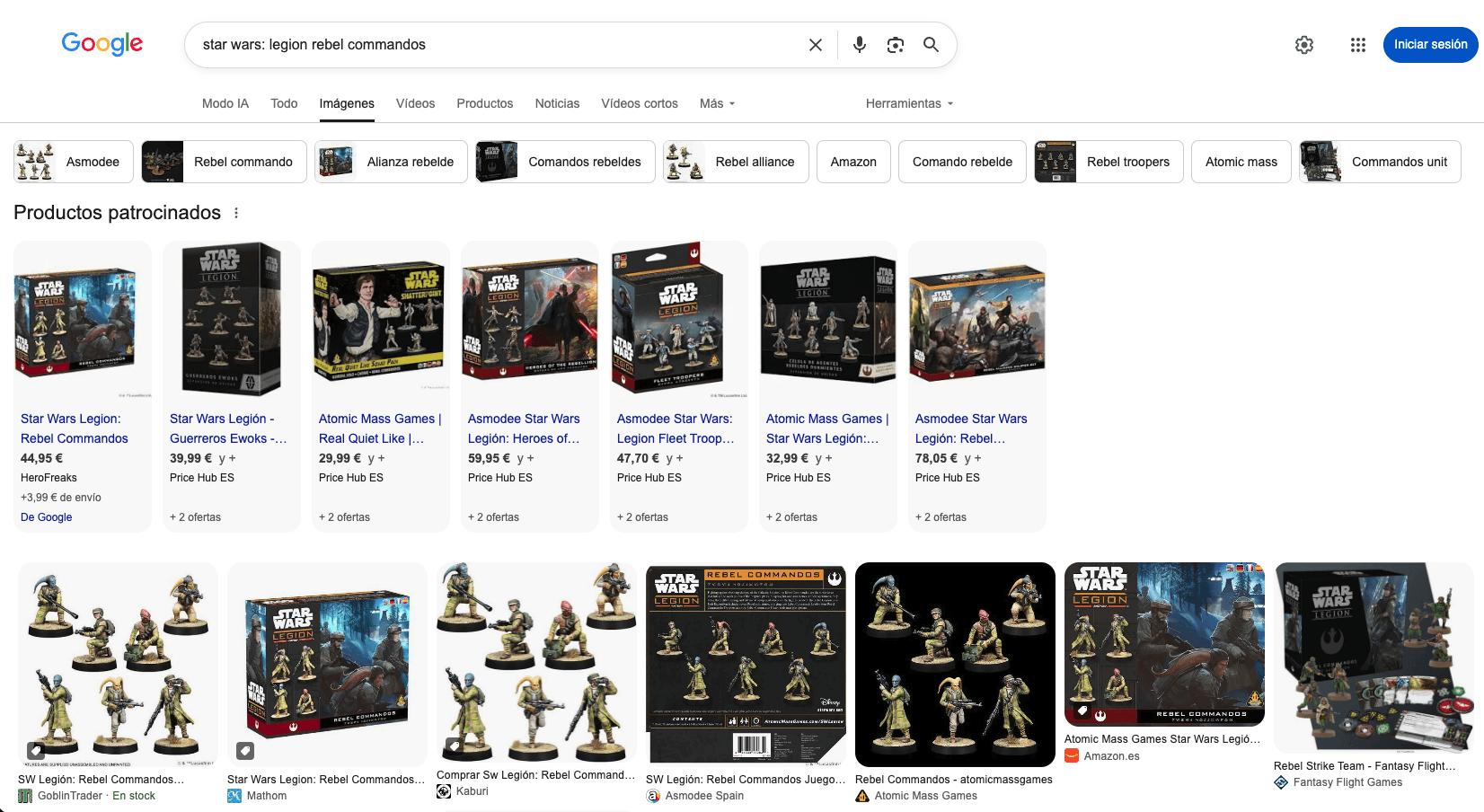
Caption: The same architecture on a different vertical and in a different language. Note the source diversity in the organic row — specialist retailers, the manufacturer, marketplaces, and a games publisher all competing on the same visual query.
Compare the two SERPs and the strategic point emerges. In the sunglasses example, nearly every organic result is a merchant. In the miniatures example, the organic row mixes independent retailers, the manufacturer and marketplaces. Categories differ enormously in how contested their Images results are, and in how many competitors have bothered to implement product markup. The under-optimized categories are still where the opportunity concentrates, and not because image SEO is neglected generally, but because it is neglected unevenly.
Mobile deserves separate attention rather than a footnote. Until fairly recently it was reasonable to describe desktop and mobile Images results as near-identical, because the product labelling had just reached parity. That is no longer true: the layouts have diverged, the preview behavior is different, and — as the next subsection shows — mobile drops functionality that desktop keeps.

Caption: The mobile Images SERP for the same query. Same four layers, materially different layout.
The preview panel: what feeds every field
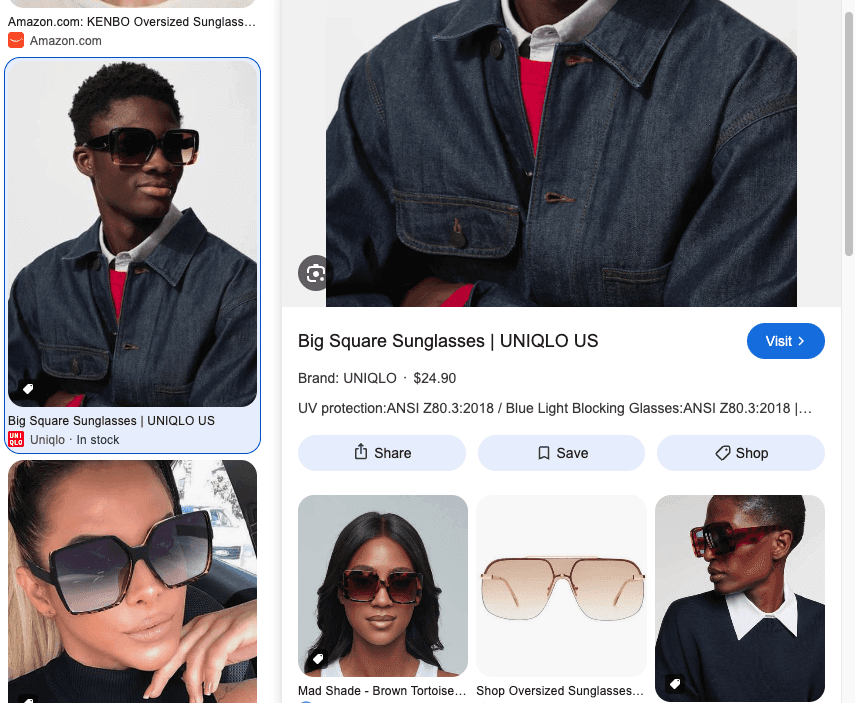
Caption: The desktop preview panel with Product structured data present. Title, brand, price, description, a Visit button, and three actions — Share, Save, Shop.
Every field in that panel has a specific source, and each one is a place you can win or lose:
Field | Source |
|---|---|
Source | The page’s title tag, or the image’s own metadata |
Brand | Product structured data → brand |
Price | Product → offers.price |
Availability | Product → offers.availability |
Description | Meta description, image caption, or surrounding text |
Source attribution | Domain and favicon |
Visit | Destination URL |
Two things follow immediately.
Structured data is what promotes an image result into a product card. Brand, price and stock status are not inferred from the picture. They come from markup. An image with no Product schema gets a title, a description and a link, aka a strictly worse card competing directly against richer ones.
The description field is contested. Google will use a meta description if one exists; failing that, it falls back to the caption or the text surrounding the image. This is why a product page with no meta description and an image floating in whitespace produces a preview panel with nothing persuasive in it. The old failure mode — a product page whose image sits in a container with no adjacent copy, no caption and an empty alt attribute — is still common and still costly.
Now the mobile version:
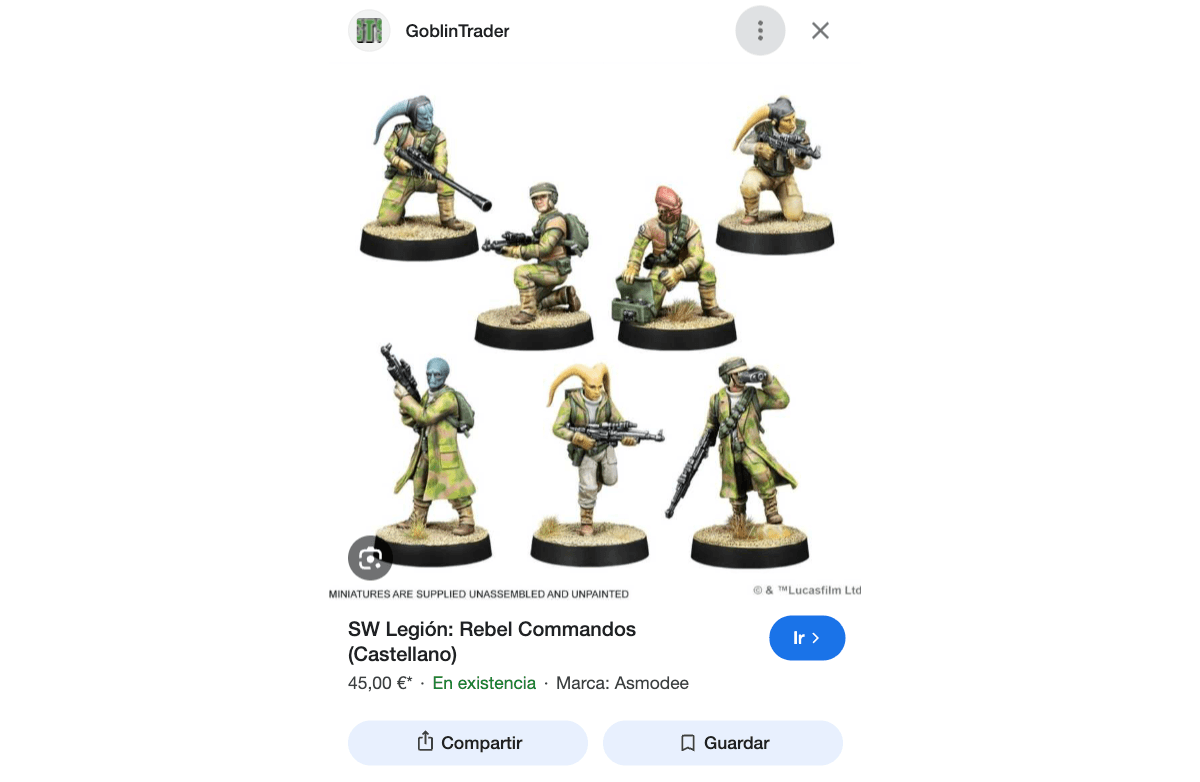
Caption: The mobile preview occupies the entire first viewport. Structured data renders as a single line — price, availability, brand. Note the Lens icon overlaid on the image itself, and the absence of the Shop button.
Three observations that matter commercially:
The mobile preview owns the whole screen. Nothing competes with it. Where a rich result in web search is one snippet among many, an Images preview on mobile is the only thing the user can see; closer in character to a PDP than to a search result.
Structured data compresses to one line. 45,00 € · En existencia · Marca: Asmodee. Price, availability, brand. If any of the three is missing from your markup, the line is visibly shorter than a competitor’s, on a screen where that line is one of only four text elements present.
Lens sits directly on the image. The user’s next action may not be your Visit button but a visual search that takes them to alternatives. This is the pivot point into section 4 of this guide, and it is worth registering as a competitive threat as much as an opportunity: every one of your Images results is one tap from a comparison shop.
The missing Shop button on mobile is a genuine platform inconsistency, not an error in the capture. Desktop offers Share, Save and Shop; mobile offers Share and Save only. Do not build a mobile strategy that assumes the Shop affordance is there.
Product badges, price and availability, and what absence looks like
The badge system is straightforward: a small icon marks results as Product, Recipe, Video and similar. Underneath it, though, is a compounding advantage.
A badged result with price and stock status occupies more visual weight in the grid, gives the user a reason to click before they arrive, and — critically — is eligible for surfaces the unbadged result is not. Merchant listing eligibility, Shopping integration, and the product-data pathways that feed AI Mode all descend from the same markup.
The inverse is worth stating plainly because it is what most audits find:
No `Product` schema → no badge, no price, no availability. The result competes on the picture alone.
Schema present but incomplete → a partial card. offers.availability is the most commonly omitted field and the most visible when missing.
Schema present, prices stale → worse than absent. Google reduces trust in feeds and markup that disagree with the live page.
One technical note I will develop later: put `Product` structured data in the initial HTML. Google’s own guidance is that JavaScript-generated markup is crawled less frequently and less reliably for fast-changing fields like price and availability; precisely the fields that make the card worth having.
Collections: saved visual research, and the Maps connection
Visual shopping is rarely a single session. A shopper gathers, leaves, returns. Google’s mechanism for that gathering is Collections, and it has been rebranded and relocated: saved items now live under Saved on the Interests page on desktop, and under a Saved tab in the Google app on mobile. Anyone looking for the old standalone Collections entry point will not find it where it used to be.
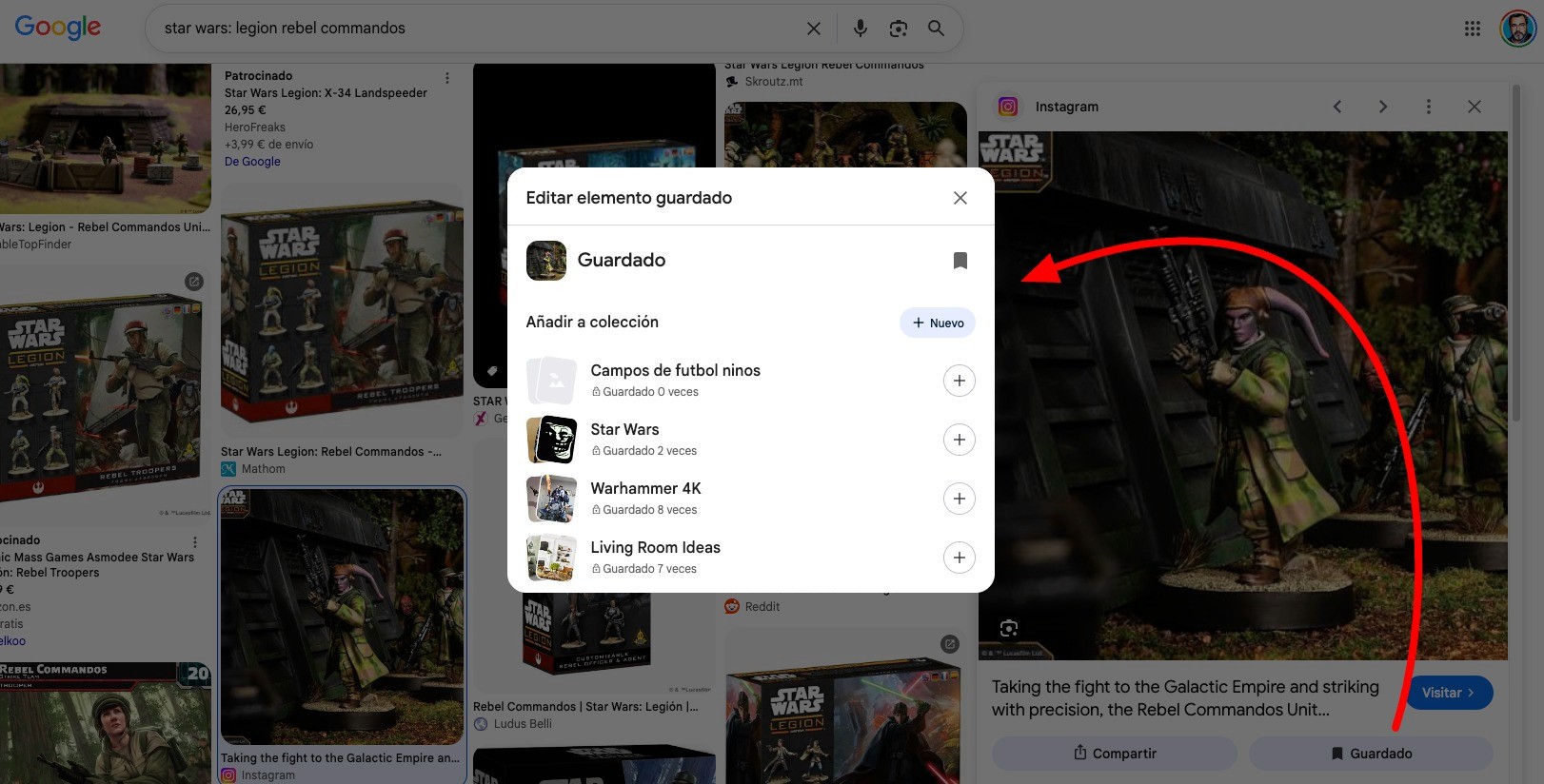
Caption: Saving from an Images result. The user’s existing collections are shown with save counts — Star Wars (2), Warhammer 4K (8), Living Room Ideas (7). Collections are built around projects and intents, not around merchants.
Look at those collection names, because they are a small window into how visual shoppers actually think. Warhammer 4K. Living Room Ideas. These are projects, and they persist for weeks. Your product image is not competing for a click at the moment it is saved but to be in the consideration set when the project resumes.
That matters more than it sounds, because a saved item retains its rich result. The card the user returns to still carries the title, price and availability it had in the SERP. A saved image with Product markup remains a shoppable object; a saved image without it is a picture.
The second feature is the one most SEOs miss entirely:
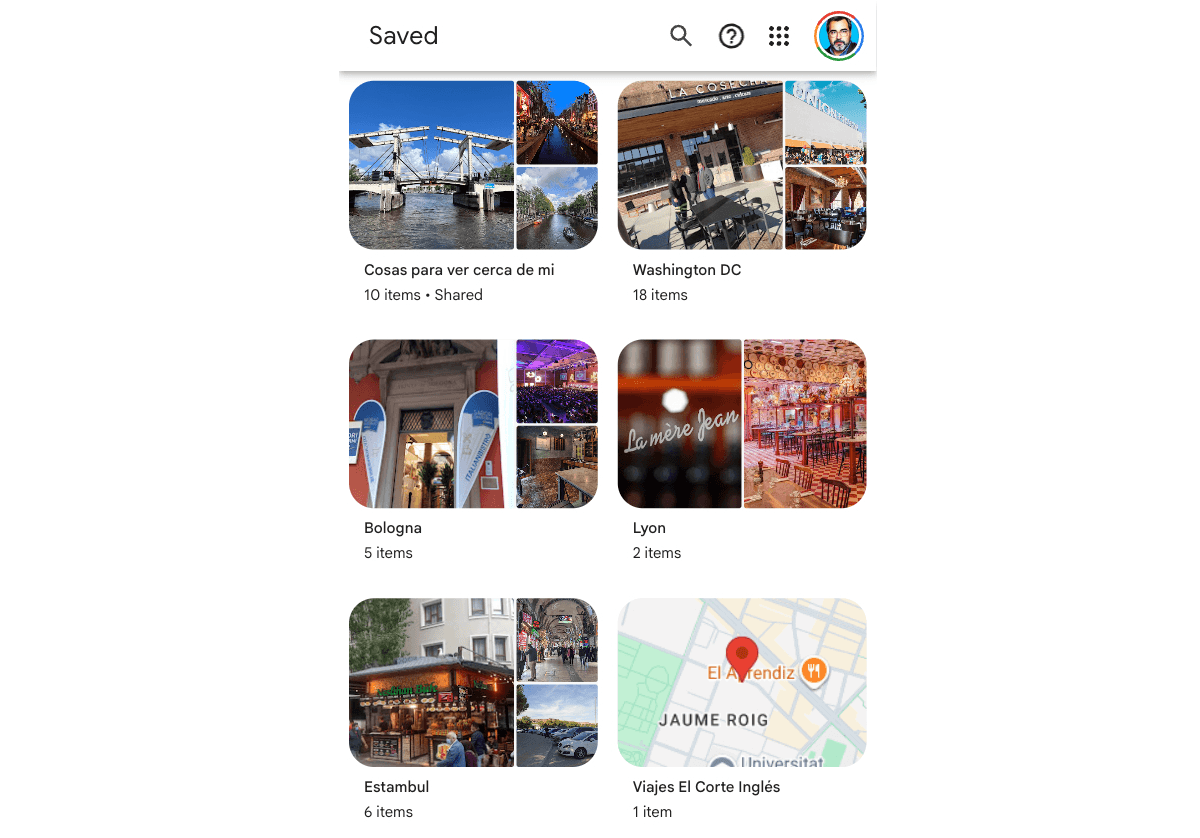
Caption: The Saved page mixes image collections with places saved from Google Maps — and one collection is shared. Visual research and local intent occupy the same shelf.
Places saved in Maps and images saved in Search land in the same interface. A user can hold Living Room Ideas alongside Cosas para ver cerca de mi and a saved restaurant, in one place.
For retailers with physical stores, that convergence is the whole online-to-offline argument in one screenshot. The shopper assembling visual inspiration and the shopper saving nearby places are the same person, using the same tool. If your product images earn saves and your local presence is properly maintained, both halves of that journey are visible to Google as belonging to one user’s intent.
Note also the Shared label on the first collection. Collections can be shared, which makes them a small collaborative surface: a couple furnishing a flat, a group planning a trip. Your product card gets seen by people who never ran the search.
Turn visual search data into actionable insights
Advanced Web Ranking gives you a clearer view of visual search performance, from rankings in Google Images to image results in Universal SERPs and visibility across major AI engines.
The Images tab: Google’s Pinterest answer
One further development belongs here, because it changes what "ranking in Google Images" means.
In November 2025, Google rolled out an Images tab in the Google app for iOS and Android in the US; a personalized, continuously refreshed feed of images built from the user’s selected interests and activity. Users pick topics on first run (fashion, home décor, travel, food), then scroll a Discover-style visual stream. Any image can be shared, saved to Collections, or long-pressed to search with Lens.
Then, in July 2026, timed to Google Images' 25th anniversary, Google rebuilt the Images home page itself. Where images.google.com was a search box, it is now a browsable gallery of images from across the web, refreshed in real time and tailored to the signed-in user's interests. The detail that matters most here is what happened to Collections: saved ideas now appear as tabs above the main gallery, so a collection stops being a place you navigate to and becomes a persistent lane through the feed you return to. Announced by Brad Kellett, Senior Engineering Director for Search, it is rolling out on desktop in the US in English and requires a signed-in Google Account.

Caption: The Images feed itself, plus the first-run topic-selection screen. This is the newest surface in the guide and currently the only subsection running on prose alone.
The significance is that this is image distribution without a query. Every surface discussed so far requires the user to search for something. The Images tab pushes visual content to users who searched for nothing at all — the pure inspiration behavior that Pinterest built a company on, now inside the default Google app.
Two implications for ecommerce:
Inspirational imagery gains distribution value. Styled lifestyle photography — the interior scene, the outfit, the table setting — has a feed to appear in now, not just a SERP. Catalogue-only image strategies capture demand; they do not create it.
The feed pulls from publicly available images across Search, including social sources. Being indexed well in Google Images is the entry requirement for a surface that did not exist a year ago and has no separate optimisation lever.
Continue the guide
How Machines See Images ← Previous · Next → Google Lens: Visual Search Explained

Article by
Gianluca Fiorelli
With almost 20 years of experience in web marketing, Gianluca Fiorelli is a Strategic and International SEO Consultant who helps businesses improve their visibility and performance on organic search. Gianluca collaborated with clients from various industries and regions, such as Glassdoor, Idealista, Rastreator.com, Outsystems, Chess.com, SIXT Ride, Vegetables by Bayer, Visit California, Gamepix, James Edition and many others.
A very active member of the SEO community, Gianluca daily shares his insights and best practices on SEO, content, Search marketing strategy and the evolution of Search on social media channels such as X, Bluesky and LinkedIn and through the blog on his website: IloveSEO.net.