Images in Universal Search
This section is short, and the reason it is short is itself the finding.
For most of the last decade, the web results page was where images earned their keep outside the Images vertical: the Images box, the Popular Products carousel, refinement chips, thumbnails in snippets, images inside Knowledge Panels and featured snippets. Optimizing for that surface meant optimizing for a page dense with visual entry points.
That page has been substantially eaten. AI Overviews now occupy the top of a large share of commercial and informational queries, and the click economics beneath them have changed accordingly — SISTRIX’s analysis of over 100 million German keywords found position-one CTR falling from 27% to 11% when an AI Overview is present, a 59% drop. Several image-bearing SERP features that once merited detailed treatment — refinement carousels, Knowledge Panel image strips, featured-snippet image rows — are either gone, restyled beyond recognition, or displaced by the AI answer above them.
What survives is worth knowing precisely. There is less of it than there was.
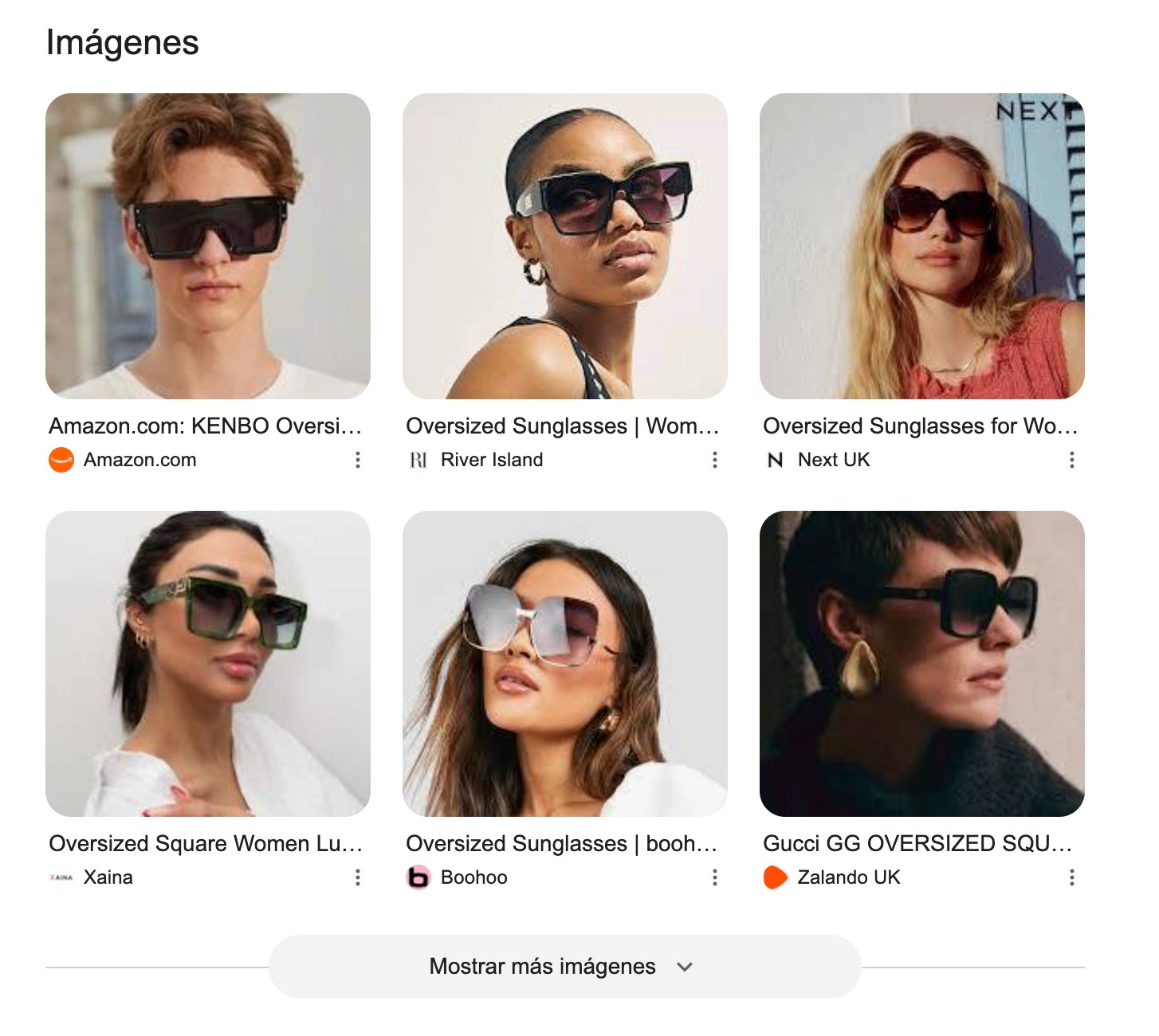
The Images box
When Google detects visual intent in a query, it inserts an expandable block of images into the web results; a compressed version of the Images vertical, with no refinement tags and a fraction of the results, plus a link through to the full vertical.
Three things remain true and useful:
It is organic and should be counted as organic in your analysis. Positions in the Images box are earned the same way vertical Images positions are, and traffic from it lands in the same Search Console reporting (Performance > Filter > .
Its prominence scales with visual intent. The stronger the visual character of the query, the higher the box sits. Queries about appearance, style, design and physical objects pull it up; transactional queries pull it up and then place paid product listings above it.
Its contents are not the vertical’s top results. The images shown in the box are frequently not the first ten you would see in the Images SERP for the same query. Ranking well in one does not guarantee inclusion in the other, and they are worth checking separately.
Thumbnails and item carousels in snippets
Images appear inside ordinary web snippets in two distinct forms, and the difference between them matters more than it appears.
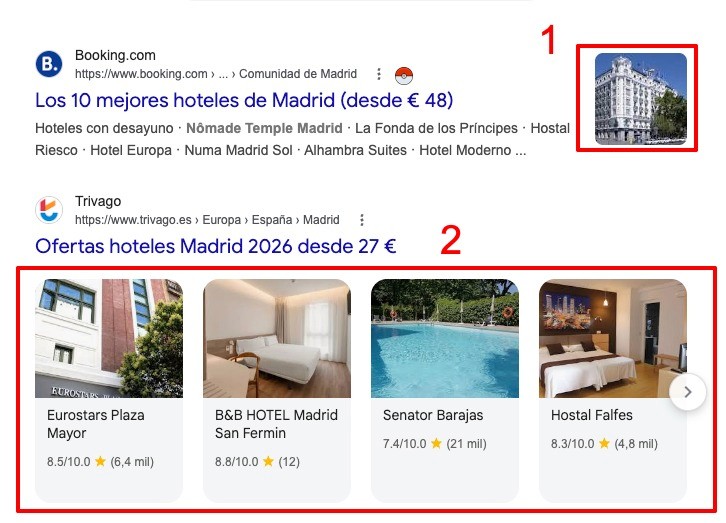
Caption: Two visual treatments in adjacent snippets. Above (1), a conventional result with a single thumbnail. Below (2), a result reduced to its title with a carousel of individual items — each linking directly to its own detail page, each with its own image and rating.
The thumbnail is the familiar case: one small image beside the snippet, drawn from the page. It is chosen algorithmically and can be influenced but not dictated. The practical constraint is unchanged and still routinely ignored — that image will be rendered at roughly 100 pixels square. A composition that reads beautifully at full size and becomes indistinguishable grey mush at thumbnail scale is a failure, no matter how good the photograph is. Category and listing pages are the usual offenders, because their hero images are often wide, busy, or text-heavy.
The item carousel (available only if you apply here, because it is a beta still) is the more consequential pattern, and it is where a category page’s images stop being decoration. The listing has been decomposed: the title tag remains, but beneath it Google presents individual entities — here, specific hotels with their own images, ratings and review counts — each linking straight to its own detail page.
Two implications:
The images being surfaced are product-level images from within the listing page, not the page’s hero. Their quality and clarity are now a direct ranking-surface asset.
Traffic bypasses the category page entirely and lands on detail pages. Any analysis that assumes the category page is the entry point will misread the journey.
This pattern is common in travel, retail, events and local — anywhere a page contains a structured set of comparable entities. It is powered by structured data, which is section 7’s subject.
The max-image-preview robots directive still governs the size of image previews Google may show. max-image-preview:large remains the sensible default for ecommerce; there is rarely a reason to restrict it.
Turn visual search data into actionable insights
Advanced Web Ranking gives you a clearer view of visual search performance, from rankings in Google Images to image results in Universal SERPs and visibility across major AI engines.
Popular Products and the Merchant Center path
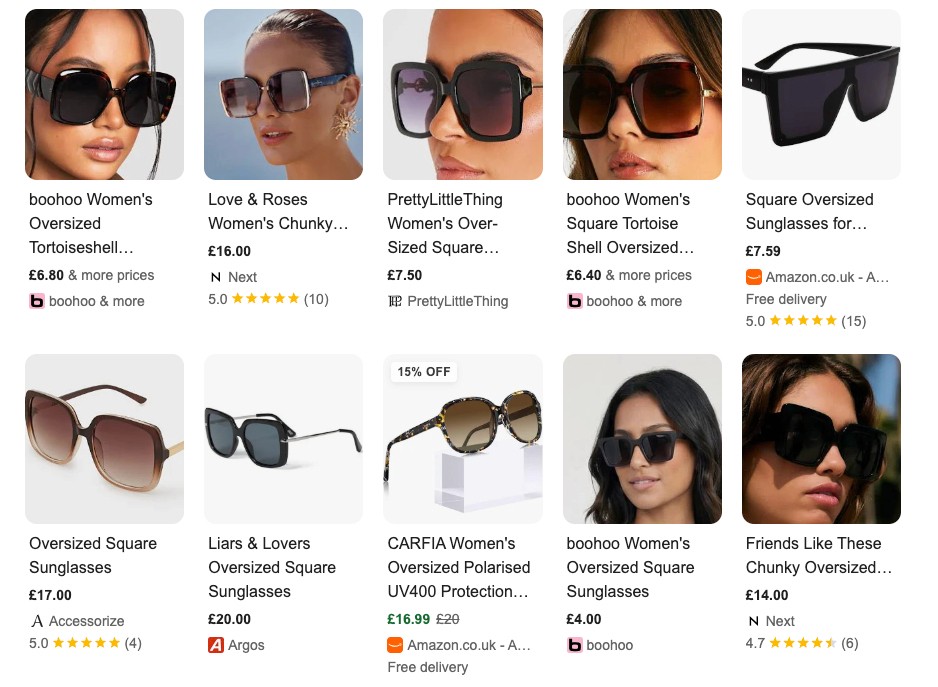
The Merchant/Shopping-adjacent image features — Popular Products and its descendants — remain organic and remain fed from Google Merchant Center rather than from your page markup.
This is the part of the section with lasting importance, and it is worth being direct about why: the product feed has stopped being a Shopping-only artefact. The same feed data now flows into free product listings, Shopping surfaces, YouTube Shopping, and the product graph behind AI Mode’s shopping features — Google describes that graph as holding 50 billion-plus listings with more than 2 billion refreshed hourly. Section 6 shows the same pattern repeating outside Google, where OpenAI and Perplexity both ingest merchant feeds.
Feed image requirements changed materially in 2026, and the numbers most teams are working from are out of date:
Requirement | |
|---|---|
Minimum size | 500 × 500 px for all products |
Recommended | ~1500 × 1500 px |
Maximum | 64 megapixels / 16 MB |
Product fill | 75–90% of the frame |
Background | White or neutral |
Overlays | No promotional text, watermarks or borders |
The 500 × 500 minimum replaces the old split between non-apparel and apparel thresholds, being a single floor now that applies to everything. Google began surfacing warnings on 14 April 2026, with enforcement from 31 January 2027. Any catalogue still built to the older, lower thresholds has a deadline.
Two notes on the practicalities. First, the no-overlay rule has an exception in Google’s own tooling: Product Studio can generate backgrounds and enhancements within the platform, and images produced there are compliant by construction. Second, the recommended 1500 × 1500 is not padding — it is the resolution at which images survive being rendered across surfaces you do not control, from a phone-sized product card to a desktop comparison grid.
The through-line into the next section: your feed is no longer a Shopping asset; it is your product’s machine-readable identity. Every surface that shops on a user’s behalf — Google’s or anyone else’s — reaches for a feed before it reaches for a page.
Continue the guide
Google Lens: Visual Search Explained ← Previous · Next → Images in AI Search

Article by
Gianluca Fiorelli
With almost 20 years of experience in web marketing, Gianluca Fiorelli is a Strategic and International SEO Consultant who helps businesses improve their visibility and performance on organic search. Gianluca collaborated with clients from various industries and regions, such as Glassdoor, Idealista, Rastreator.com, Outsystems, Chess.com, SIXT Ride, Vegetables by Bayer, Visit California, Gamepix, James Edition and many others.
A very active member of the SEO community, Gianluca daily shares his insights and best practices on SEO, content, Search marketing strategy and the evolution of Search on social media channels such as X, Bluesky and LinkedIn and through the blog on his website: IloveSEO.net.