

Advice and answers from the Advanced Web Ranking Team
Search for articles
One Page Can Rank for a Whole Cluster: Meet Keyword Clusters in AWR
AWR's Keyword Clusters report groups tracked keywords by shared Google results. Spot pages worth building, page-2 wins worth pushing, cannibalization worth fixing.

AWR knows something your content plan doesn't: which of your keywords share the same Google results, and therefore the same page. Keyword Clusters turns that into a page-level plan.
What is Keyword Clusters?
Keyword Clusters is a report in Advanced Web Ranking (AWR) that groups your tracked keywords into page-level clusters, based on how much their Google results overlap. Each cluster shows the page best placed to rank for it, the combined search volume at stake, and a status: Top 10, 11–20, Below 20, or Uncovered. That makes it easy to see which pages to build, which to strengthen, and where your own pages compete with each other. Clusters recompute automatically after every ranking update.
The problem: you track keywords, but Google ranks pages
Every keyword you track in AWR answers the core question: where do I rank for it? Useful, and the foundation for almost every other metric you track in AWR. But that's not the unit Google ranks, or the unit content gets built around: Google ranks pages, and one good page routinely ranks for dozens of related queries. The practical questions behind a keyword list are page questions:
Which of these 900 tracked keywords actually belong to the same page?
Where is there real search demand that no page of mine answers yet?
Which pages are one push from page one, and for how much volume?
Where are two of my own pages fighting for the same searches?
Answering these on your own means exporting keywords, eyeballing SERPs, and maintaining a spreadsheet that's stale by the next core update. Keyword Clusters answers them from data AWR already collects for you, and keeps the answer current.
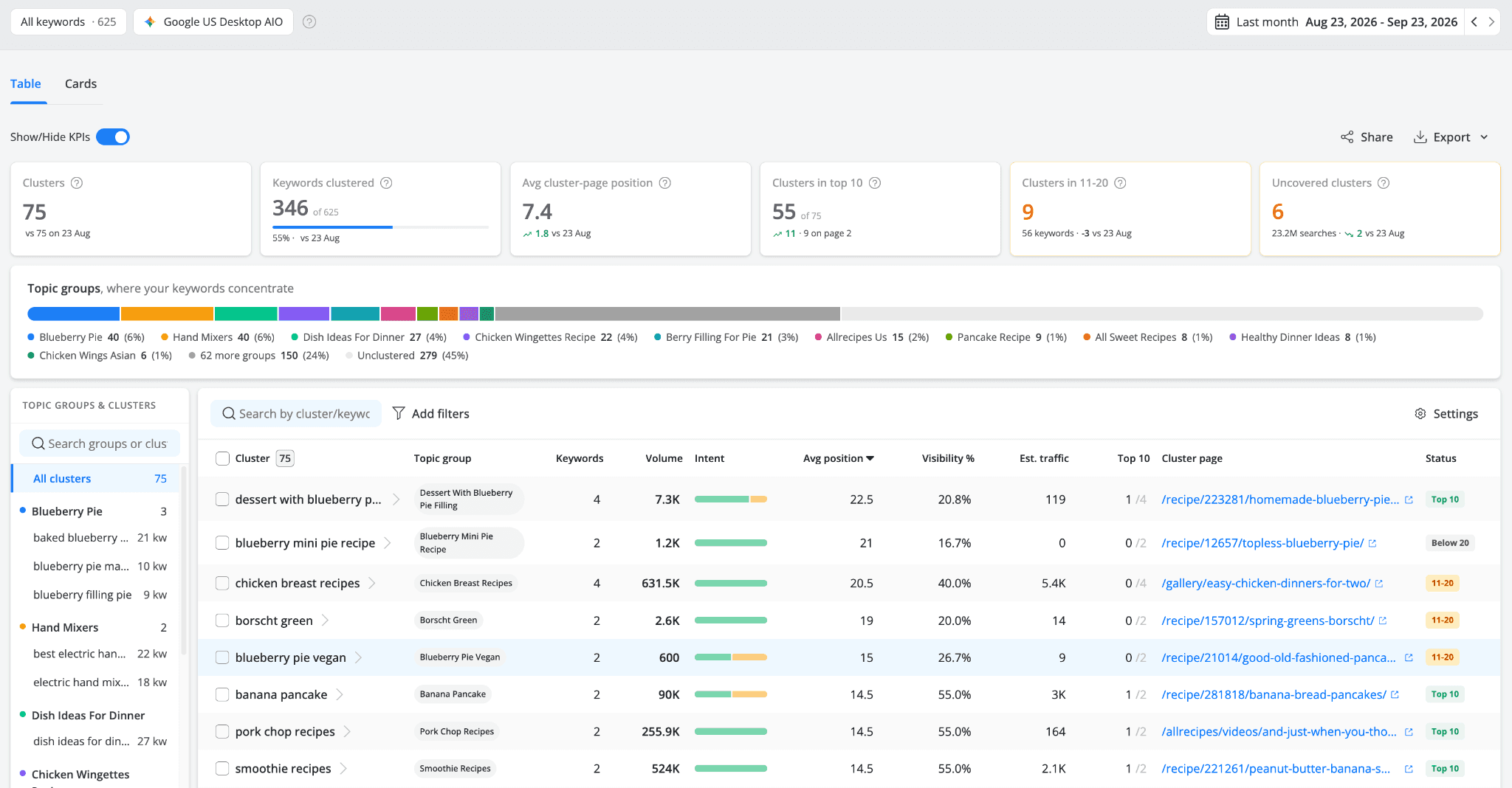
The Keyword Clusters report shows every tracked keyword grouped into page-level clusters, with statuses and opportunity KPIs.
What Keyword Clusters does
The report groups keywords by SERP overlap: when two keywords' top Google results share enough URLs, they're really the same search, just phrased differently, and one page can serve both. AWR runs this comparison across your whole project and organizes the result on three levels:
Clusters - keywords whose Google results overlap enough that the same page can rank for all of them. Each cluster takes its name from the keyword with the most SERP connections to the others, and points to one cluster page: your best-positioned page for the whole group.
Topic groups - clusters that sit under the same theme, gathered into one group. This is where your keywords, and your demand, concentrate, and where pillar pages live: the hub page a group's cluster pages support.
Unclustered keywords - keywords with no real overlap partner. No other keyword in the project shares enough of their SERP, so they stay outside any cluster and get evaluated on their own.
Because clustering is computed from the live SERPs AWR tracks, rankings you can verify, collected by emulating real searches, the clusters reflect how Google groups intent today, not a semantic guess about which words look alike. And because it recomputes after every ranking update, the map never goes stale: new clusters and page changes surface on their own.
Keywords in one cluster overlap enough that a single page can rank for all of them. That sentence is the whole feature: everything else is what you do with it.
Four workflows it unlocks
1. Find the pages you haven't built yet
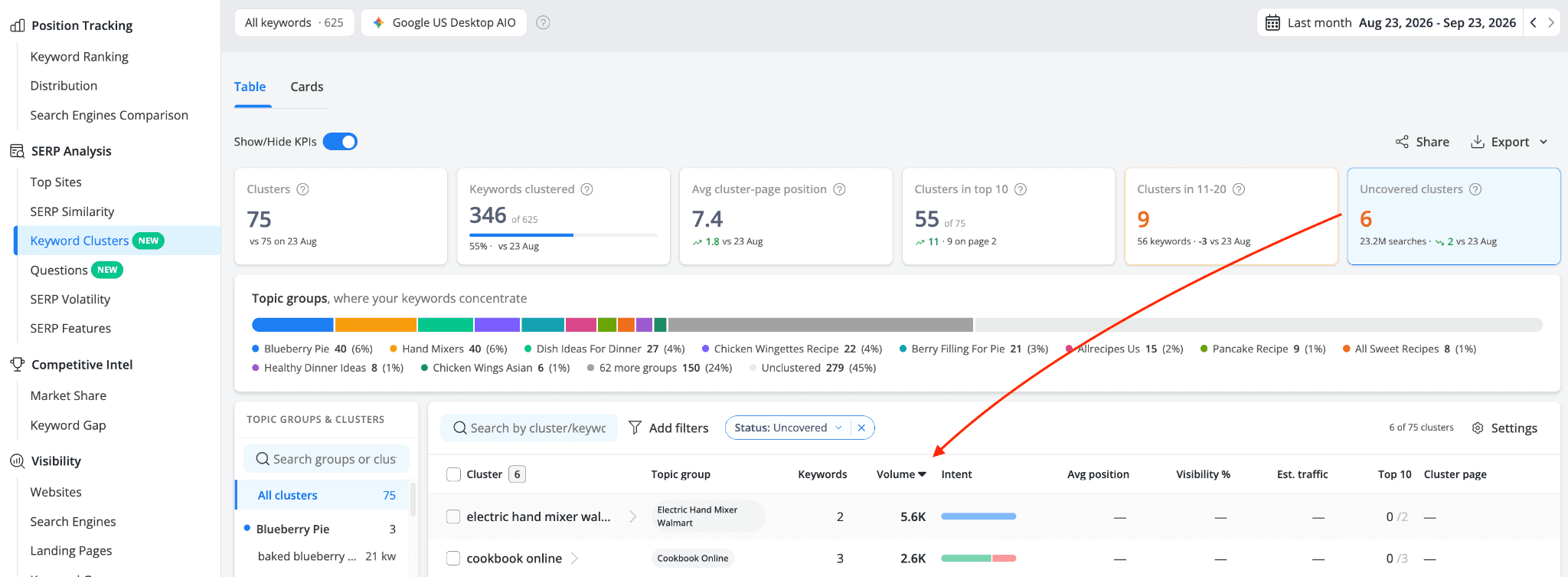
The Uncovered clusters KPI counts clusters where no page of yours ranks at all. Each one is a page worth building, with the search volume figure showing the demand waiting. Click the tile to filter the table down to them, sort by volume, and open a cluster to see exactly what a new page needs to cover:
Click Uncovered clusters. The table filters to clusters with no ranking page of yours.
Open a cluster. The drawer lists every keyword in it, with volume, CPC and search intent: the keyword set one new page should target.
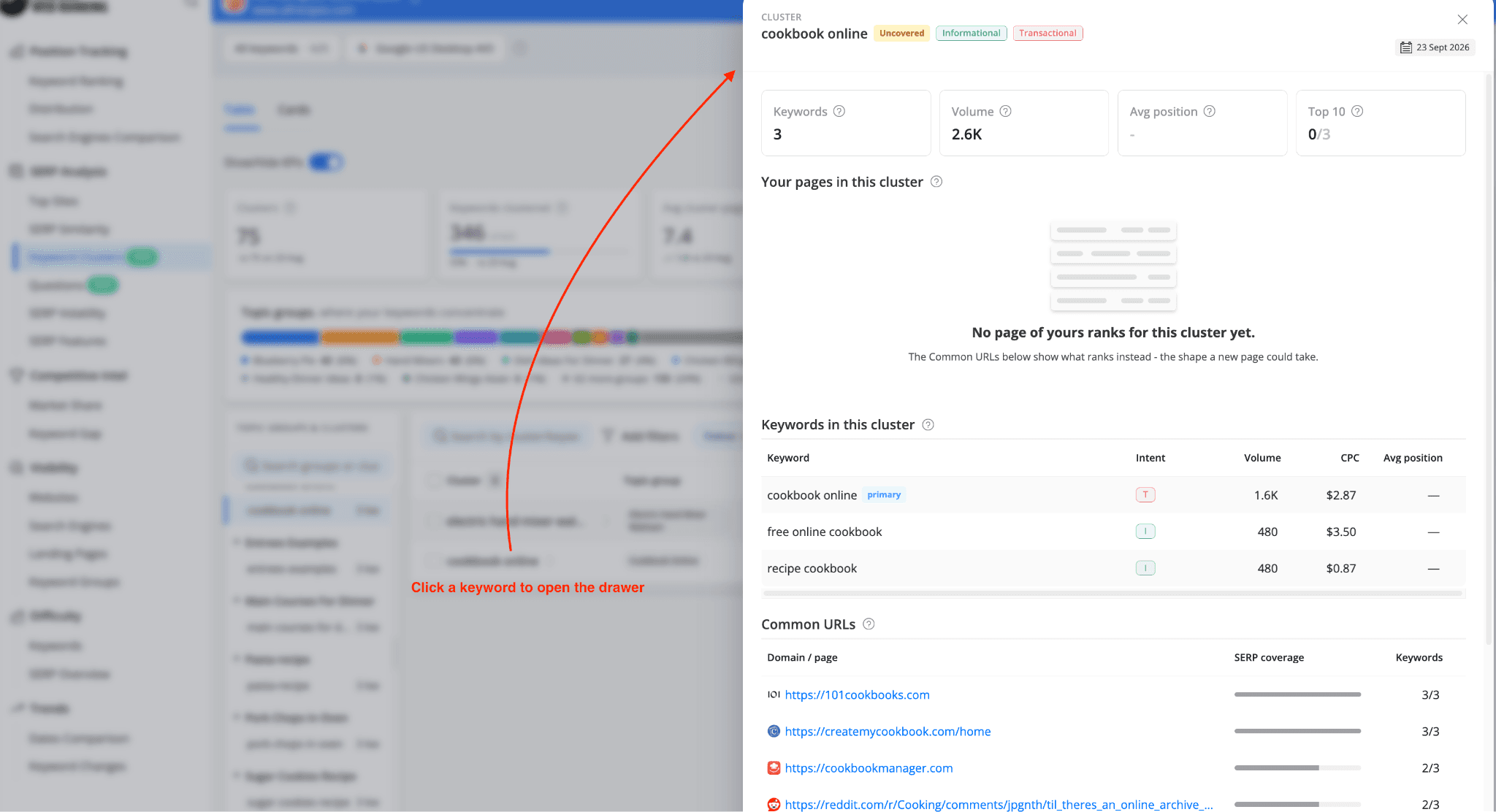
Check Common URLs: the pages already ranking across this cluster's SERPs. A competitor page covering most of the cluster's keywords is proof one page can win it, and a model for the shape yours should take.
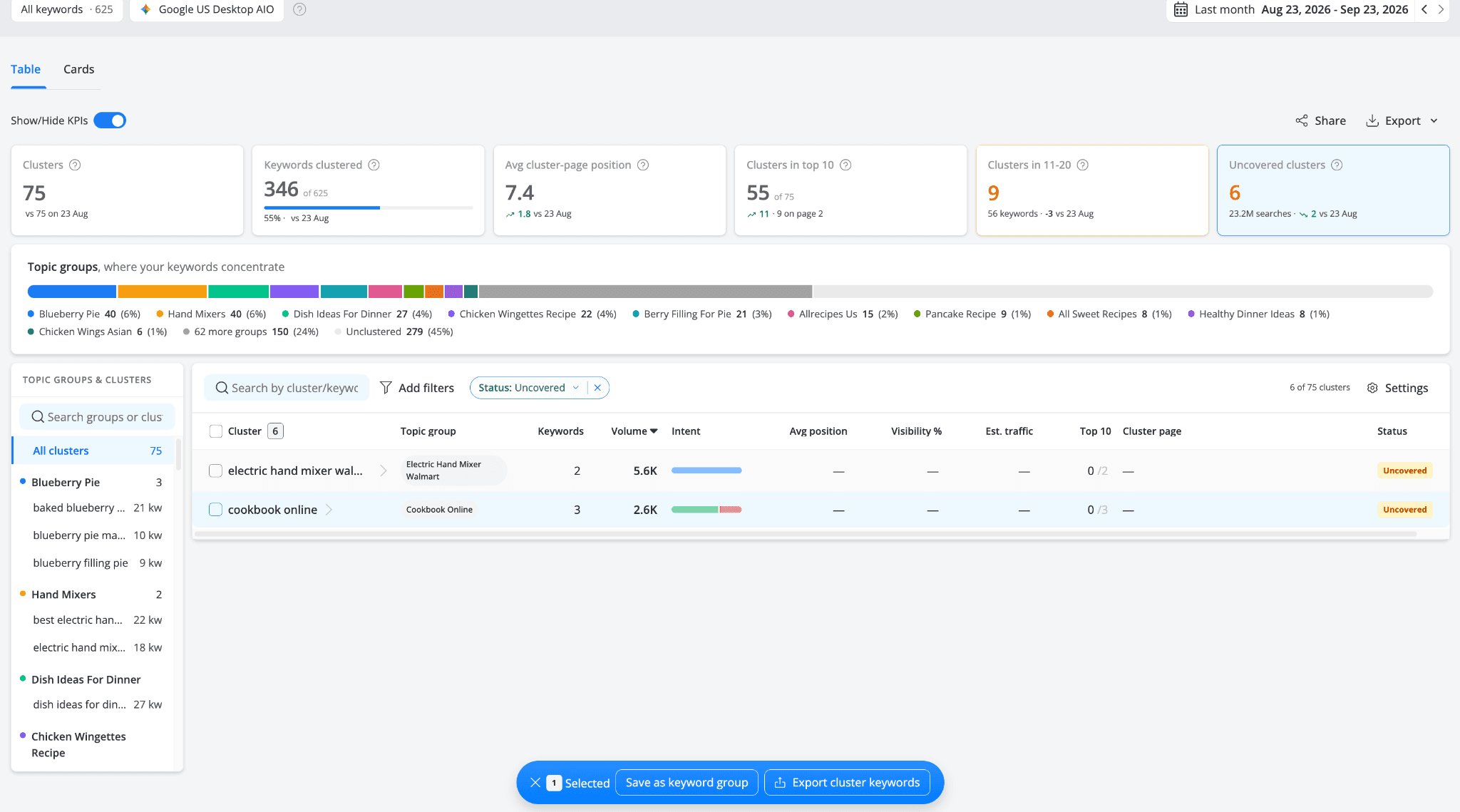
Select the cluster and hit Export cluster keywords: a ready-made content brief for whoever writes the page.
2. Push the clusters sitting on page two
The Clusters in 11–20 tile is the striking-distance list at page level: clusters averaging positions 11–20, just off page one. These tend to be the quickest gains you can make. The page already ranks, Google already considers it relevant, and the jump from position 11 to the top 10 is the single biggest traffic step in organic CTR by position. The difference from a keyword-level striking-distance list: here you get the page to improve and the full keyword set it should be improved against (internal links, content gaps, title coverage), not one keyword in isolation.
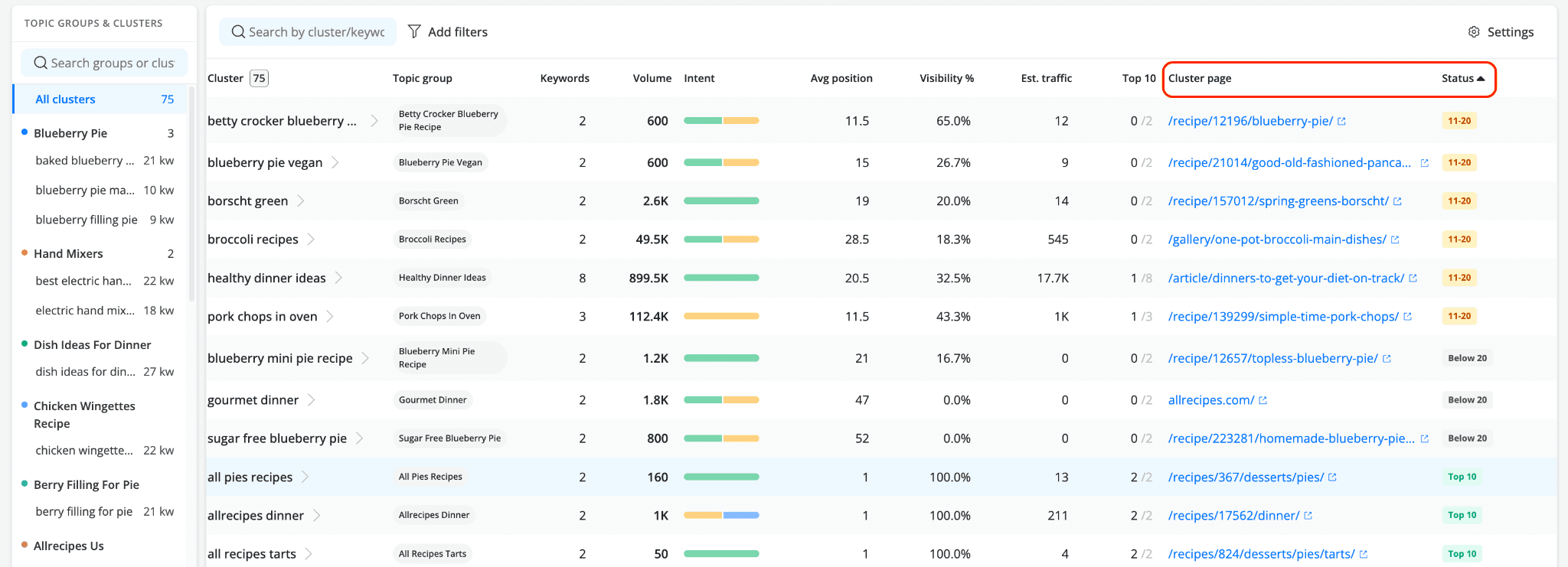
Clusters on page one, page two and below; the 11–20 clusters and the cluster page to push for each are one glance away.
3. Catch your pages competing with each other
Open any cluster by simply clicking on its name and the drawer's Your pages in this cluster table lists every page of yours ranking for at least one of its keywords, with the cluster page badged. Several pages ranking in one cluster means they compete for the same searches. That's keyword cannibalization, visible per cluster instead of scattered across reports. From there the fix is a consolidation call: fold the weaker pages in, or re-point them at neighboring clusters they can own outright.
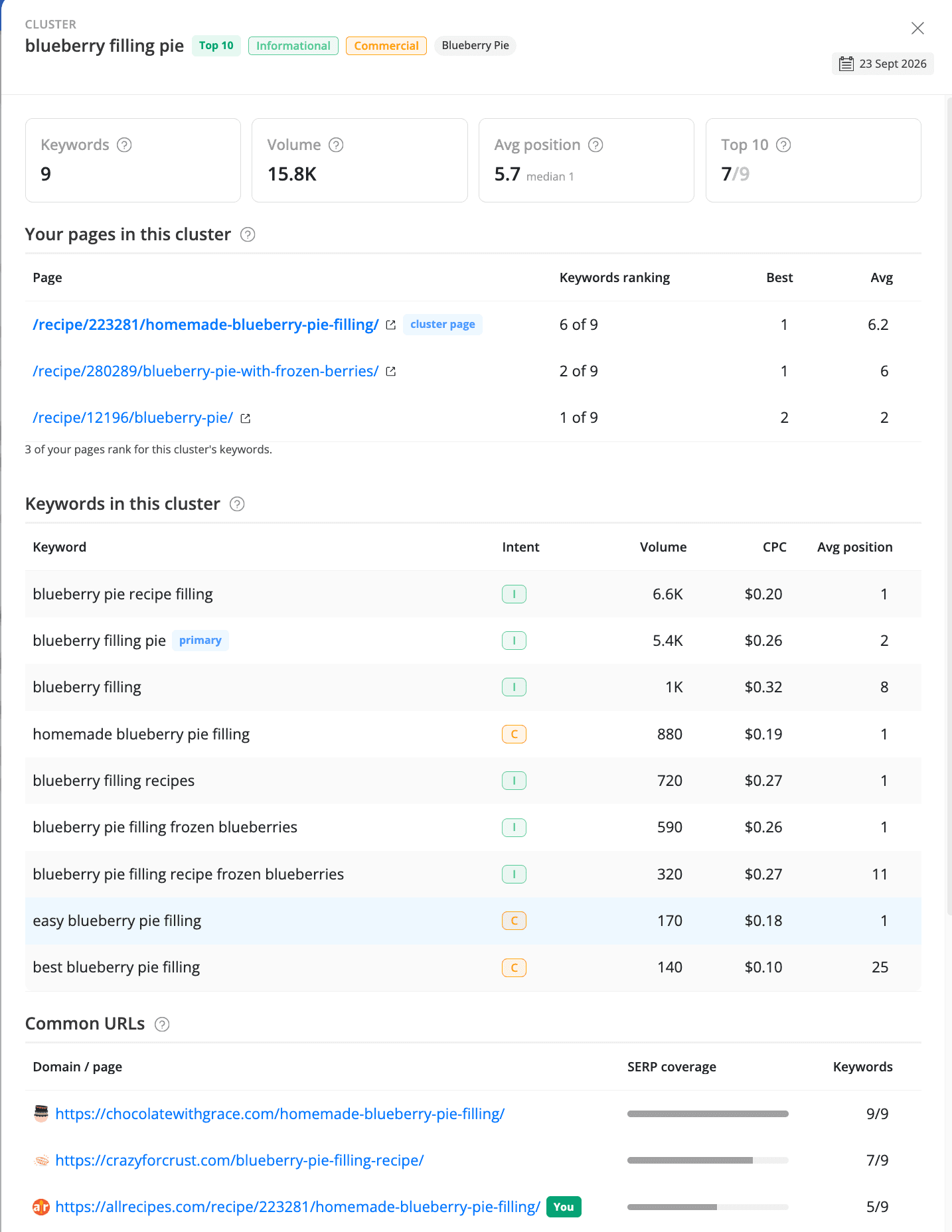
The cluster drawer: your ranking pages with the cluster page badged, every keyword in the cluster, and the URLs ranking across its SERPs.
4. Plan topic clusters and pillar pages from real data
Topic clusters and pillar pages are usually planned on a whiteboard and defended on faith. In AWR, the structure is derived from your own SERP data: the Cards view's topical map draws every topic group as a bubble sized by search volume, so the themes worth a pillar page are visible before anyone writes a word. Each topic group card names its pillar page (the most important page of the group) and the clusters that support it, turning "we should build topical authority" into a concrete list of hub-and-spoke pages with demand figures attached.
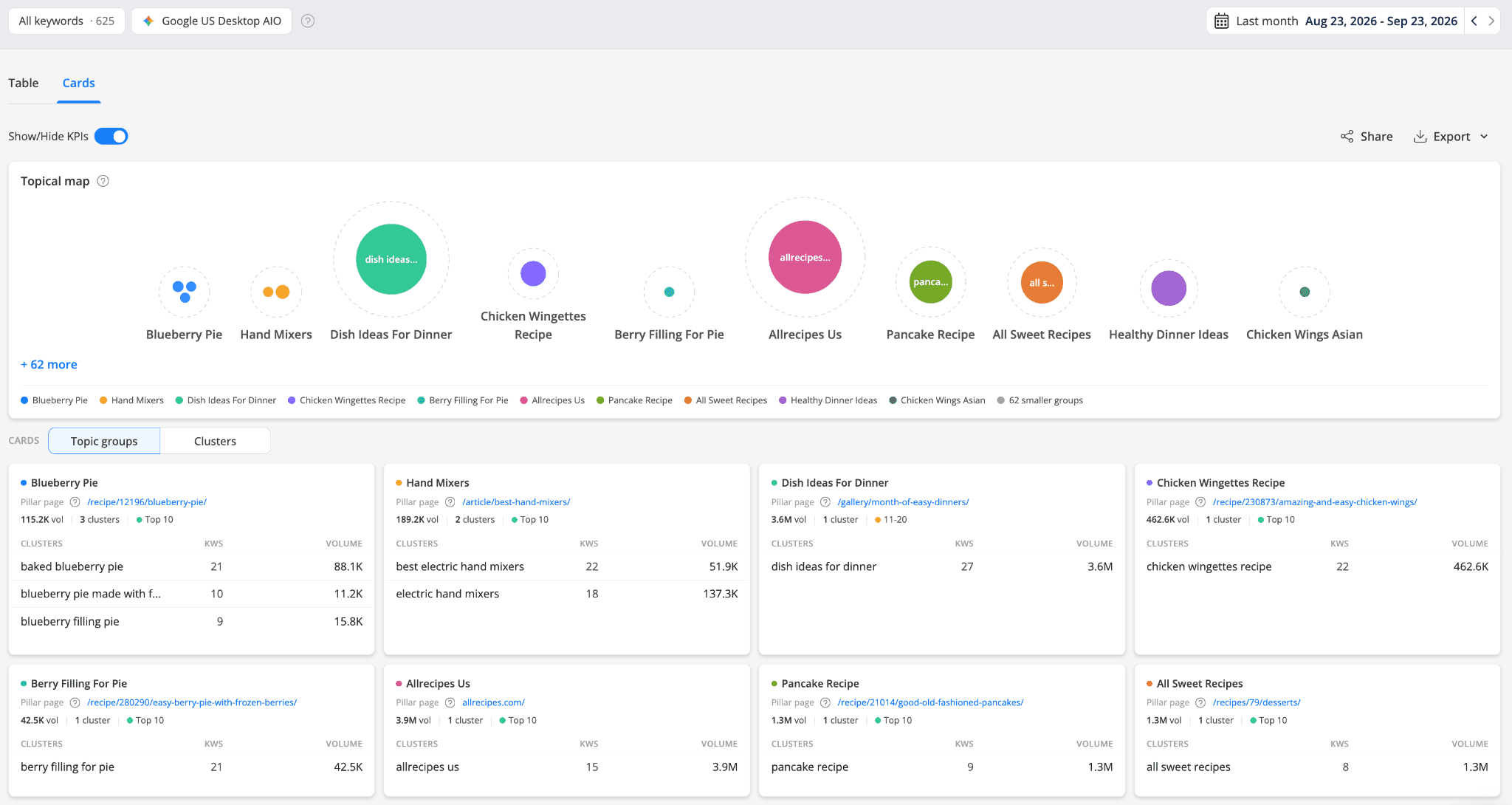
The topical map: topic groups as bubbles sized by search volume, with each group's pillar page on the cards below.
From analysis to action in two clicks
The Keyword Clusters report is built for research, and research ends in a handoff. Once you've found the clusters worth acting on, two built-in actions get the data out of the report:
Save as keyword group: select any clusters and each becomes its own keyword group, a static copy that stays put when clusters recompute. Saved groups work everywhere keyword groups do: Keyword Ranking, dashboards, scheduled reports.
Export: download the cluster list as CSV or XLSX (or straight to Google Sheets), or export a cluster's keywords as a ready-made content brief: keyword, volume, CPC, intent, your position, your ranking URL, cluster page.
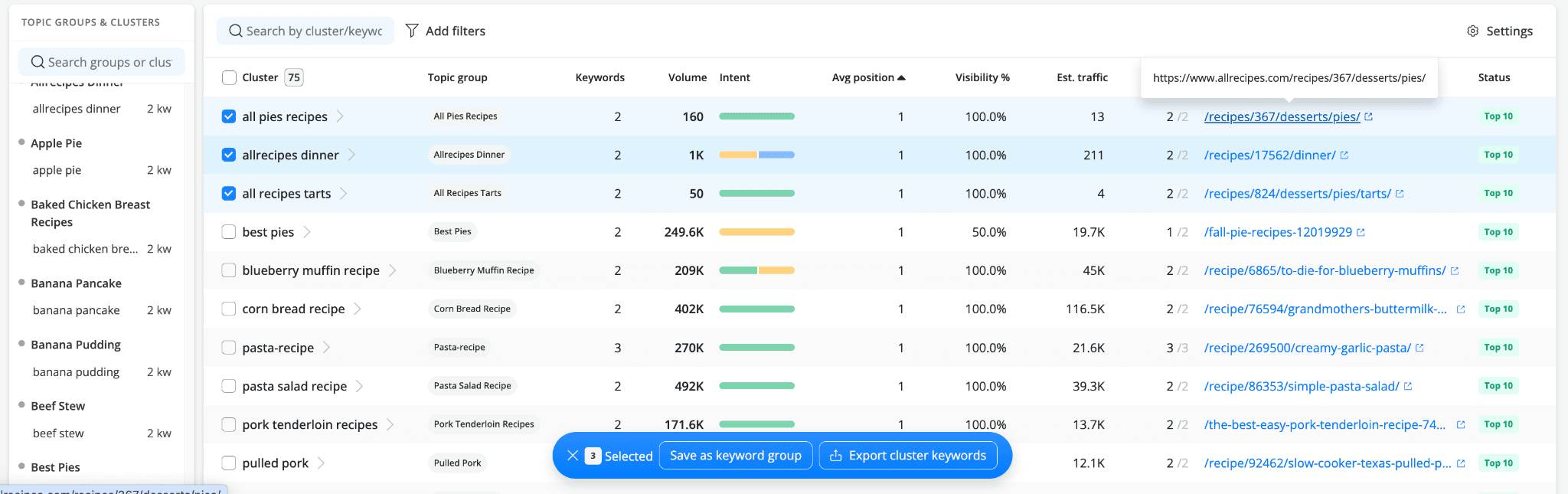
From analysis to action; select clusters, then save each as a keyword group or export its keywords as a brief.
What makes this clustering different
Keyword clustering tools aren't new. Most live on the research side: you feed them a seed list, they cluster it once, and the output ages in a spreadsheet. AWR's Keyword Clusters is built into your rank tracking, and that gives it advantages a standalone tool can't match:
It clusters the keywords you actually track, your real portfolio, not a hypothetical seed list. The clusters, statuses and volumes describe your project.
It's computed from real, verifiable SERPs, the same Google results AWR collects for your rankings, gathered by emulating human searches. SERP-based clustering beats semantic grouping because it measures what Google actually does with intent, not what words look like.
It stays current on its own. Clusters recompute after every ranking update, and the report shows what changed against the previous update: new clusters appearing, cluster pages shifting. A clustering spreadsheet is a snapshot; this is a live layer of your tracking.
It's connected to everything else. Statuses come from your tracked positions, intent from AWR's search intent detection mechanism, and clusters flow out into keyword groups and exports. It sits in the SERP Analysis menu next to the SERP Similarity report, where the rest of your SERP analysis already happens.
No keyword ceiling, no extra cost. Clustering runs on every tracked keyword in the project. There's no separate clustering quota to buy or ration.
Why this matters more in the AI search era
AI answers reward the same structure classic SEO does, only more sharply. When an AI engine expands a question into a set of related sub-queries, a site with one strong page per cluster and a pillar page holding each topic group together has an answer for every branch. Scattered near-duplicate pages dilute that; consolidated cluster pages concentrate it. Keyword Clusters shows you, from your own SERP data, what that consolidated structure should look like. That's topical authority planned from evidence rather than instinct. It's the natural next step after your keyword research workflow: research finds the keywords, clustering decides the pages.
Where to find it & availability
Keyword Clusters lives under SEO → SERP Analysis → Keyword Clusters. It's computed per project from one Google desktop or mobile search engine in your project, and covers all tracked keywords. Full details in Keyword Clusters: How the Report Works. Available on Agency plans and above.
Frequently Asked Questions
What is a keyword cluster?
How does AWR build the clusters?
What's the difference between a cluster and a topic group?
What does “Uncovered” mean?
Why are some of my keywords unclustered?
Do clusters change over time?
stay in the loop