



What is keyword research in SEO?
Keyword research maps search demand - which terms drive traffic, what intent sits behind them, and where competitors are winning visibility you're not. The mechanics haven't changed fundamentally; what has changed is the landscape they operate in.
Is keyword research still relevant?
Yes, but it has evolved. As Andy Chadwick puts it, keywords are not dead, they are still the Lego bricks of content strategy. Even if we now call them “topics,” they remain essential for understanding search demand and prioritizing content.
Recent data from Eight Oh Two shows that over a third of users now start their online searches with AI rather than traditional search engines, which means your content needs to be readable and relevant to both.
In practice, that means:
Targeting intent, not just search volume
Using keywords to structure content, not just fill it
Creating content that works for both users and AI systems like Google's AI Overviews and AI Mode
Build your keyword research strategy with AWR
AWR gives you multiple angles into keyword discovery: Keyword Suggestions, the full set of keywords your site is visible for in Google, the keywords your competitors are showing up for, Google Search Console data, and page-level performance.
Each source adds a different layer to your research, helping you build a more complete and actionable keyword list.
A practical keyword research sequence: start with Keyword Suggestions to seed or expand your list, then use the Keywords report to surface everything you're already ranking for but never tracked. Mine competitor domains for gaps, layer in GSC data to find CTR and position-based opportunities on your existing content, and use the Pages report to see which URLs are doing the actual traffic work.
You'll circle back to different steps as your research evolves.
Quick Start: Keyword Suggestions Tool
Use this when you're building a keyword list from scratch or expanding an existing project: it generates ideas from your domain, a competitor's domain, or a seed keyword.
If you want to audit what's already ranking in Google's index rather than generate new ideas, skip ahead to the Keyword Research add-on below.
How to access it
You can use Keyword Suggestions at any stage of your project:
New project: directly in the setup wizard
Existing project: go to Add keywords > Import from > Keyword Suggestions
Specific keywords: request suggestions for individual terms you're already tracking
For a step-by-step guide on accessing the tool, see Keyword Suggestions Tool in AWR.
Choose your starting point
Pick your starting point based on what you're trying to find:
Your own domain
A competitor's domain
A seed keyword
AWR returns related terms, long-tail variations, and competitor-based ideas, each with search volume and a status flag, so you can quickly decide what's fresh and decide which terms are worth tracking and which aren't.
Tip: How to identify long-tail keywords for your content strategy?
Use the dedicated search bar in the Keyword Suggestions tool to search for specific keywords. From the list displayed, select the long-tail terms and add the most relevant ones to your tracking list.
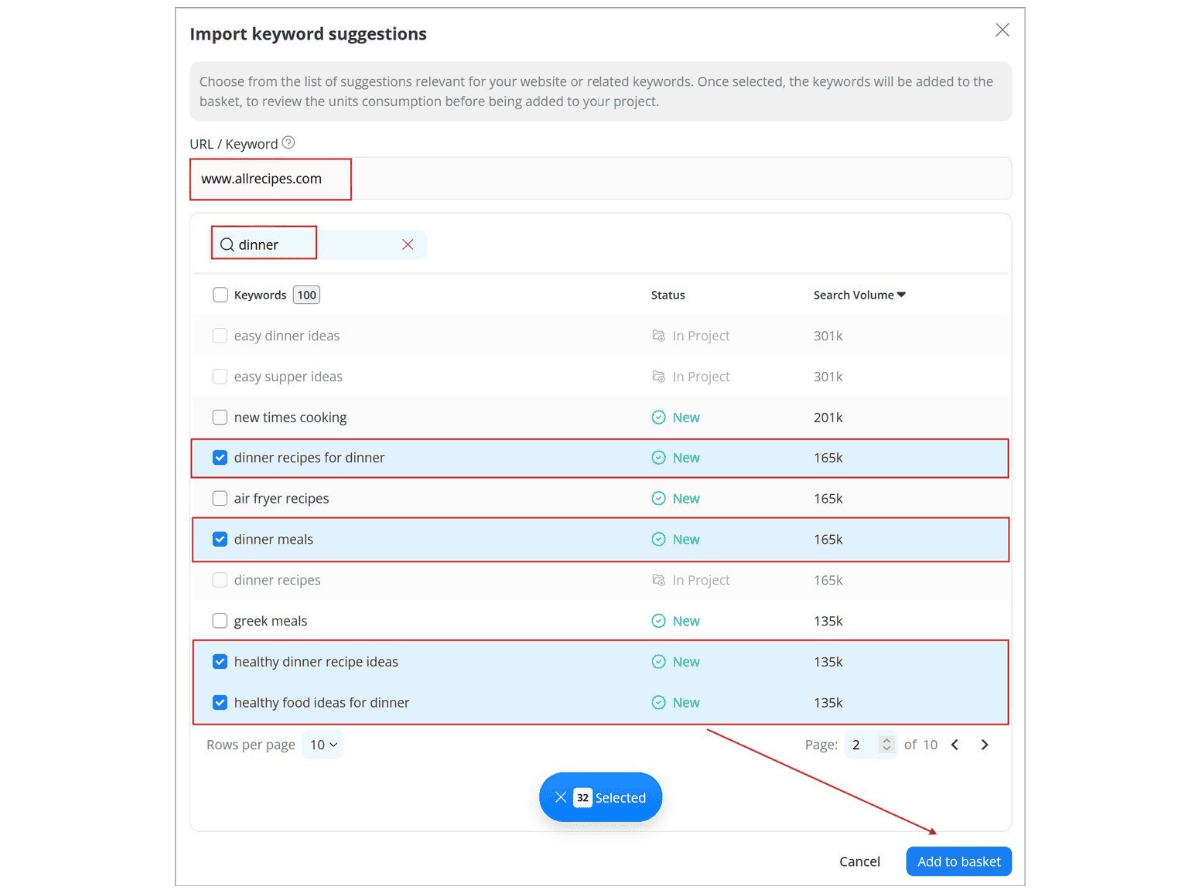
Turn suggestions into tracked keywords
When setting up a new project, you can select keywords manually, but adding them in bulk is the fastest way to get started. Just keep in mind that the latter may include some cleanup work later, so scan through the suggestions first and filter out anything irrelevant, including competitor brand terms
Once you've collected the keywords you want to target, you can:
Track them as-is
Assign them targeted URLs
Organize them into groups
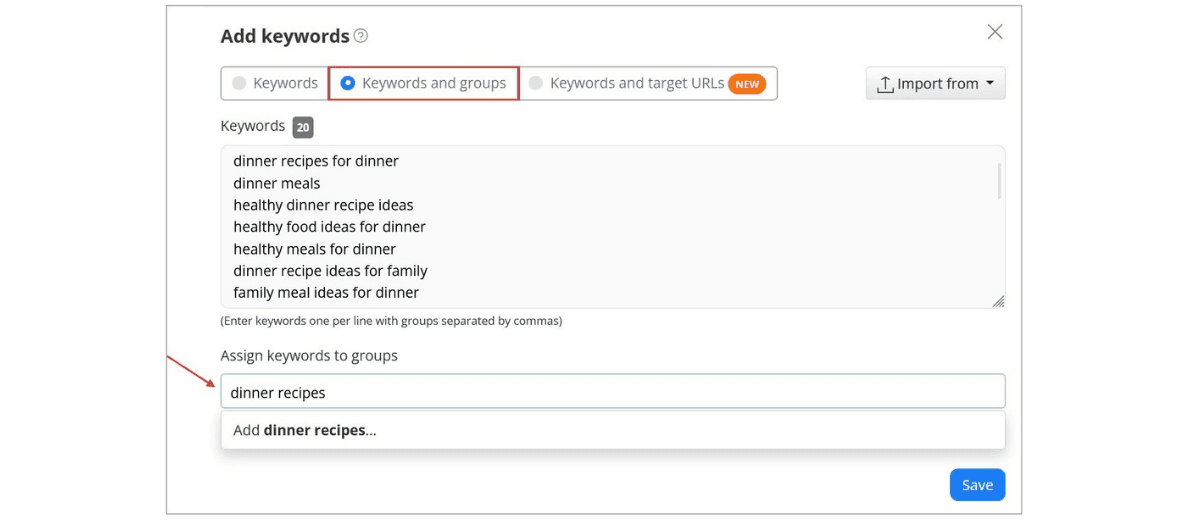
Tip: When you organize keywords into groups, you can track performance by topic and see exactly how you and your competitors rank for those same groups, not just overall.
Ready to build your first list? Set up your first project and run Keyword Suggestions to get started.
Go deeper: Keyword Research Tool
The AWR Keyword Research add-on picks up where rank tracking leaves off.
Instead of telling you where you stand for the keywords you already know about, it shows you the full picture: every keyword your domain ranks for, who you’re actually competing with on those SERPs, and which pages are doing the heavy lifting.
Three reports—Keywords, Competitors, and Pages—each giving you a different angle on the same core question: where are the opportunities, and who’s currently taking them?
For a full overview of the Keyword Research add-on and how to get started, see this article.
Uncover keywords you're already ranking for
You're likely ranking for more keywords than you think, terms you never targeted but Google is already sending traffic for. The Keywords report surfaces all of them across 100+ countries, and with a single click on any sortable metric, it reorders instantly so you can find the biggest opportunities without manual scanning.
See the full picture of your organic presence
Before you start sifting through individual keywords, the report gives you three numbers worth orienting around:
how many terms your domain ranks for in the top 50,
the estimated traffic those rankings generate,
and what that traffic would cost if you were paying for it in ads.
Each one comes with a month-over-month change and a 12-month sparkline, and clicking any KPI expands a full trend chart. From there you can break it down by position bucket: Top 1, 2–5, 6–10, 11–20, 21–50, which is the fastest way to see whether your gains are coming from climbing into the top 3 or just creeping up from page two.
Use the table metrics to surface the most valuable terms:
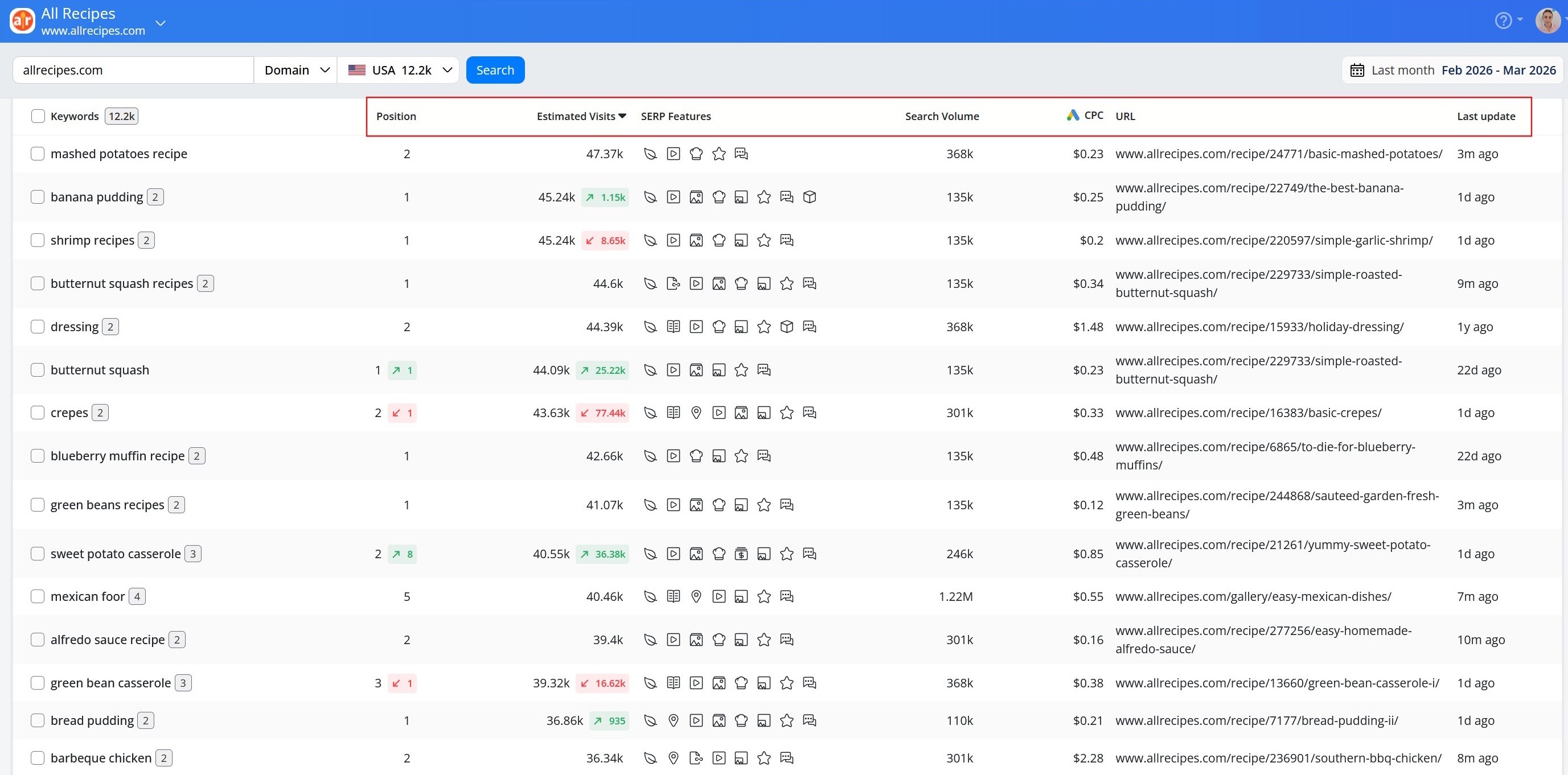
Here is what each metric tells you and how to use it:
Metric | What it shows | How it helps you find new keywords to track |
|---|---|---|
Position | Where you currently rank for each keyword | Uncovers terms you're already ranking for but haven't added to your tracking list yet. |
Estimated visits | Monthly traffic each keyword delivers based on your position | Surfaces untracked keywords that are already sending visitors to your site, so you can start monitoring and protecting that traffic. |
Search volume | Average monthly demand for each keyword | Highlights untracked terms with high audience interest, the ones most worth adding to your list for long-term growth. |
SERP features | Which special results appear for each keyword and whether you're winning them | Reveals keywords where you have extra visibility or could gain it. Worth tracking to monitor and improve your presence. |
CPC | Average cost per ad click based on Keyword Planner data | Flags commercially valuable keywords you may not be tracking yet, where organic rankings could replace or complement paid spend. |
Use filters to zero in on what matters most
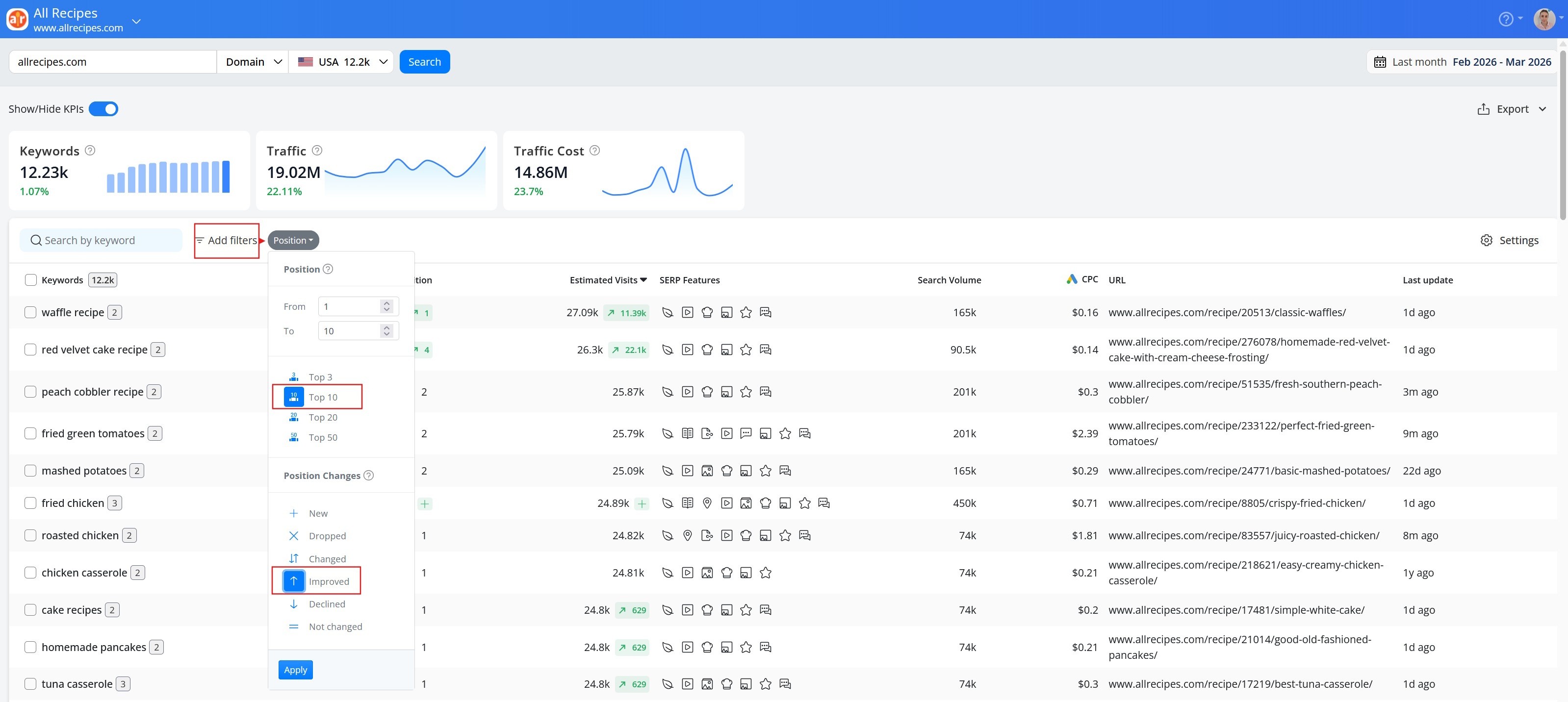
Take this one step further and apply filters to narrow down your full keyword list to the terms that really matter. Each metric comes with its own filter, and you can combine multiple filters at once to get as specific as you need. The smarter the combination, the better the results. Some of the things they may help you discover:
Position filter:
Quick wins: filter by positions 11–50 to find terms within reach of page one; these often move with less effort than building new rankings from scratch.
Terms at risk: filter by "dropped" or "declined" rankings to catch slipping keywords before they're lost.
Newly discovered terms: filter by "new" to spot keywords you've recently started ranking for without targeting them; early movers are worth adding to your list before a competitor notices the same gap.
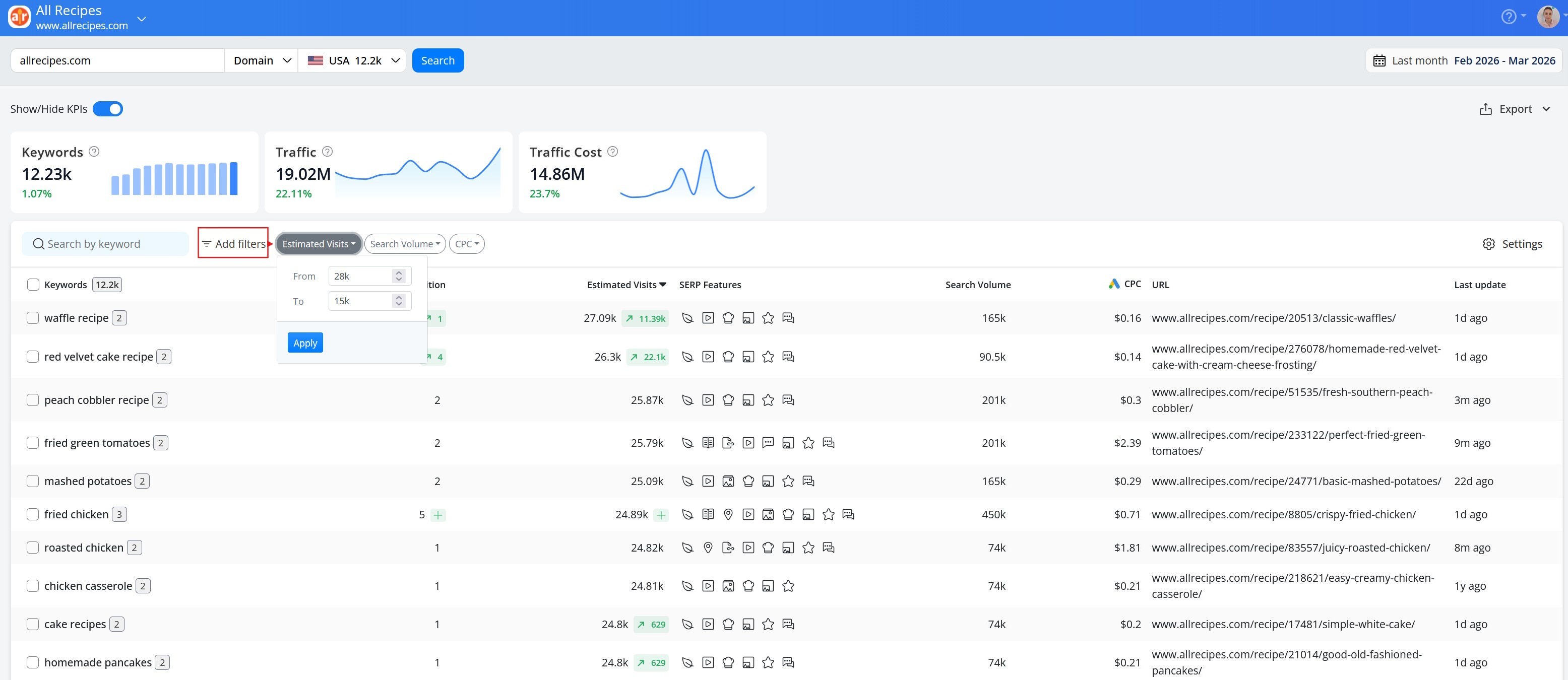
Estimated visits, Search volume, CPC:
Desired range: set an Estimated Visits filter above a meaningful floor (e.g. >200/month) to find keywords you're already ranking for but haven't added to your tracking list yet. For CPC, look at it alongside your current position: if you're sitting on page two for a term with high commercial intent, that's a gap worth closing before a competitor takes the spot you're already close to holding.
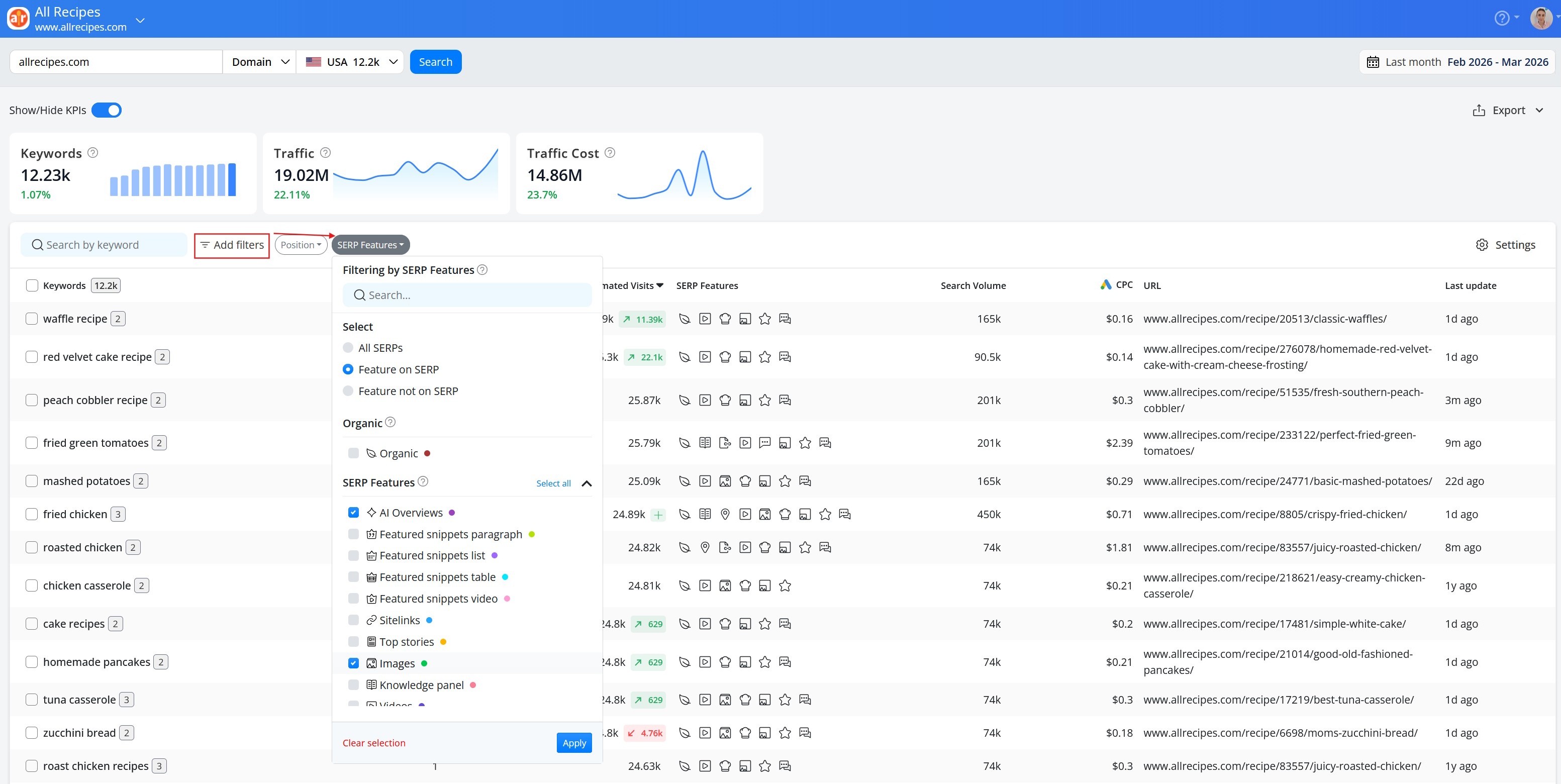
SERP features:
Additional SERP visibility: select one or more SERP features (AI Overviews, People Also Ask, Images, Videos, Top Stories, and more) to see the keywords that trigger that feature and protect the existing visibility or to target new opportunities.
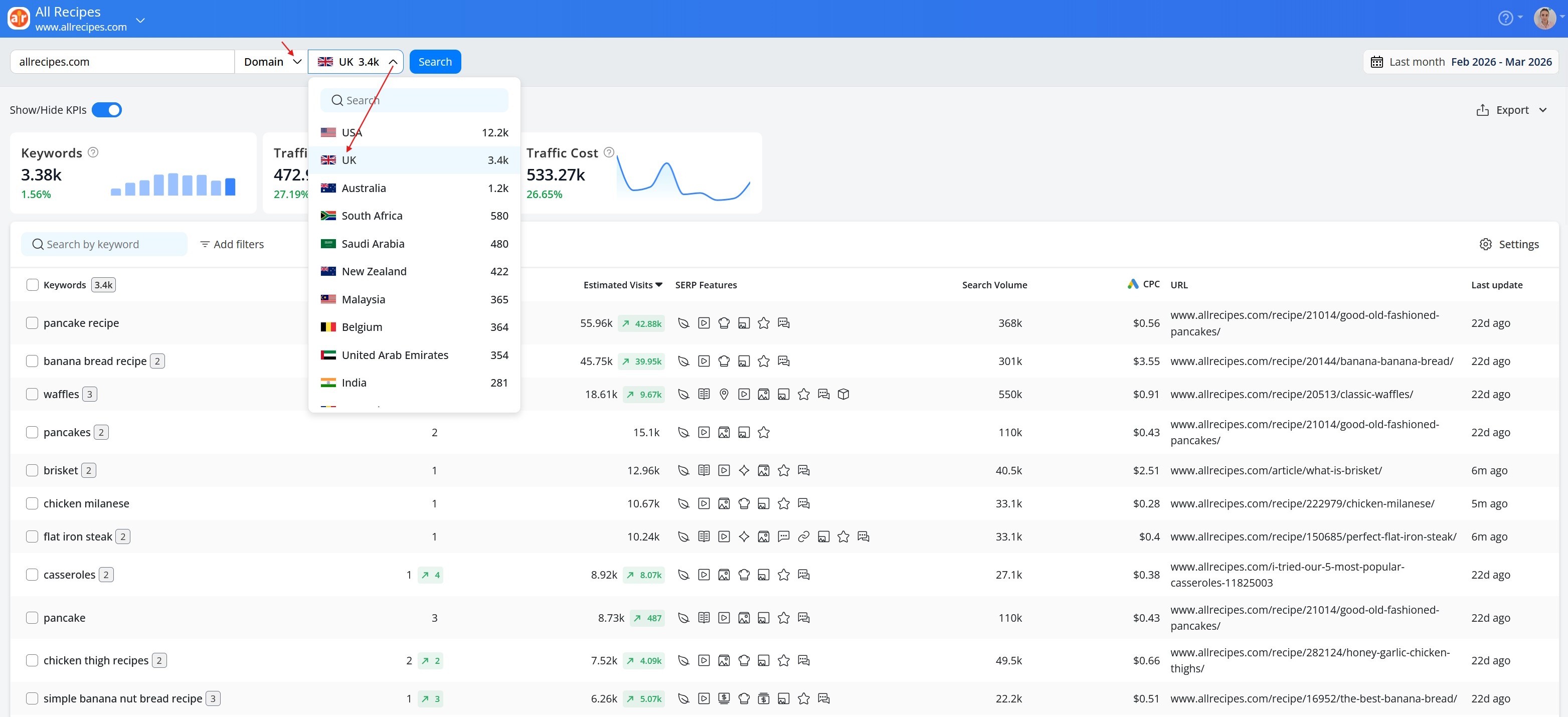
You can also dig even deeper into your data:
New market opportunities: switch to a different country to see how your domain ranks in that market and build a targeted keyword list for it from scratch. For a broader look at international SEO strategy, see International SEO.
Detailed site analysis: narrow the view to a specific subdomain, subfolder, or URL to find keyword opportunities at a more granular level.
Add your findings to your tracking list
Select keywords directly from the filtered view and add them to your list in one click:
New project: keywords are added in bulk to get you started quickly.
Existing project: add them to your main list, to an existing group, or create a new group to keep newly discovered keywords separate from the ones you're already tracking.
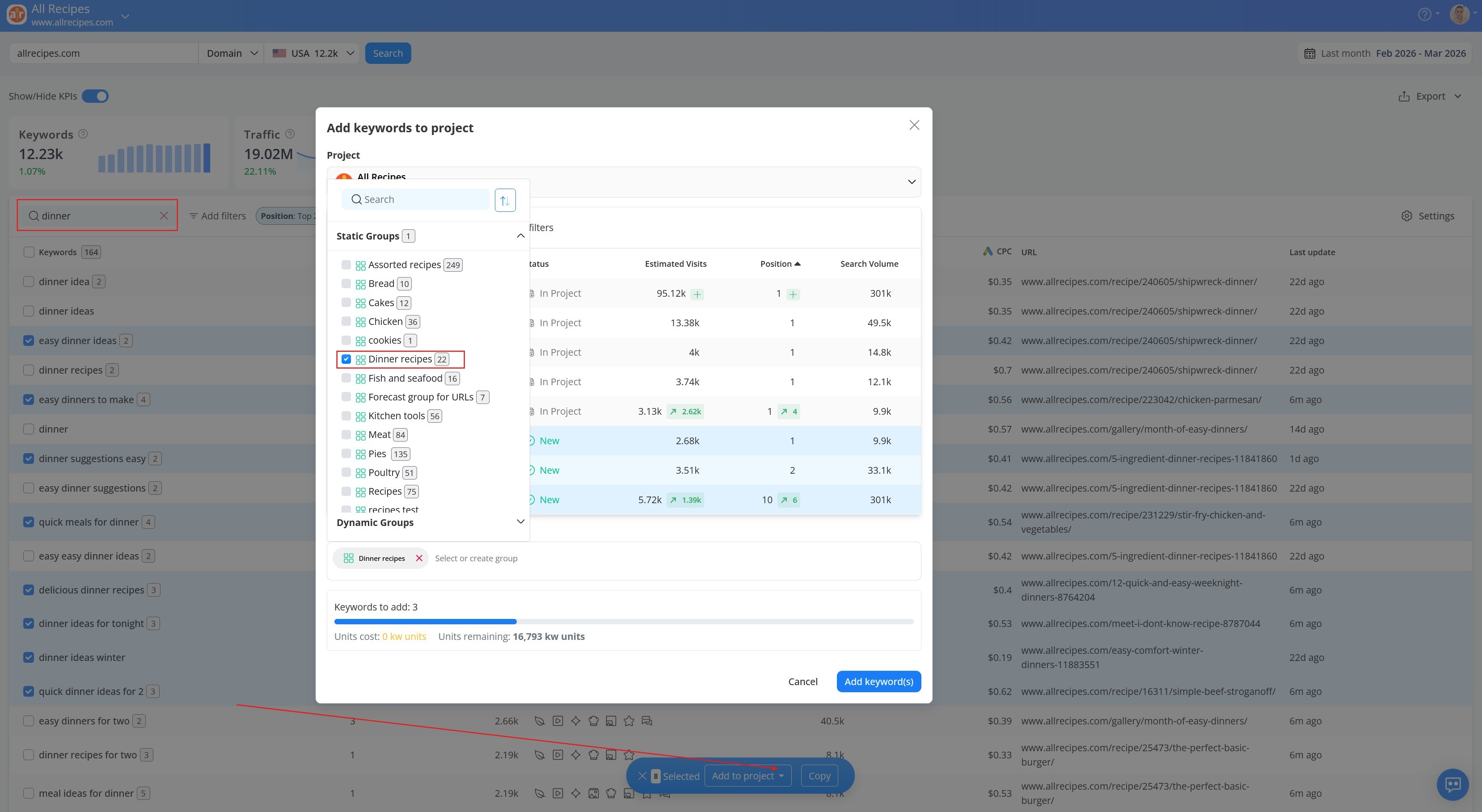
Note: Don't worry about selecting duplicates. The Status column shows whether each keyword is already being tracked ("In Project") or new ("New"), and only new keywords will be added to your project.

Mine your competitors' rankings for new opportunities
Once you've mined your own rankings, the next step is to find what your competitors are ranking for that you're not. The Competitors report shows who is actually competing with you on Google—not just who you think your rivals are, but every domain showing up on the same SERPs.
Want to take your competitor analysis further? See Competitor Analysis in AWR.
How to identify your true rivals
Use the table metrics to identify which competitors deserve a closer look:
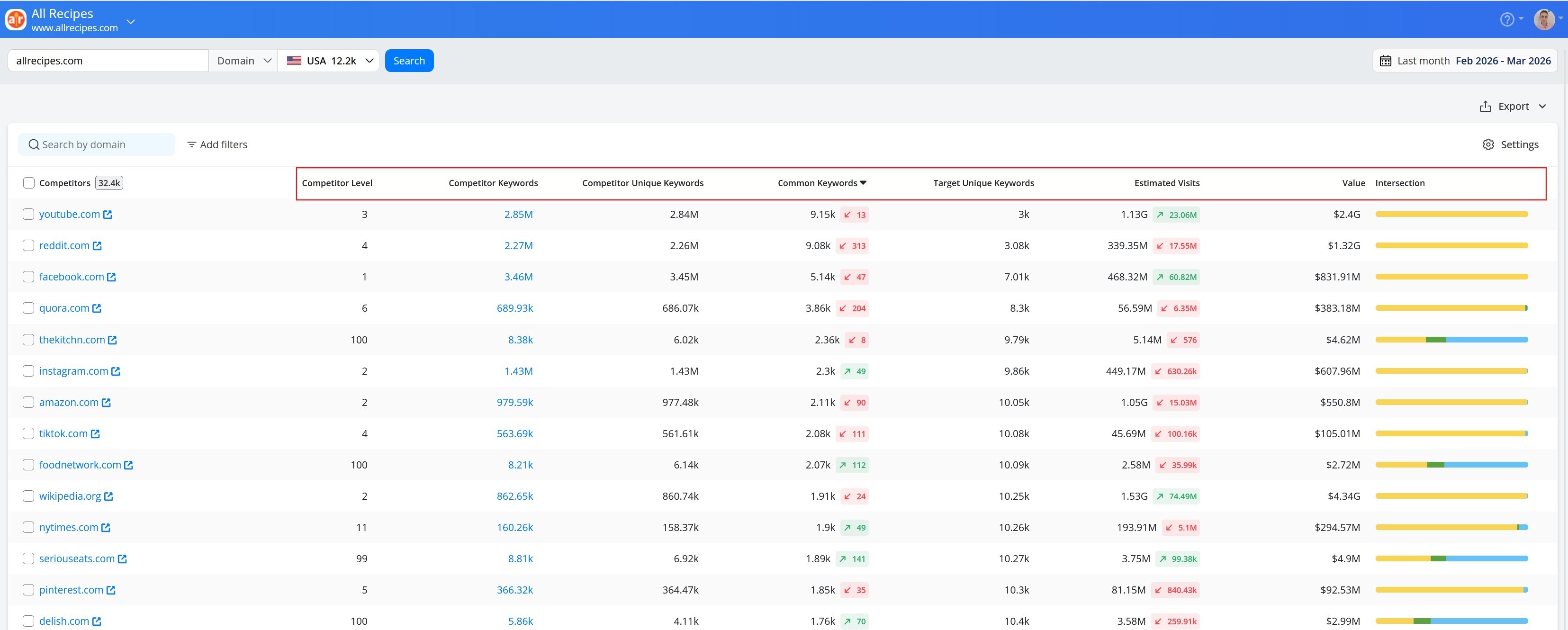
Here is what each metric tells you and how to use it:
Metric | What does it tell you | How to use it to find the right competitors |
|---|---|---|
Competitor Level | How much of their keyword set overlaps with yours | Start here. The higher the score, the more directly they compete with you. |
Competitor Keywords | Their total keyword footprint | A large footprint means more opportunities to mine, even if the overlap isn't the highest. |
Competitor Unique Keywords | Keywords they rank for that you don't | The more they have, the more content gaps you could potentially fill. |
Common Keywords | Keywords you both rank for | A high count means you're fighting for the same audience. These are the rivals to watch most closely. |
Target Unique Keywords | Keywords your domain ranks for that the competitor doesn't | Shows where you already have a competitive advantage. Useful for understanding your strengths before analyzing rivals. |
Estimated Visits | Their estimated monthly organic traffic | High traffic signals strong performance. Worth studying to understand what's working in your space. |
Value | The PPC equivalent of their organic traffic | A high score means their presence is commercially significant. Useful for identifying valuable keyword targets. |
Intersection bar | A visual split of shared vs. unique keywords | A quick way to compare competitors at a glance before deciding who to dig into first. |
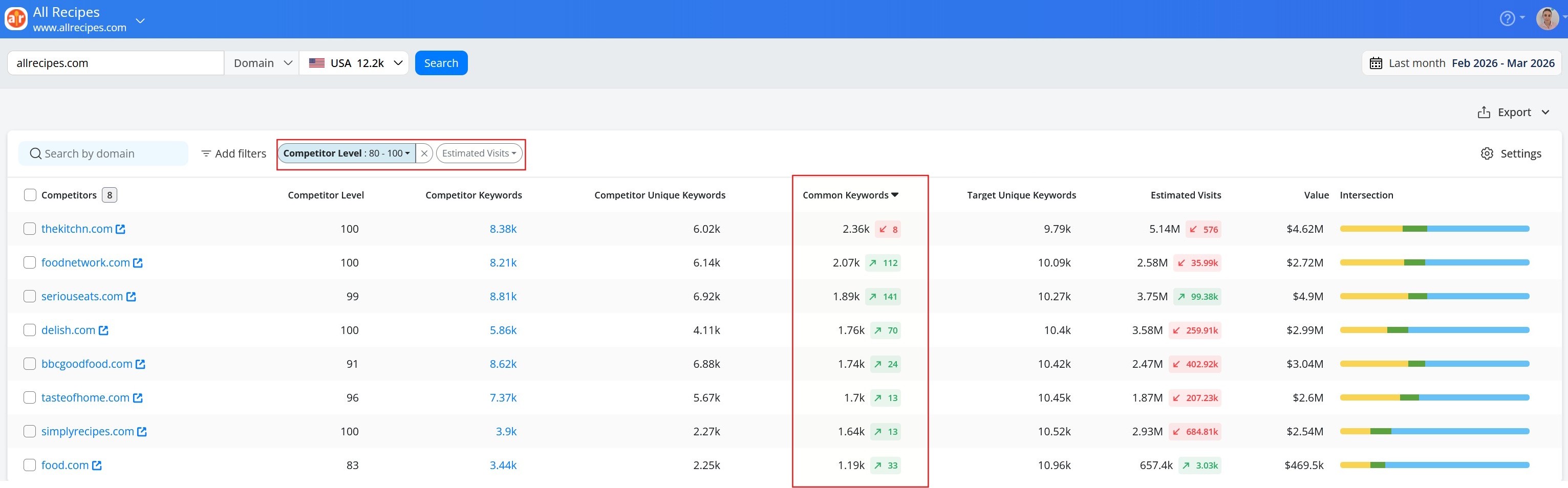
To cut through a long list of competitors, use the built-in filters for Competitor Level, Common Keywords, and Estimated Visits, or combine them for a more focused view:
The combination to use:
Set Competitor Level to a high threshold (e.g. 80+) to focus on domains with significant keyword overlap.
Then sort by Common Keywords to see who you're most directly battling for visibility. A low count (3–4) means the overlap is a small fraction of their total presence, making them large generic domains rather than true rivals.
Cross-reference with Estimated Visits to understand which of those rivals are actually winning the most organic traffic.
Explore what your competitors rank for
After identifying your most relevant competitors, jump straight into analyzing their keywords. Click on the Competitor Keywords count for any domain to open their full keyword report, the same powerful view as your own Keywords report, but for their domain.

Add competitor keywords to your tracking list
From here, follow the same steps as for your own rankings: sort and filter by Position, Estimated Visits, Search Volume, SERP Features, and CPC to surface the most valuable terms, then add them to your tracking list in one click.
For more on how to manage and organize your keywords once they're in a project, see Keyword management in AWR.
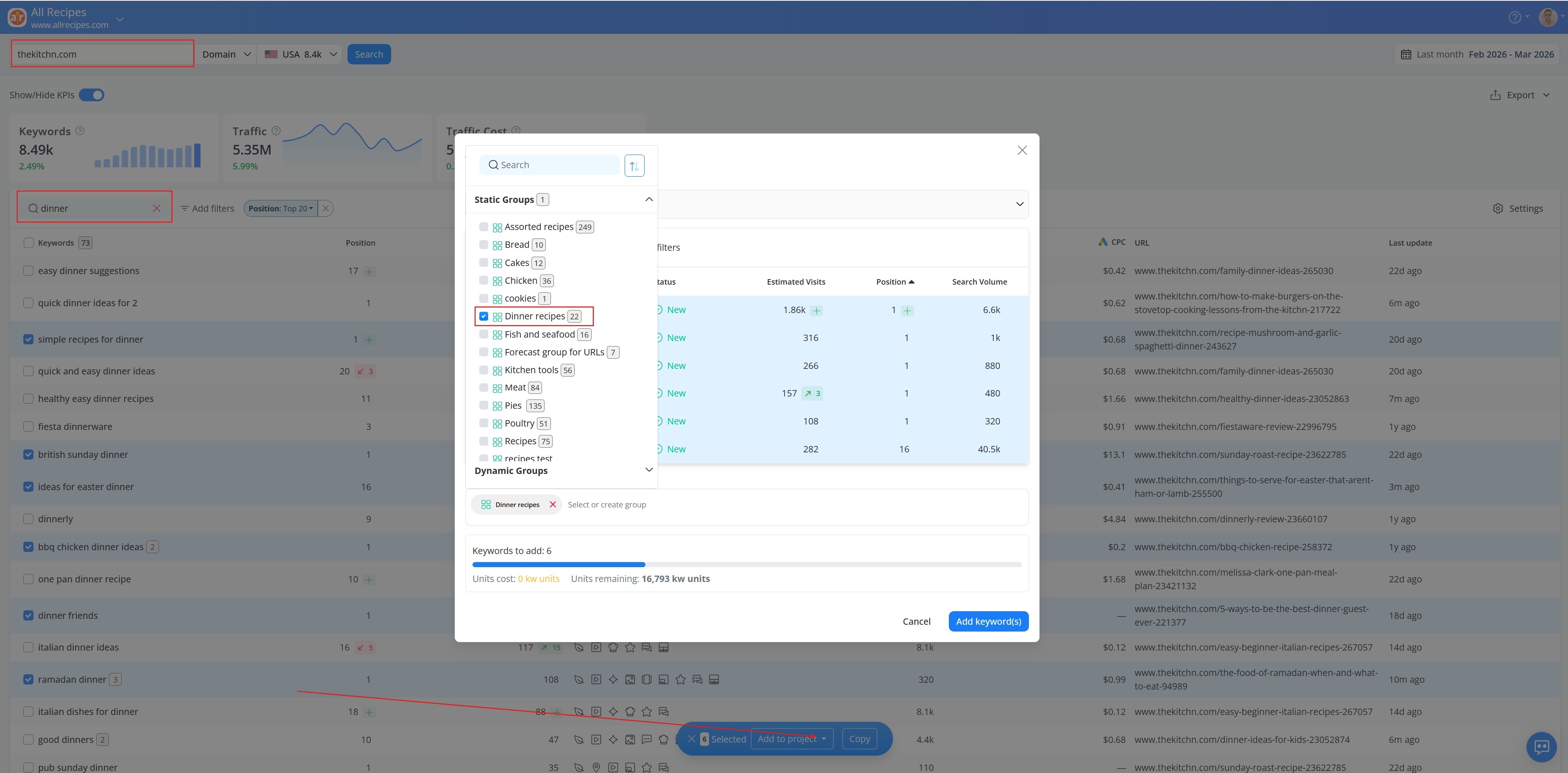
Repeat the process for as many competitors as you want to build a comprehensive keyword list drawn from across your entire competitive landscape.
Don't have the add-on yet? Start your free trial here.
Add Google Search Console data to your research
Connect AWR to GSC to pull in the queries Google is already reporting for your site (Impressions, Clicks, Average Position, and CTR) updated daily under Google Data > Search Console. This is the one source that shows intent-qualified traffic: users who actually saw your result and chose whether or not to click.
Keywords from GSC aren't automatically added to your tracking list. The data is noisy, and deciding what's worth pursuing requires judgment. A few patterns worth scanning for beyond the obvious sort-by-clicks pass:
High impressions, low CTR: your page is appearing but not getting clicked—usually a title or meta description problem, not a ranking problem.
Positions 11–20 with meaningful search volume: your most defensible quick wins. A content refresh or targeted internal linking push can move these to page one faster than building new rankings from scratch.
Terms you're ranking for but never targeted: cross-reference with the Keyword Research add-on. If they also appear there with meaningful Estimated Visits, they're worth adding to your tracking list and monitoring.
Don't sort and stop. Scan the full list—high-value terms with low impressions won't surface at the top.
Note: To connect GSC, go to Settings > Project Settings > Connections and add your Google account. You'll need at least Restricted User access on the Search Console property. The connection must be set up separately for each project. More details in this article.
Keyword research is never truly finished
Keyword research isn't a one-time task. Set a regular cadence to revisit your rankings, track new opportunities, and reassess the competition. AWR makes it easy to do all three in one place. You may find yourself needing to dig deeper into certain terms, re-evaluate market share, or research the competitive landscape all over again. Come back to any part of your research whenever you:
Enter a new niche or market
Launch a new page or content area
Notice a competitor gaining ground on terms you care about
Feel like your current list has gone stale
Think of it less as a task to complete and more as a habit to build. The more consistently you revisit your research, the better your keyword list reflects where your audience is and where your opportunities lie.

Article by
Dana Zavaleanu
Dana leads the marketing team at AWR. Having 13+ years of experience in the industry, she's an all-round digital marketer, with a focus on search analytics and content. Say hello @dana_zavaleanu