

SERP Analysis: How to Analyze the SERP and Track How It Changes
Getting on the first page of search results isn’t easy, and even when you do, real visibility is harder than ever. SERP features like AI Overviews and sponsored results can push organic listings down the page.
So how do you choose the right keywords and give your content a real chance of being seen?
It starts with a SERP analysis.
Before targeting a keyword, you need to understand more than search volume or ranking difficulty. You need to evaluate the full search landscape, then monitor how it changes over time for the keywords you choose to target.
What is a SERP analysis?
A SERP analysis examines the top-performing websites and SERP features to understand the intent of a search query and the potential requirements for a webpage to outrank competitors.
A SERP analysis is a core part of your SEO strategy in two ways:
On-demand SERP analysis: for keyword research and content briefing. It tells you whether a query is worth targeting before you invest in content by showing what Google is rewarding today.
Ongoing SERP monitoring: it's the foundation for tracking how the search landscape shifts for that query, since rankings, SERP features, and competitors change constantly.
Why SERP Analysis Matters
SERP analysis turns keyword selection from guesswork into a more informed decision. It helps you understand whether the opportunity is realistic, what kind of page you need, and what could limit your visibility even if you rank.
Here’s what changes when you analyze the SERP before creating or updating content:
With SERP analysis
Without SERP analysis
You understand the search intent behind the keyword.
You may create content that does not match what users want.
You identify the content type and depth needed to compete: guide, tool, video, product page, comparison page, or local result.
You may create the wrong format or cover the topic too lightly.
You see who your real SERP competitors are and what they do well.
You may focus only on business competitors and miss the pages already winning visibility.
You spot SERP features, sponsored results, and other elements that affect organic visibility
You compete only for organic positions and ignore where attention actually goes
You estimate the real click opportunity by checking how much space organic results actually get on the page.
You may assume ranking on page one automatically means strong traffic potential.
You uncover related questions, subtopics, and keyword opportunities.
You may miss useful subtopics or create content that adds little new value.
You assess whether you have the authority, trust signals, and content quality needed to compete.
You may underestimate how difficult it will be to rank.
You set up ongoing SERP monitoring to catch changes in rankings, competitors, intent, search features, and visibility.
You may miss shifts that affect performance after your content goes live.
How to Do a SERP Analysis
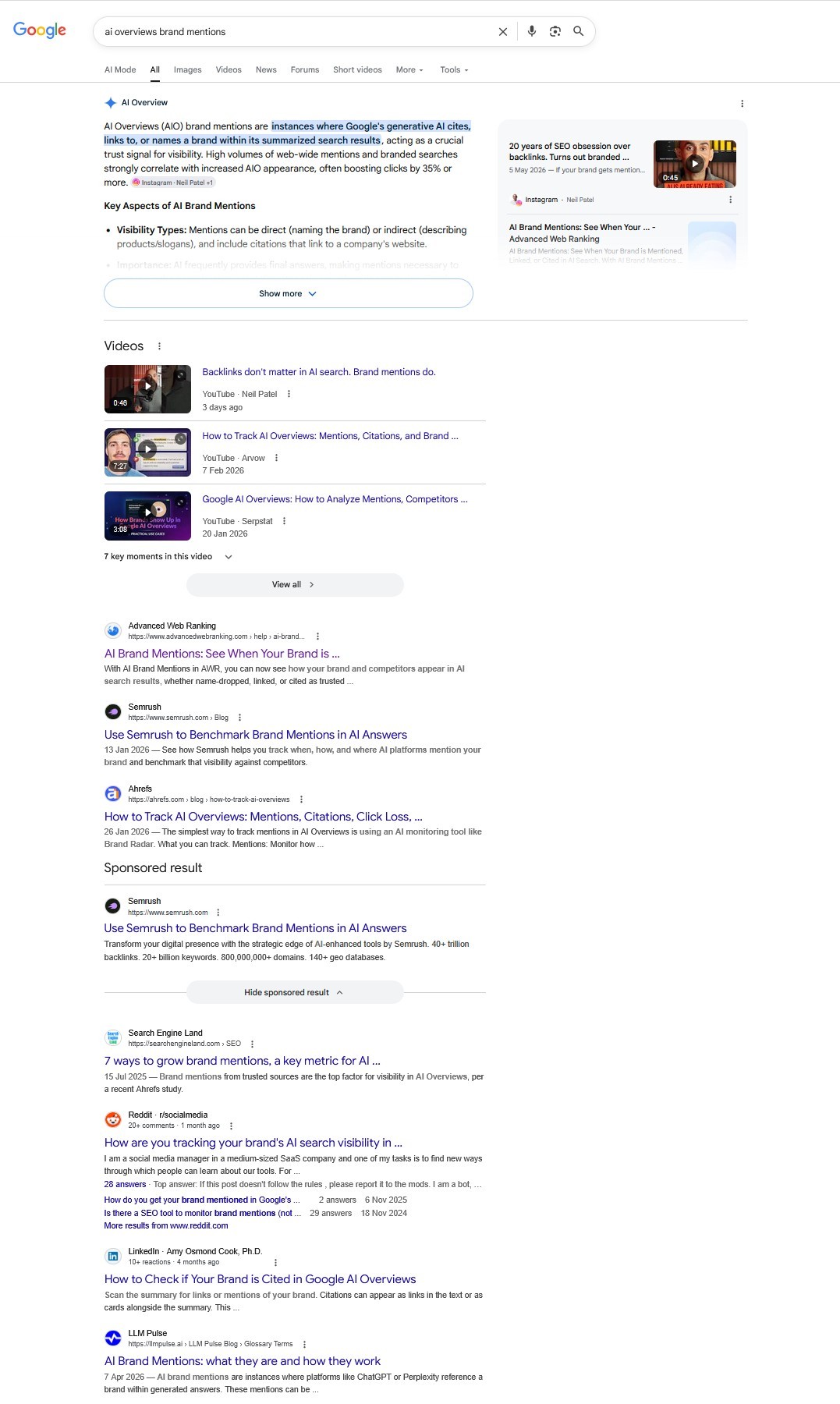
The best way to learn how to do a SERP analysis is to walk through one. The five-step process below covers an on-demand analysis for a real example of a SERP triggered by the keyword "AI Overviews brand mentions", which includes many of the elements a modern analysis needs to cover.
Step 1: Check the SERP by Location and Device
Before analyzing anything, make sure you’re looking at the SERP your audience actually sees. Search results can change by country/city, language, and device, affecting ranking order, the SERP features triggered, and ad placement.
For a quick ad-hoc check, use AWR Search Anywhere, a free Chrome extension that lets you preview Google results from different locations without a VPN or proxy. Set the location (country/city or GPS), Google domain, language, and device, then compare views.
The SERP for “AI Overviews brand mentions” shows different layouts on desktop and Android.
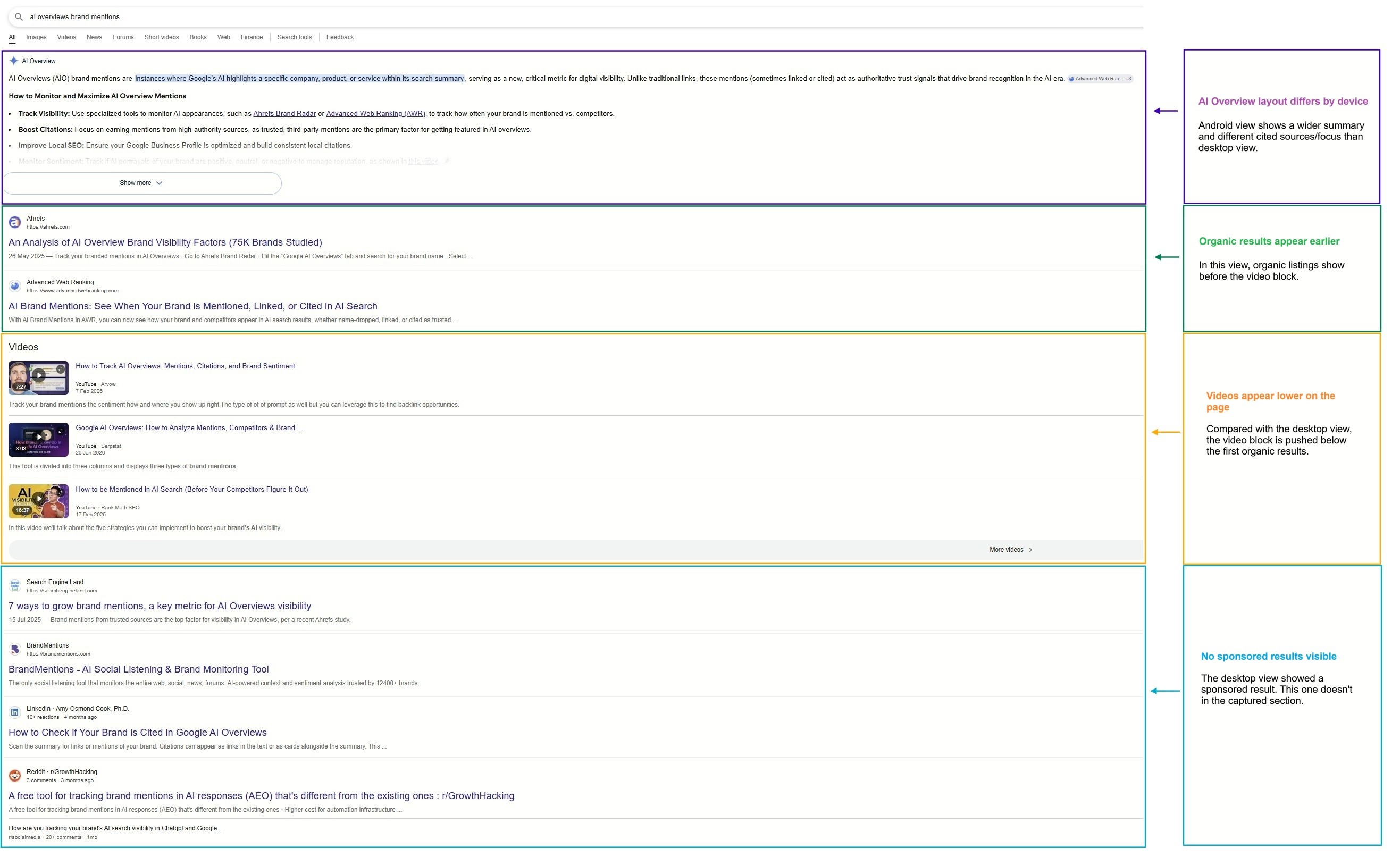
Remember: Always validate the SERP in the same location, language, and device as your audience, otherwise your analysis and content decisions may be based on the wrong results page.
Step 2: Identify Search Intent and Content Type
The next step is reading what the search engine believes the searcher wants and what kind of page satisfies that need. This is essential, since it directly shapes what your content needs to contain.
Understanding search intent
Intent takes many forms. A simplistic approach groups queries as the following:
Informational: the user wants to learn or research something.
Commercial: the user is comparing options before making a decision.
Transactional: the user is ready to buy, sign up, download, or take action.
Navigational: the user is looking for a specific website, brand, or page.
Google's Quality Rater Guidelines use a parallel but more precise classification:
Information-seeking queries:
Know queries: broad topics that need a more complete answer.
Know simple queries: questions with a short, direct answer.
Action-based queries:
Do queries: when the user wants to buy, download, calculate, compare, or interact.
Visit-in-person queries: when the user wants a local business, service, or place.
Website queries: when the user wants to reach a specific site.
Let’s analyze the SERP for “AI Overviews brand mentions” to understand what Google believes users are trying to accomplish.
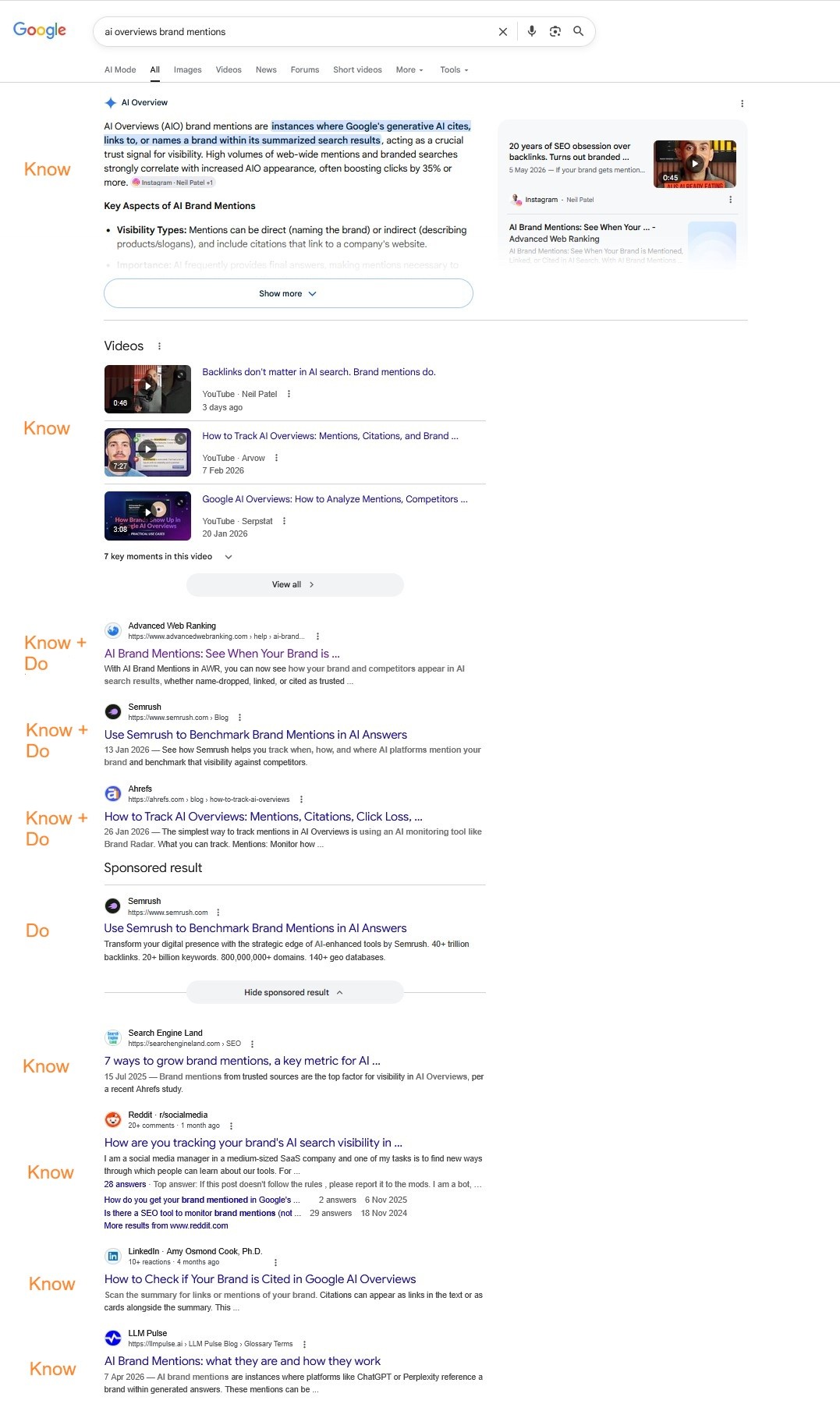
In this view, the AI Overview and Videos section, along with the explanatory articles at the base of the page, signal strong Know intent. At the same time, prominent SEO tool listings (e.g., Advanced Web Ranking, Semrush, Ahrefs) add a clear Do layer.
This is classified as a mixed intent, indicating users want not only to understand the concept but also to take action by tracking or benchmarking brand mentions in AI results.
Ads as an intent signal: Heavy ad coverage often points to stronger commercial intent, while few or no ads may suggest a more informational query. Ads do not affect organic rankings directly, but they can push results lower and reduce click potential.
Picking the correct content type
With intent clear, the next call is content type, the format Google prioritizes for that intent. Even the best-written content in the wrong format won't rank.
Match informational intents with content types such as:
Listicles
Short-form articles
Long-form articles
Video
Step-by-step tutorials
Reviews
Case studies
Match "do" intents with:
Tools
Calculators
Products
Product categories
Service pages
Remember: Intent and content type are the two earliest decisions in a SERP analysis and the hardest to fix later if they're wrong.
Step 3: Read SERP Features
A modern SERP rarely starts with the first organic result. SERP features now occupy most of the screen, often pushing organic listings below the fold. Treat them as part of the ranking landscape, not as extras.
Common SERP features include:
Videos
Top Stories / News
Images
Local Packs
and more.
Target the features Google consistently surfaces for your keyword as part of your strategy.
For “AI Overviews brand mentions,” two key SERP features stand out: an AI Overview and a Videos block.
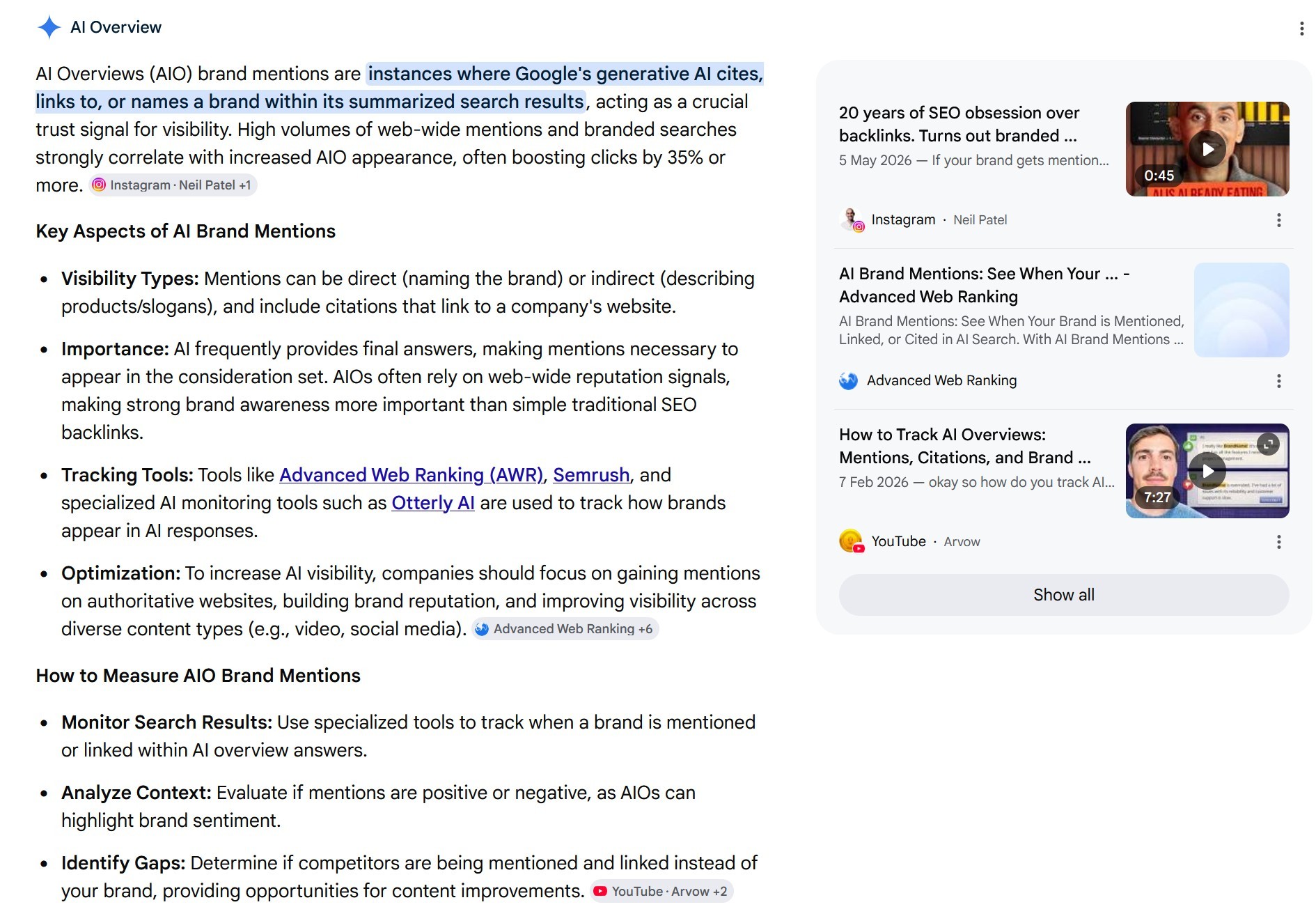
Because the AI Overview appears at the top of the page and can expand to take up even more screen space, many users may get a satisfactory answer before reaching the organic results. That makes inclusion or citation within the AIO a major visibility opportunity.
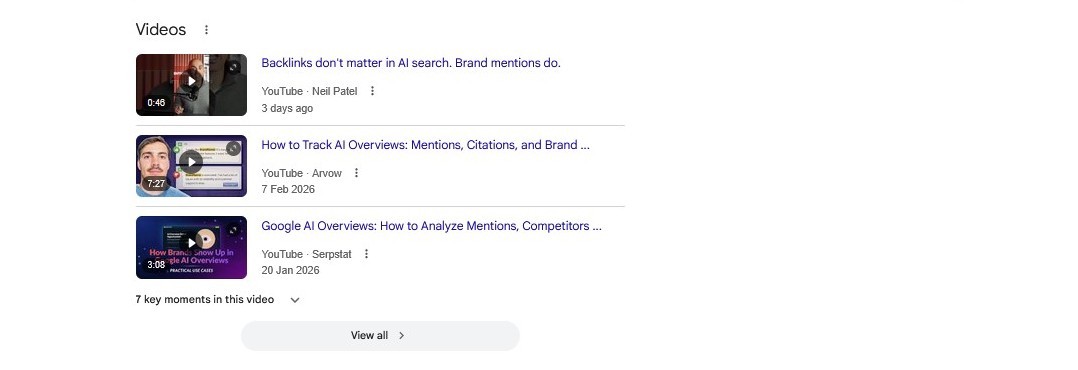
The video block that follows shows how-to explanations and walkthroughs are rewarded, too, making video a viable format for this topic.
Remember: SERP features shape what users see and often satisfy the query without a click, before they ever reach organic listings. Treat them both as visibility opportunities and as competitors for attention.
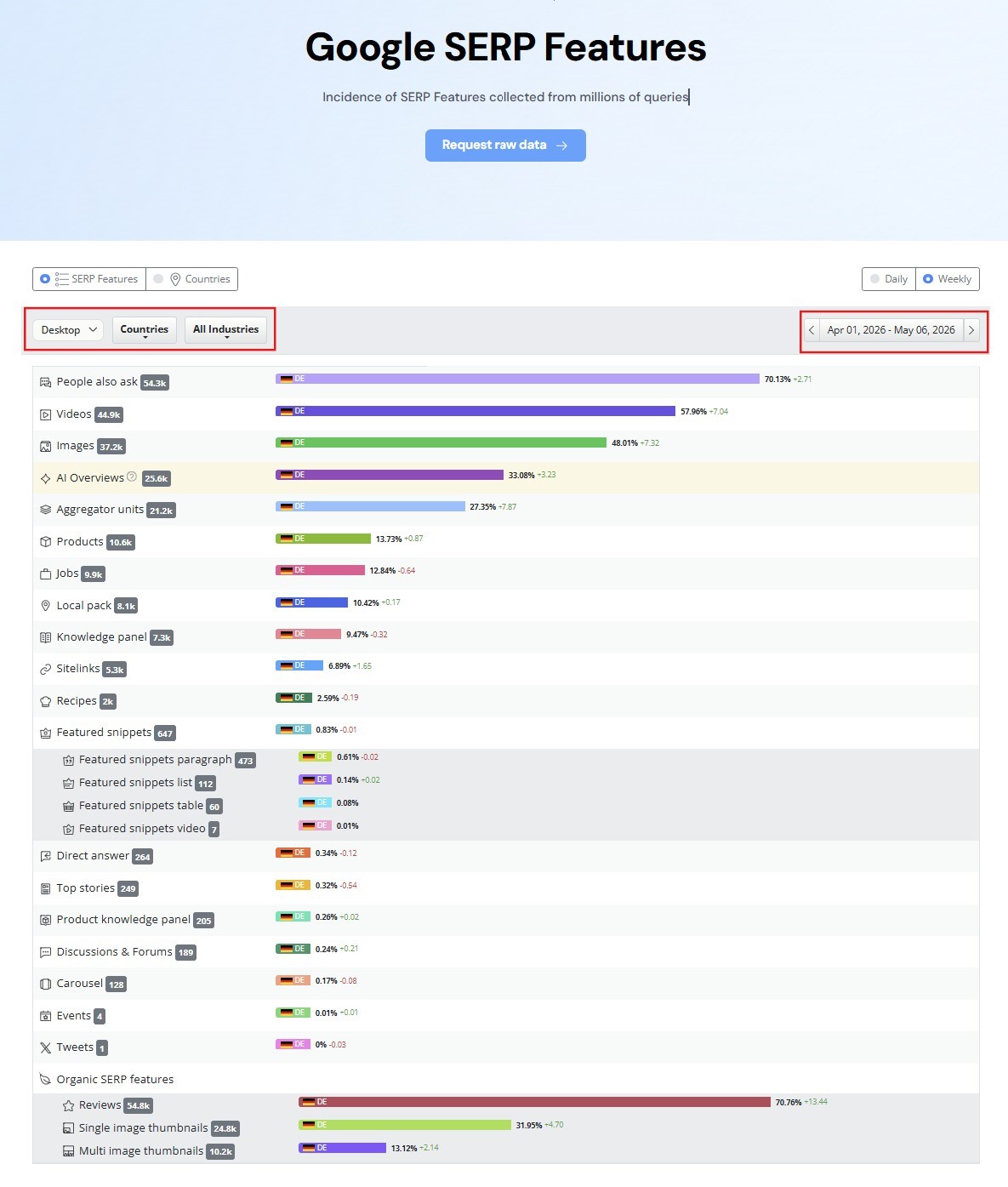
Want a quick benchmark of what Google is showing in your market? AWR’s free Google SERP Features tool lets you filter SERP features' occurrences by country, industry, and device for a specific period to see which ones appear most often.
Step 4: Analyze Organic Competitors and Spot the Gaps
Understanding the competition is a necessary element of SERP analysis and your overall SEO strategy. A proper competitor analysis tells who's already ranking, why they're ranking, what they're missing, and whether you can realistically compete.
Who's ranking
Top domains and URLs: note the sites that rank, their authority, and whether they recur across related queries.
SERP vs. business competitors: your search rivals may be publishers, forums, or aggregators, not direct market competitors.
SERP feature owners: note who's cited in the AI Overview, PAA, or video carousels. Owning a feature can matter more than ranking #1.
Find the gaps
A SERP gap analysis is what turns competitor research into a ranking opportunity. The best ones come from giving searchers something the top results don't. Look at competing pages and find where you can outperform them on:
Content structure: get an idea of competitor word count, headings, and organization, and improve clarity.
Content depth: expand on points competitors cover too briefly, especially where readers need more detail.
Data and research: ad add original studies and stats where competitors only recycle third-party data.
Examples and use cases: show real scenarios and workflows where competitors only describe them.
Visuals: include screenshots, diagrams, and walkthrough videos that competitors lack.
Freshness: update outdated examples, references, or guidance where competing results are stale.
Missing subtopics: answer important questions, angles, or edge cases the top results leave out.
Quick analysis for “AI Overviews brand mentions” SERP:
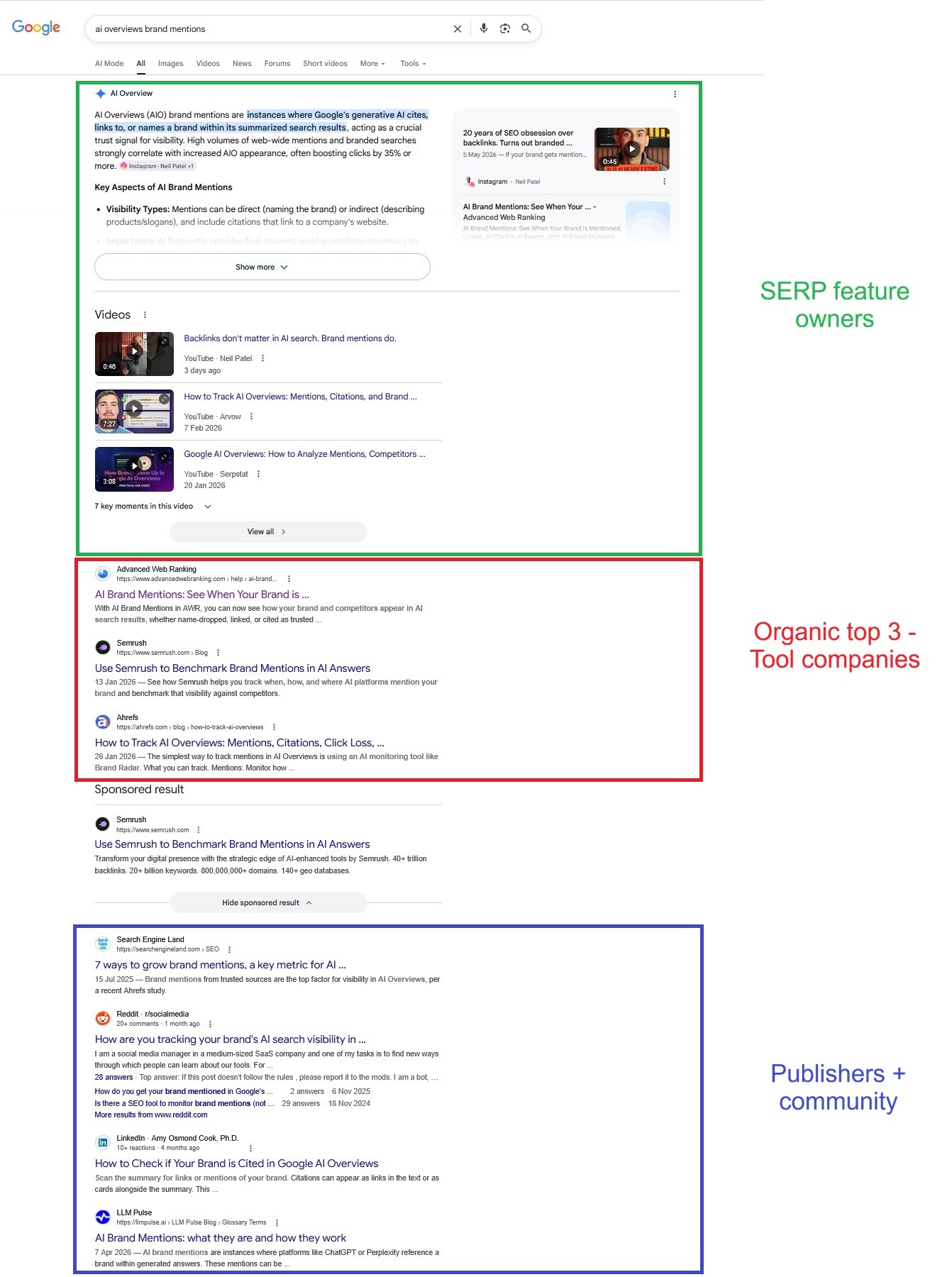
SERP feature owners: the AI Overview cites Neil Patel and Advanced Web Ranking, and mentions AWR, Semrush, and Otterly AI in the generated answer. The Videos block is led by Neil Patel, Arvow, and Serpstat.
Top organic results: the first three organic listings are SEO tool companies: AWR (#1), Semrush (#2), Ahrefs (#3), all focused on tracking AI brand mentions.
Publishers + community: lower on the page, Search Engine Land and Reddit add supporting education and real-world discussions.
The opportunity is a proof-driven guide with screenshots, a clear monitoring workflow, and practical templates. A short video could also support visibility in the Videos block, while strong structure may improve the chances of being surfaced in the AI Overview. Together, these bridge “what it is” and “how to do it,” while improving visibility across SERP features.
Remember: a SERP competitor analysis isn’t about copying what ranks; it’s about establishing a path to win. Identify who owns the key placements (top organic + SERP features), then look for a clear content advantage you can create. If none of those are realistically achievable, it’s not a keyword to pursue.
Step 5: Check Traffic Potential from Click Data
A keyword can have strong volume, clear intent, and achievable rankings and still drive fewer clicks than expected.
With more SERP features answering queries directly, zero-click searches are increasingly common. So before investing in content, check whether the SERP can realistically generate traffic.
Here, the layout for “AI Overviews brand mentions” offers a useful example, with both an AI Overview and a Videos block shaping click potential.
Important: This CTR data below isn't measured for this specific keyword. It's a benchmark from aggregated US desktop data (March 2026), used to show how this type of SERP layout typically affects organic clicks.
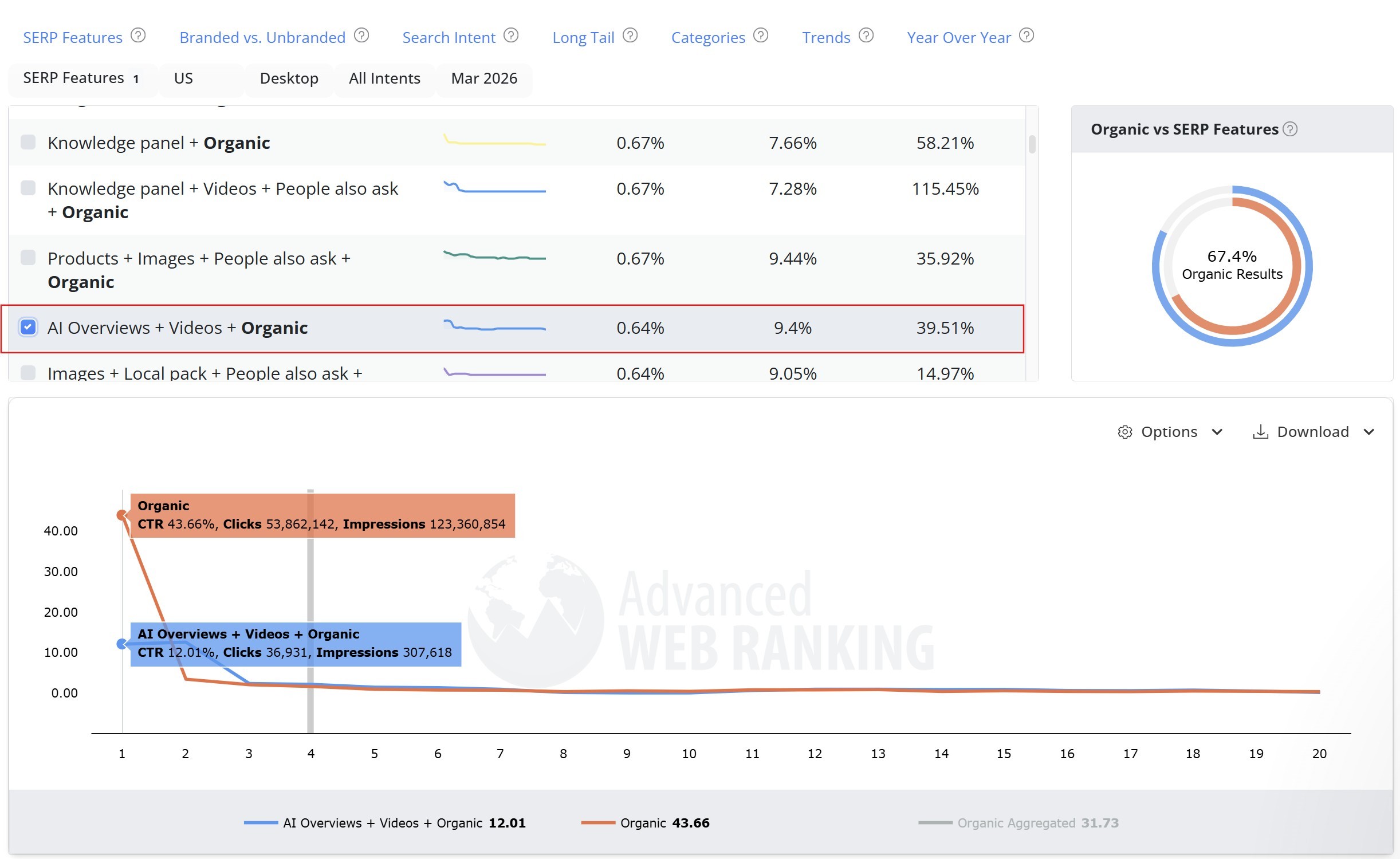
Screenshot source: Google Organic CTR free tool by Advanced Web Ranking
Using AWR’s free Google Organic SERP CTR Curve tool, you can see:
The donut shows the average split between organic results and SERP features across this SERP layout: 67.4% organic results and 32.6% SERP features (including the AI Overview and Videos block).
The CTR curve shows how often each organic ranking position gets clicked per impression: on an organic-only SERP, position #1 averages ~43.66% CTR, while on a SERP with AI Overviews + Videos, position #1 drops to ~12.01% CTR—nearly a 4x decrease in click potential for the same ranking position.
Remember: click potential is not fixed. The same organic position can drive very different traffic depending on the SERP features and layout users actually see.
On-Demand SERP Analysis vs. Ongoing SERP Monitoring
The on-demand SERP analysis is essential for keyword research and content planning. But SERPs do not stand still. Algorithm updates, AI Overview changes, new competitors, shifting intent, and evolving feature mixes can reshape the page within days.
The same SERP for "AI Overviews brand mentions," captured just days after the original screenshot used in this article, already looks different:
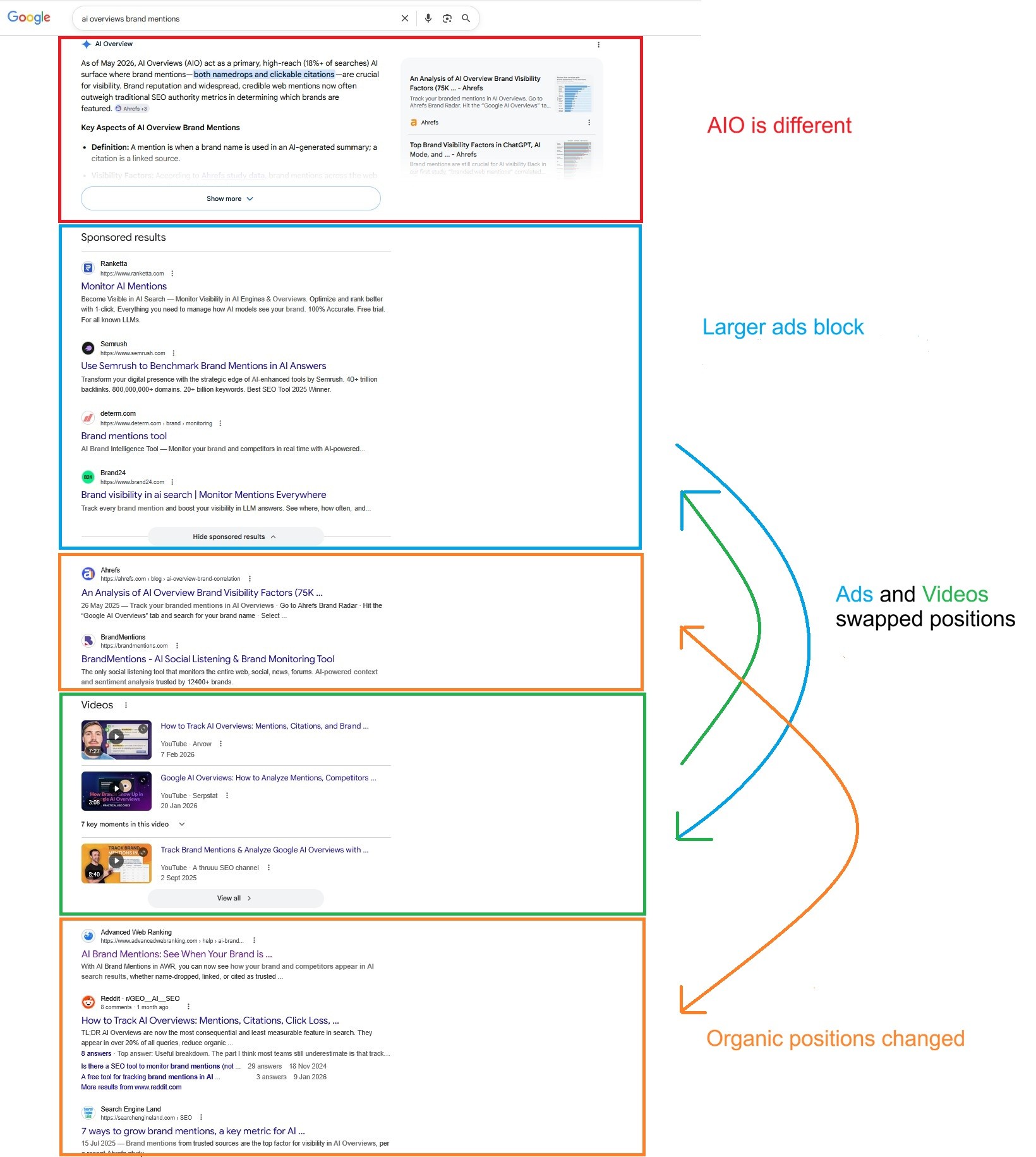
the AI Overview wording and cited sources have shifted.
a larger sponsored block now sits below it.
organic rankings have moved.
the video section was pushed further down the page.
The SERP analysis performed at the start of this article is already partially out of date. That's where ongoing SERP monitoring comes in.
What Ongoing SERP Monitoring looks like in AWR
Once a keyword is worth pursuing, it's worth tracking.
With Advanced Web Ranking, that means adding the keyword to your project and monitoring the search landscape around it over time: which pages rank, which competitors keep showing up, what SERP features appear, and whether your visibility is improving or being pushed down the page.
With its SERP Analysis reports, AWR helps turn one-time SERP analysis into ongoing monitoring across four dimensions:
1. Monitor the Full SERP Landscape with the Top Sites Report
The Top Sites report shows how rankings, competitors, and SERP features change between updates for a tracked keyword within a search engine.
Use it to:
Spot fast-moving SERPs that need closer monitoring
See whether your brand is gaining or losing visibility
Understand the gap between ranking position and actual SEO visibility
Track competitors that appear, improve, or decline
Identify which SERP features are shaping the results page
Estimate which listings are most likely to attract clicks
Assess each keyword's competitive value and traffic potential
These insights are supported by built-in AWR metrics. You can dive deeper into how each one works in this supporting article.
In the example for “AI Overviews brand mentions,” the report shows a highly volatile SERP, the top-ranking URLs, the AI Overview result, video results, and how far down each listing appears on the page.
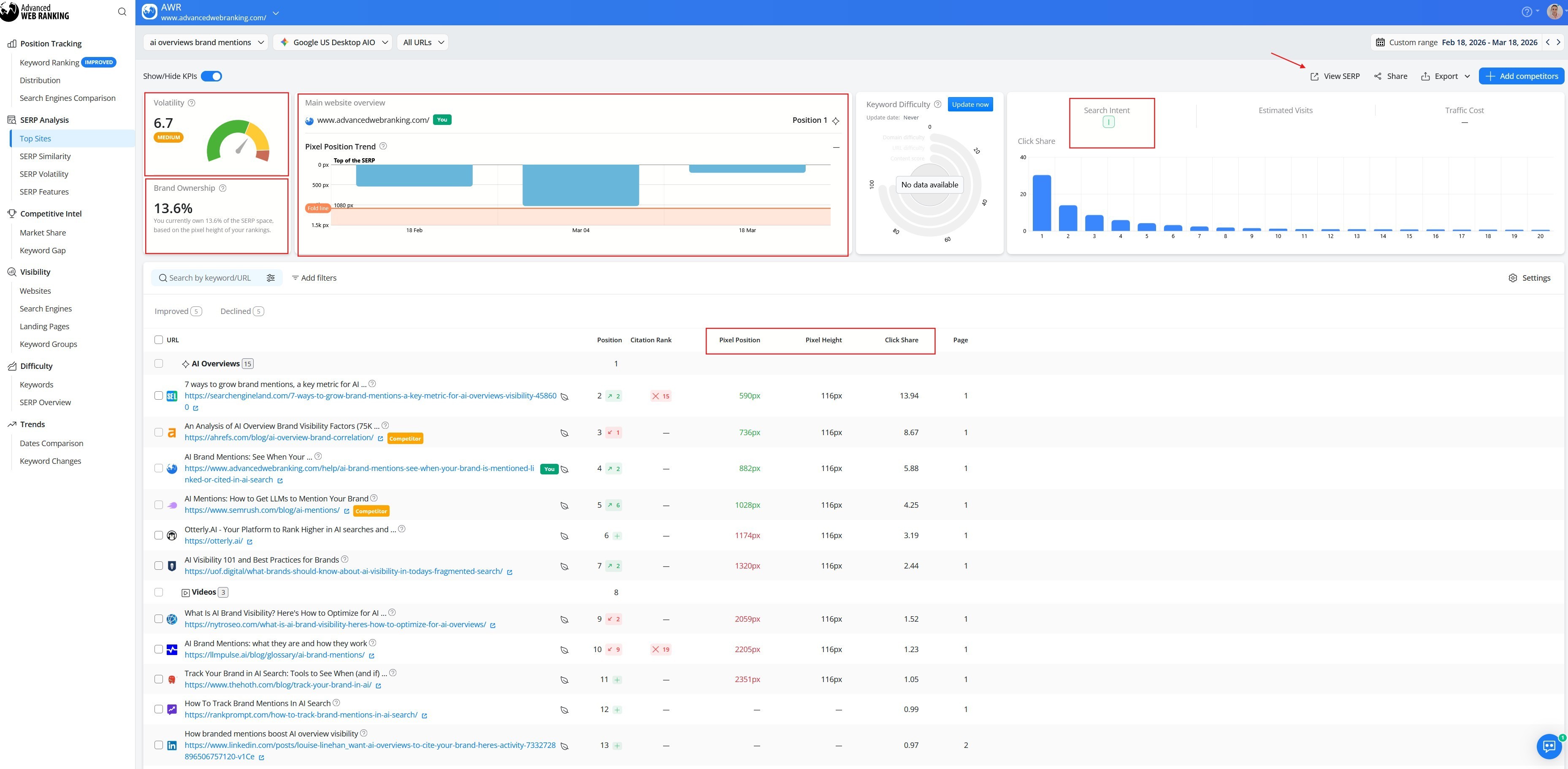
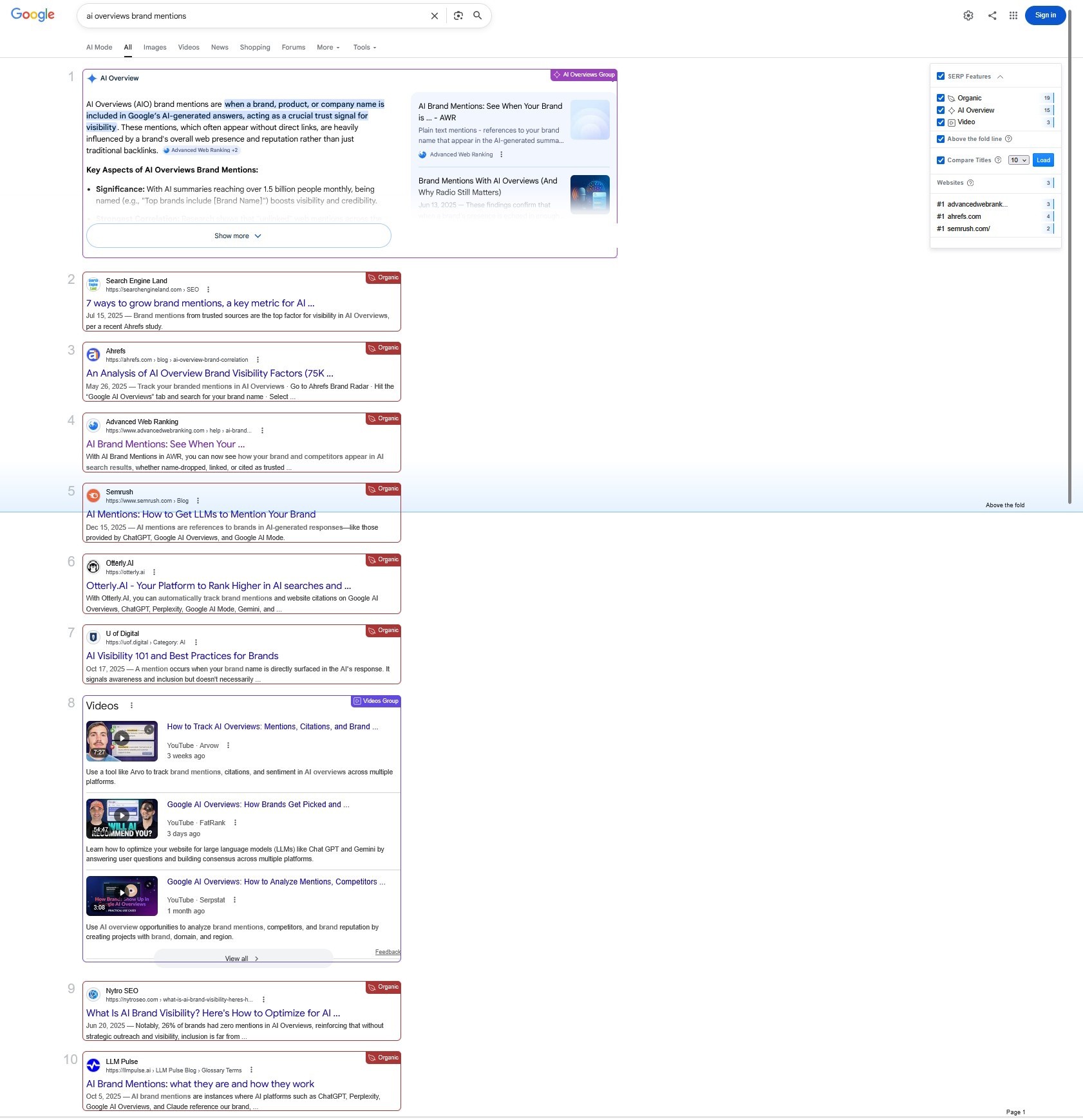
To see the SERP itself, the View SERP option opens a snapshot of the tracked keyword. There, you can inspect the exact retrieved layout, identify result types, check above-the-fold placement, and review pixel position and result height in context.
2. Compare SERP Changes with the SERP Similarity Report
The SERP Similarity report compares two SERP snapshots side by side, helping you see what changed between dates, devices, markets, or even different keywords.
Use it to:
Compare how much two SERPs overlap in rankings, URL mix, and search intent
Detect the impact of algorithm updates, intent shifts, or competitor movement
Spot the biggest ranking winners and losers between updates
See which new URLs entered the SERP and which ones lost visibility
Understand how much of the current SERP has been replaced by new domains
Drill into URL-level changes to see exactly where rankings shifted
Track SERP feature changes, including features that appear, disappear, or get replaced
For a deeper breakdown of these comparisons and metrics, explore the full SERP Similarity report guide in this supporting article.
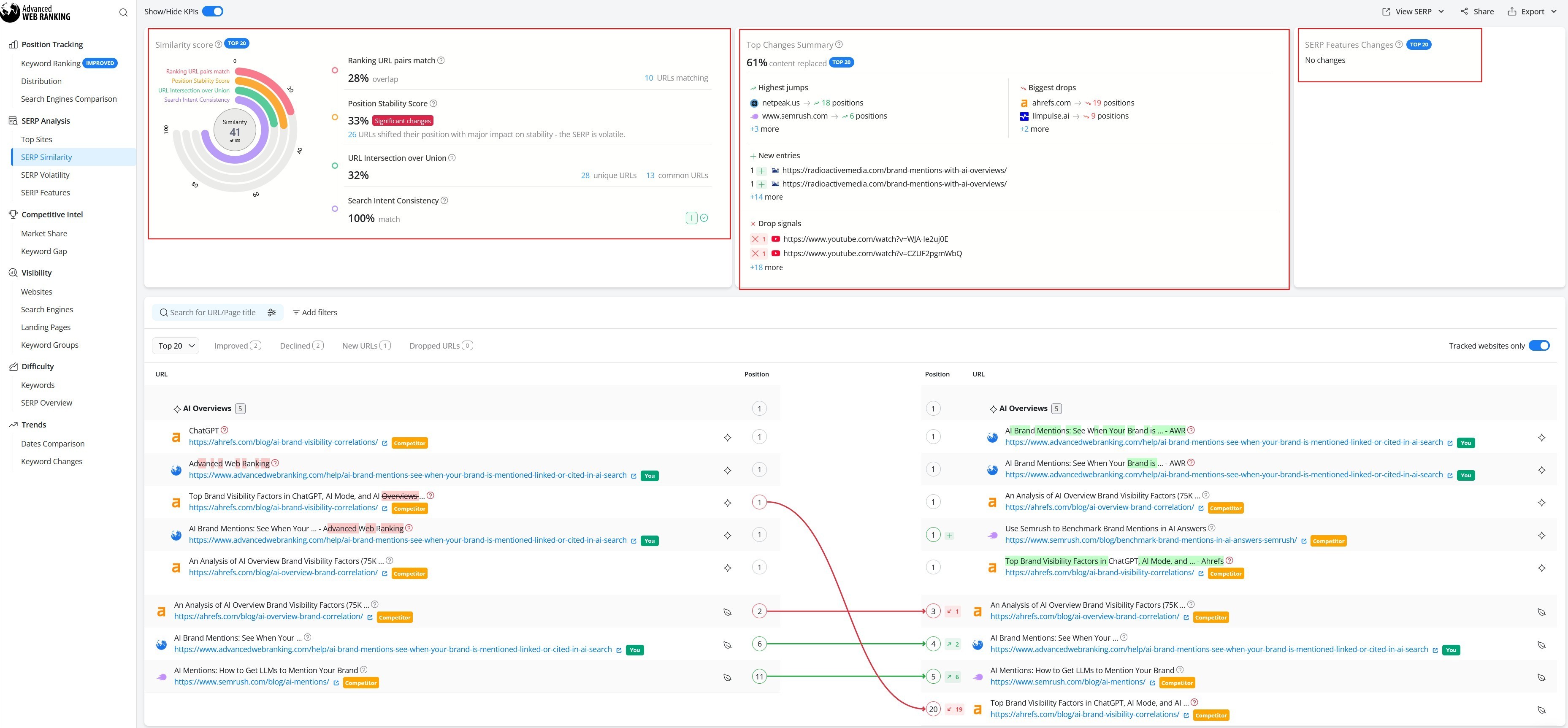
For “AI Overviews brand mentions,” the report shows a Similarity score of 41, meaning the SERP has changed noticeably between the two updates. Only 10 URLs kept their position, while 26 URLs moved significantly, and 61% of the top 20 results were replaced by new domains.
At the same time, search intent consistency remains at 100%, suggesting the query still serves the same overall intent even though the ranking landscape has shifted considerably.
3. Understand Why Rankings Shift with the SERP Volatility Report
The SERP Volatility report shows how rankings and result sets change over time, helping you distinguish individual position shifts from broader SERP movement.
Use it to:
See how many URLs improved, declined, stayed stable, entered, or dropped
Spot whether the SERP is experiencing broad churn or smaller ranking adjustments
Track whether search intent changes across updates
Follow how individual domains move through the rankings over time
Identify emerging competitors and domains losing ground
Understand whether ranking losses are isolated to your page or part of a wider SERP shift
To get a deeper breakdown of the report and its charts, explore the full supporting article.
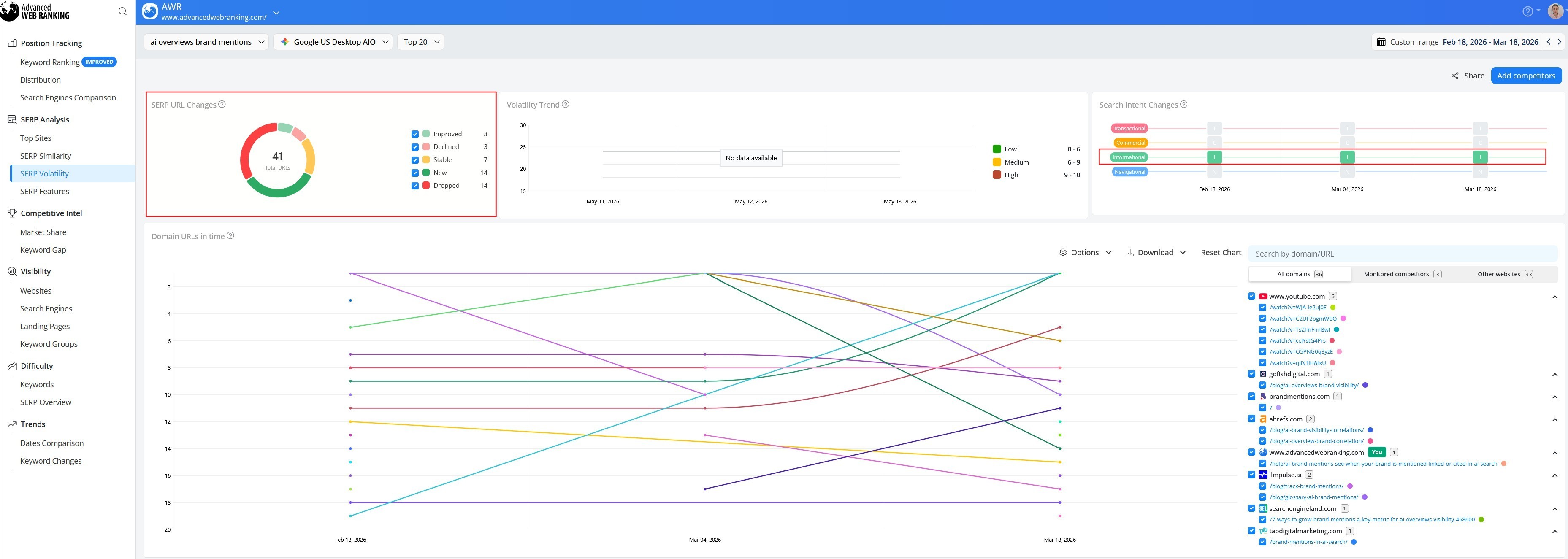
For the tracked keyword, the report indicates a very fluid SERP: 41 total URLs, with 14 new entries and 14 dropped URLs, while only 7 remained stable. That points to significant turnover in the result set. At the same time, the search intent stays informational across the displayed dates.
The volatility trend by domain shows visible volatility for several competitors, with multiple domains moving in and out of top positions during the period.
4. Track Feature Visibility with the SERP Features Report
The SERP Features report reveals how search features shape visibility across a keyword group, rather than for one query at a time. That makes it useful for monitoring broader topic areas, content clusters, or campaign themes.
Use it to:
See which SERP features appear most often across a keyword group
Track whether your site is gaining or losing visibility in those features
Compare feature ownership between your website and competitors
Measure won vs. lost SERP feature opportunities over time
Estimate the traffic potential connected to achieved features
Spot topic-level shifts that may call for broader content updates
Separate visibility from organic rankings by seeing where features influence the SERP
To get the most out of this report, check the full SERP Features guide.
To use this report effectively, group your target keyword with closely related queries from the same topic or content cluster. For example, “AI Overviews brand mentions” can sit inside an AI brand visibility group alongside other related queries.
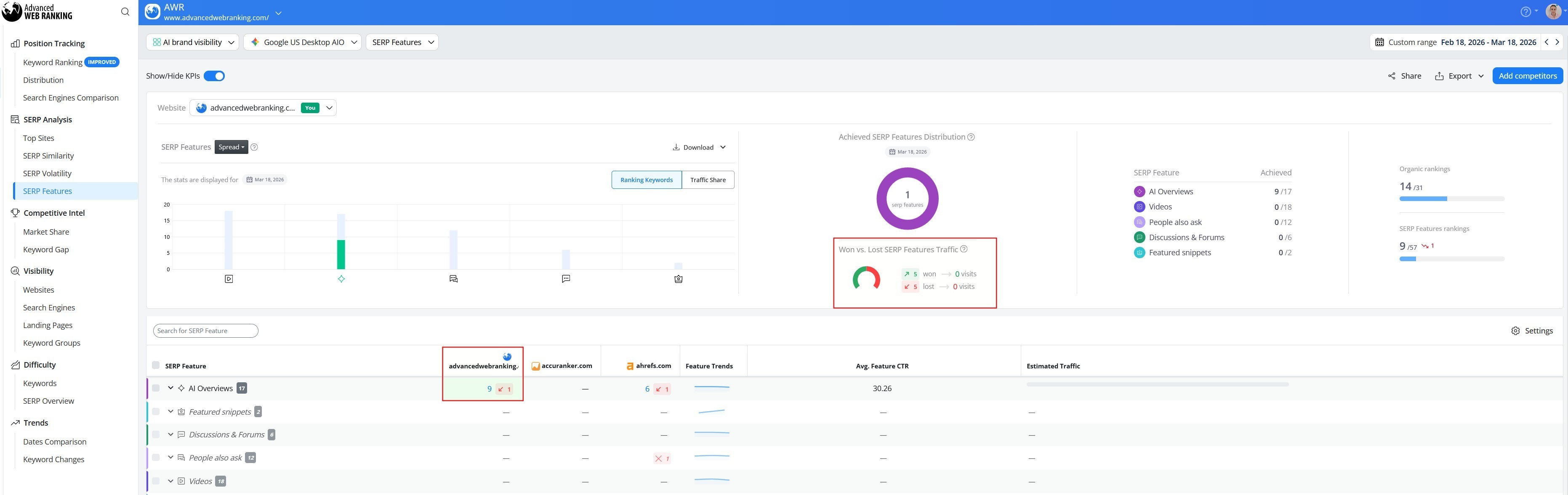
Looking at the group as a whole, AI Overviews appear for 17 keywords, with AWR owning 9. Videos appear for 18 keywords but remain unclaimed, as do People Also Ask, Discussions & Forums, and Featured Snippets. AWR also gained 5 feature placements and lost 5 over the period, showing movement but no net change.
Final Thoughts
SERP analysis shows what the search landscape looks like today: who ranks, what features appear, and whether a keyword offers real visibility potential. But in an AI-shaped, fast-changing SERP, a one-time snapshot is not enough.
For the keywords that matter, it is essential to track rankings, competitors, SERP features, volatility, and real visibility over time.
Used together, on-demand analysis and ongoing monitoring turn SERP analysis from a one-off research task into a smarter, ongoing SEO practice.
AWR: Your SERP analysis platform with competitor insights
✓ Analyze ranking URLs, competitors, and SERP features for your tracked keywords
✓ Compare two SERPs side by side to spot ranking, intent, and feature changes
✓ Measure SERP volatility and identify what’s driving the movement
✓ Track which SERP features appear across your keyword groups, who owns them, and how that shifts over time

Article by
Irina Diaconu
I’m a passionate content writer who loves researching and exploring new topics. With a keen eye for detail, I am dedicated to creating well-informed pieces that captivate and inform readers. Sharing knowledge and arousing curiosity is at the heart of my writing journey.