

Advice and answers from the Advanced Web Ranking Team
Search for articles
Google Update just released? See if and how your website’s performance changed
Learn how to spot ranking, visibility and traffic changes after a Google update and understand what they actually mean for your website.

You log into your SEO dashboard and notice something unusual.
Some keywords are suddenly ranking higher. Others dropped overnight. A few pages lost visibility, while competitors started appearing more often in the search results.
Then you hear the news: Google just released a new algorithm update. At that point, the most important question becomes: did this update actually change my website’s performance?
The answer isn’t always obvious.
Google updates can influence your position in the search results differently depending on your industry, location and the types of keywords you track. Sometimes the impact is immediate. Other times, changes happen gradually over several days as Google adjusts the SERPs and recalculates rankings.
This article explains how to understand what changed after a Google update, which signals matter most and how to monitor your website without getting lost in individual rankings.
TL;DR: How to Measure the Impact of a Google Update
Don't rely on a few ranking changes to determine whether a Google update affected your website. Instead, check your overall visibility, review estimated traffic, analyze changes in SERP features, compare your performance against competitors and examine how the search results themselves have changed.
By looking at these signals together, you'll be able to separate short-term fluctuations from meaningful trends, understand what actually changed and decide whether any action is needed.
AWR’s Visibility, Market Share, SERP Features and SERP Similarity reports make it easier to understand what changed during the update and how those changes affected your website.
If you want to speed up the process, you can use AI Insights to analyze your ranking data automatically and generate recommendations based on the changes detected in your project.
First Things To Check After a Google Update
Track overall search visibility instead of isolated rankings
Instead of checking a few rankings manually, try to look at the bigger picture. In AWR, you can do this by using the Visibility > Websites report, where the Visibility Score evolution in time chart helps you understand how your website’s overall search presence changes over time.
The Visibility Score is calculated across all tracked keywords, giving you a broader view of your performance instead of focusing on isolated ranking movements.
If you're wondering whether a recent Google Core Update may have influenced your rankings, start by selecting a date range that covers the period before and after the update. You can do this using the date selector in the top-right corner of the report.
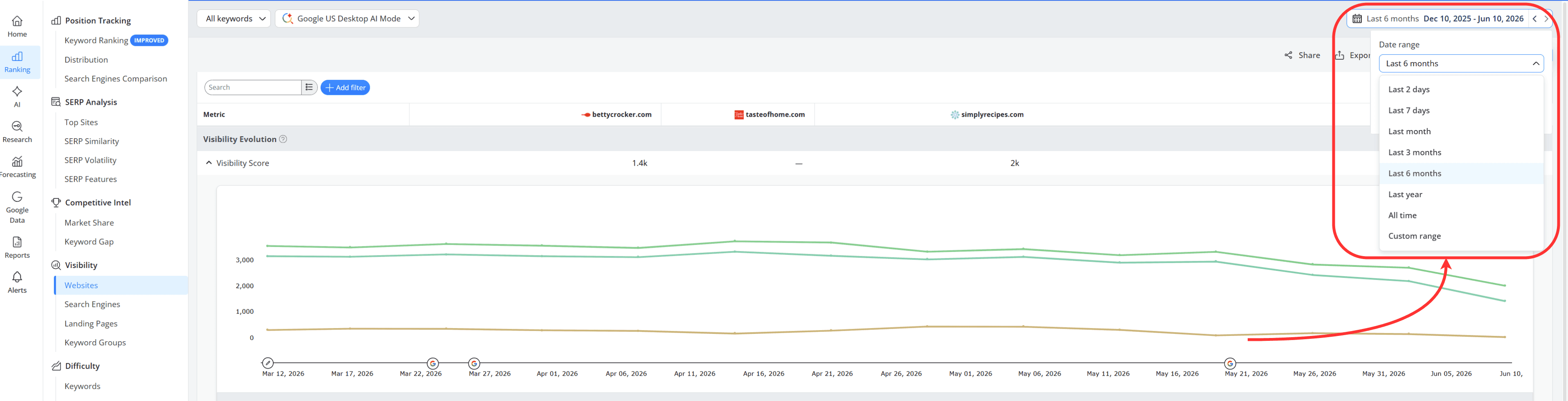
This will display the ranking updates that occurred within the selected timeframe in the chart.
You'll also notice small Google icons appearing above certain ranking update dates on the chart, marking when a Google update was released.
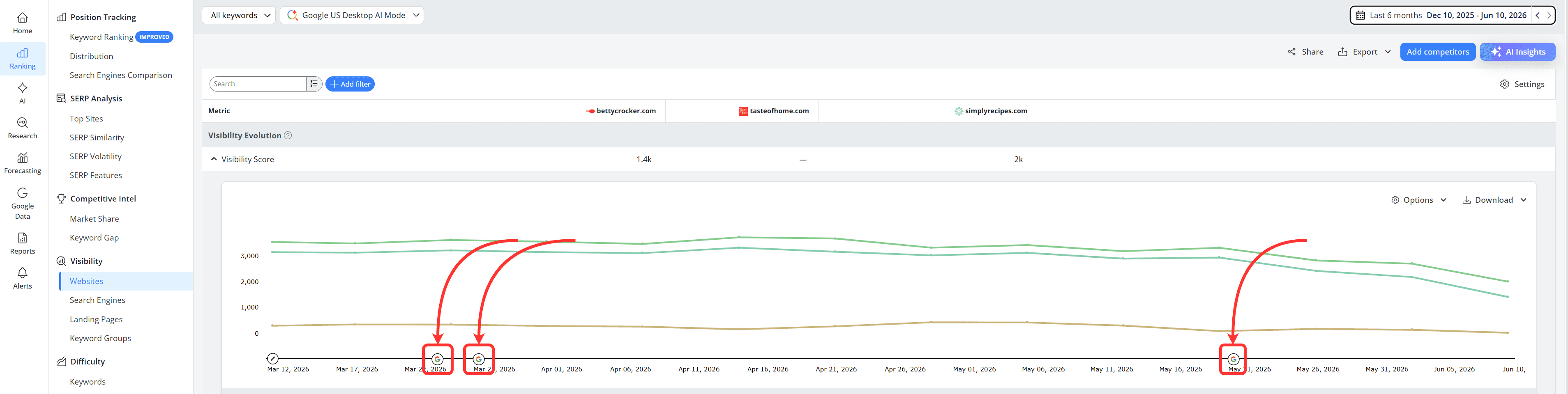
By comparing your Visibility Score before and after these markers, you can quickly see whether your website's search visibility started changing around the same time, helping you determine if the update may have influenced your performance.
For example, in the case of these websites, rankings started declining shortly after the May 2026 Core Update was released.
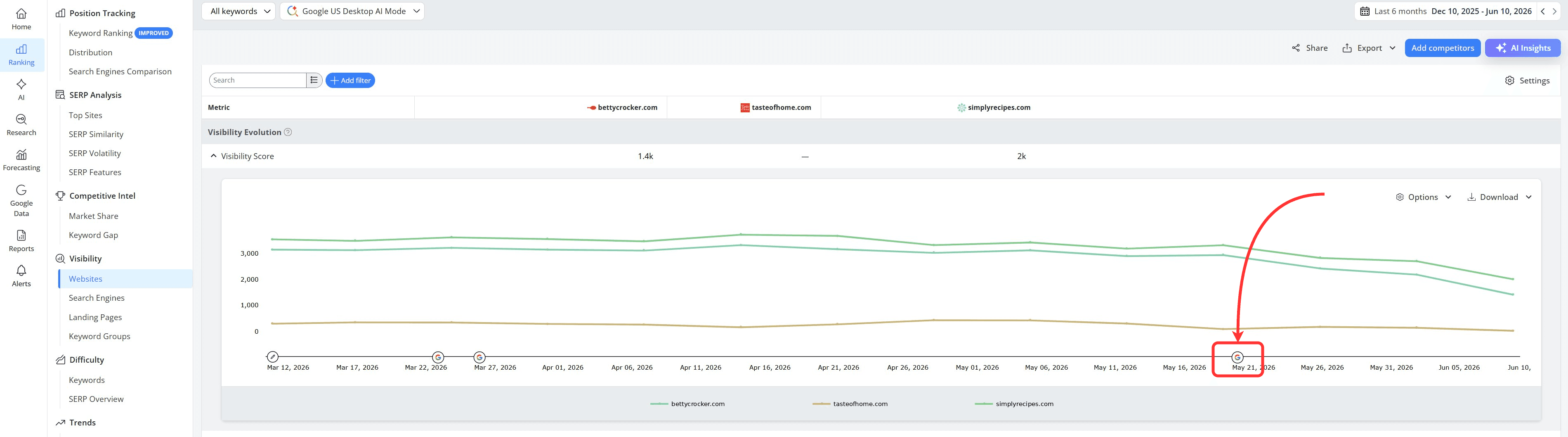
How this helps: This makes it easier to connect ranking and visibility changes to specific Google updates, helping you understand whether a drop or increase in performance may be related to a recent algorithm change.
You can also check the influence of a Google update by hovering over its Google icon and clicking "More information".
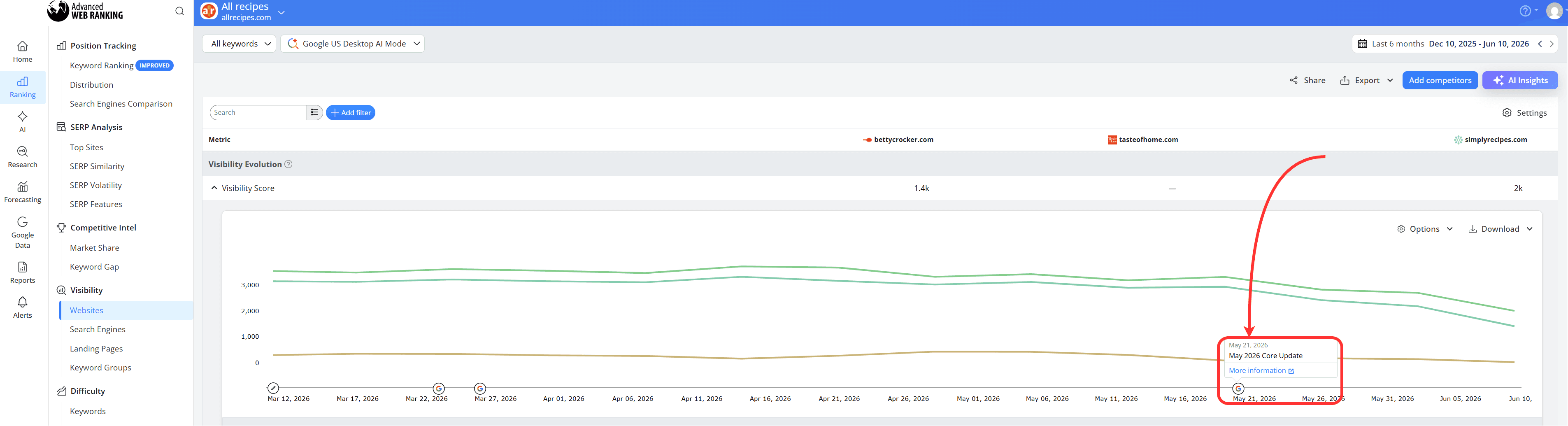
This will take you to our Google Algorithm Changes tool, where you can explore the ranking volatility associated with that update, view its rollout timeline and compare it against the overall level of SERP fluctuations observed across Google at the time.
How this helps: This allows you to determine whether the changes are affecting just your website or search results more broadly.
Monitor traffic, not just rankings
A website can lose a few positions and still receive roughly the same amount of traffic. At the same time, a small ranking drop for an important keyword can have a much bigger impact than several ranking changes combined.
That's why it's worth keeping an eye on Estimated Visits. This metric estimates how many visits your website could receive based on the keywords you're tracking, their Search Volume and the clicks those rankings are likely to generate.
If rankings fluctuate but Estimated Visits remain relatively stable, the update may not have affected your traffic potential very much.
If you notice a significant drop in Estimated Visits, it could be a sign that the update influenced some of the keywords that drive the most traffic to your website.

For example, in the chart above, shortly after the May 2026 update was released, the websites began experiencing much larger fluctuations in their Estimated Visits, suggesting that the update may have influenced their traffic potential.
How this helps: This makes it easier to understand whether a Google update is likely to affect the number of visitors coming to your website, not just your rankings.
Pay attention to your presence in SERP Features
Users are often presented with different types of search features before they even reach the traditional organic results.
Because of this, ranking well isn't always enough. A Google update can change which websites appear in these features, affecting your visibility and potential traffic even if your rankings stay relatively stable.
That's why it's worth checking the SERP Features report after an update.
This report shows how frequently your website appears in different SERP features, how you compare to competitors and how much traffic those features are expected to generate.
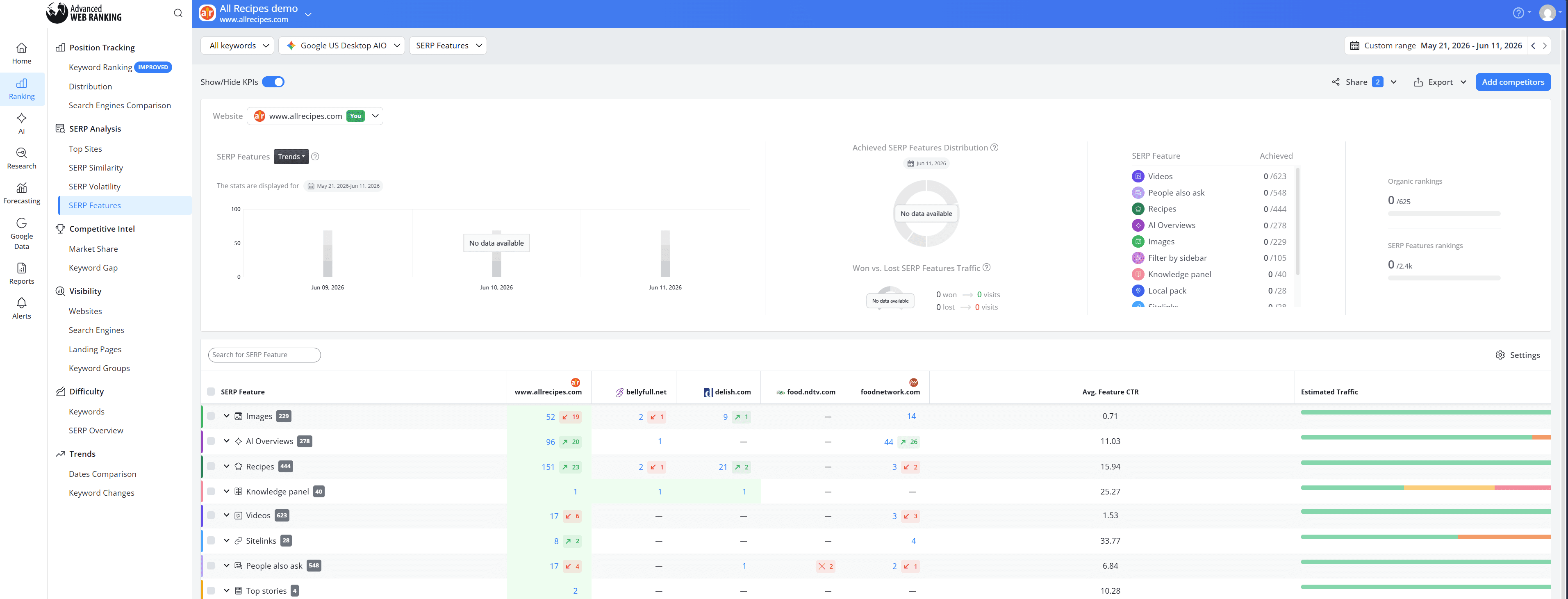
For example, in the report above, after the May 2026 Core Update, allrecipes.com appeared less often in Images, Videos and People Also Ask results, which is highlighted in red:
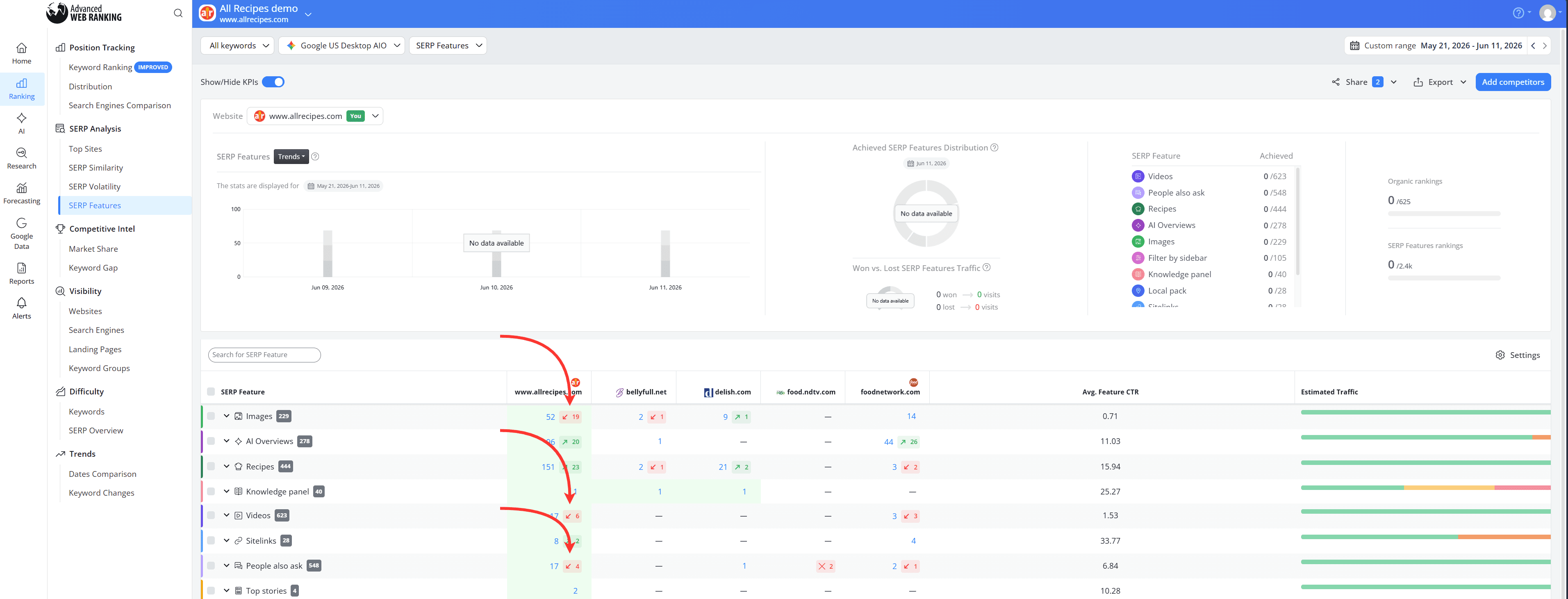
The same website gained visibility in AI Overviews and Recipes, which is highlighted in green:
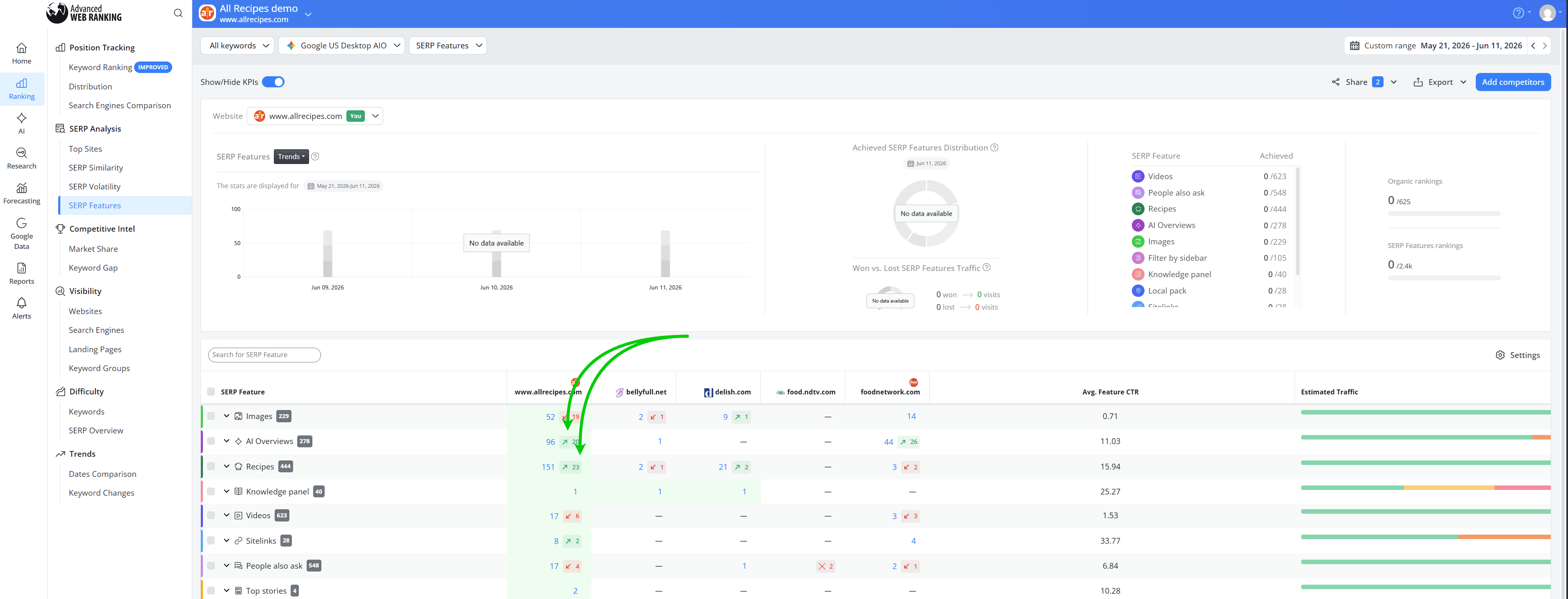
How this helps: This makes it easier to understand whether changes in traffic could be linked to shifts in your SERP feature presence, not just ranking fluctuations.
Compare your performance against competitors once the update is complete
When a Google update rolls out, it's rarely just your website that changes. Competitors are often affected too.
That's why it's useful to check the Market Share report after an update. It helps you compare your performance against other websites competing for the same keywords and see whether they gained or lost visibility after the update.
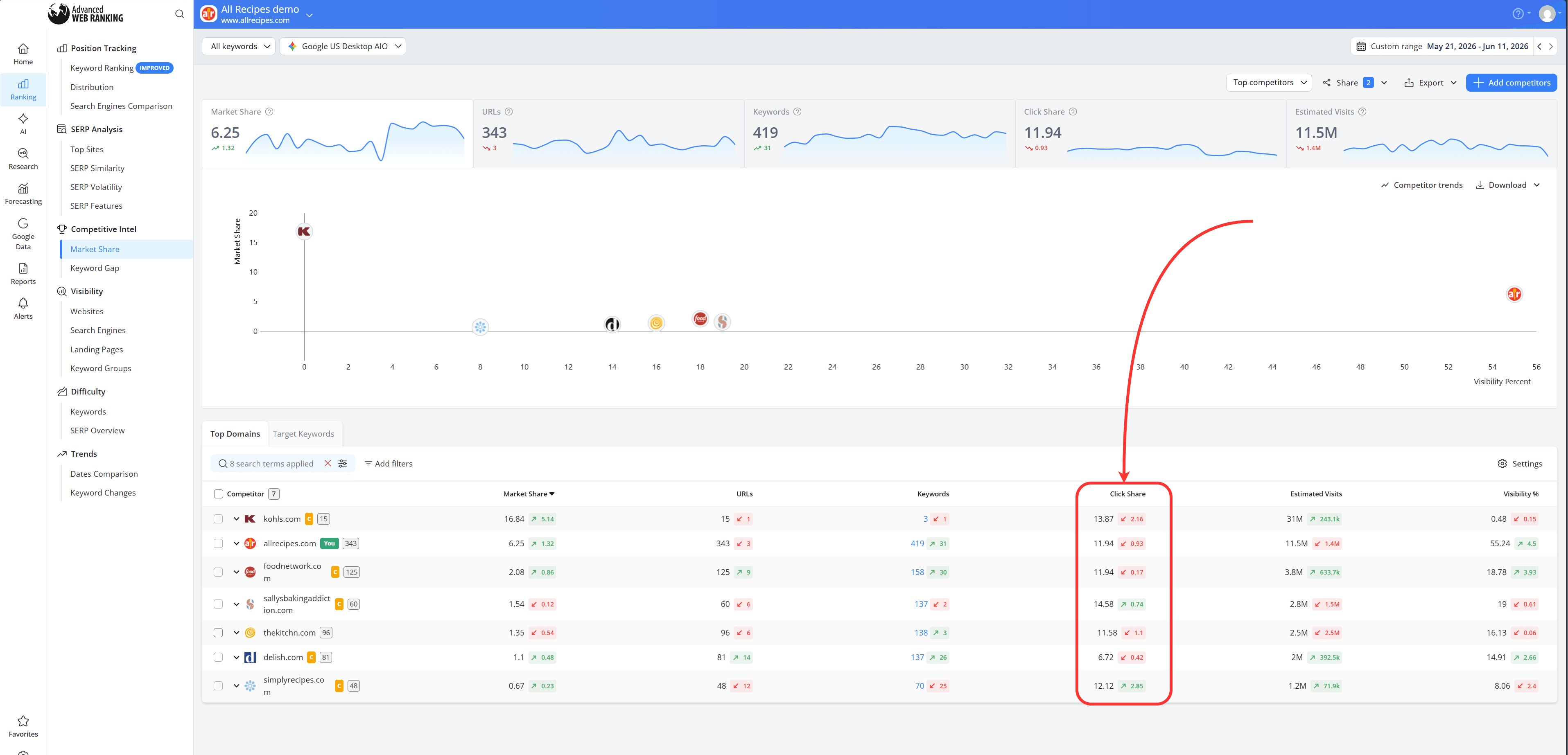
In this example, almost all competitors experienced a drop in Click Share following the May 2026 Core Update. Seeing the same trend across multiple websites suggests that the update may have influenced the entire market, not just a single website.
How this helps: This reveals whether the changes you're seeing are specific to your website or occurring across competing websites as well.
My Performance Changed After a Google Update. What Next?
Don’t Panic Over Short-Term Fluctuations
Google updates don't happen instantly. Rankings often move up and down while the update is still rolling out and it can take days or even weeks before search results settle.
That's why it's important not to react to every ranking change you see. A temporary drop doesn't always mean your website has been negatively impacted, just as a temporary gain doesn't guarantee long-term improvement.
The May 2026 Core Update is a good example for this. During the rollout, many websites saw significant ranking fluctuations. Some websites started regaining visibility they had previously lost, while Reddit threads and forum discussions began appearing more often in search results.
You can use the Market Share report to see how the increased visibility of Reddit and forum content has changed the search results. Start by selecting a date from before the Google update was released:
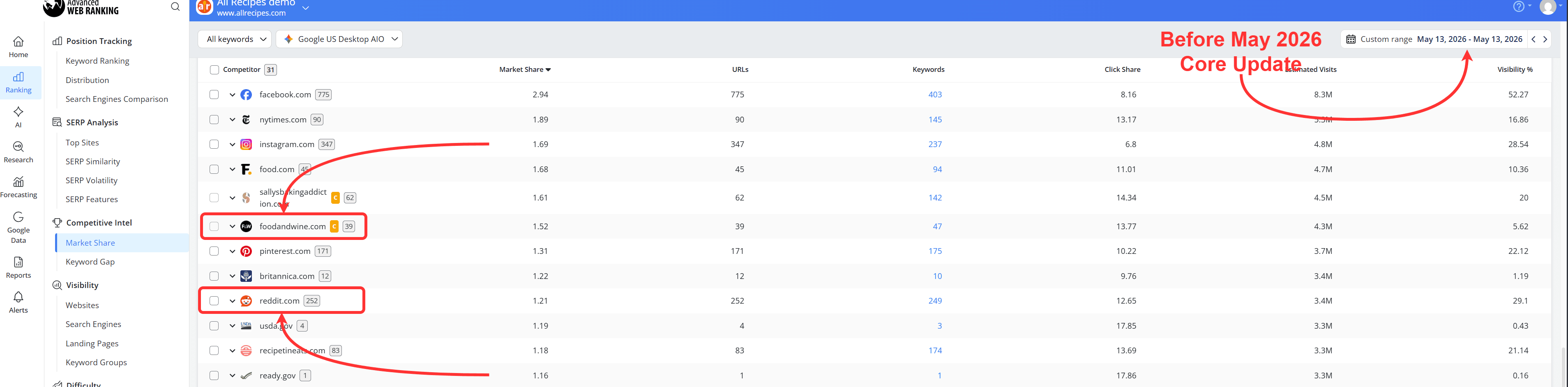
In this example, before the May 2026 Core Update, foodandwine.com had a larger share of visibility than Reddit across the tracked keywords.
Next, select that same date as the start date and choose a date after the update rollout as the end date. This allows you to compare the search landscape before and after the update.
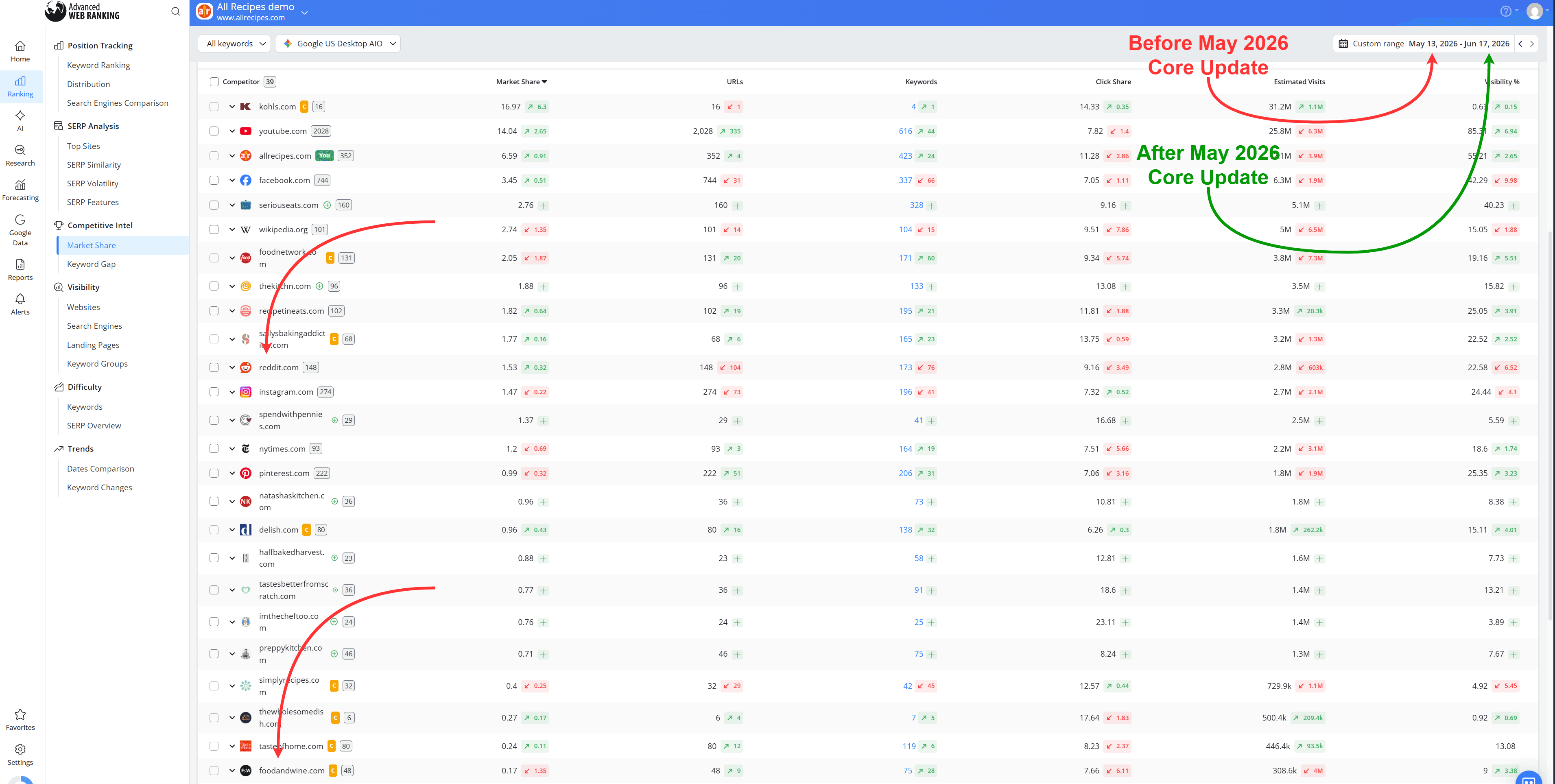
We can also observe that while Reddit gained a larger share of the available traffic opportunity than other websites, it is actually ranking for fewer keywords and fewer URLs than before. At the same time, it has lost some clicks, visibility and estimated traffic potential.
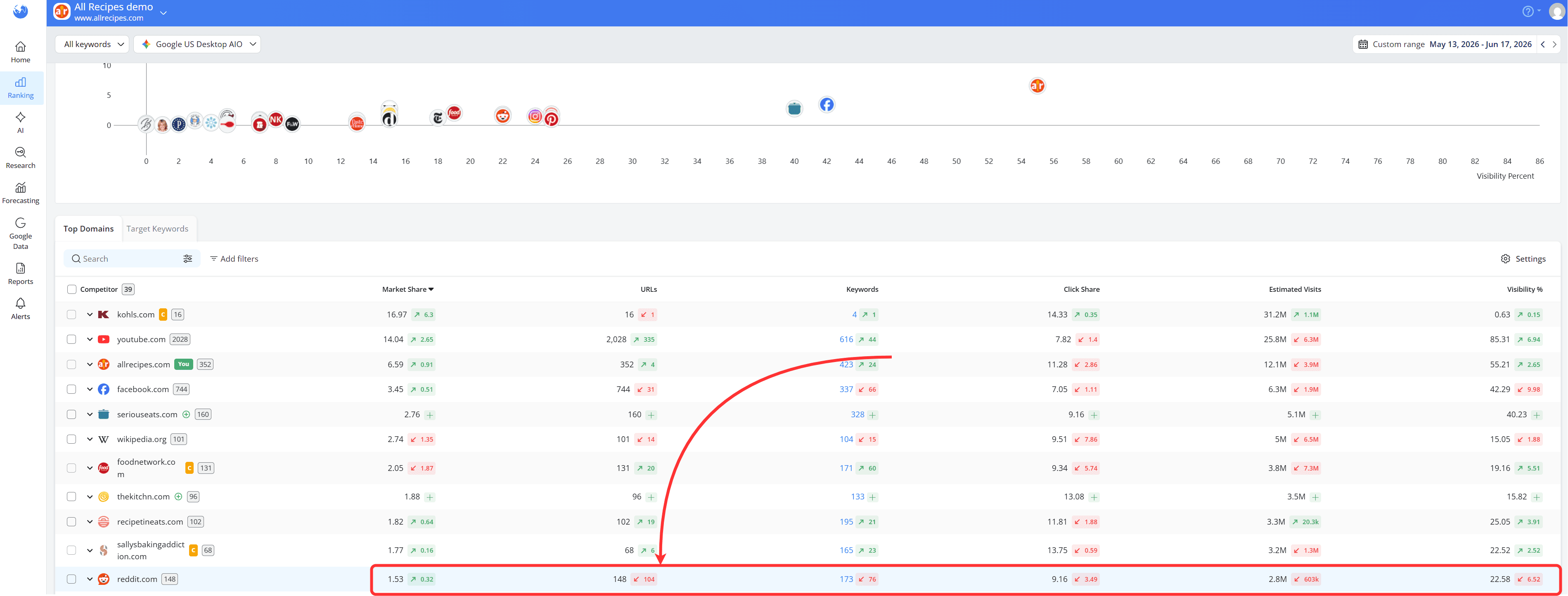
This suggests that Reddit's increased Market Share isn't coming from ranking for more keywords. Instead, it is ranking higher in the SERPs for the keywords it still ranks for, allowing it to capture a larger share of clicks despite appearing for fewer searches overall.
This completely aligns with foodandwine.com's performance. Although it is ranking for more keywords and more URLs, its Market Share is lower.

This means the website is appearing for more searches overall, but many of those rankings are in lower positions, resulting in a smaller share of the available clicks.
This is why it's important to focus on the bigger picture instead of individual ranking changes. Look at how your overall visibility, estimated traffic, SERP feature presence and competitors are performing over time.
Once the update has finished rolling out, you'll have a much clearer understanding of whether your website was actually affected and how the search landscape may have changed.
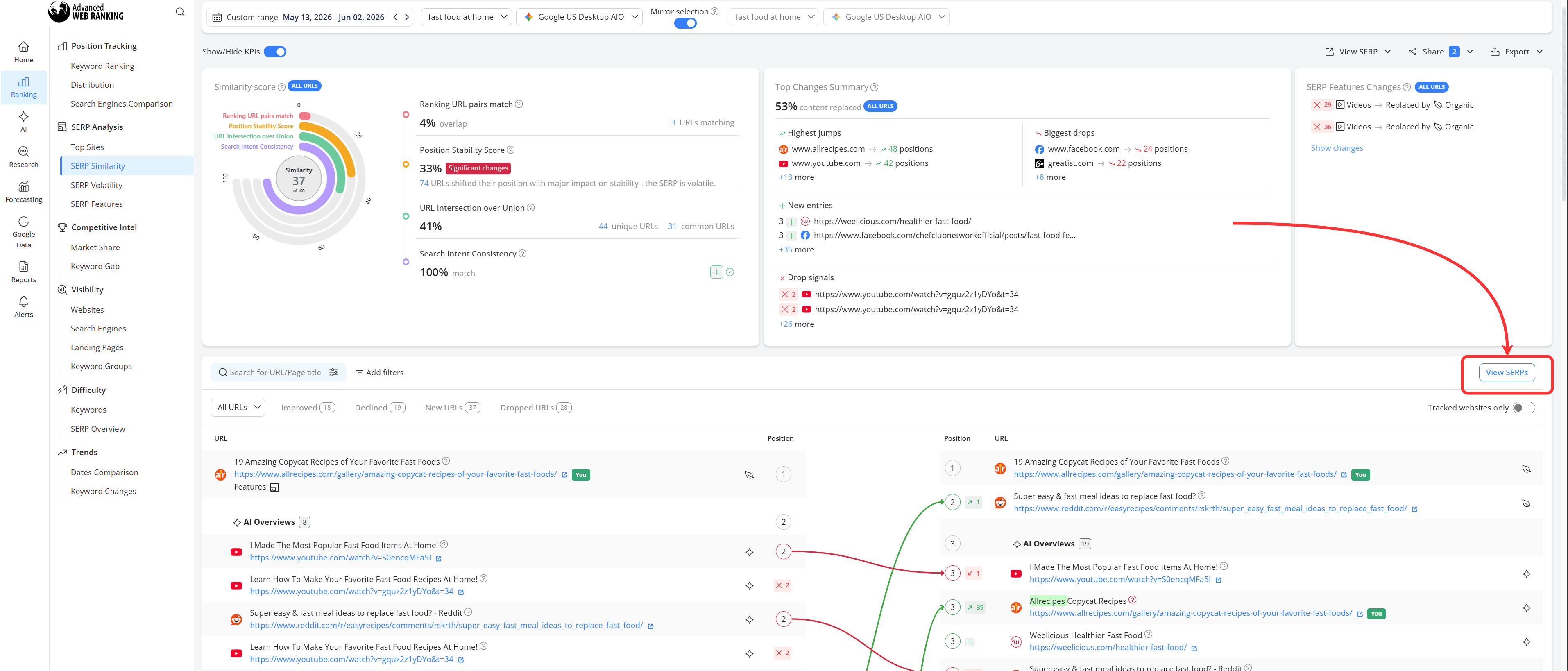
You can also use the SERP Similarity report to compare search results at the keyword level and see how the SERP changed after a Google update.
To do this, select a date from before the update as the start date and a date from after the rollout as the end date.
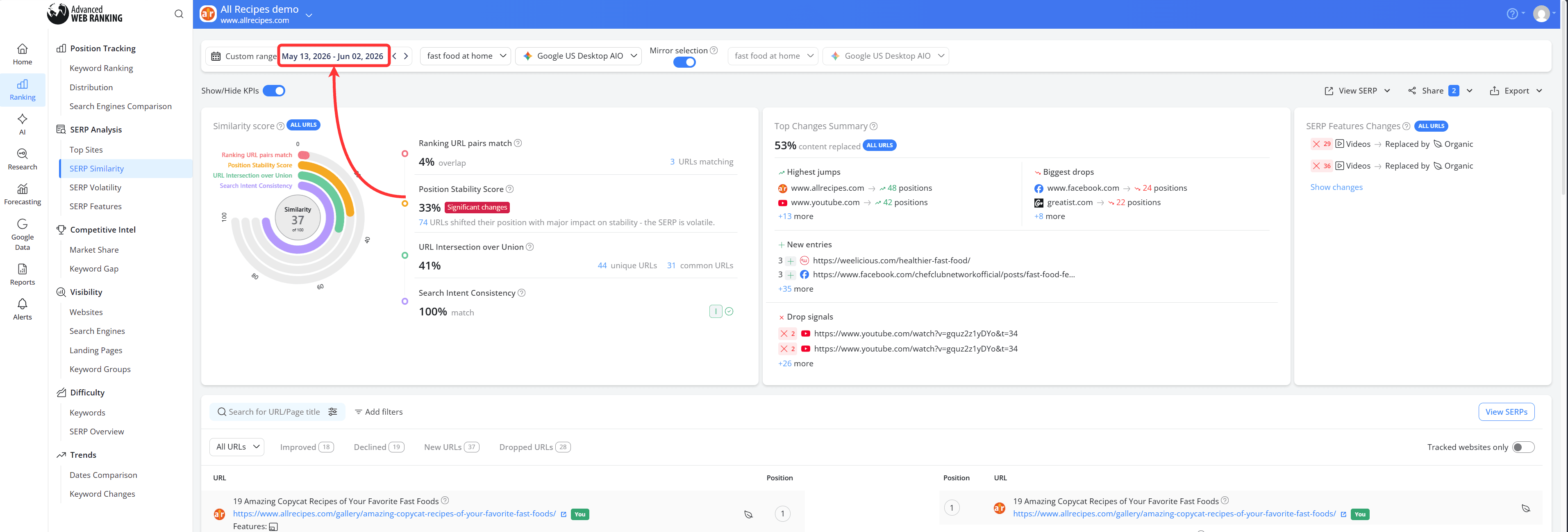
This allows you to compare the two versions of the SERP and identify which websites, content, or results gained or lost visibility following the update.
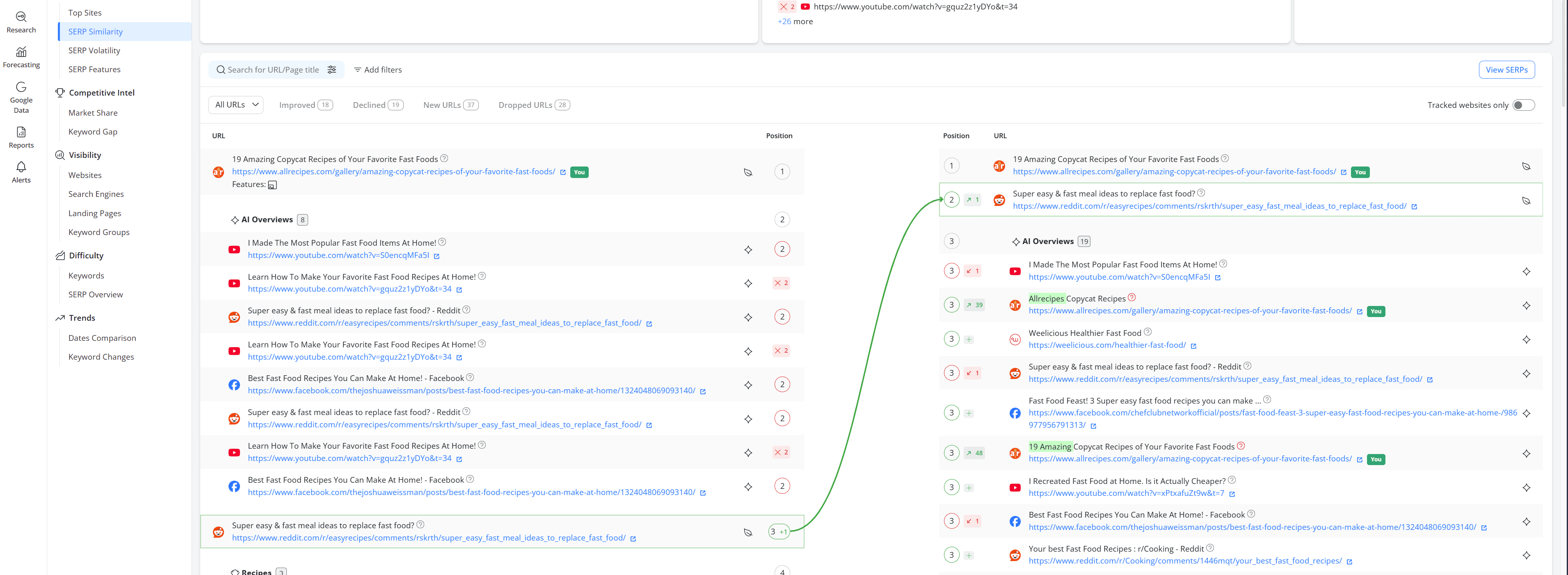
In this example, Reddit is appearing above even the AI Overview, showing just how visible forum content has become for this keyword. By clicking "View SERPs", you can compare the actual search results side by side and see exactly how the SERP changed after the update.
Before the update, the AI Overview appeared above the Reddit result, making it one of the first results users would see on the page.
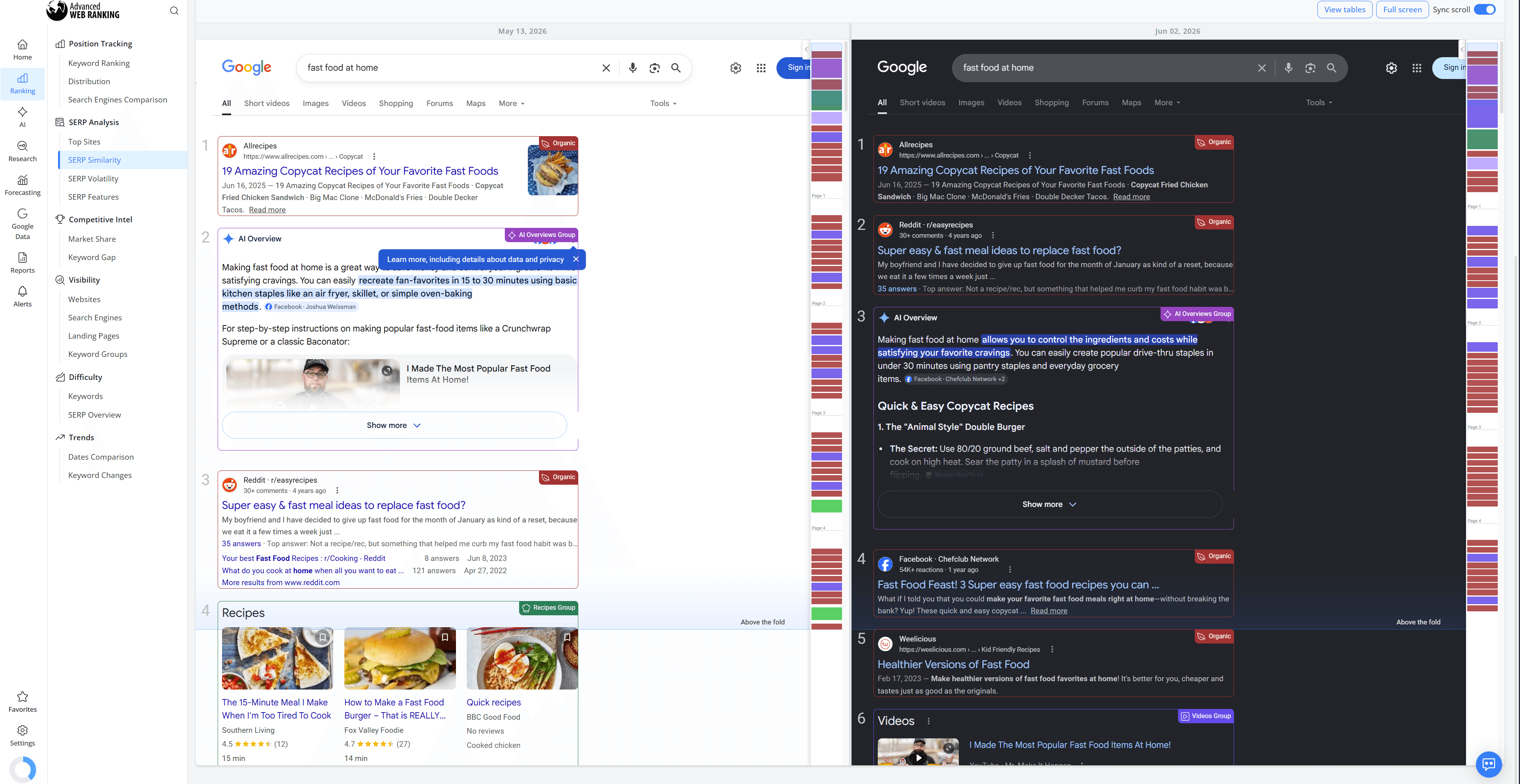
After the update, Reddit moved into the second position, appearing above the AI Overview. This means users are now more likely to see and interact with the Reddit discussion before reaching Google's AI-generated answer.
Looking at the two SERPs side by side, it's clear that the change isn't just about a few rankings moving up or down. The search results themselves have changed, with forum content becoming more prominent while the AI Overview has moved further down the page.
This is why comparing SERPs before and after a Google update can be useful. It helps you see more than just ranking changes. You can understand how the search results are evolving, which websites are gaining visibility and what types of content Google is choosing to show more prominently for a particular query.
Follow a workflow, not individual rankings
After a Google update, it's easy to focus on individual ranking changes. However, a few keywords moving up or down rarely tell the whole story.
Instead, start a workflow for checking the impact of a Google update:
Check the Visibility > Websites report to see whether your overall search visibility changed. Review your Estimated Visits data to understand whether those changes are likely to affect your traffic.
Analyze the SERP Features report to identify any gains or losses in search features.
Compare your performance against competitors in the Market Share report.
Use the SERP Similarity report to see how the search results themselves changed after the update.
Following this workflow will give you a much clearer understanding of how the update affected your website and whether any action is actually needed.
You can also use the newly released AI Insights feature to analyze the impact of a Google update much faster.
Simply click the "AI Insights" button in the top-right corner of the screen and enter a prompt such as:
"Following the Google May 2026 Core Update, I've noticed that my website's overall performance was affected. What happened and what should I do?"
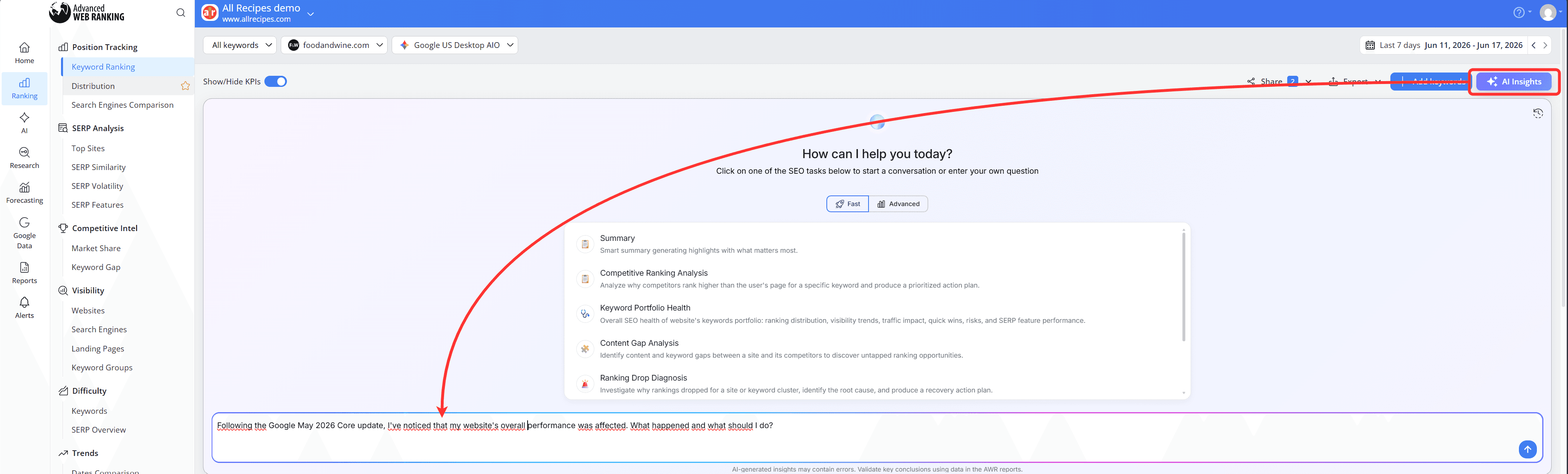
AI Insights will automatically use your project's data and ranking history to analyze the changes.
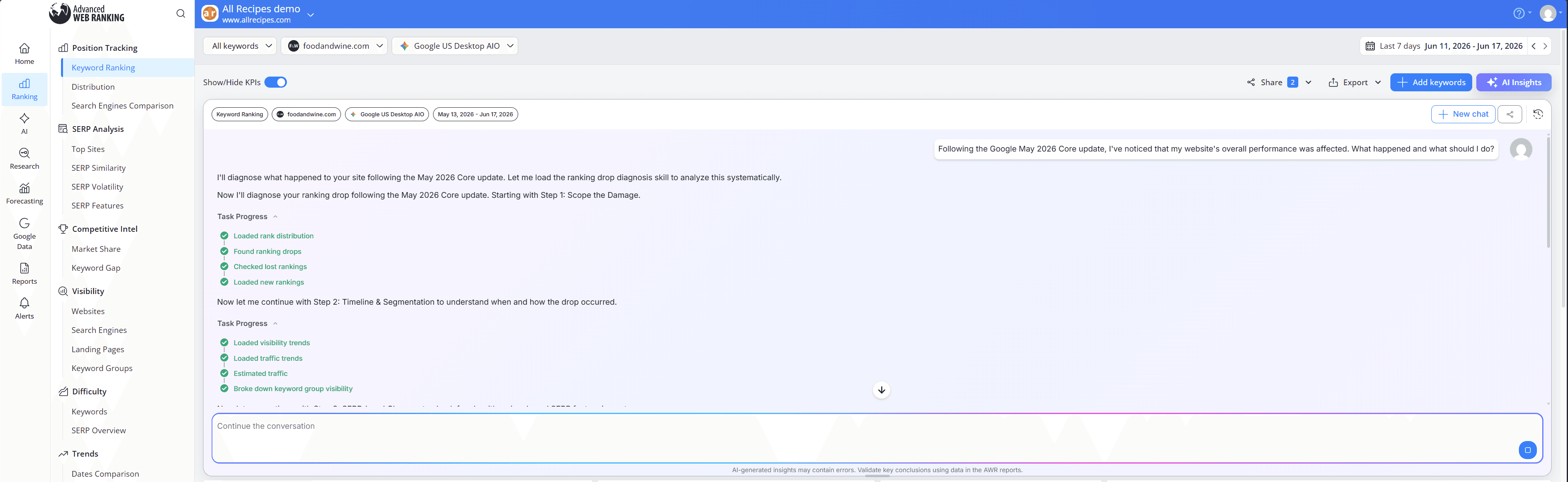
Instead of manually reviewing multiple reports, you'll receive an explanation of what likely happened, which areas of your website were affected and recommended next steps based on the ranking data already available in your project.
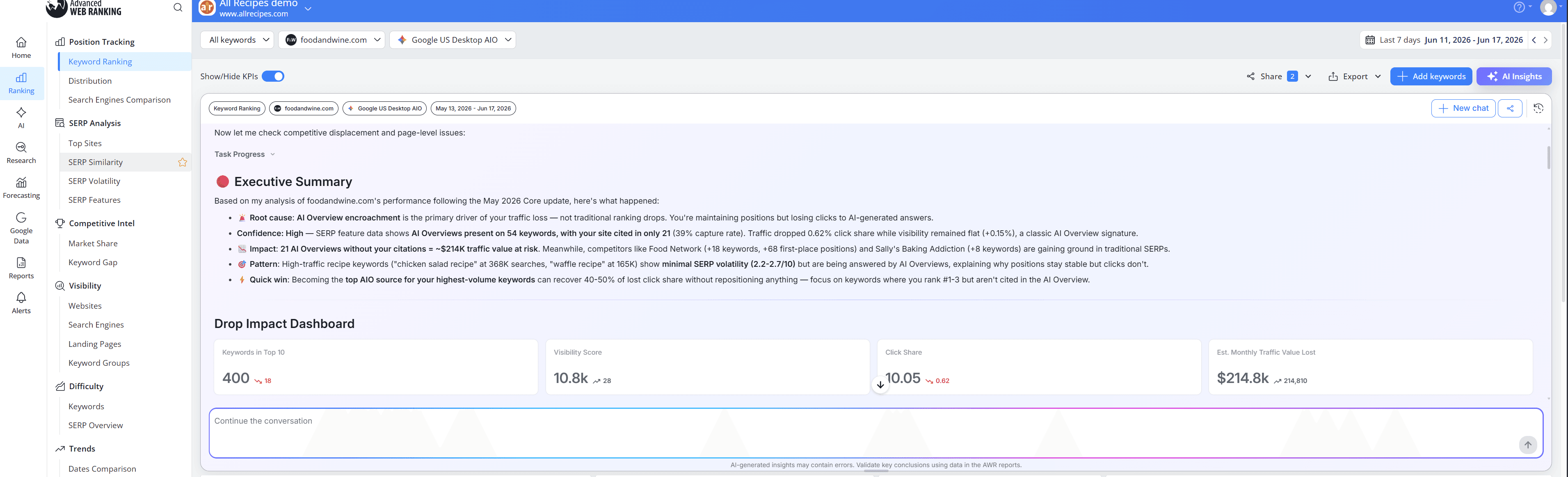
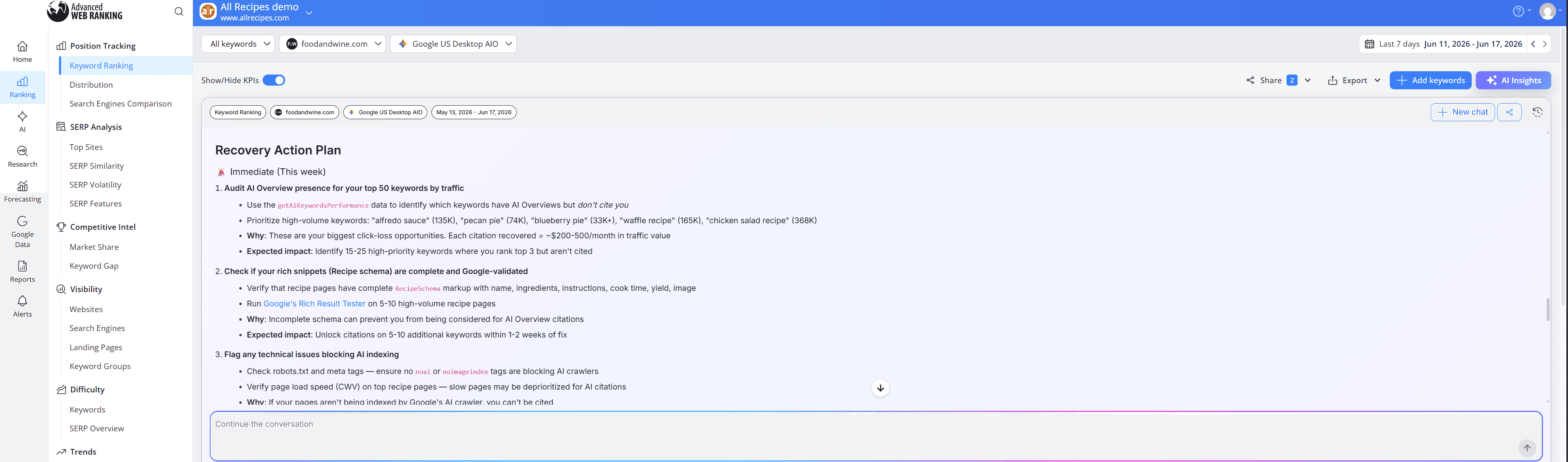
AI Insights will then generate a prioritized action plan tailored to your website. This may include highlighting keywords that lost visibility, identifying opportunities in AI Overviews or SERP features, uncovering technical issues and recommending content improvements that could help recover lost performance.
By following a structured workflow and looking at the bigger picture, you can quickly understand what changed, how your website was affected and whether any action is needed.
The combination of visibility data, SERP analysis, competitor insights and AI-powered recommendations gives you the context needed to make informed decisions instead of reacting to short-term fluctuations.
The goal isn't to react to every ranking change. It's to understand the trends, identify meaningful shifts in search results and focus your efforts where they can have the greatest impact.
Do you have any other questions? Don’t hesitate to get in touch and we will keep building the FAQ.
Frequently Asked Questions
How long does it take for a Google update to affect rankings?
My rankings dropped after a Google update. Does that mean my website was affected?
How long should I wait before analyzing a Google update?
Why is Reddit appearing more often in search results?
stay in the loop