

Advice and answers from the Advanced Web Ranking Team
Search for articles
Meet AWR AI Insights: stop reading dashboards, start talking to your data
Turn your AWR data into a conversation. Diagnose ranking drops, spot quick wins, or benchmark competitors with strategic, data-backed answers in seconds.

AWR users can now talk to their SEO data.
Whether you need to diagnose a ranking drop, benchmark your visibility against competitors, understand your AI search presence, or find quick-win keywords, AWR AI Insights is the place to do it.
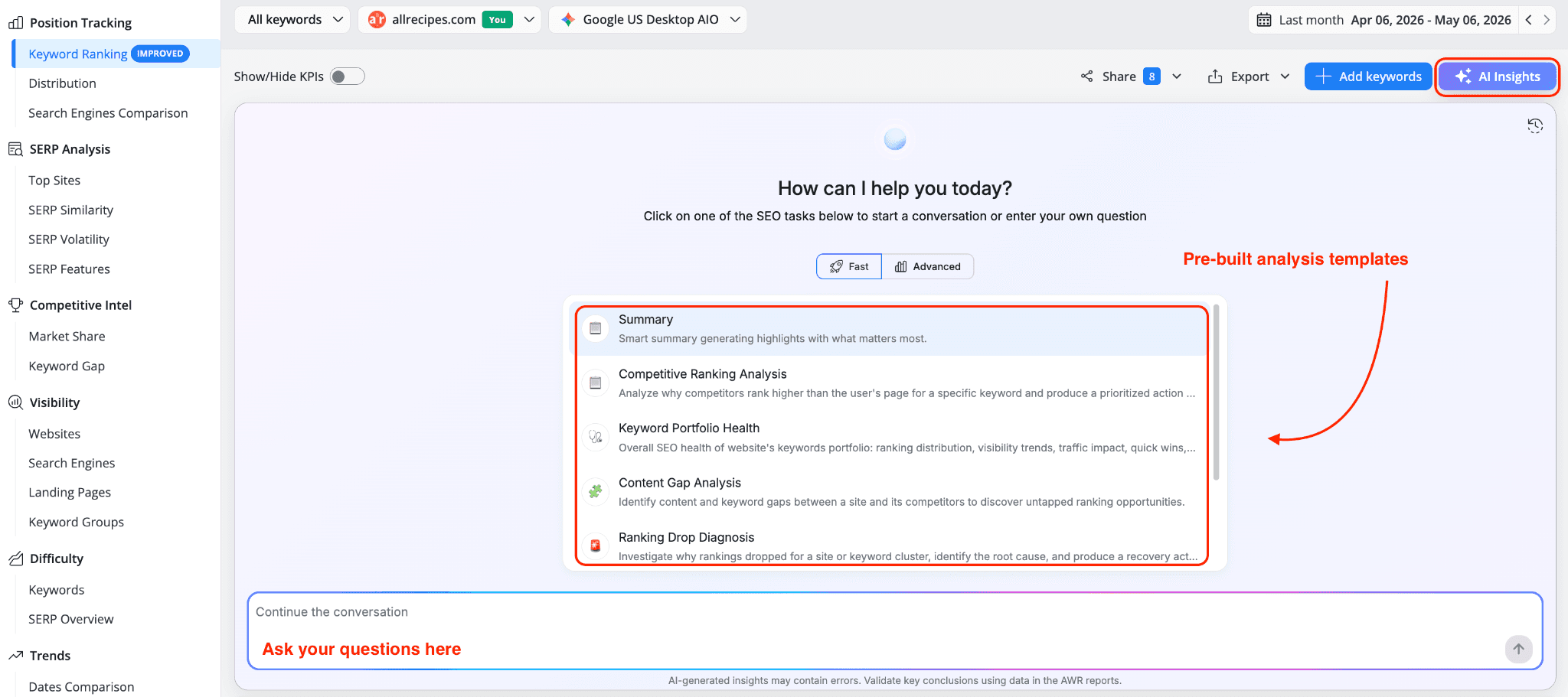
Open the Insights panel from any AWR report, ask your question or pick a pre-built analysis template, and watch a strategic, data-backed answer built in front of you, complete with charts, KPI cards, and prioritized action items.
The short story
AWR AI Insights turns your reports into a conversation. Ask a question or pick a template, and get strategic, data-backed answers with charts, KPI cards, and prioritized next steps, all in seconds.
Here's what we'll cover:
What Insights does and the data it pulls from
How to share, revisit, and start new sessions
Five real-world ways AWR customers use it
The pre-built analysis templates available in each report
How AI credits work and what's included with your plan
What AWR AI Insights does
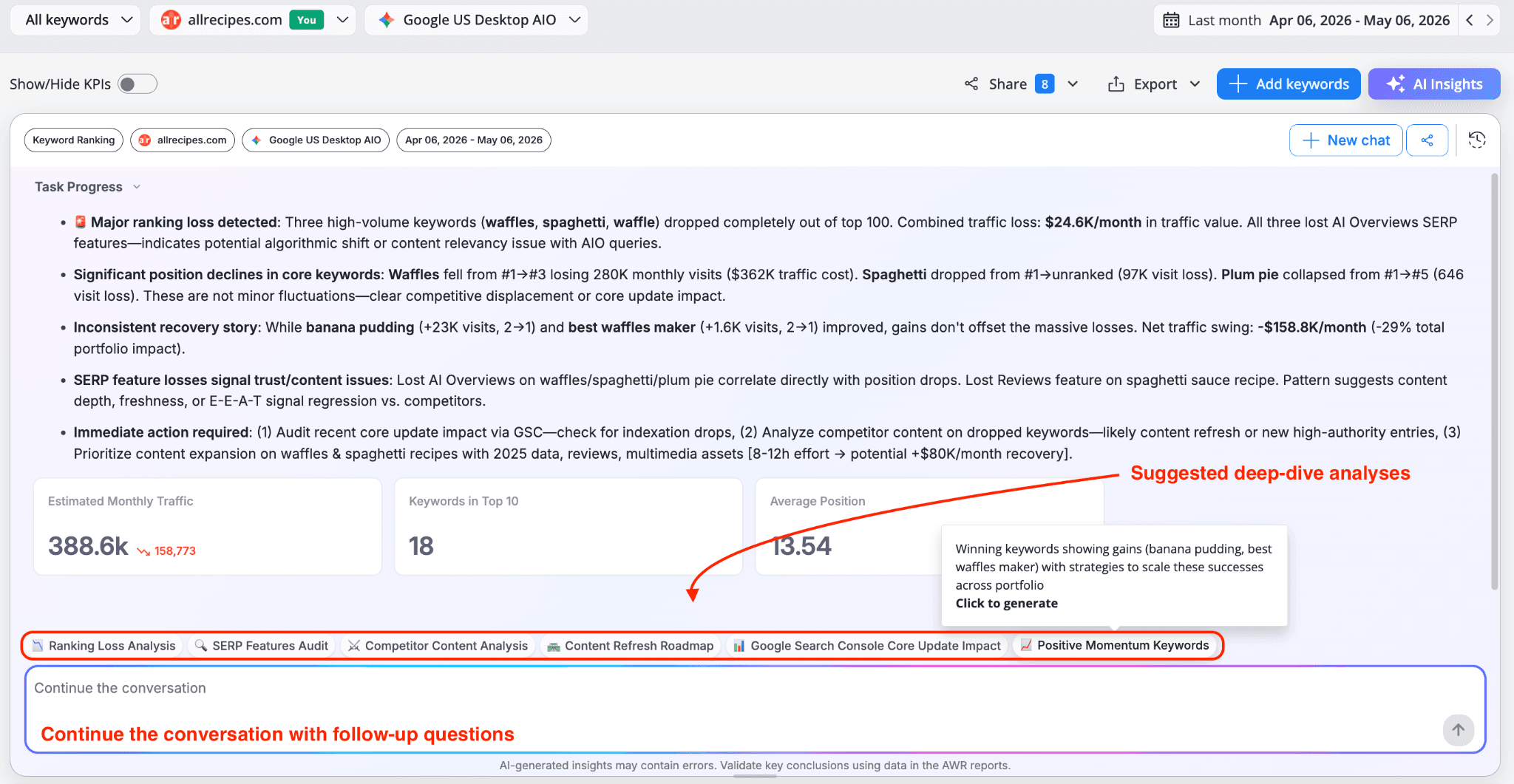
When you start a session, AI Insights pulls from everything AWR already knows about your project: keyword rankings, visibility scores, SERP features, keyword difficulty, AI search citations or brand mentions, competitor positions, and traffic estimates.
The result comes back as a structured analysis - not a wall of data, but an interpreted summary with specific findings, quantified impact, and recommended next steps. You can continue with follow-up questions in the conversation box, or click one of the suggested deep-dive analyses that appear below the result.
Start fresh, share insights, and revisit past sessions
Three controls in the top-right corner of the Insights panel keep your work organized:
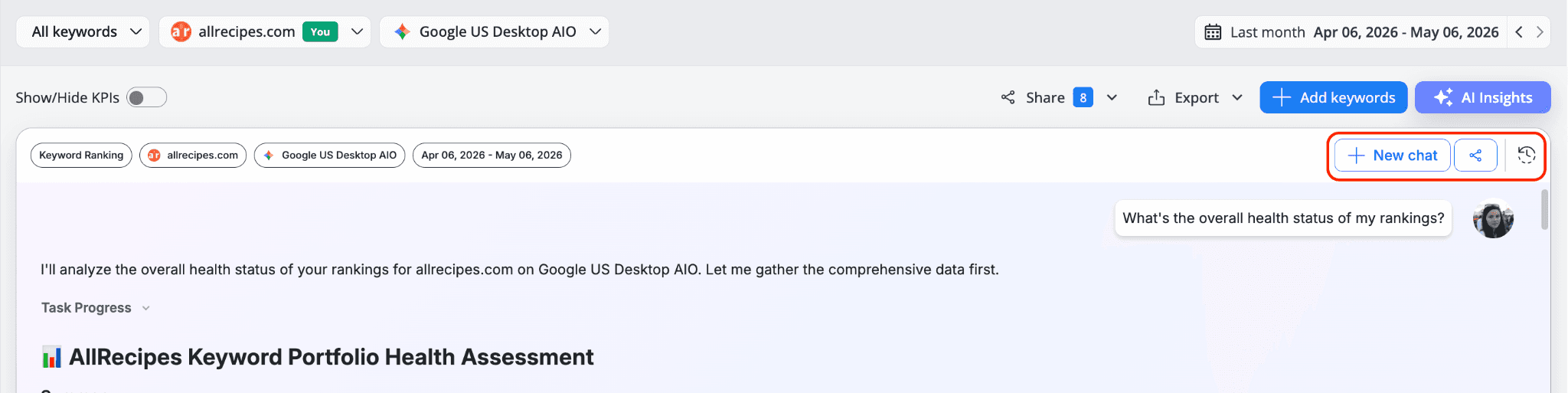
New chat starts a fresh session whenever you want to switch topics or run a different analysis. Your previous conversations stay available in history, so nothing gets lost when you change topic.
Shareable link turns any analysis into a clean, read-only view you can send to clients, teammates, or stakeholders. They see the full insight without needing an AWR account or access to the underlying report. Useful for client deliverables, internal handoffs, or when you want to walk someone through what the data is showing.
Chats history brings back every session you've run, with the model used (Fast or Advanced) and how long ago it was opened. Click any past chat to reopen it and continue the conversation, or use the edit icon to rename it so it's easier to find later.
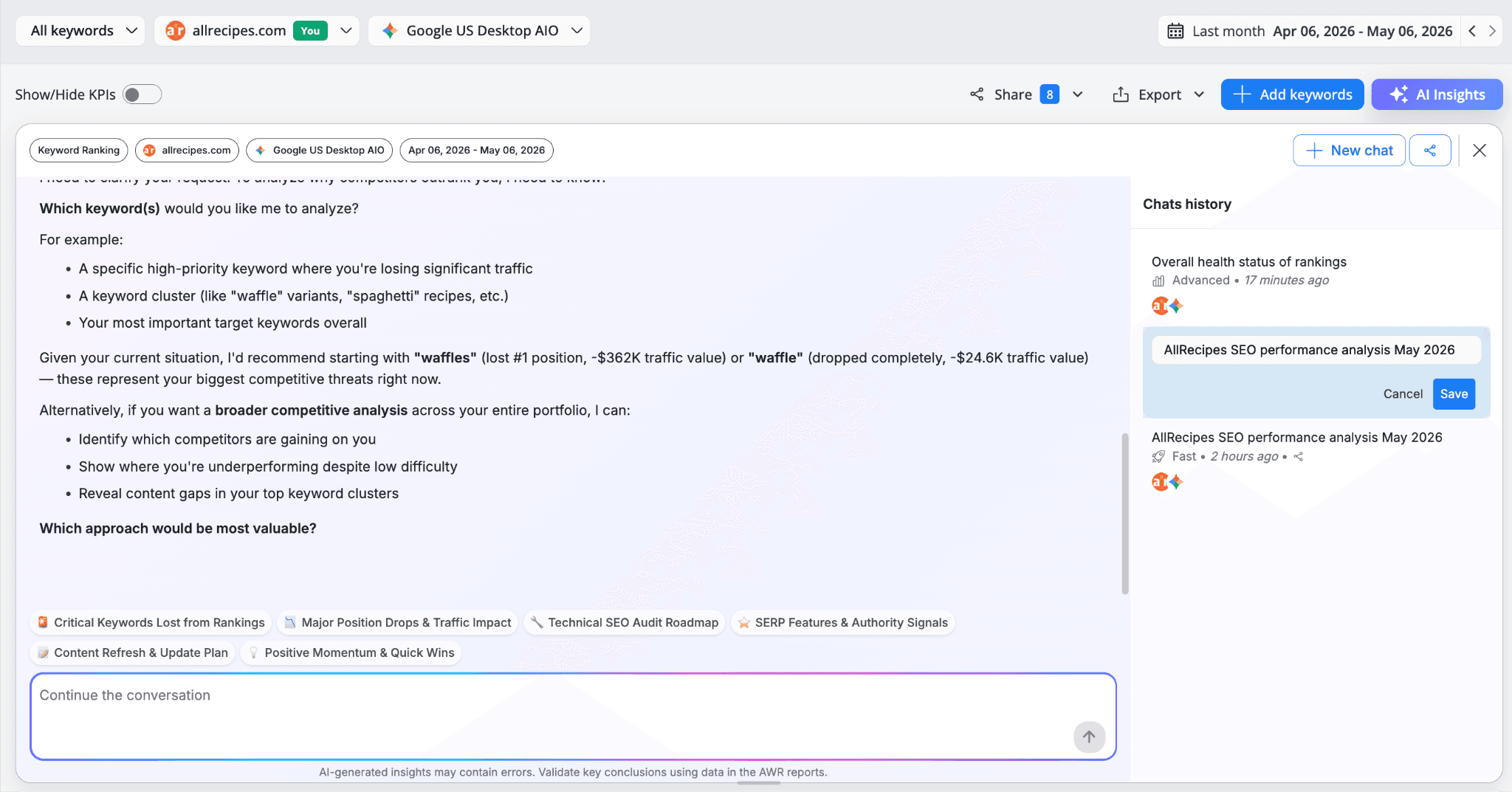
Together, these three options mean Insights isn't just a one-shot Q&A. It's a workspace where analyses accumulate, get revisited, and get shared with the people who need to see them.
Five ways to put AI Insights to work
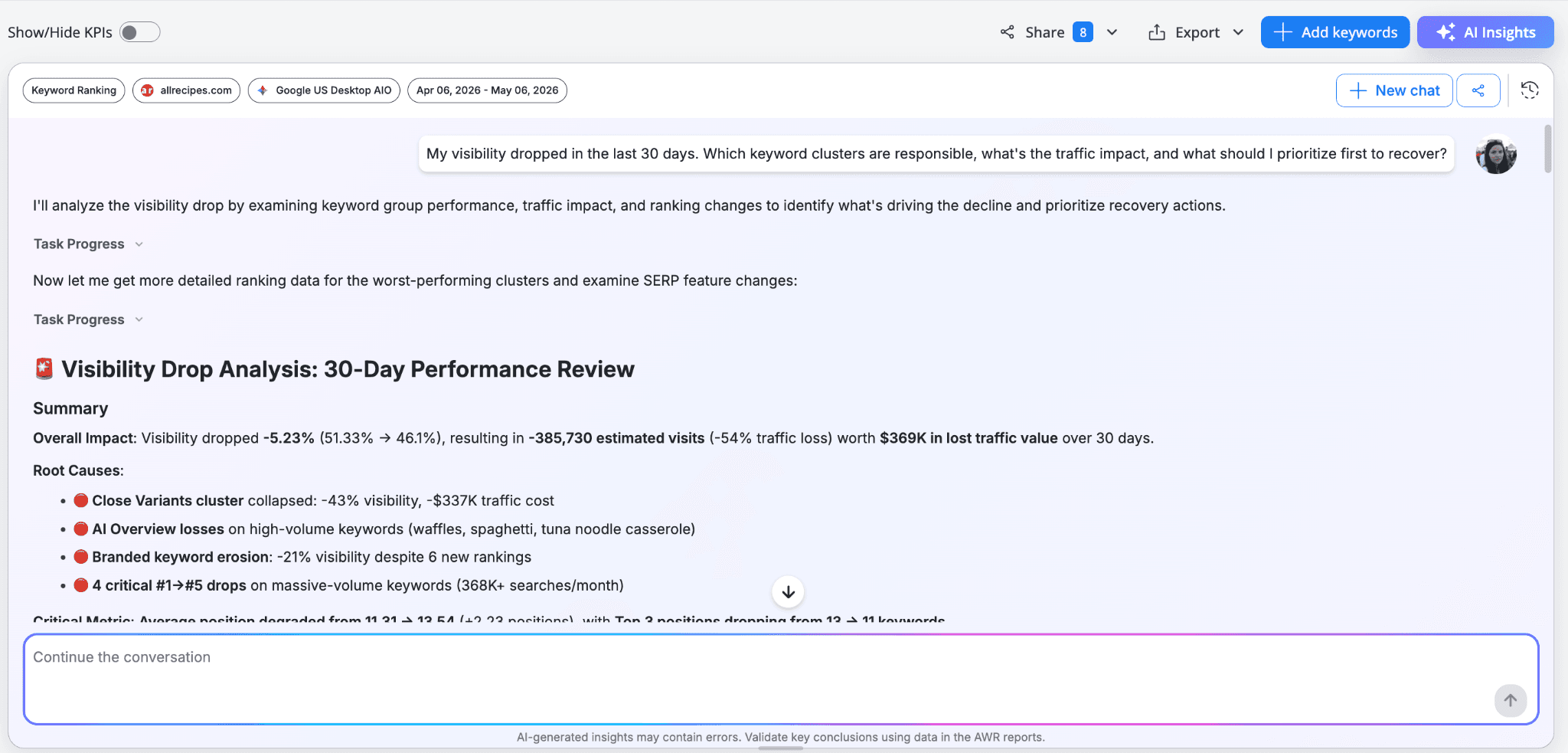
1. Diagnose a ranking drop in minutes
If your visibility declines between updates, Insights can pinpoint exactly which keyword clusters lost ground, quantifies the traffic impact, and identifies the root causes, whether that's AI Overview losses, branded keyword erosion, content relevancy issues, or a competitor move. You can get the headline impact, the breakdown by cluster, and a prioritized recovery plan, all in one analysis.
2. Find quick wins across your portfolio
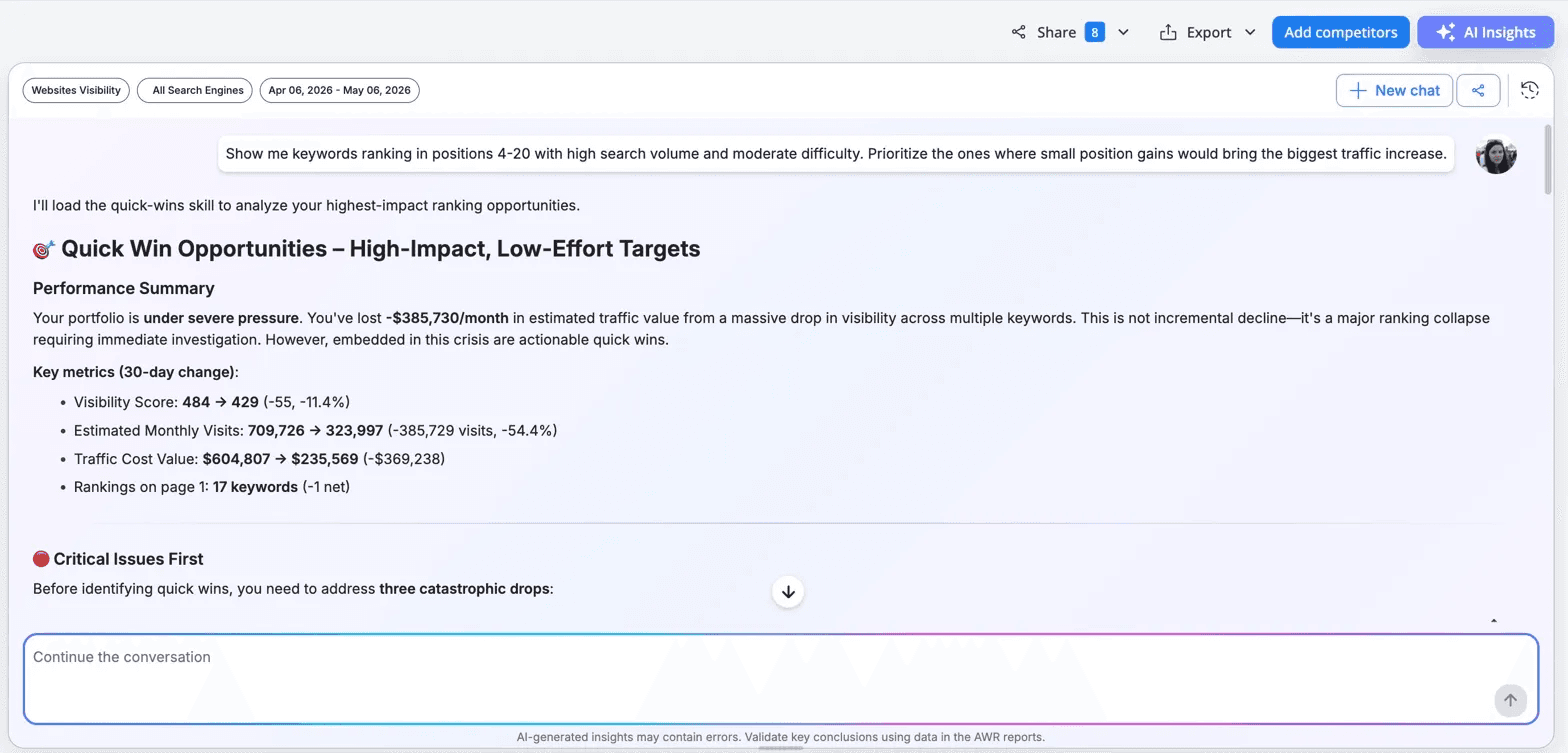
Insights can scan your keyword set based on given criteria (such as for positions 4-10 and 11-20 with high search volume and moderate difficulty), then surface a prioritized list of keywords where small improvements could yield disproportionate traffic gains. Instead of a flat list, you get opportunities grouped by type, like keywords one or two spots from page 1, those already trending up, or top-ranked terms losing traffic to SERP feature changes. Each comes with estimated impact and recommended actions, and when bigger issues need attention first, the analysis surfaces those before the quick wins.
3. Benchmark against competitors at a glance
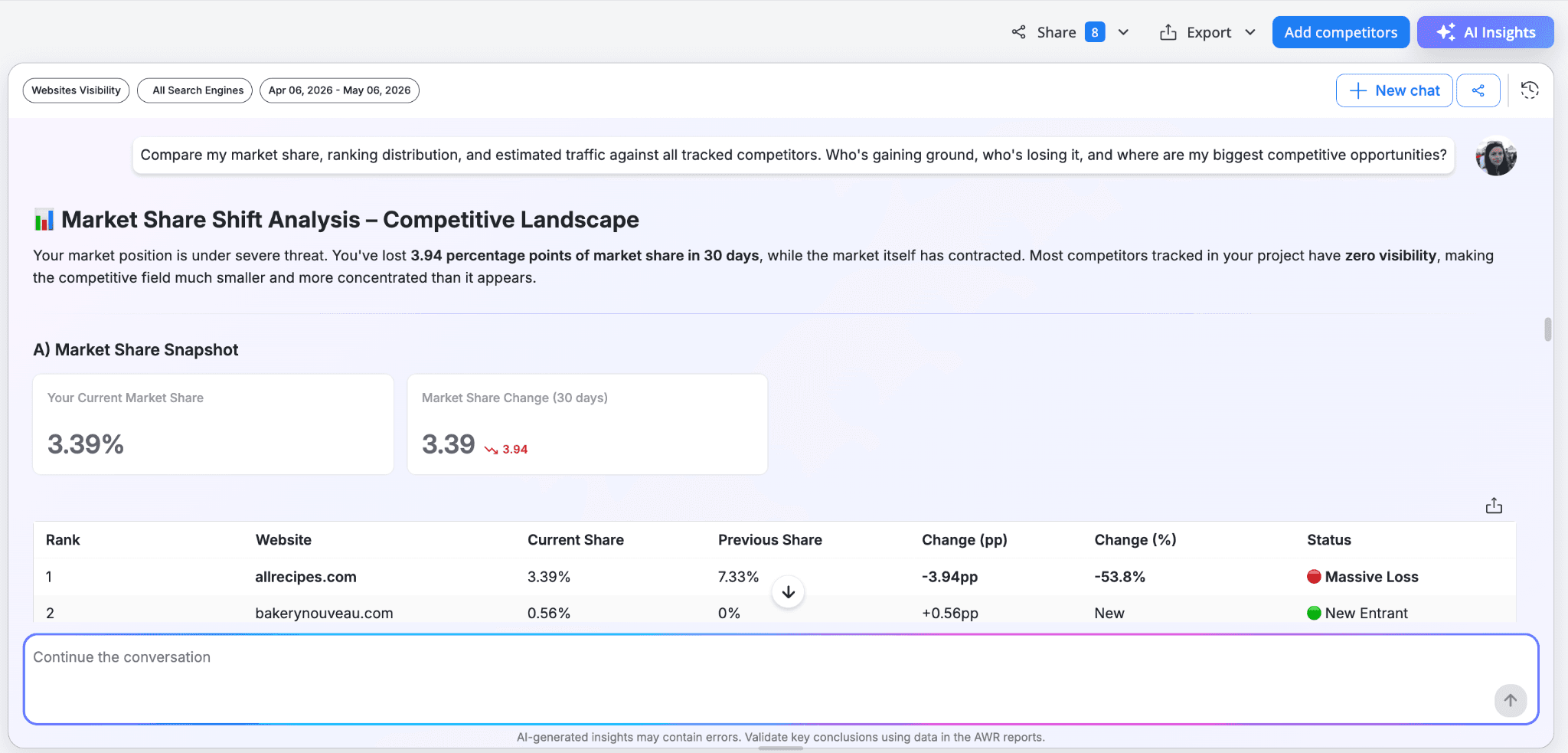
Insights can compare your market share, ranking distribution, and estimated traffic against every competitor you track. You'll see who's gaining ground, who's losing it, and how the share has shifted between you, with each competitor classified by status so you can spot rising threats and fading rivals at a glance. The analysis goes beyond a simple ranking, surfacing where your visibility is being eroded and where the biggest competitive opportunities are.
4. Understand your AI search presence
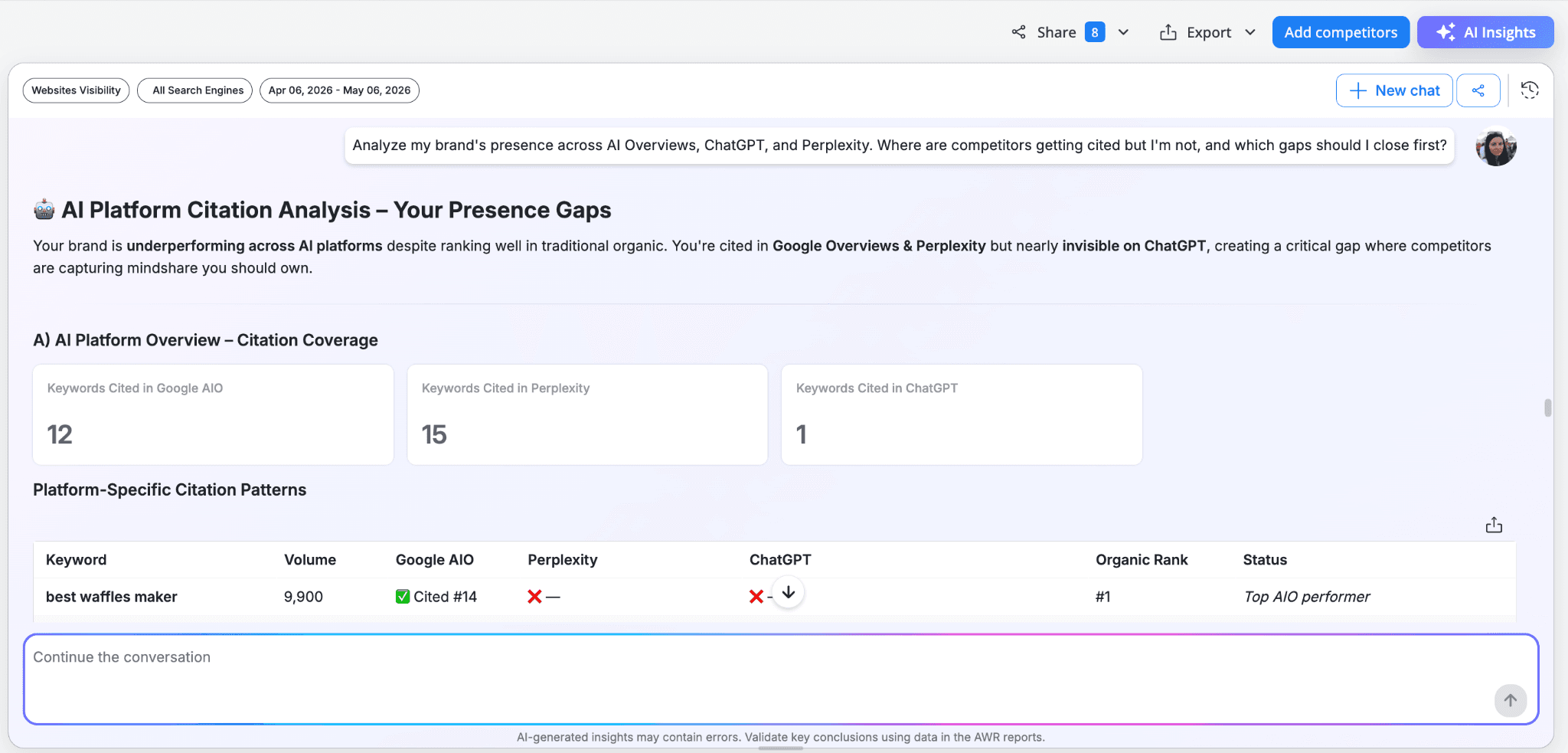
AI Overviews, ChatGPT, and Perplexity are reshaping how answers reach your audience, and Insights can give you a quick read on where your brand stands across these platforms. It analyzes your citation presence, brand mentions, and AI traffic potential side by side, so you can spot the patterns at a glance: keywords where you dominate one platform but are missing from another, queries where you rank #1 organically yet aren't cited at all, and topics where competitors are capturing the mindshare you should own. The result is a clear list of gaps to close first, prioritized by volume and competitive cost.
5. Run a full portfolio review from Home
For agencies and multi-project teams, the Home Insights dashboard can summarize performance across all tracked projects in one place. It flags underperformers, surfaces cross-portfolio trends, and highlights where to focus your team's effort next, with clear priorities, expected impact, and even operational cleanup tips when projects are stale or duplicated. Walk into a team meeting with a clear picture of which clients need attention and which are quietly winning.
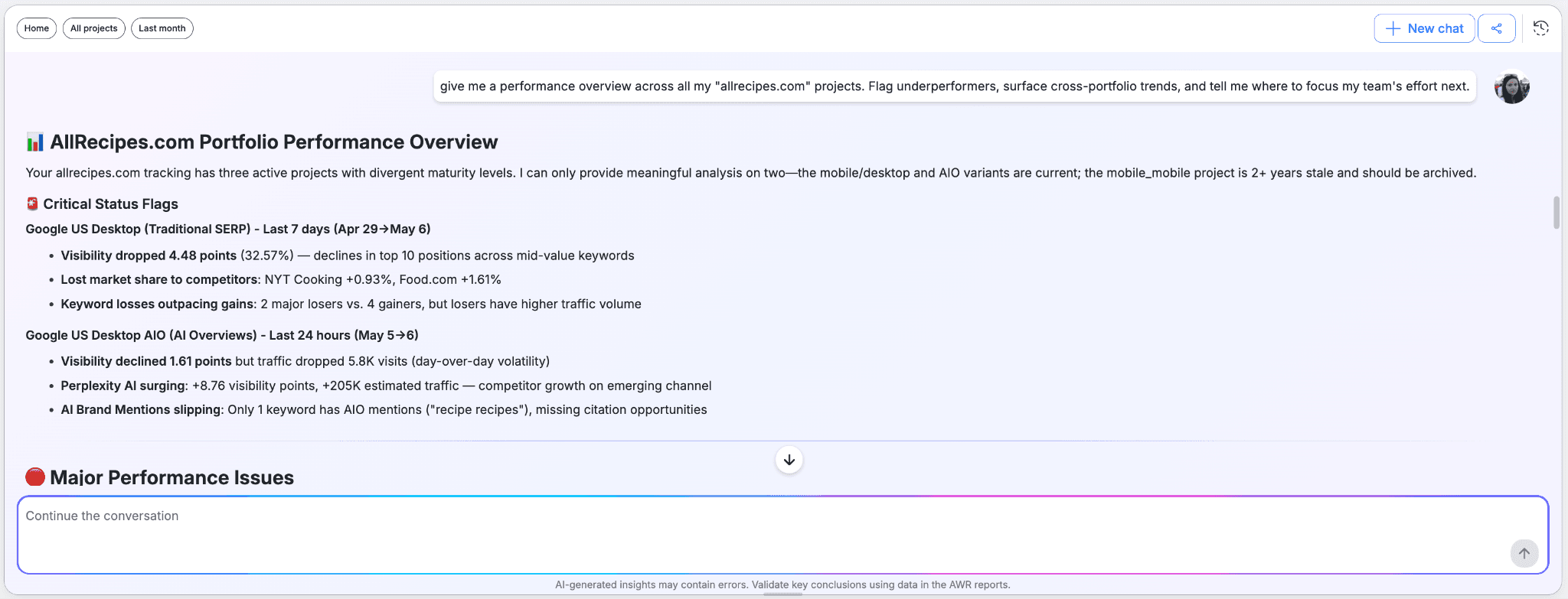
Pre-built AI Insights templates so you can skip typing
Each AWR report comes with its own set of purpose-built Insights templates you can run with one click, no question typing required. They cover the most common SEO workflows for that report, from quick summaries to deep-dive diagnostics, and each one comes with a short description so you know what you'll get before you click. You're free to pick a template, type your own question, or do both, starting from a template and steering the conversation from there.
Every report includes a Summary template at the top that surfaces the highlights from that specific data set, alongside more focused templates listed below.
Keyword Ranking report
Competitive Ranking Analysis: Analyze why competitors rank higher than your page for a specific keyword and produce a prioritized action plan.
Keyword Portfolio Health: Overall SEO health of your keyword portfolio: ranking distribution, visibility trends, traffic impact, and quick wins.
Content Gap Analysis: Identify content and keyword gaps between your site and competitors to discover untapped ranking opportunities.
Ranking Drop Diagnosis: Investigate why rankings dropped for a site or keyword cluster, identify the root cause, and produce a recovery plan.
AI Overview Strategy: Assess your presence in AI Overviews, including citations, brand mentions, and visibility, then produce a strategy to earn more.
Keyword Cannibalization Audit: Detect pages from the same site competing for the same keywords, quantify the traffic impact, and recommend consolidation.
AI Keyword Performance report
AI Brand Mention Audit: Analyze brand mention presence across AI Overviews to measure brand authority and awareness.
AI Citation Optimization: Analyze citation presence, rank, and quality in AI Overviews to identify optimization opportunities.
AI Traffic Potential Prioritization: Find keywords by AI traffic potential to prioritize content optimization efforts for maximum ROI.
AI Visibility Gap Analysis: Identify keywords with strong traditional rankings or high search volume but low AI visibility.
AIO Position Impact Analysis: Analyze the correlation between AIO block SERP positions and visibility/traffic metrics to understand positioning impact.
Cited Competitor Analysis: Check competitor citation patterns in AI Overviews to understand the competitive landscape and identify strategic opportunities.
Visibility - Websites report
Competitive Velocity Tracking: Track and analyze the rate of visibility change across competing domains to identify which competitors are gaining or losing momentum fastest.
Market Share Shift Analysis: Analyze how organic search market share is redistributing among competing domains to identify share capture, loss, and zero-sum competitive dynamics.
Visibility Volatility Audit: Identify which competing domains exhibit the most ranking instability and diagnose whether volatility indicates algorithm sensitivity, SERP churn, or strategic testing.
Ranking Efficiency Comparison: Compare how effectively competing domains convert their rankings into visibility, traffic, and market share by analyzing ranking quality vs. quantity.
Traffic Potential Gap Analysis: Calculate the traffic opportunity gap between current performance and maximum potential based on competitors' positions and search demand.
Quick Wins Finder: Identify low-effort, high-impact SEO opportunities by analyzing which competitors have rankings close to page 1, in positions 11-20, or showing recent upward momentum.
The Distribution, Keyword Difficulty, SERP Difficulty, and Home reports each come with their own specialized templates, tailored to the data they surface. Open the Insights panel in any of them to see the full list with descriptions.
Powered by AI credits
AI Insights run on a AI credit system, so you only pay for what you use. Every paid AWR plan includes 1,000 free AI credits per month, enough to get familiar with the feature and run roughly 7 to 10 Insights sessions, depending on the model you choose:
Fast: quicker responses, lighter on credits, ideal for everyday questions and quick checks.
Advanced: deeper reasoning, better for complex analyses or when you want the most thorough breakdown.
For teams that need more, AI Credits add-on tiers range from $10/mo (50 sessions) to $100/mo (500 sessions).
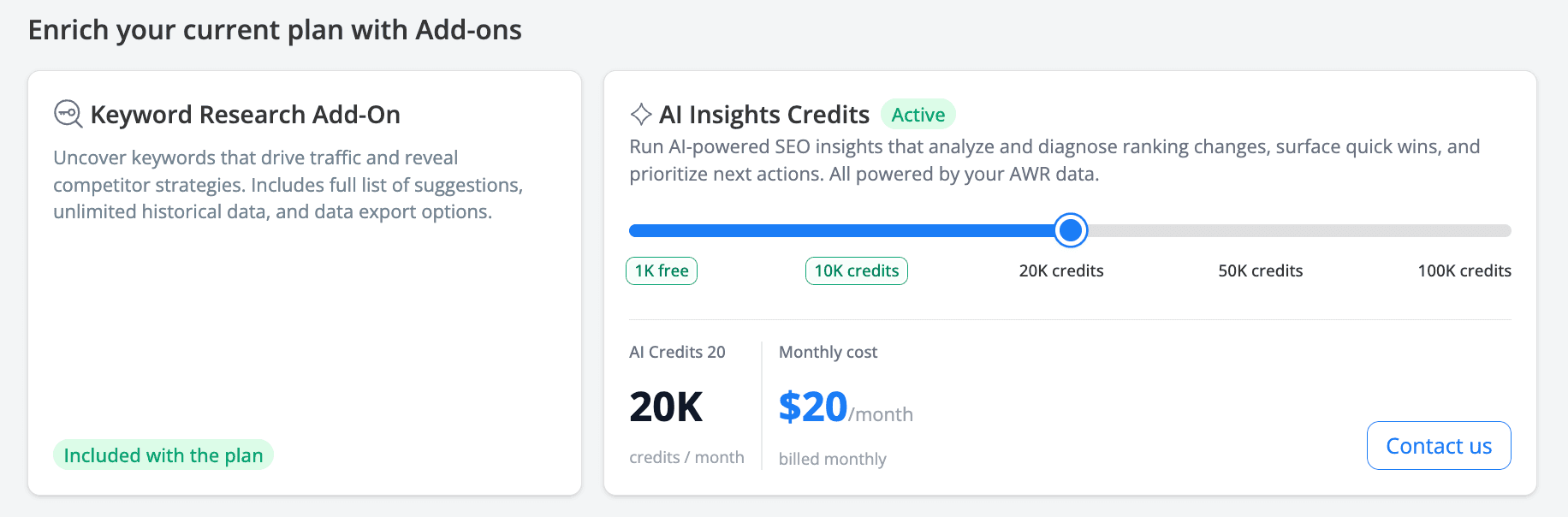
Note: AI Insights are available on all paid AWR plans. Trial accounts don't have access to the feature.
Ready to talk to your data?
AI Insights is available for all AWR paid plans. Log in, open any of reports mentioned above, click the AI Insights button, and start your first session, either by picking a template or typing your own question.
Do you have any further questions or need more information about this product update? Don't hesitate to get in touch with our dedicated support team.
stay in the loop