

Advice and answers from the Advanced Web Ranking Team
Search for articles
Switching Search Engines in AWR: What Happens to Your Data
Learn what happens to your historical rankings and other data when you switch search engines and whether replacing or duplicating fits your use case.

Search results keep changing. AI Overviews are showing up on more and more queries, and the way people search shifts along with them. Sometimes it's not the search results at all, it's your own tracking needs: a client's focus moves to a different location, or your SEO strategy shifts and the project needs to reflect that. At some point, you may want to switch your search engine, so it's worth knowing how to approach this change.
What this article covers
What happens to your historical data when you switch search engines
The different ways to replace a search engine
How to choose the right approach for your situation
How to switch from Google Universal to Google AIO
What happens when you remove a search engine from your project
What happens to your historical data when switching a search engine
If you're considering switching the search engine for a project you've been tracking for a while, you may be wondering what happens to the data you've already collected. Rankings, visibility, competitors, and months or even years of ranking history are valuable, so it's important to know what happens before you make the switch.
The good news is that your historical data stays intact. Whether you switch the search engine within the existing project or create a new project alongside it, the data you've already collected is preserved.
Here are some common scenarios where switching to a different search engine may make sense:
Switching from Universal to Google AIO as AIO tracking becomes more relevant to your tracked queries
Switching between Organic and Universal to get a broader or narrower view of the search results
Narrowing a country-wide project to a specific location
Expanding a location-specific project to cover the entire country
Changing the search engine itself, for example from Bing to Google
Let’s see which approach works best for each use case and what happens to your existing ranking data.
Choosing your replacement approach
There are three options you can use and they work in different ways:
Replace the search engine in the existing project
A member of the Customer Support team handles the switch directly on your existing project. The old search engine setting is replaced with the new one and starting with the next ranking update, the project tracks the new search engine configuration.
What happens when you replace the search engine in the existing project
Your historical rankings, visibility data, competitive analysis data, and data from other reports remain the same. The only things that aren't preserved are the SERP Snapshots and the data from the Top Sites report, but as soon as a new ranking update is delivered, these will be updated again.
Charts for different metrics and reports aren't affected by the search engine replacement either.
Duplicate the project and replace the search engine in the duplicated version
You duplicate the project, set the ranking update frequency of the original project to Paused if you no longer want it to consume keyword units and then one of the members of the support team will replace the type of search engine tracked in the duplicated project.
You can duplicate a project in two ways: select the project on the Home page and click the Duplicate projects button
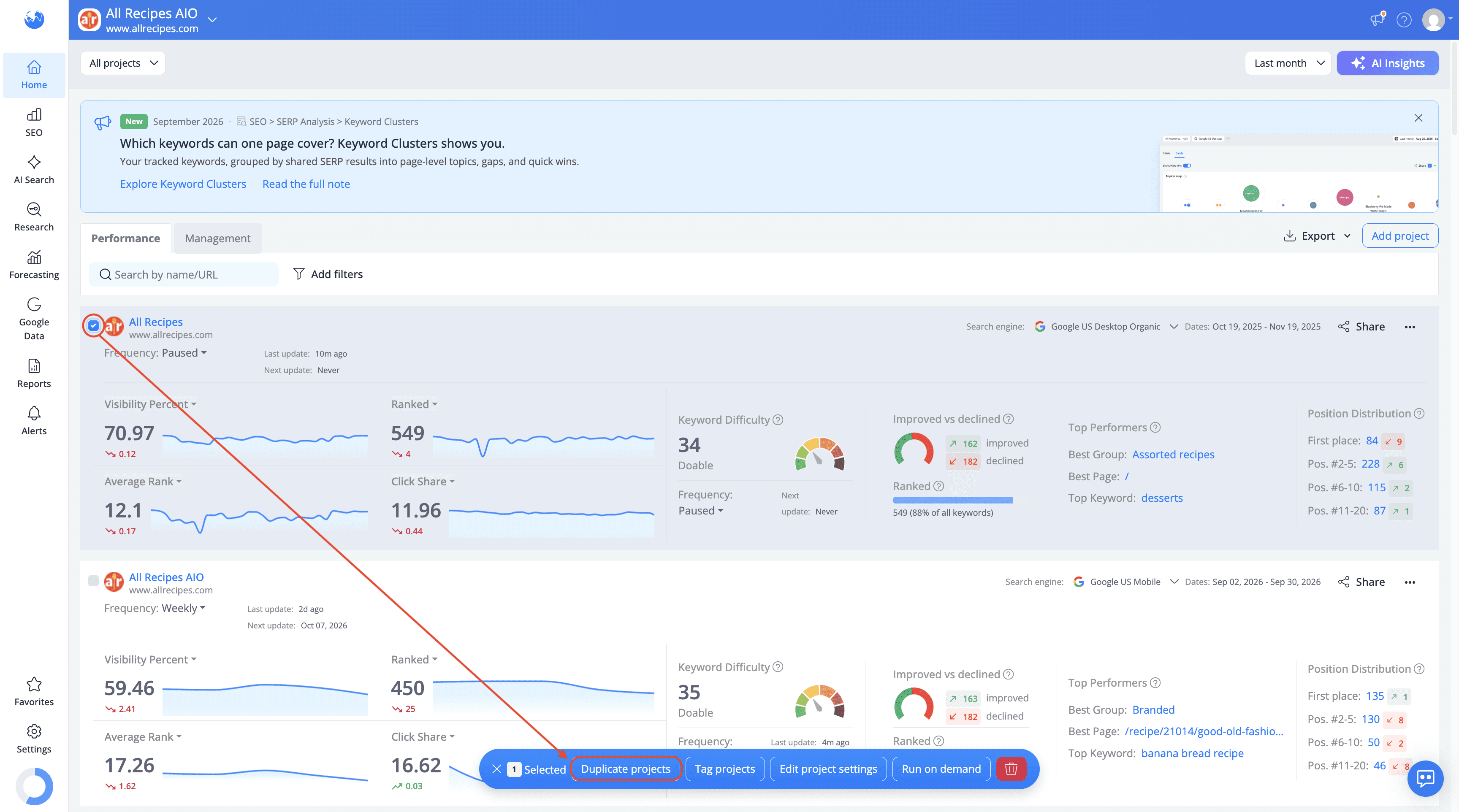
or click the duplicate icon next to the project in the Projects drop-down list.

What happens when you duplicate the project and replace the search engine in the duplicated version
Everything in the original project remains unchanged. It simply stops updating if you pause it.
The duplicated project works like the replacement approach described above: your historical rankings, visibility data, competitive analysis data and other reports are preserved. The only exceptions are SERP Snapshots and Top Sites data, which are not preserved.
What this approach gives you is a safety net: the original project stays available exactly as it was, so you can go back to it or resume tracking it if needed. It's also a good way to test whether the new search engine actually suits your needs before committing to it in your main project.
Switching to a completely different search engine
Sometimes the change isn't about engine type or tracking scope, it's about dropping one search engine in favor of a different one. Say you've been tracking Bing and want to move to Google instead.
In this case, the recommended approach is to duplicate the project and pause the original. In the duplicated project, add the new search engine and remove the old one rather than replacing the existing search engine.
Because the two search engines are completely different, their historical rankings and other metrics are not directly comparable. There is therefore no historical data from the old search engine to carry over to the new tracking setup. The original project remains available in its paused state, so you can refer back to your previous data whenever you need it.
Finding the right approach for your use case
Changing the search engine type (Universal to AI Overviews, Organic to Universal, and similar)
If you're confident about the change, you can replace the search engine directly in the existing project. This keeps everything in one project and avoids having to manage a second project.
If you'd rather test the new configuration first, duplicate the project and change the search engine in the duplicated version. This lets you explore the new setup while keeping the original project and its existing tracking unchanged.
Narrowing a country-wide project down to a specific location
If you're sure that the narrower location is what you need going forward, replacing the search engine setting directly in the existing project is the simplest option. If you're unsure how the narrower targeting will affect your results, you can duplicate the project first and compare the new location with your existing data without changing your country wide tracking.
The same reasoning applies in reverse, if you're broadening a location-specific project back out to country-wide.
Switching to a completely different search engine
Duplicating the project is the only approach that makes sense here if you want to keep your historical data.
If you don't need to keep it, you can simply add the new search engine you want to track and remove the one you no longer need, directly in your existing project.
Switching from Universal (All Results) to Google Search + AIO
This is the most common scenario, so let's walk through it directly. This switch is useful when you're interested in more accurate and precise tracking of AI Overviews.
While both search engines track the same types of results, all web search results excluding Ads, the Google Search + AIO search engine has an enhanced mechanism for retrieving AI Overview results more consistently and accurately.
Your historical rankings remain intact, as well as the other metrics covered earlier in the article. The same rule applies here too: the only things that aren't preserved are the SERP Snapshots and the Top Sites data.
While replacing the search engine directly is safe for your historical ranking data, duplicating the project is also a useful option here if you'd rather test it first.
What happens if you remove a search engine from your project
Removing a search engine is different from replacing or duplicating it. When you delete a search engine from a project, all its associated ranking history is removed along with it. If you add that search engine back later, the previous data won't be restored.
If you're unsure which approach is right for your situation, you can always reach out to our Customer Support team. They can help you understand how each option would affect your specific project before you make any changes.
Either way, the data you've already collected stays safe. Switching search engines doesn't mean starting over.
Do you have any other questions? Don’t hesitate to get in touch and we will keep building the FAQ.
stay in the loop