Your client checks their website on Google and sees it ranking on the second page. But your latest ranking report tells a different story: dozens of keywords have dropped, including branded searches that were previously stable. Naturally, they start questioning the accuracy of your data.

Before assuming their rankings have actually declined, there's another possibility worth investigating: poisoned SERPs.
This has sparked widespread discussion across the SEO industry, with leading SEO publications, rank-tracking tools and industry experts sharing research and observations about how Google's changing search results may affect ranking data.
Google may return incomplete, irrelevant or unexpected search results to automated ranking tools, creating apparent ranking drops that don't necessarily reflect what real users see.
So, how can you tell whether your client has experienced a genuine ranking loss or a poisoned SERP?
In this guide, we'll walk you through practical AWR workflows to investigate suspicious ranking changes, identify potential SERP collection anomalies and give your clients the evidence they need to trust your reporting again.
TL;DR: How to Handle Poisoned SERPs Without Losing Client Trust
Poisoned SERPs can make websites appear to lose rankings even when their actual Google visibility hasn't changed. As Google changes how it handles automated searches, understanding these discrepancies is becoming increasingly important for SEO reporting.
Don't assume every ranking drop is real: incomplete or unusual SERPs can lead to missing or inaccurate rankings.
Understand why tools report different results: Collection methods, proxy networks and how tools handle Google's changes can all affect ranking data.
Track rankings locally: city- or region-level tracking better reflects what real users see in Google.
Investigate suspicious drops in AWR: use the Dates Comparison and SERP Similarity reports to spot unusual changes, then Keyword Clusters to show the bigger picture.
Keep your clients informed: explain what's happening with Google SERPs, be transparent about suspicious data and focus on long-term SEO progress rather than individual ranking fluctuations.
The takeaway: A suspicious ranking drop doesn't automatically mean your client's SEO performance has declined. Investigating the data and explaining what you've found can help maintain their confidence in your reporting.
What Is a Poisoned SERP and Why Does It Happen?
A poisoned SERP is a Google search results page returned in response to an automated query that contains unexpected, irrelevant or incomplete results instead of those a real user would normally see.

Unlike CAPTCHAs or explicit request-blocking errors, which are easy to identify, a poisoned SERP can look like a legitimate Google results page. This makes it particularly difficult to detect, as ranking tools may collect and process these results as valid ranking data.
As a result, a website may appear to have lost rankings even though its actual visibility in Google hasn't changed.
But why is this happening?
Google has been tightening restrictions on automated searches, although these measures don't appear to target rank trackers specifically. Some SEO experts believe they may be linked to the growing volume of scraping activity associated with AI and LLMs.
Other changes have also made automated SERP collection more challenging, including requiring JavaScript rendering to access search results, retiring country-specific Google domains (ccTLDs), changing how the num parameter works and introducing /goto/ URLs that complicate the extraction of destination links.

Beyond these changes, Google now appears to be returning incomplete or irrelevant search results to some automated requests rather than simply blocking them.
While poisoned SERPs have only recently gained widespread attention across the SEO industry, we've been investigating this behavior at AWR for months. Following Google's May 2026 Core Update, we started seeing these discrepancies more frequently across different markets.
Poisoned SERPs can take several forms, each affecting ranking data differently. Here are some scenarios you might encounter when investigating unexpected ranking drops.
Irrelevant Search Results
One of the clearest signs of a poisoned SERP is when the collected results don't match the keyword's search intent. Instead of returning relevant websites, Google may display pages that focus on individual words within the query and cover entirely unrelated topics.
For example, a search for "emirates first class" returns results about CSS programming, AI regulations, Netflix movies and other unrelated topics instead of Emirates Airlines' first-class services. In this case, the poisoned SERP appears to focus on the word "first" rather than the full search query.
This is the behavior we previously described as the "dual-SERP reality" in our Why Your Tracked Rankings No Longer Match What You See in Google article. The challenge is that these results still look like a valid Google SERP.
Without specific detection rules to identify unusual patterns, such as results that don't match the search intent, there's no obvious indication that anything is wrong. The page could be processed as normal, leading to missing rankings or significant reported drops, even though the website may still rank well in the results shown to real users.
Incomplete SERPs
Another scenario occurs when Google returns fewer search results than expected, even though your project is configured to collect a specific search depth.
For example, your AWR project might be configured to track five or ten pages of Google results, but the collected SERP contains only two or three pages.

Here, the project was configured to collect two pages of results, but Google returned only one for the keyword "アップルフォン".
To see if your collected SERPs match your project's configured search depth, go to Settings > Overview and check the "Project preferences" section.

Next, open the Top Sites report, click "View SERP" to check how many pages were collected for your keywords, and compare that number with the search depth set in your project settings.

In other cases, Google may return a page containing just a handful of results or, more commonly, an image group with little to no additional organic listings.

A search for "running shoes" reaches page 9, but instead of displaying a full page of organic results, Google returns an image group, related searches and a message indicating that some similar results have been omitted.
“No Documents Matched Your Search Terms” Pages
Another variation is Google's "No documents matched your search terms" page.

For this particular scenario, AWR already has a retry mechanism in place. When this page is detected, AWR automatically requests the page up to two additional times to try to retrieve valid search results.
Google Sign-In Pages
In some cases, Google may return a sign-in page instead of the expected search results. When this happens, the automated request doesn't receive the organic listings needed to determine keyword positions.

These cases can lead to missing rankings or apparent drops, even though the website's actual visibility in Google hasn't necessarily changed.
Examining the collected SERPs before drawing conclusions or reporting ranking changes is essential to maintaining your clients' trust in your data.
Rather than simply explaining discrepancies, take the opportunity to educate them about Google's evolving search behavior, why these inconsistencies occur and what you can do as an SEO professional to continue providing reliable, meaningful reports.
Why Do Ranking Results Differ Between Tools?
You might see accurate rankings in one tool and significant drops in another, only for the situation to reverse during the next update.
Does that mean one tool is better at collecting accurate rankings than another?
It really comes down to how each tool collects and processes its data. Here are a few things that can make a difference:
SERP Databases vs. Live Queries
Some SEO tools, such as Semrush and Ahrefs, use large keyword databases that are refreshed on their own schedules. When poisoned SERPs first started appearing, these databases may still have contained older, unaffected results.

So, while some tools initially showed more stable rankings, the discrepancies may have started appearing as their databases were updated.
AWR, on the other hand, collects fresh results whenever clients request a ranking update.
Poisoned SERP Detection
The tricky part about poisoned SERPs is that they can look just like normal Google results. That's why we've been working on a set of rules at AWR to spot unusual patterns and retry suspicious requests before accepting the results as valid ranking data.

Handling /goto/ URLs
These URLs redirect through Google before reaching the actual website. Resolving them during SERP collection creates additional requests, which may increase the chances of Google identifying the traffic as automated.

At AWR, we decode these URLs locally, after collecting the SERPs, to avoid sending those extra requests.
Shared Proxy Networks
SEO tools don't necessarily have exclusive access to the proxies they use. The same IP address may be shared by multiple tools and scraping services, meaning one provider's activity can affect the results another receives.

For example, if one tool doesn't decode /goto/ URLs locally after collecting the SERP, it may generate additional requests through a shared proxy. This extra activity could cause Google to flag the IP address as automated traffic.
Other tools using the same proxy might then receive poisoned SERPs, even though they weren't responsible for those additional requests.
The Proxy Behind the Search Matters
The problem isn't necessarily the SERP itself, but rather the proxy used to collect it.
SEO tools rely on proxy networks to retrieve Google results from different locations. These proxies may also be used by other automated services, including scraping APIs and AI-related data collection systems.

If Google identifies traffic from a particular proxy IP as automated, it may start returning incomplete or irrelevant results instead of those shown to regular users.
In other words, a poisoned SERP is often the consequence of a proxy being flagged as a source of automated traffic.
This also explains why the same keyword can return accurate rankings through one proxy and poisoned SERPs through another. The keyword hasn't changed and neither has the website's actual visibility. What has changed is how Google treats the request based on where it comes from.
Why Local Rank Tracking Helps
Another factor that can make a difference is the geographic location you're tracking.
Google doesn't serve truly country-wide search results in the same way it serves results to individual users. Real searches are influenced by the user's location, whether that's a city, a region or a smaller area.
For example, here's what Google returns for a country-wide US search for "chicken wings."

Notice how the Local Pack includes businesses from several different states, including Colorado and Oregon. That's not what a real user would typically see. Someone searching for "chicken wings" would expect nearby restaurants, not a mix of businesses scattered across the country.

In this country-wide search, the website we were tracking was missing from the results. But when we checked the same keyword on the same date, this time targeting Los Angeles, the website appeared in position 9.

The Local Pack also looked much more natural, showing restaurants in Los Angeles. Unlike the country-wide results, this looks like the kind of SERP someone actually searching from Los Angeles would see.
Because country-wide queries don't closely reflect how people actually search, they may also be easier for Google to identify as automated.
Tracking rankings at the city or regional level produces results that more closely resemble a real user's search experience. It may also reduce the chances of triggering bot detection and receiving poisoned SERPs.
For agencies, local tracking makes ranking reports more meaningful by showing how clients perform in the locations where their potential customers actually search.
How to Keep Reporting Rankings to Your Clients
Poisoned SERPs can make ranking data confusing, especially when a client suddenly sees drops that don't match what they're seeing in Google.
But you don't have to stop reporting and your clients don't have to lose trust in your data. There are a few ways to investigate suspicious rankings in AWR, figure out what might have gone wrong and give your clients a clearer picture of how their website is actually performing.
Here are some workflows that can help.
Spot Unusual Drops with the Dates Comparison Report
Start with the Dates Comparison report to see how rankings have changed over time. If a keyword suddenly drops after consistently ranking well, that's a good reason to take a closer look.
For example, the website in the screenshot below usually ranks in Position 1 for "cornbread recipe." On October 5, though, it dropped to Position 21. By October 9 and 13, it was missing from the tracked results altogether. Then, on October 17, it was back in Position 1.

That's a pretty unusual pattern: if the website had genuinely lost visibility, you wouldn't necessarily expect it to disappear and then return to exactly where it was within a few updates.
It doesn't automatically mean the SERPs were poisoned, but it's a sign that something may have gone wrong with the results collected on those dates.
The Dates Comparison report helps you spot these cases early, so you know which keywords and updates to investigate before sharing the numbers with your clients.
Use the SERP Similarity report to investigate what changed
Now that you've identified when the ranking drop happened, the next step is to check how much the search results actually changed.
Open the SERP Similarity report and compare a date when your website was missing with one when it returned to its usual position.
For our "cornbread recipe" example, we're comparing October 13, when the website was missing, with October 17, when it was back in position 1.

First, look at the Overlap Percentage. In this case, it's just 4%, meaning that very few of the URLs found in one SERP also appeared in the other. That's a big difference for the same keyword just four days apart.
Next, check the Position Stability Score, which shows how much the order of results changed between the two updates. A score closer to 0% indicates greater volatility, while a score closer to 100% means the rankings stayed relatively stable.
Here, the score is only 9%, suggesting that the order of results changed almost completely.
Taken together, these numbers are a strong reason to investigate the October 13 SERP more closely. They don't prove it was poisoned, but they show that the collected results were very different from those returned just a few days later.
Then, scroll further down the report and select the New URLs and Dropped URLs filters. These help you compare the URLs that appeared in the SERP where your website was missing with those from the SERP where it normally ranks.

In this example, the results are still relevant to "cornbread recipe," but Google returned mostly YouTube videos instead of recipe websites from different sources.

This helps explain why the website disappeared from the rankings, even though the results weren't completely unrelated to the search query.
By looking at which URLs appeared and disappeared, you can spot anything unusual about the collected SERP, whether that's an unexpected mix of websites, a sudden change in result types or something that simply doesn't look like a normal Google search results page. These are all reasons to investigate further before treating the ranking drop as a real change in visibility.
Use the Keyword Clusters Report to Show the Bigger Picture
As an SEO, your job isn't just to show clients where their keywords rank. Most clients don't care about individual positions as much as they care about the direction their website is heading. Is their visibility improving? Are they making progress on the topics that matter to their business?
That's where the Keyword Clusters report can help. Instead of looking at each keyword separately, this report groups together keywords around the same topic and calculates an average ranking position for the cluster.
For example, in the screenshot below, the report has identified seven keywords related to the topic "recipe for blueberry pie with frozen blueberries". Click on the cluster to see the ranking positions for each of these keywords.

Some keywords rank in position 1, one ranks in position 21 and two are missing from the tracked results altogether. Looking at those keywords individually might raise concerns, especially if a client focuses on the ones that dropped.
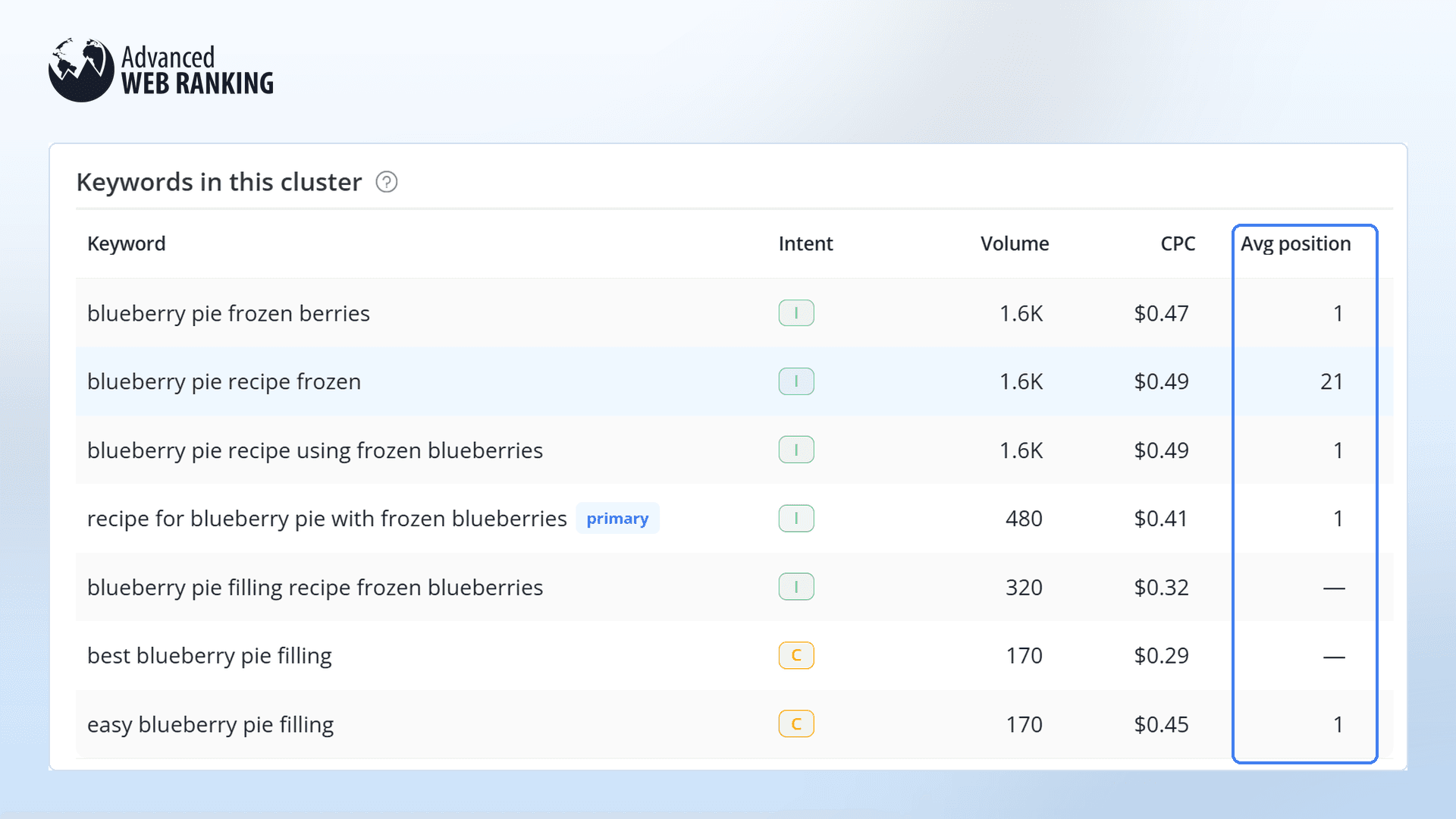
But the Keyword Clusters report brings them together under the main keyword "recipe for blueberry pie with frozen blueberries" and shows an average position of 5 for the cluster.

This doesn't mean you should ignore missing rankings or unusual drops. Those are still worth investigating. But looking at the cluster as a whole helps you move the conversation away from individual ranking fluctuations and toward the bigger picture.
And by tracking how the cluster performs over time, you can show clients whether they're gaining or losing visibility for the topics that matter to them, rather than leaving them worried about every keyword that drops.
Educate Your Clients About What's Happening with Google SERPs
SEO isn't just about tracking URLs and their rankings anymore. And it's not just about AI search or monitoring brand mentions in AI-generated answers. Everything is changing, from how people search to how Google serves results.
That's why educating your clients matters. When rankings suddenly drop, explain that Google may return different results to automated tools than to real users. Show them what you've found and why those numbers might not reflect an actual loss of visibility.

You don't need to get too technical. Be transparent about what you're seeing, what you're investigating and how you're adapting your reporting.
At the end of the day, clients care less about individual rankings and more about whether their SEO efforts are moving in the right direction. Your job is to help them understand that bigger picture.
Have questions about poisoned SERPs or need help investigating suspicious ranking drops? Don't hesitate to reach out to our dedicated support team. We're always happy to help!
Questions We've Heard From Clients and the SEO Community
Do Google's /goto/ URLs affect ranking results?
Can Google Search Console help confirm whether a ranking drop is real?
Should I rerun a ranking update if I suspect a poisoned SERP?
Does Google officially acknowledge poisoned SERPs?

Article by
Sabina Comandasu
The freshest addition to the Advanced Web Ranking support team, Sabina Comandasu is here to walk you through the tool, gather and pass along your feedback promptly, and assist you through both demo calls and our messaging service. She also supports users in navigating AWR through the content articles she writes, helping them quickly find the guidance they need.