

Advice and answers from the Advanced Web Ranking Team
Search for articles
What Is the Difference Between Keywords and Keyword Units?
Learn the difference between keywords and keyword units in Advanced Web Ranking and how keyword units are calculated for different types of updates.

Advanced Web Ranking operates on a keyword units system and each subscription plan includes a fixed number of keyword units, calculated considering the volume of ranking updates.
Although the terms keyword and keyword unit may sound similar, they represent different concepts within the platform. Understanding the distinction is essential for accurately estimating tracking capacity and managing project configurations.
In this article, we’ll explain what each term means and how they relate to one another.
Keyword vs. Keyword Unit
A keyword represents the term added to your project for which AWR sends a live keyword query to the search engine(s) added to your project.
For each update, AWR retrieves the search results and displays the ranking position of your website (if found ranking) for that keyword returned by the selected search engine at the time of the update.
Keyword unit refers to the resource used to update keywords based on the configuration of your project.
Keyword units included in AWR Subscription plans
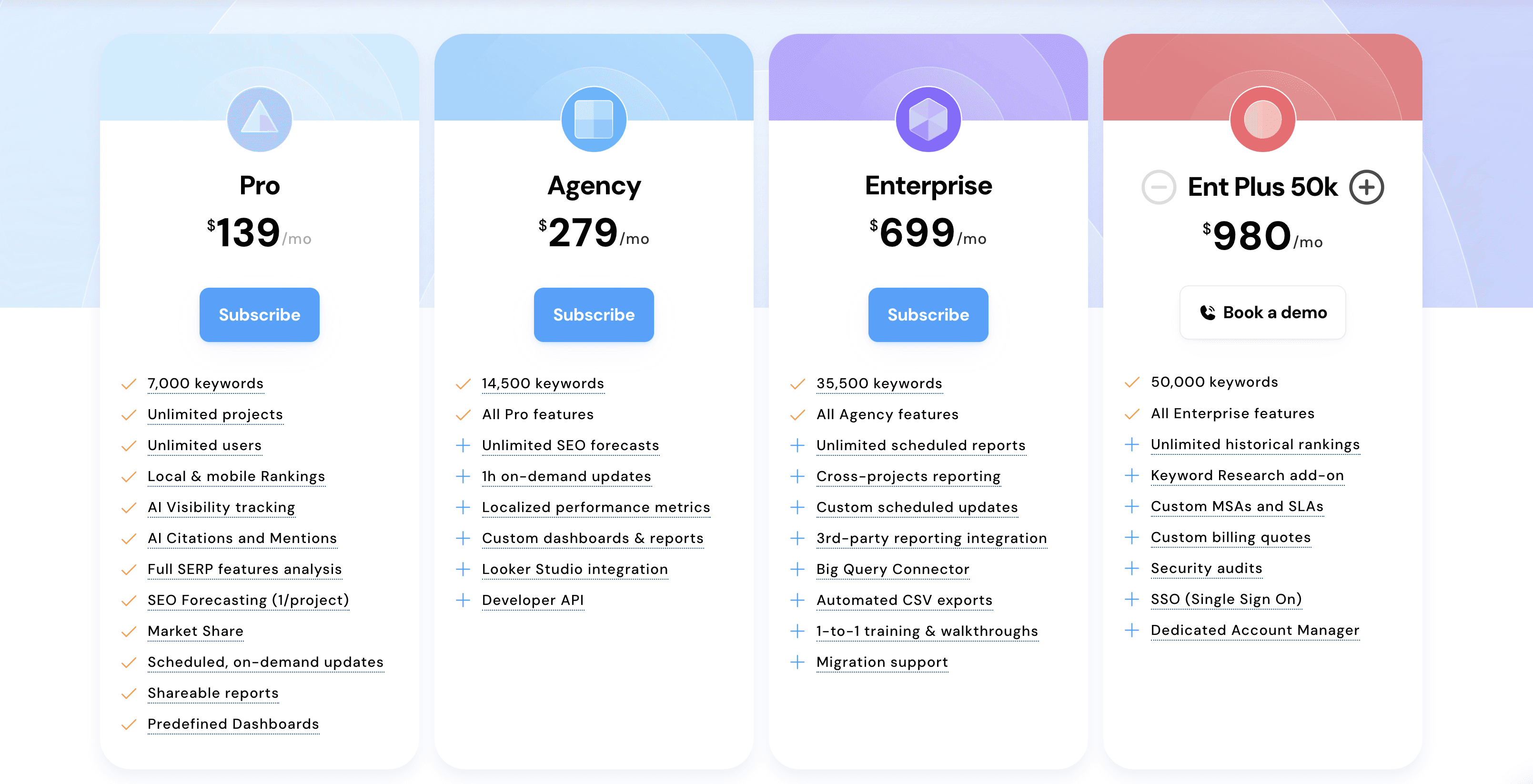
You may have wondered why a specific number of keywords is mentioned in the description of our subscription plans.
The number of keywords listed for each plan represents how many keywords you could track when using what we consider the default search preferences:
Weekly frequency update
1 search engine
A search depth of up to 5 pages
However, these numbers actually reflect the number of keyword units included in each plan. More precisely:
1 keyword unit = 1 keyword updated weekly on 1 search engine with a search depth of up to 5 pages.
How Keyword Units Are Consumed
Keyword units are consumed when running different types of updates in the app. These include:
Ranking updates (scheduled or on-demand)
The number of units required for a ranking update is computed using the following factors:
number of actual keywords to be updated
number of search engines added to the project
Each search engine, location, and device configuration added to a project is counted as a separate search engine unit. For example, tracking Google Desktop and Google Mobile counts as two search engine units.
The Google Search + AIO and Google AI Mode search engines rely on a more advanced query mechanism to collect data accurately. Because of this, they consume twice the resources compared to standard search engines.
update frequency or update type (scheduled vs on-demand) selected
For scheduled ranking updates:
Daily -> a ranking update will be completed each day
1 keyword updated daily on 1 search engine with a search depth of up to 5 pages = 7 keyword units
Weekly -> 4 updates per month
1 keyword updated weekly on 1 search engine with a search depth of up to 5 pages = 1 keyword unit
Biweekly -> 2 updates per month
1 keyword updated biweekly on 1 search engine with a search depth of up to 5 pages = 0.5 keyword units
Monthly -> 1 update per month
1 keyword updated biweekly on 1 search engine with a search depth of up to 5 pages = 0.25 keyword units
search depth
Search depth of 1, 2, 3, or 5 pages -> 1 unit is consumed for each keyword and search engine combination.
Search depth of 10 pages -> 2 units are consumed for each keyword and search engine combination.
Example
Let’s say you want to update 100 keywords daily on 2 search engines, with a search depth of 10 pages. The required number of keyword units for these updates would be:
100 (keywords) x 2 (search engines) x 7 (updates) x 2 (search depth of 10 pages) = 2800 keyword units
For partial updates:
0.5 keyword units are consumed for each keyword and search engine pair needing refreshed rankings.
For on-demand updates:
1-hour: same amount of resources as a weekly ranking update.
12-hour: half the resources of a weekly ranking update.
48-hour: one quarter of the resources of a weekly ranking update.
When using the project scheduler, the system automatically reserves the required keyword units for a month's worth of updates.
Any additional updates, such as partial or on-demand updates, consume extra keyword units that are reimbursed when the billing cycle is refreshed.
Difficulty updates
1 keyword updated for difficulty, on 1 search engine (single device) = 2 keyword units
Example
Let’s say you want to run difficulty updates for 50 keywords weekly for 3 search engines. The required number of keyword units for these difficulty updates would be:
50 (keywords) x 3 (search engines) x 1 (update) x 2 = 300 keyword units
AI Brand Visibility updates
With Grounding with web search option enabled: 50 keyword units × number of LLMs × number of topics x number of updates
With Grounding with web search disabled: 3 keyword units × number of LLMs × number of topics x number of updates
The available update frequency options for AI Brand Visibility are:
Daily -> 30 updates
Weekly -> 4 updates
Biweekly -> 2 updates
Monthly -> 1 update
Example
Let’s say you want to run AI Brand Visibility updates for 10 topics, across 3 LLMs, with a biweekly frequency and the “Grounding with Web Search” option enabled. The required keyword units for these updates would be:
50 (keyword units) x 3 (LLMs) x 10 (topics) x 4 (updates) = 6,000 keyword units
For a more detailed breakdown of how keyword units are consumed for each type of update, you can check out this article.
Keyword Unit Consumption Overview for Your Projects
You can view an overview of how many keyword units each project update consumes, broken down by update type in the Resources section.
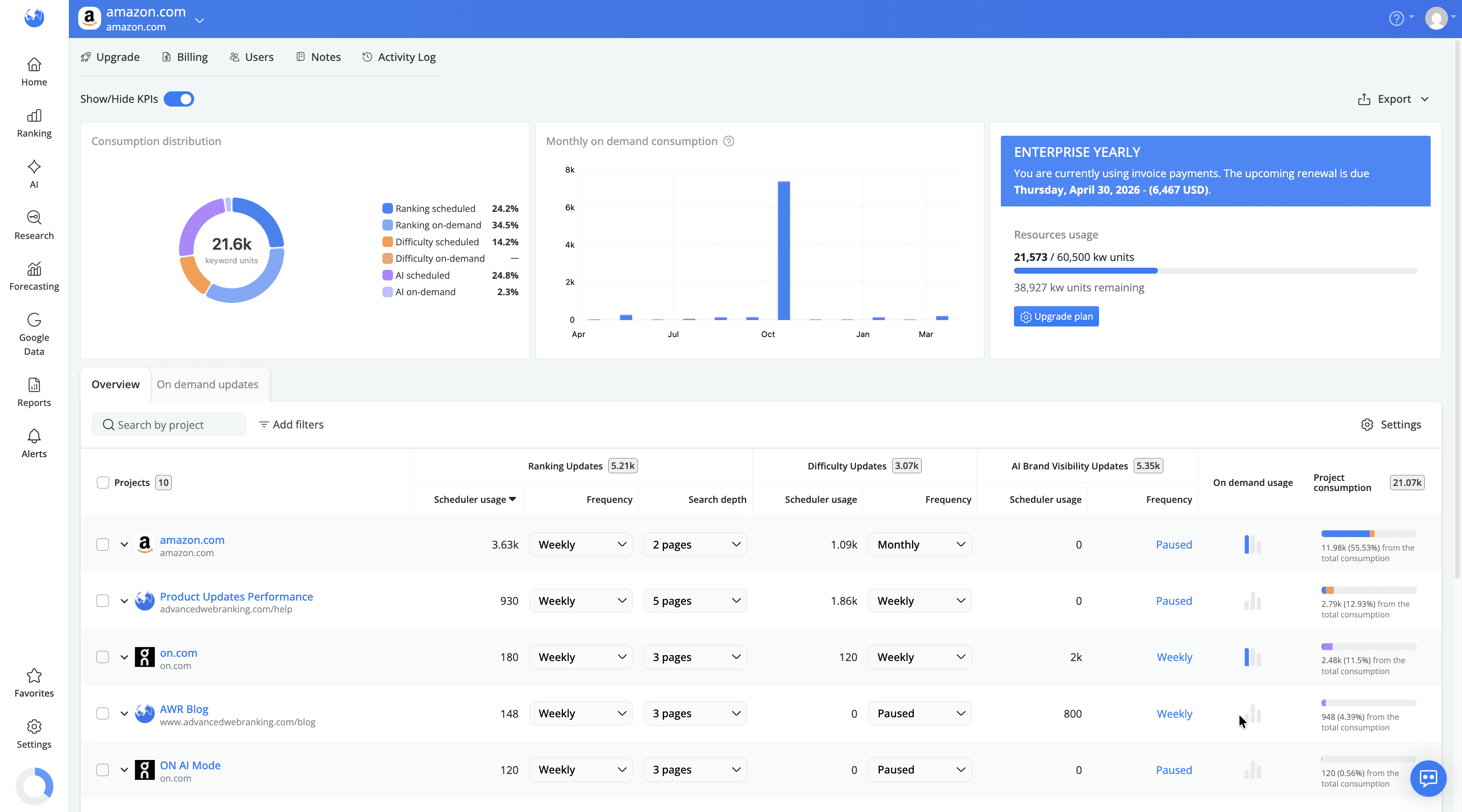
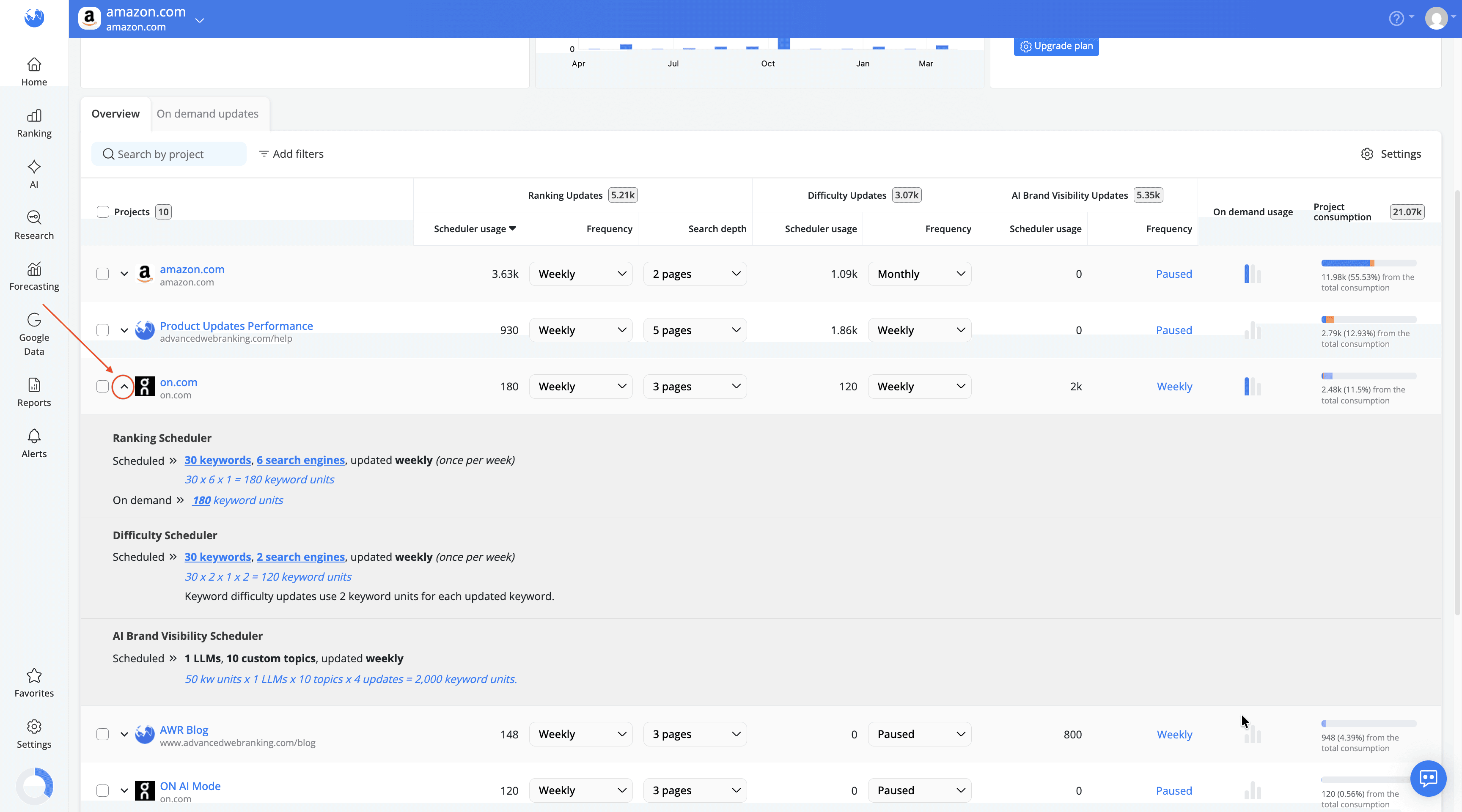
For a detailed breakdown, you can expand each project to see exactly how the keyword unit consumption is calculated.
If you need help selecting the plan that best fits your tracking needs or want to better understand how to use the keyword units in your account, please contact our support team and they’ll be happy to assist you.
stay in the loop