

Advice and answers from the Advanced Web Ranking Team
Search for articles
How to Track Your Website’s Performance in AI-Generated Search Results
Monitor rankings, visibility, and competitor insights in AI search engines like Google AI Mode, ChatGPT, and Perplexity with AWR.

Search is no longer limited to a list of blue links. With the rise of AI-powered experiences like Google AI Mode, ChatGPT and Perplexity, users consume information in a completely different way. They get direct, AI-generated answers that summarize multiple sources, act on the information, and often move on—sometimes without clicking any organic links.
For website owners and marketers, this creates a new challenge: understanding if and how their content is selected, used, or cited within these responses. Traditional rankings alone no longer tell the full story.
Tracking your performance in AI search engines helps you see where your content is being selected, how prominently it appears, and how it compares to other sources. This insight allows you to adapt your strategy, improve your chances of being cited, and maintain visibility as search continues to evolve.
What this article covers
In this article, you’ll learn:
What Google AI Mode, ChatGPT, and Perplexity are and how they display search results
How to set up tracking for Google AI Mode, ChatGPT and Perplexity in Advanced Web Ranking
What type of data AWR collects and how to interpret key metrics for each engine
Why it’s important to monitor your website’s performance in AI-generated results
How to compare your website's performance in traditional search versus AI-driven search
AI Mode
Google AI Mode is a version of Google Search that replaces the standard results page with AI-generated, conversational responses to user queries, allowing users to explore topics further through follow-up questions and helpful web links.
It’s available as a standalone tab alongside All, News, Images, and other verticals.
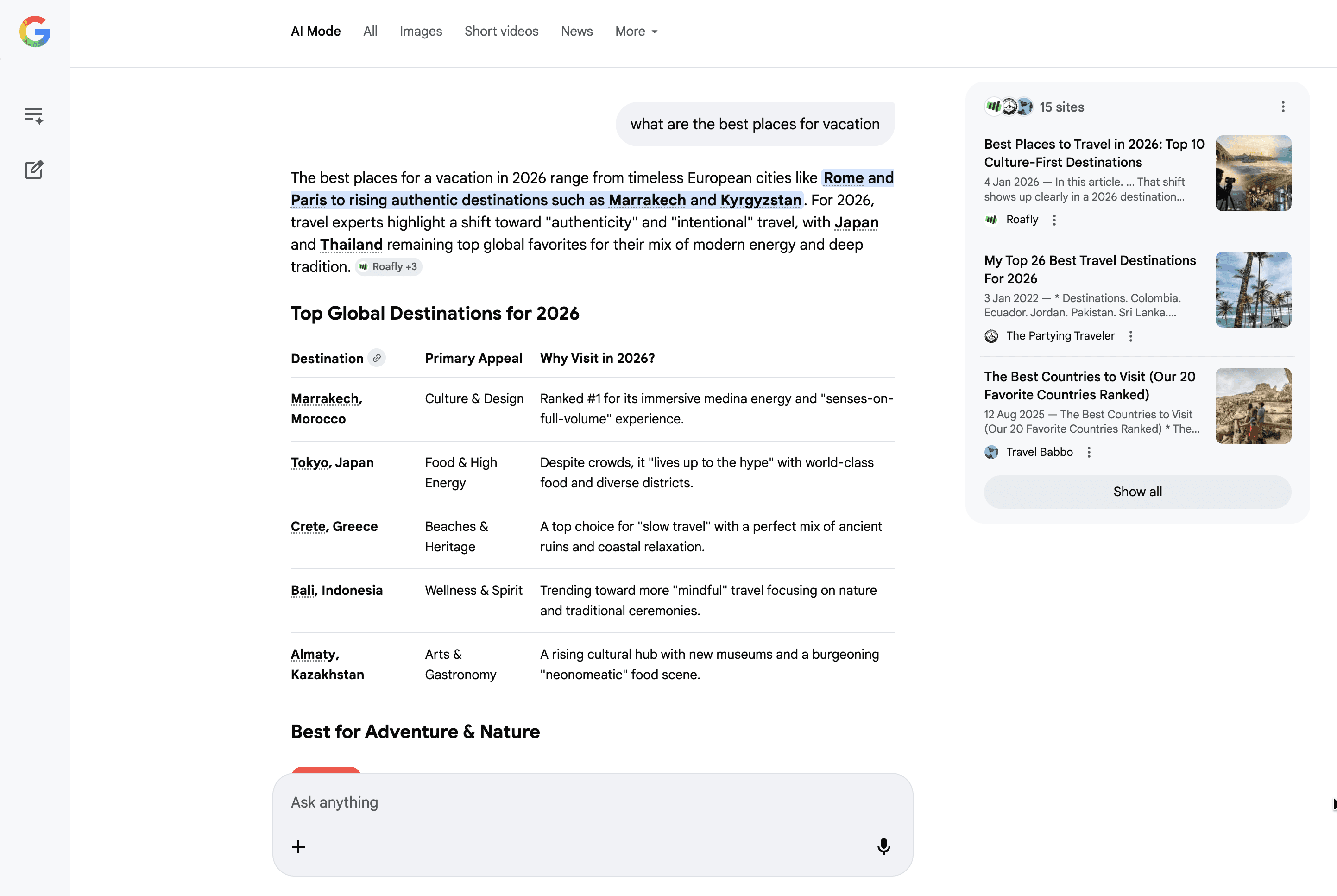
It runs on a modified version of Gemini, Google’s core AI model, and analyzes information from multiple sources. It then synthesizes this information into a clear, concise answer that emphasizes reasoning and context, rather than simply summarizing web pages.
This feature doesn’t replace traditional search, but rather complements it. As a result, it changes how users navigate information and how content is presented.
How to set up AI Mode tracking
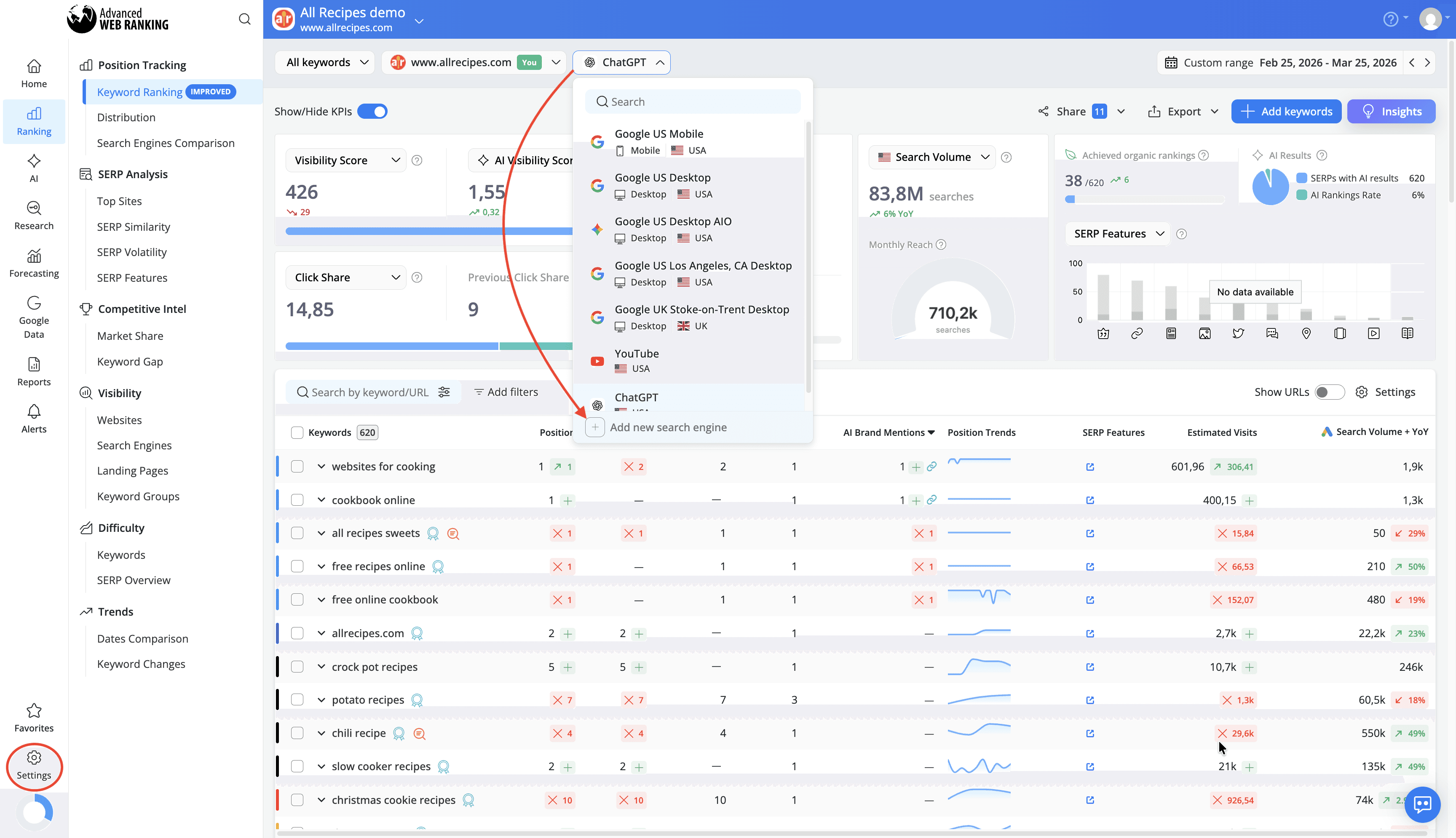
To start tracking Google AI Mode, first select the project where you want to add this search engine from the Projects drop-down list.
You can add the search engine either by opening the Search engines drop-down from most reports in the UI (for example, Keyword Ranking) or from the Project Settings > Search engines section.
In the search engine wizard, select the country and choose Google AI Mode under Search type for either Desktop or Mobile.
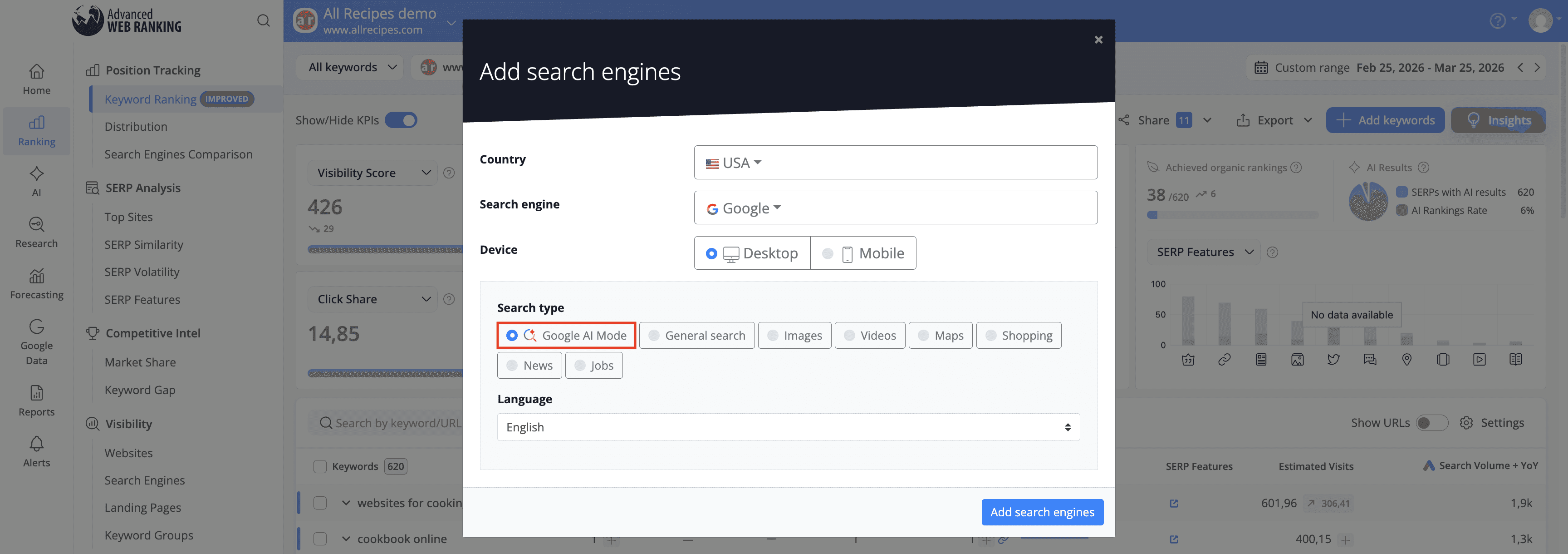
You can track AI Mode for all 170+ countries available in AWR.
After adding the search engine to your project, AWR will begin collecting data, which will be available starting with the next scheduled update or after triggering a new on-demand data refresh.
AI Mode uses an advanced query mechanism to ensure accurate data retrieval. Due to the complexity of this process, tracking AI Mode consumes twice the units of standard AWR search engines.
What type of data is collected for AI Mode?
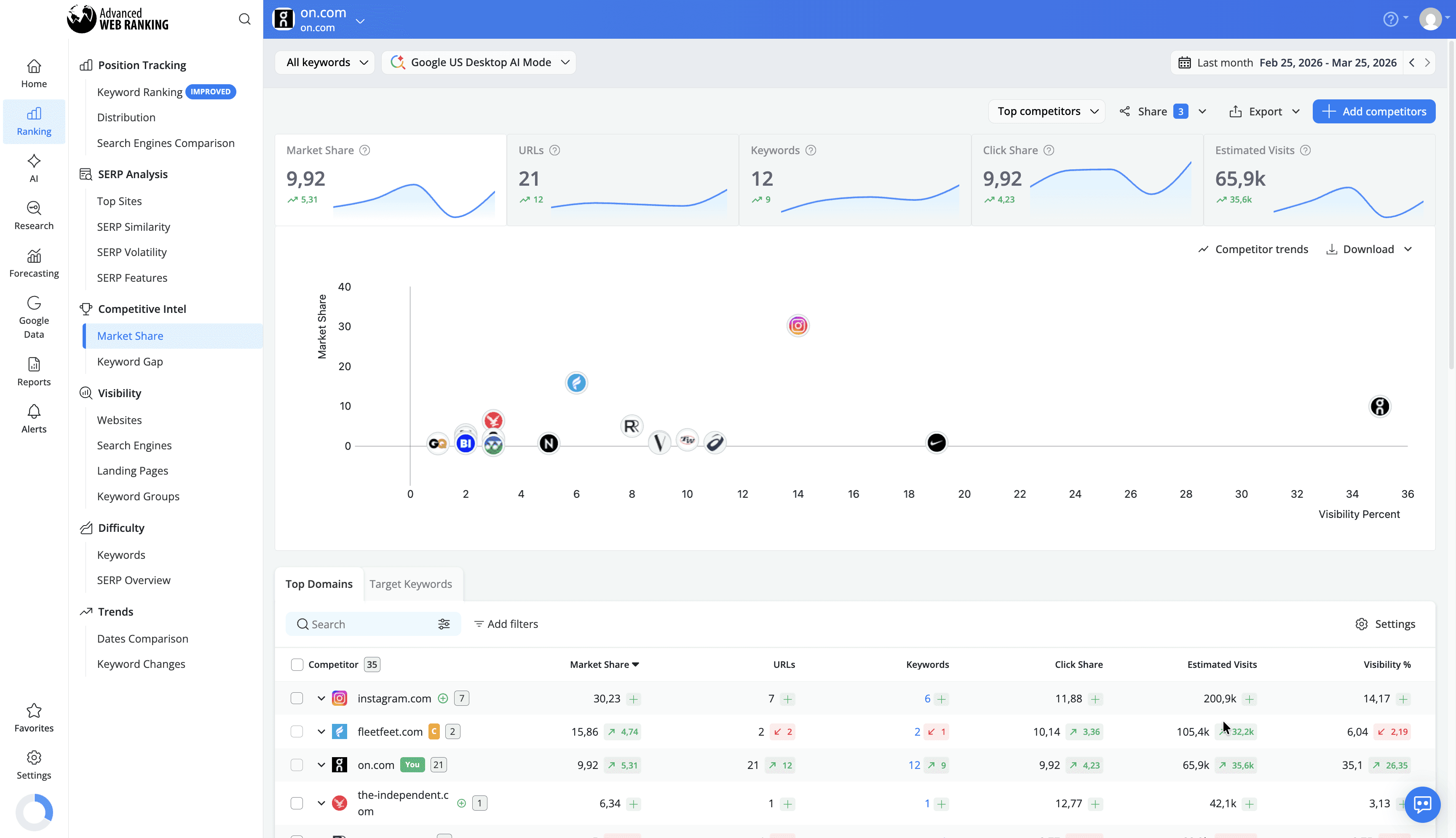
Advanced Web Ranking retrieves and analyzes all websites included in AI Mode responses, providing a detailed view of how your content performs in these AI-generated summaries.
The key types of data you can analyze for AI Mode include:
Ranking Data
In the Keyword Ranking report, you can see your website’s position among the sources cited in an AI Mode response, along with any position changes between updates. You’ll also know whether your content was used only as a source for generating the answer or if it was additionally cited as an inline link within the response.
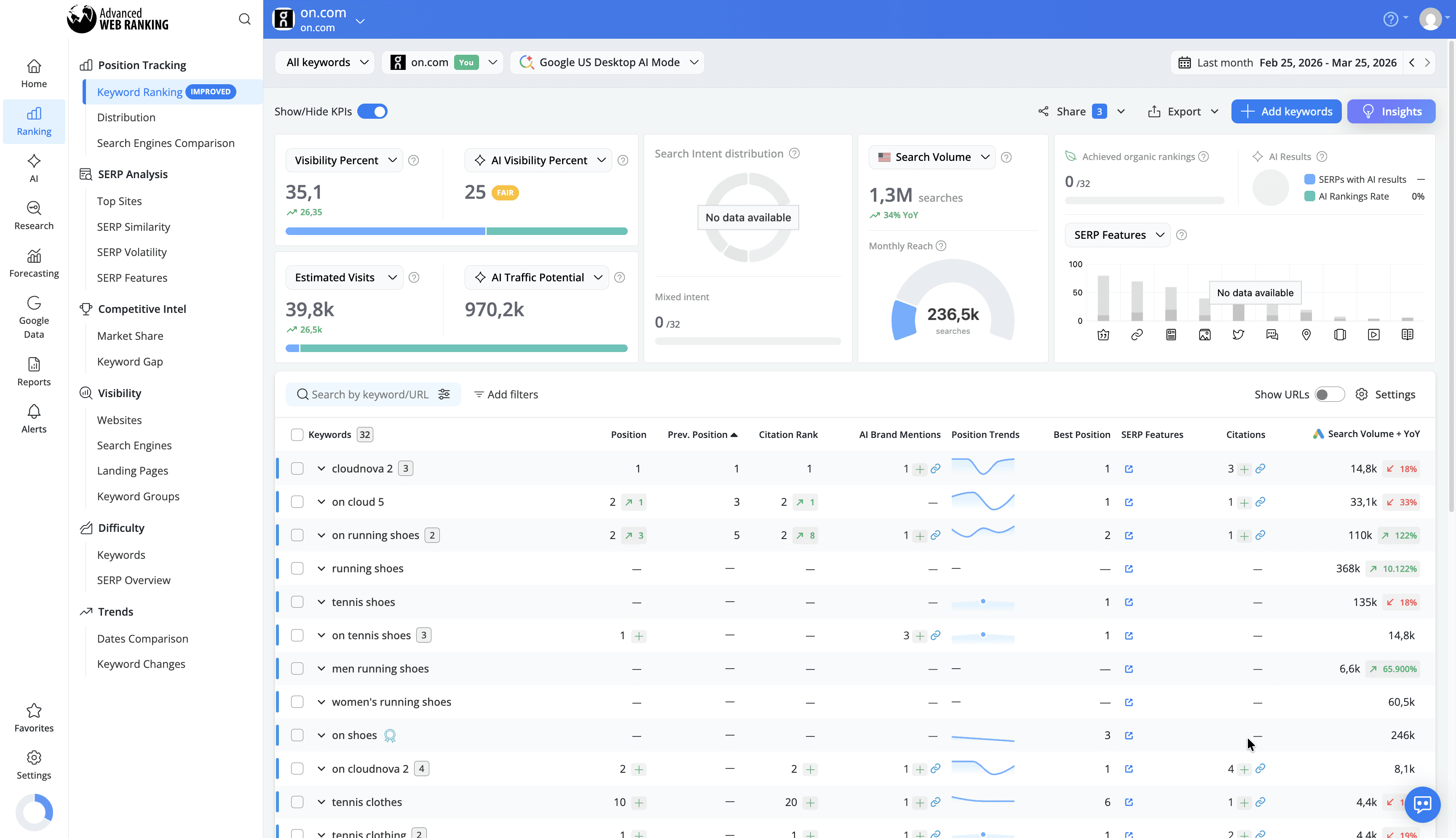
This helps you track how your visibility evolves over time, measure the impact of your optimizations, and identify opportunities to improve your presence within AI-generated results.
Top Sites & SERP Snapshot
AWR provides a breakdown of all websites referenced in AI Mode responses in the Top Sites reports, along with a snapshot of the actual AI Mode page, offering instant insights on how your site and competitors appear.
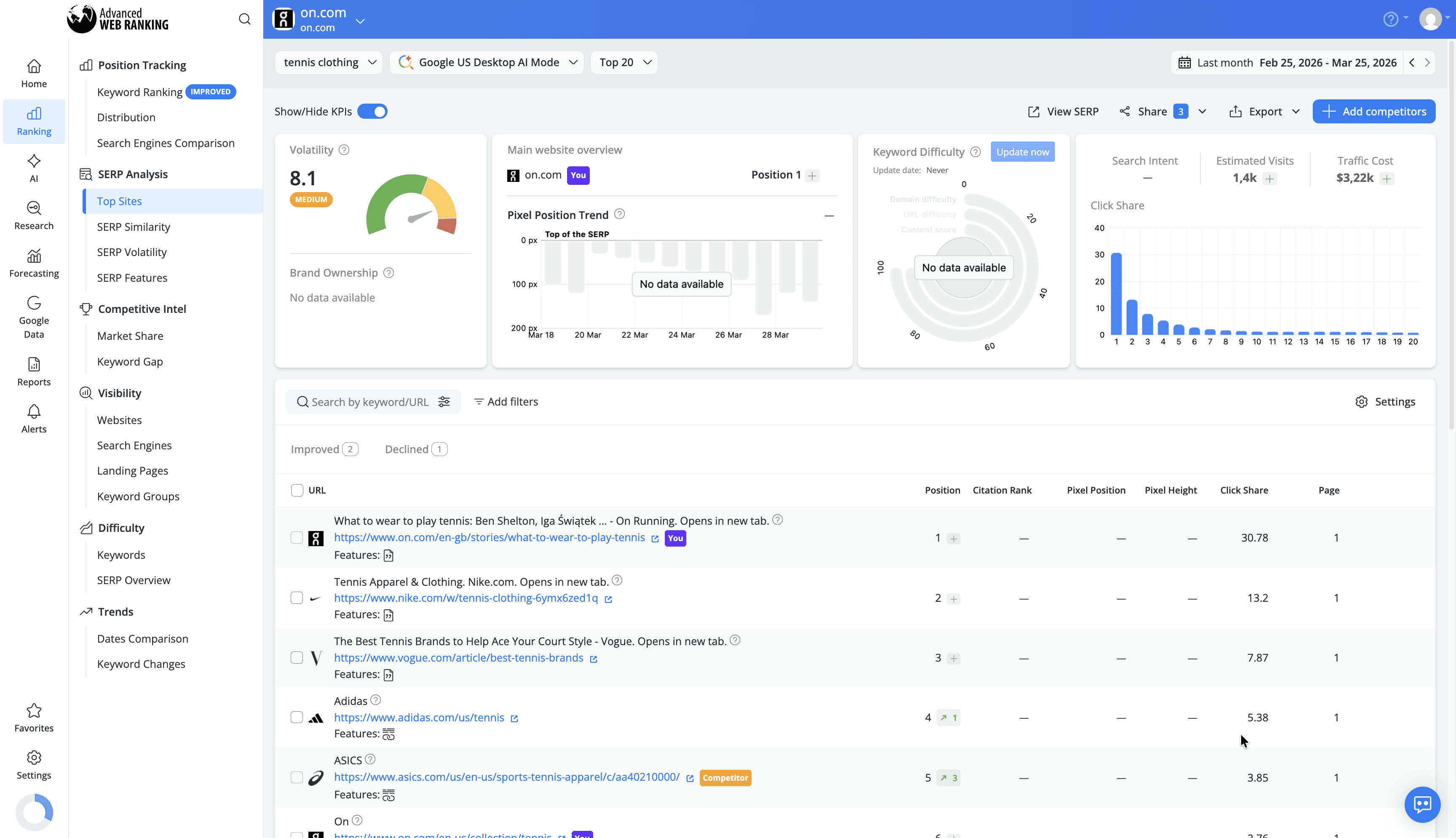
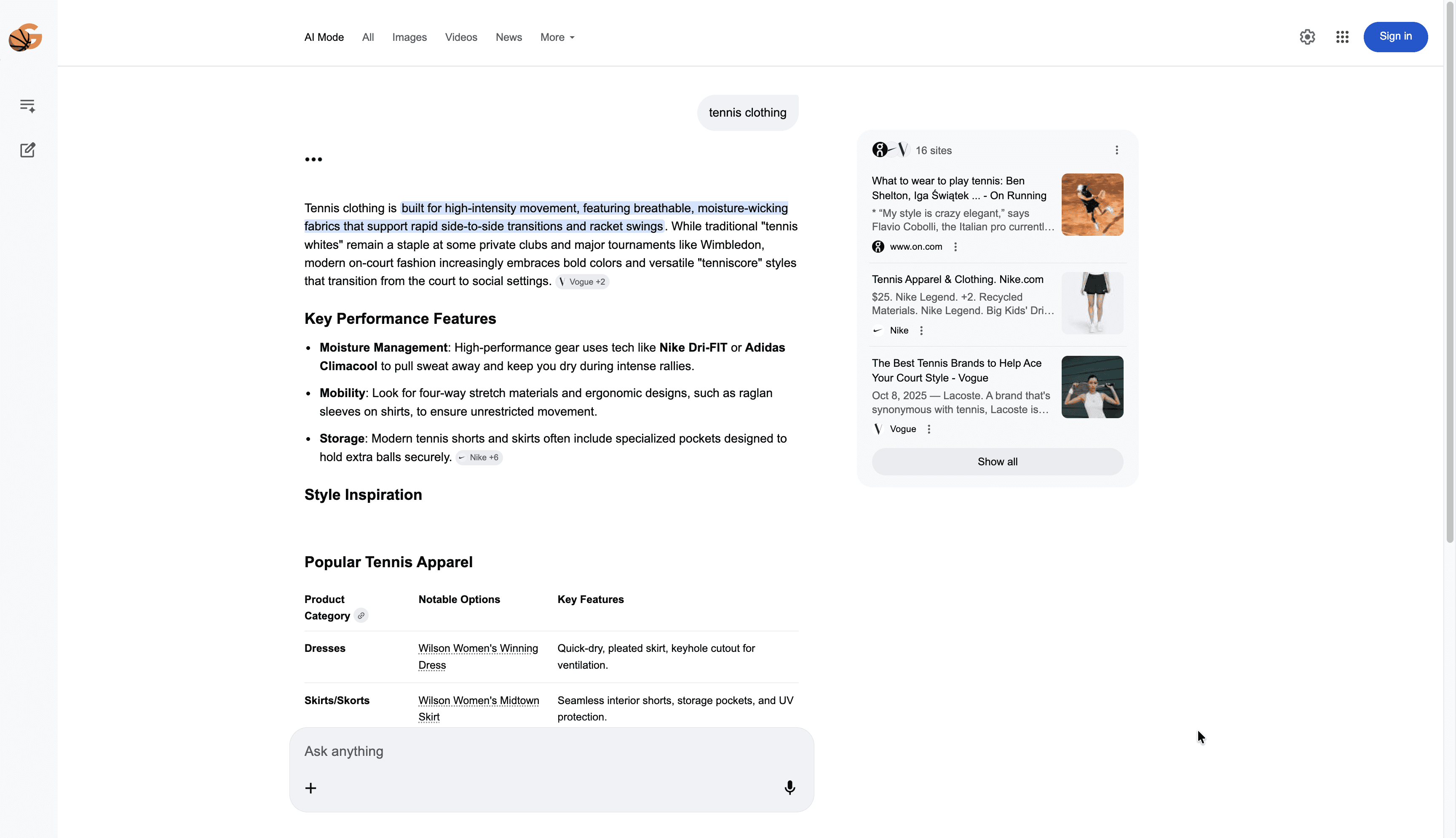
This lets you see how your site and competitors appear, analyze which content is being selected by AI, and identify patterns you can use to optimize your own content strategy.
AI Keyword Performance
The AI Keyword Performance report helps you understand how your brand performs inside AI-generated results. It measures whether AI mode is citing your website or linking to your content inline, and shows how prominently you appear relative to competitors.
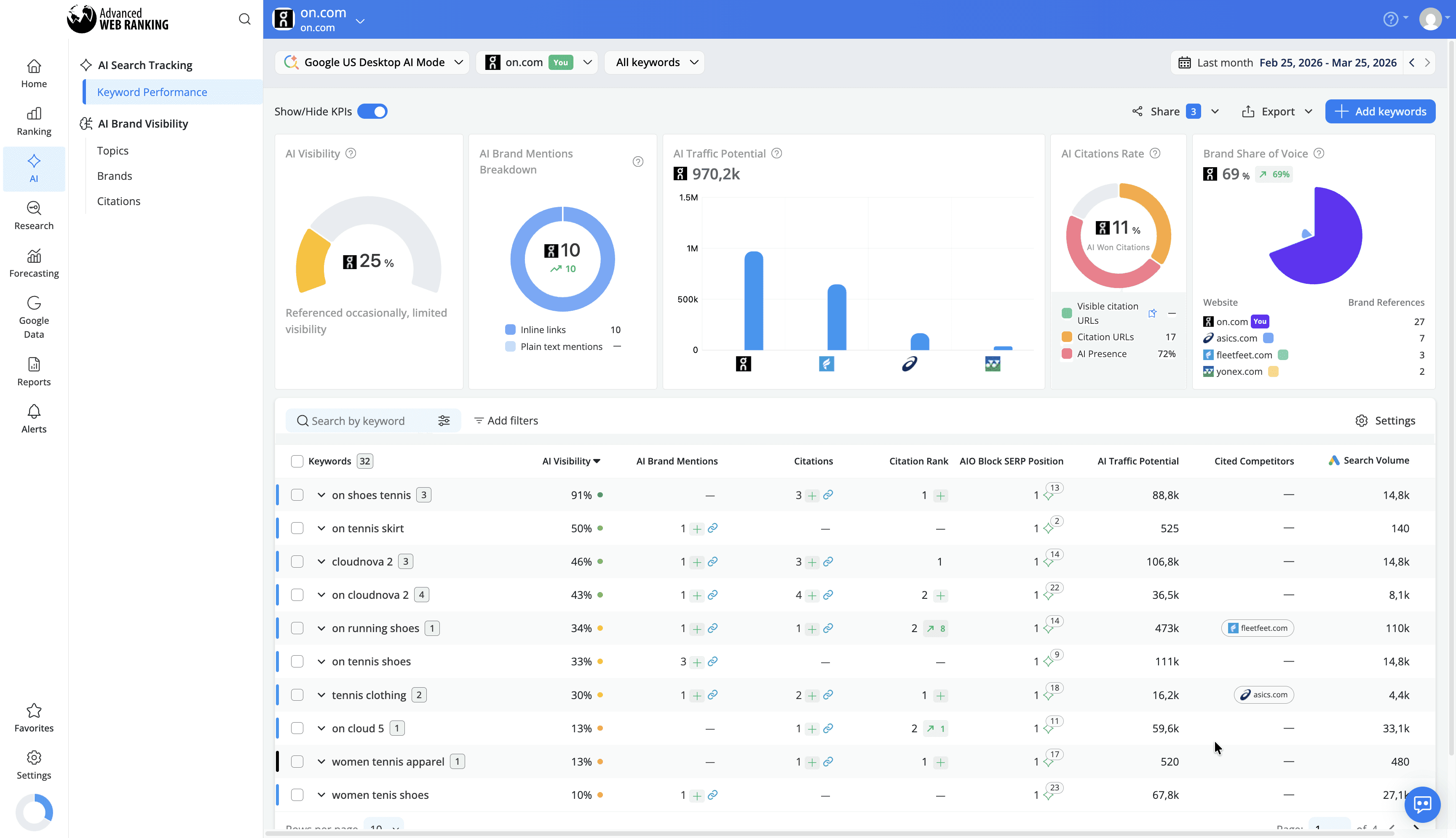
It also provides insights into AI Visibility, your position among sources used in AI Mode responses, the links included, and whether tracked competitors are cited alongside you.
By tracking these metrics, you can identify opportunities to improve your presence in AI-generated summaries, benchmark your performance against competitors, and prioritize content that is more likely to be surfaced by AI models, helping you gain a stronger foothold in this emerging search landscape.
Visibility Data
Gain a complete picture of your site’s performance in AI Mode. AWR tracks both ranking positions and visibility share, helping you see how your website compares to other sources and identify new opportunities to increase your presence in AI-powered summaries.
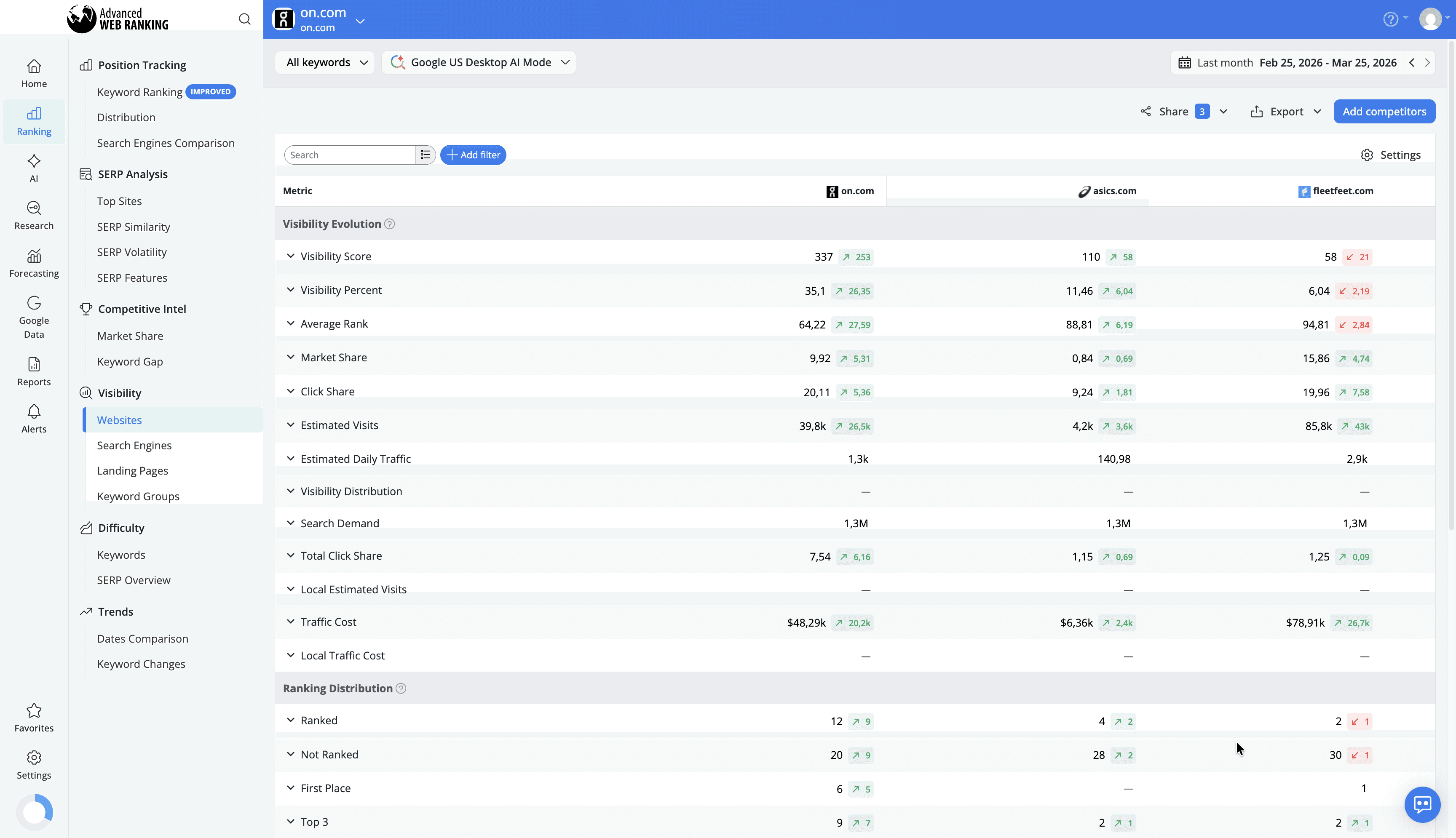
Competitive Analysis
Identify which competitors are consistently cited in AI Mode responses. AWR highlights market share dynamics across AI citations, allowing you to compare your performance against other sources, track visibility changes over time, and refine your strategy to stay ahead of competitors in your industry.
ChatGPT
ChatGPT is an AI-powered conversational chatbot developed by OpenAI that generates responses to user queries (known as prompts) using advanced language models. Unlike traditional search engines, ChatGPT delivers interactive, text-based answers that synthesize information from multiple sources.
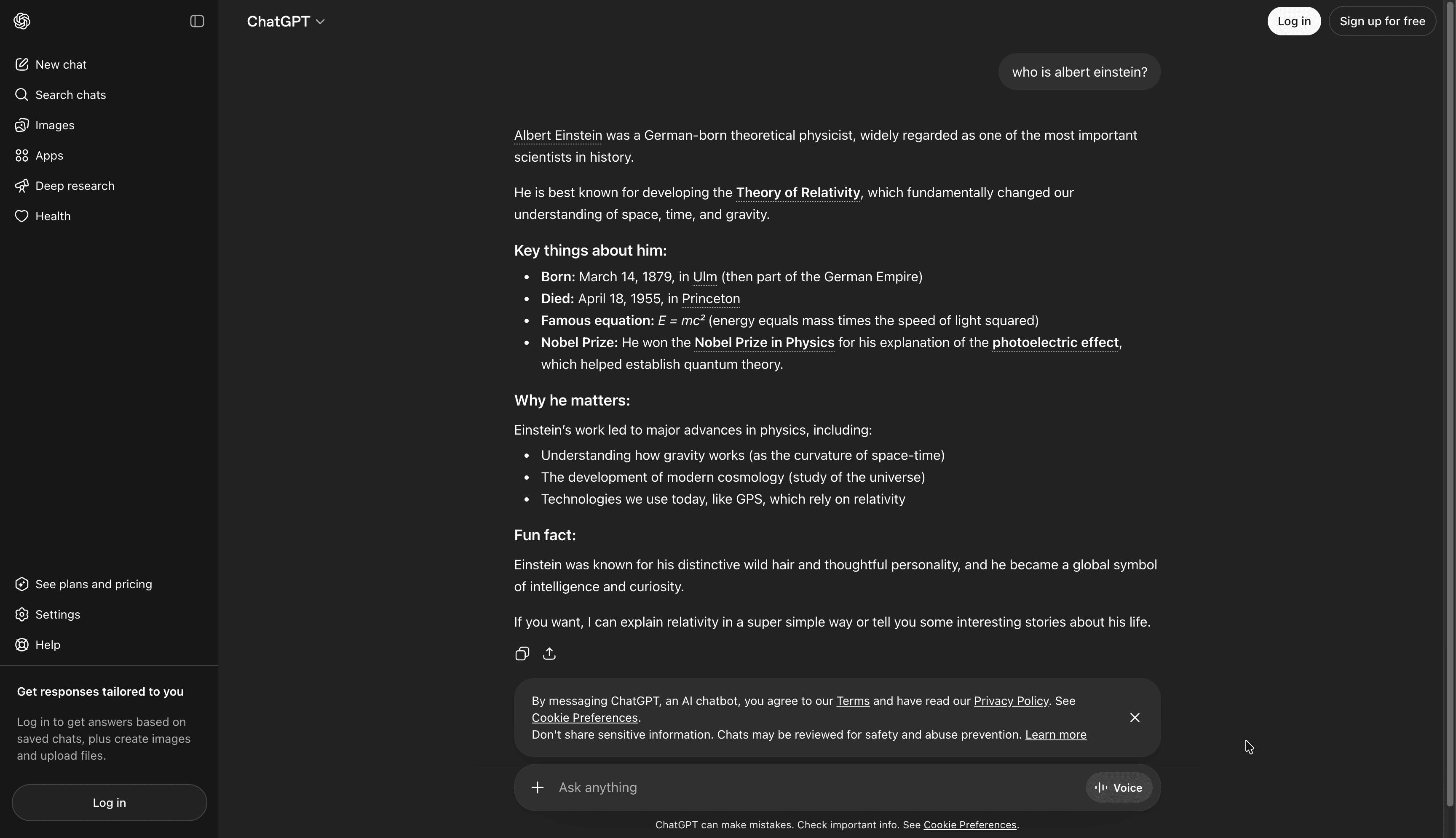
Users can ask follow-up questions, refine prompts, and explore topics in a conversational manner, creating a dynamic and personalized search experience. The visibility in ChatGPT is determined not by ranking positions on a SERP but by whether your content is included in the AI-generated responses users receive.
Tracking your website in ChatGPT allows you to monitor how often your content is referenced, understand which queries your brand appears for, and uncover opportunities to optimize content for AI-driven search experiences.
How to set up ChatGPT tracking
To start tracking ChatGPT, first select the project where you want to add this search engine from the Projects drop-down list.
You can add ChatGPT either by opening the Search engines drop-down from most reports in the UI, such as SERP Analysis > Top Sites or from the Project Settings > Search engines section.
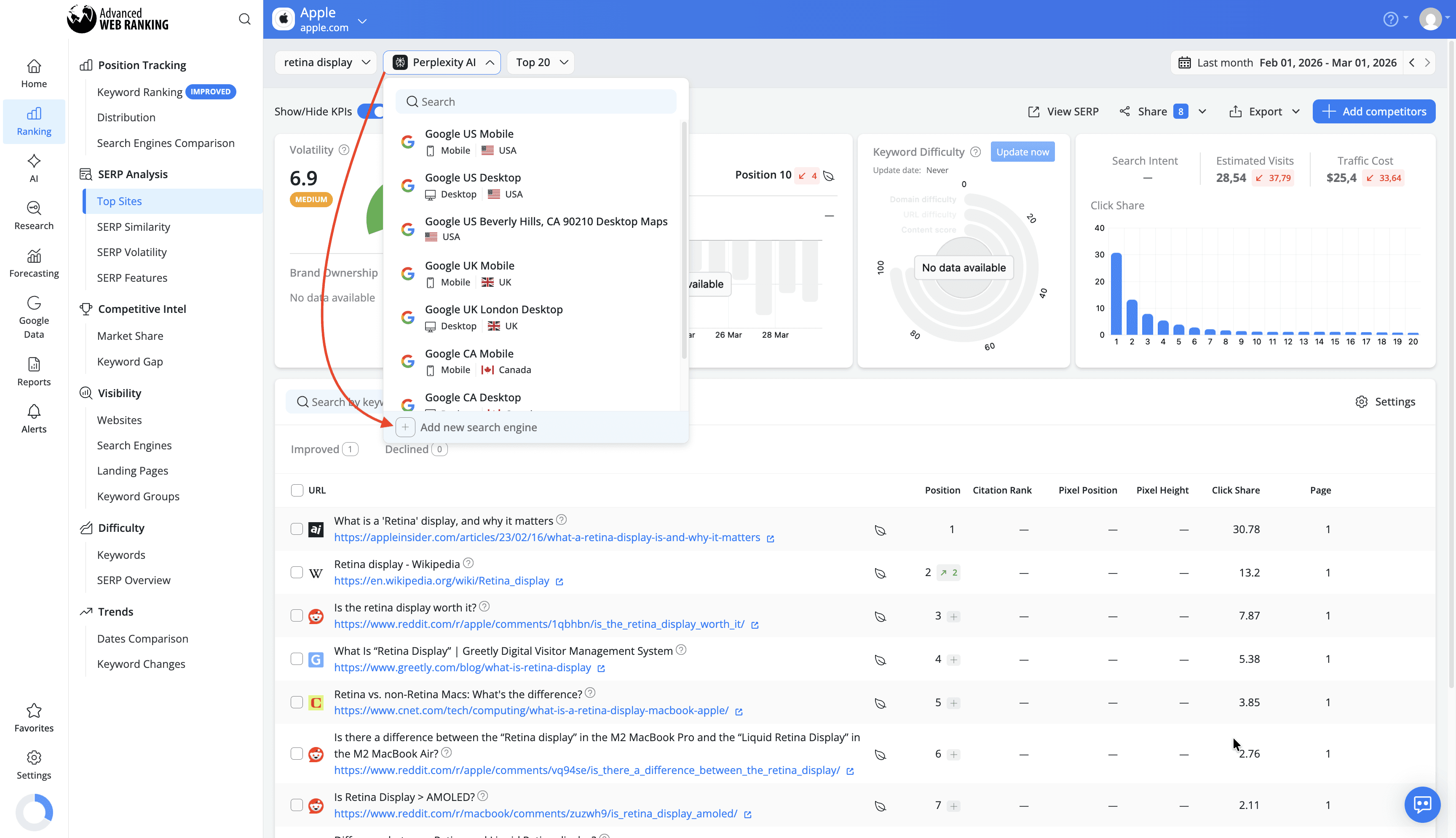
In the search engine wizard, choose a supported country as the target location and select ChatGPT from the list of available search engines.
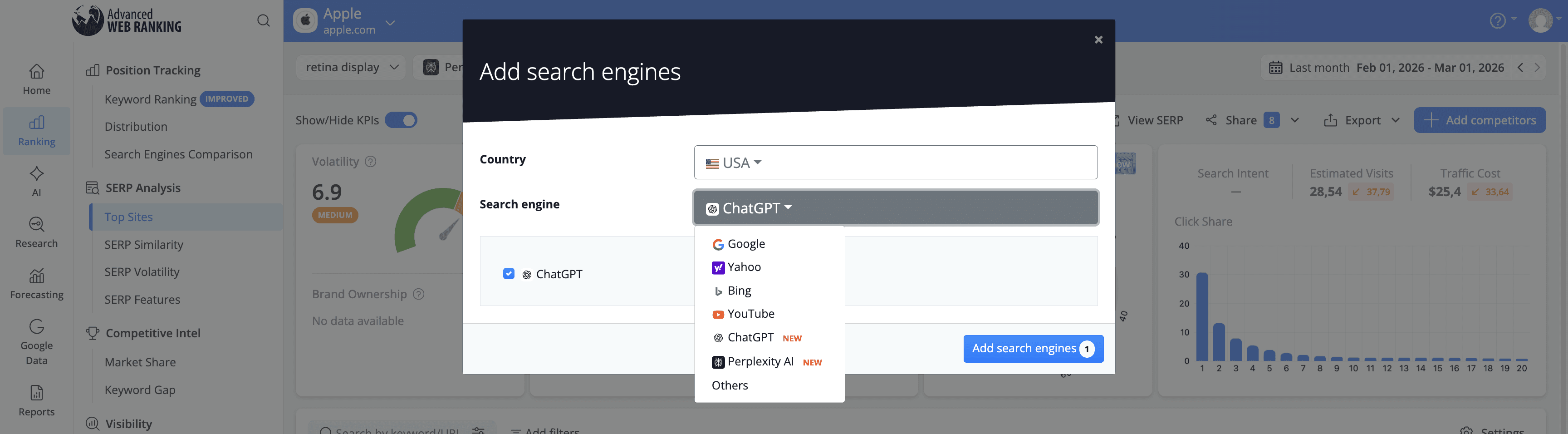
ChatGPT tracking is available for the following countries at the moment:
United States
Germany
France
Italy
Japan
Netherlands
Norway
New Zealand
United Kingdom
South Africa
If you are interested in tracking ChatGPT for a country that isn’t on this list yet, be sure to reach out to our customer support team. We will be glad to add it.
Once added, AWR will begin collecting data, which becomes available starting with the next scheduled update or immediately after triggering an on-demand manual update.
Tracking ChatGPT consumes keyword units in the same way as any standard search engine in AWR. For more details on keyword unit usage, check out this article.
What type of data is collected for ChatGPT?
Advanced Web Ranking retrieves and analyzes all websites cited in ChatGPT responses, providing a detailed view of how your content performs within these AI-generated answers.
The key types of data you can analyze for ChatGPT include:
Ranking Data
AWR tracks your website’s position within ChatGPT’s list of cited sources for each keyword, along with any position changes between updates.
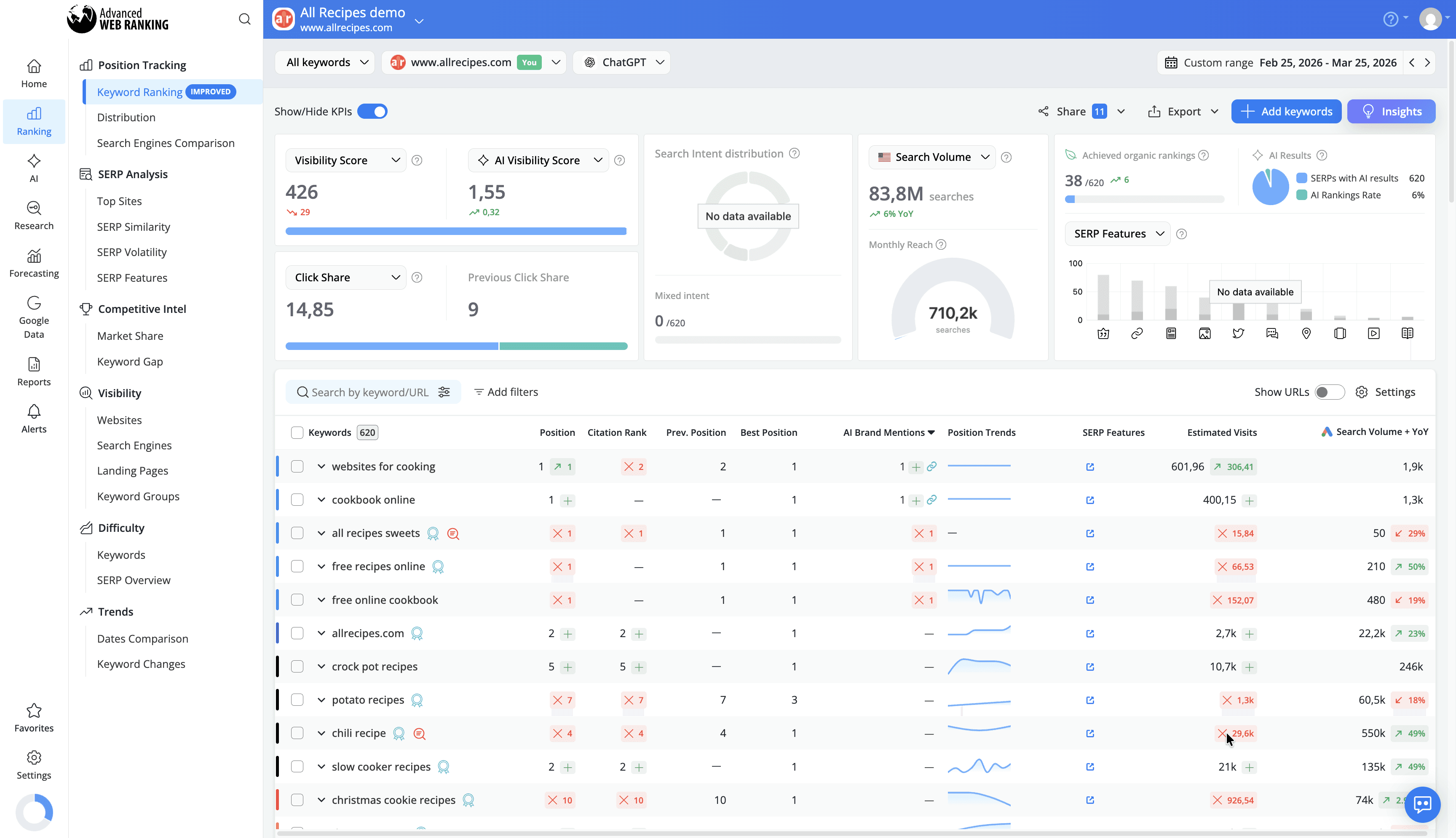
This helps you monitor how your presence evolves over time, identify fluctuations, and understand which type of queries consistently surface your content.
Top Sites & SERP Snapshot
AWR provides a complete list of all sources referenced in ChatGPT responses in the Top Sites report, along with the title and URL of each page.
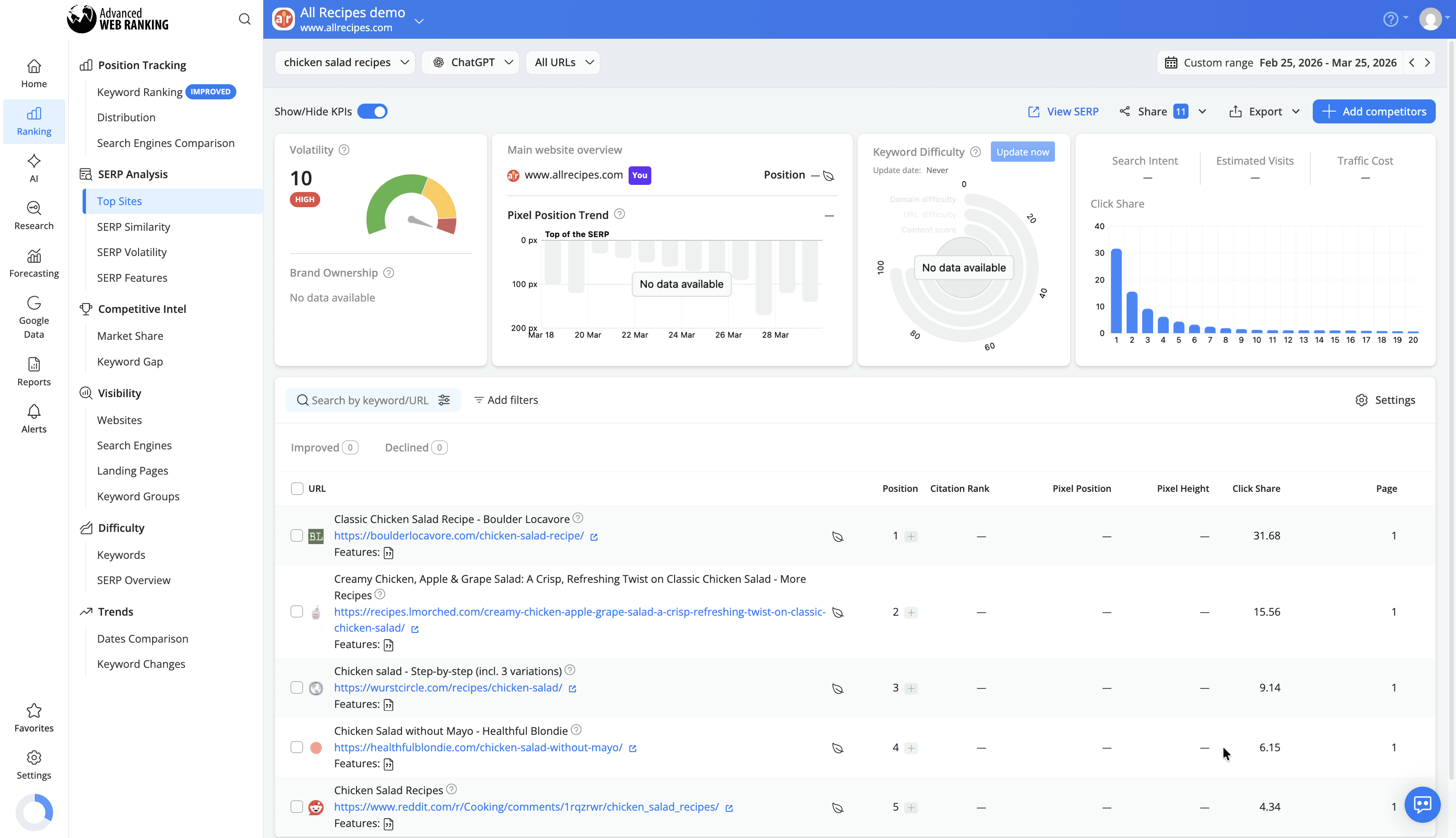
You can also view how your content appears in ChatGPT through a snapshot of the actual chat page, including the full Citations section, which shows the exact URLs used to generate the response.
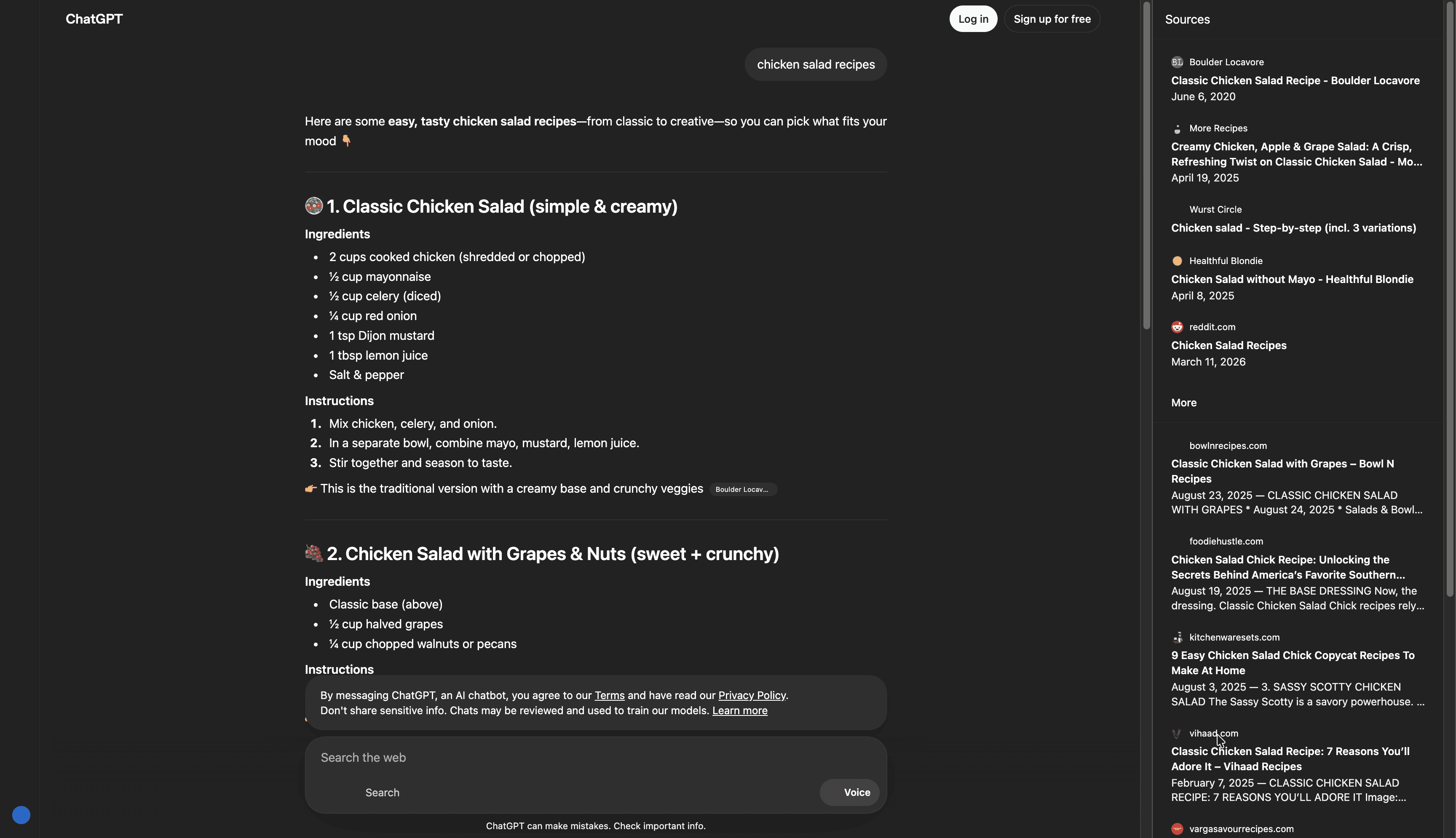
This allows you to verify how your content is presented, understand which sources are preferred, and evaluate your visibility in the context of the full AI response.
AI Keyword Performance
The AI Keyword Performance report helps you understand how your brand performs within AI-generated results. It shows whether ChatGPT uses content from your website or your tracked competitors as sources for its responses, as well as your position within the list of sources.
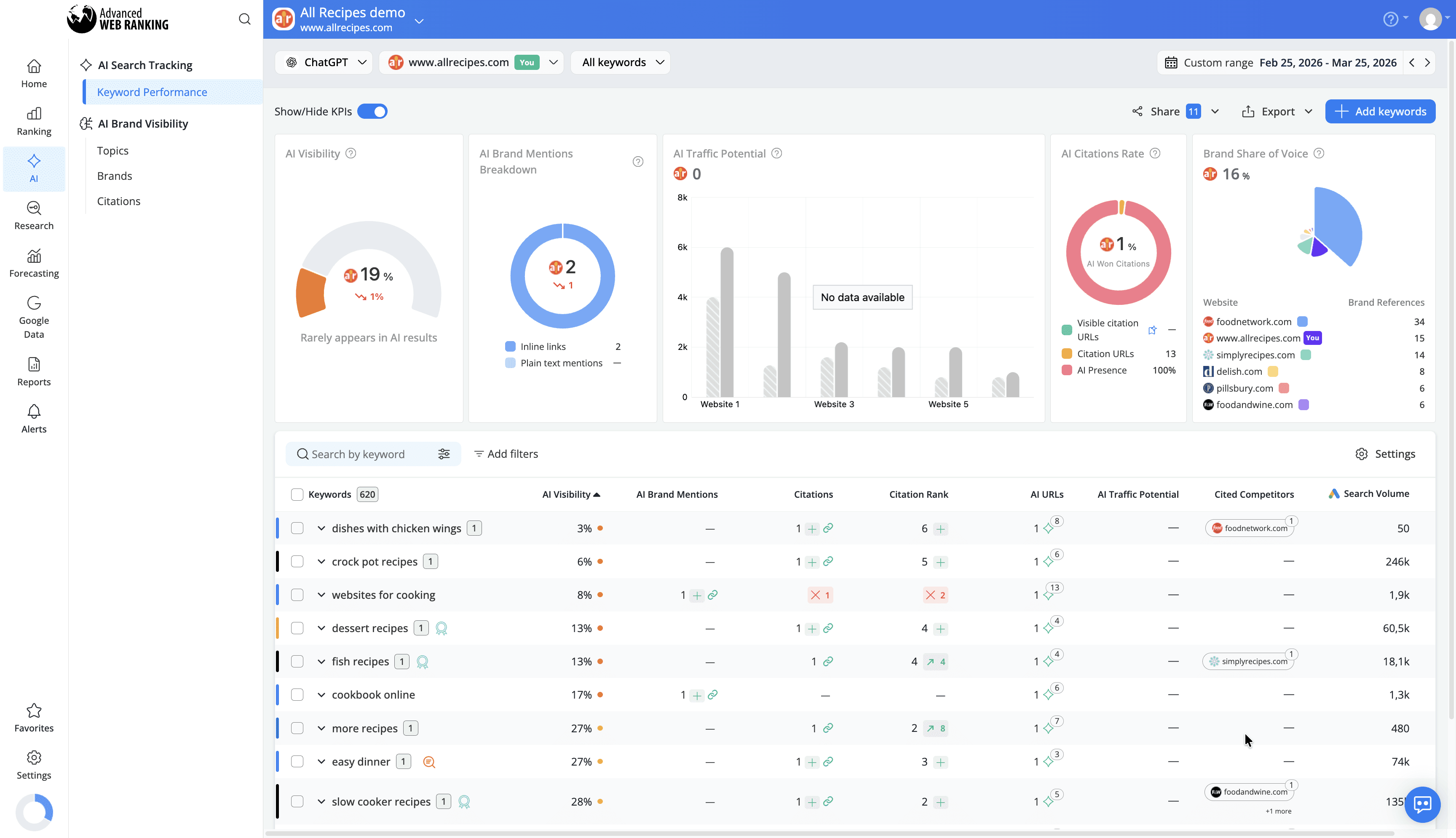
You also get access to metrics such as AI Visibility, which measures your brand’s presence in AI results, and AI Traffic Potential, which estimates the potential traffic you could gain based on your presence in AI-generated responses.
This helps you measure your overall AI presence and prioritize content that increases your chances of being surfaced in ChatGPT responses.
Visibility Data
AWR tracks both ranking positions and visibility share, giving you a complete view of how your site performs within ChatGPT’s cited sources.
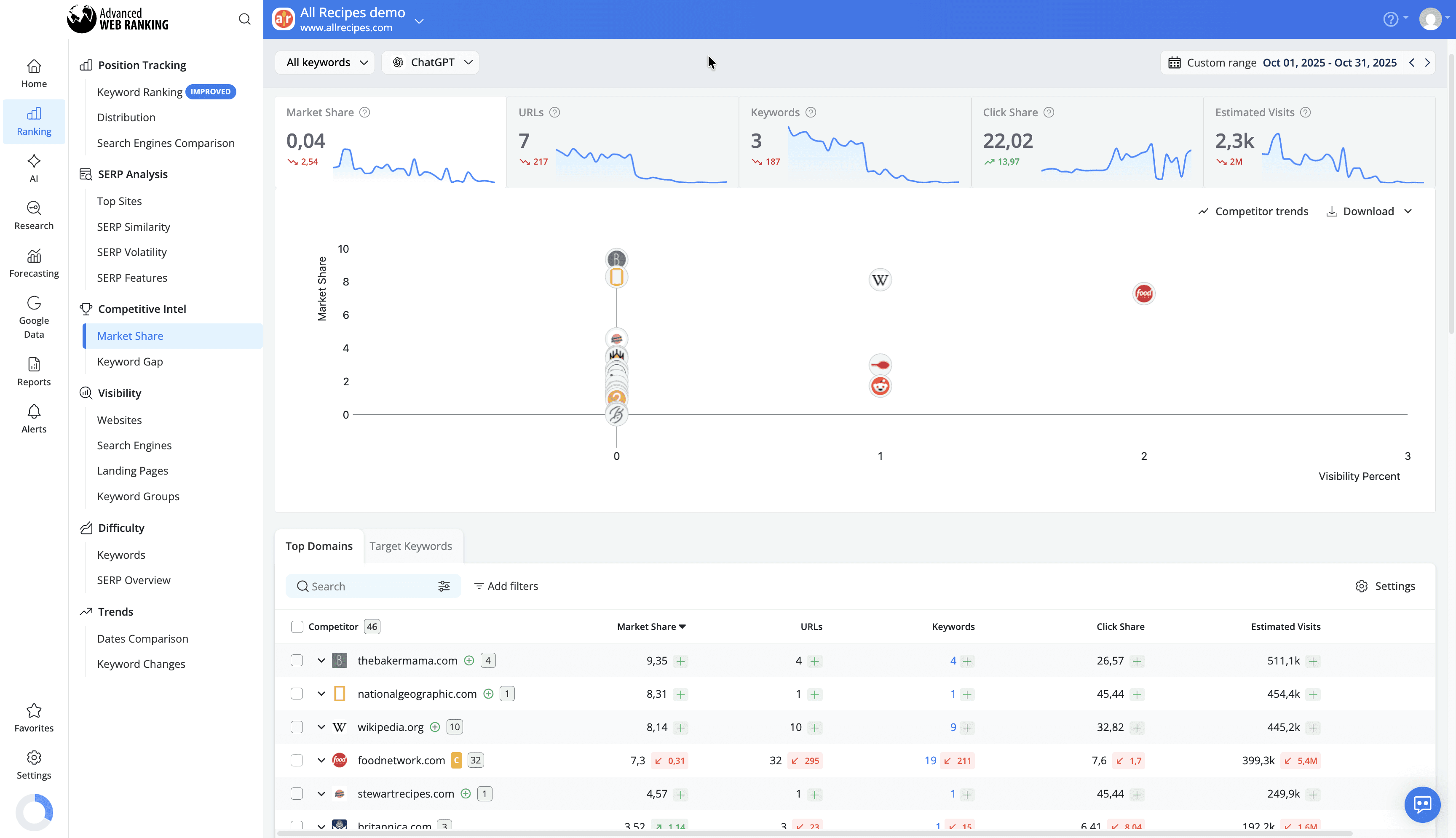
This helps you understand your share of presence compared to other sources and uncover opportunities to expand your visibility in conversational search.
Competitive Analysis
Identify which competitors are consistently cited in ChatGPT responses. AWR highlights market share dynamics across AI citations, allowing you to compare your performance, track shifts over time, and adjust your strategy accordingly.
This helps you stay aware of competitive trends and react quickly when other sites gain or lose visibility.
Perplexity
Perplexity is a conversational, AI-powered search engine that provides direct, accurate answers to user queries by searching the web in real time and citing its sources.
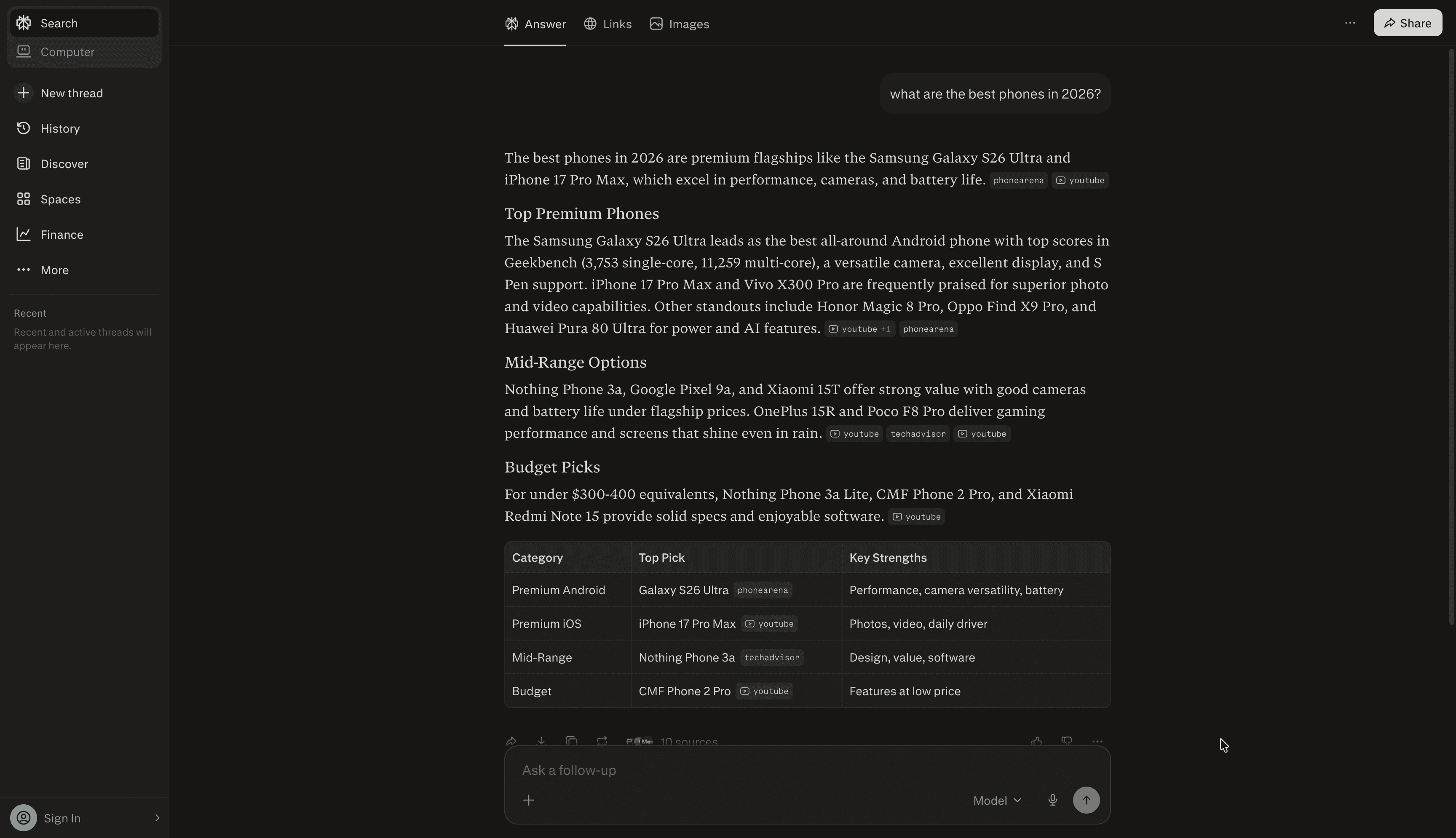
Instead of returning a traditional list of results, it generates responses that combine information from multiple pages, while clearly referencing the websites used. Users can explore topics further through follow-up questions, creating a more interactive search experience.
Because sources are explicitly cited, visibility in Perplexity depends on whether your website is selected and included in these AI-generated responses. Tracking your website in Perplexity helps you understand when your content is used as a source, how often it appears and how your presence compares to other referenced websites.
How to Set Up Perplexity Tracking
To start tracking Perplexity, select the project where you want to add this search engine from the Projects drop-down list.
You can add it either from the Search engines drop-down available in most reports or from the Project Settings > Search engines section.
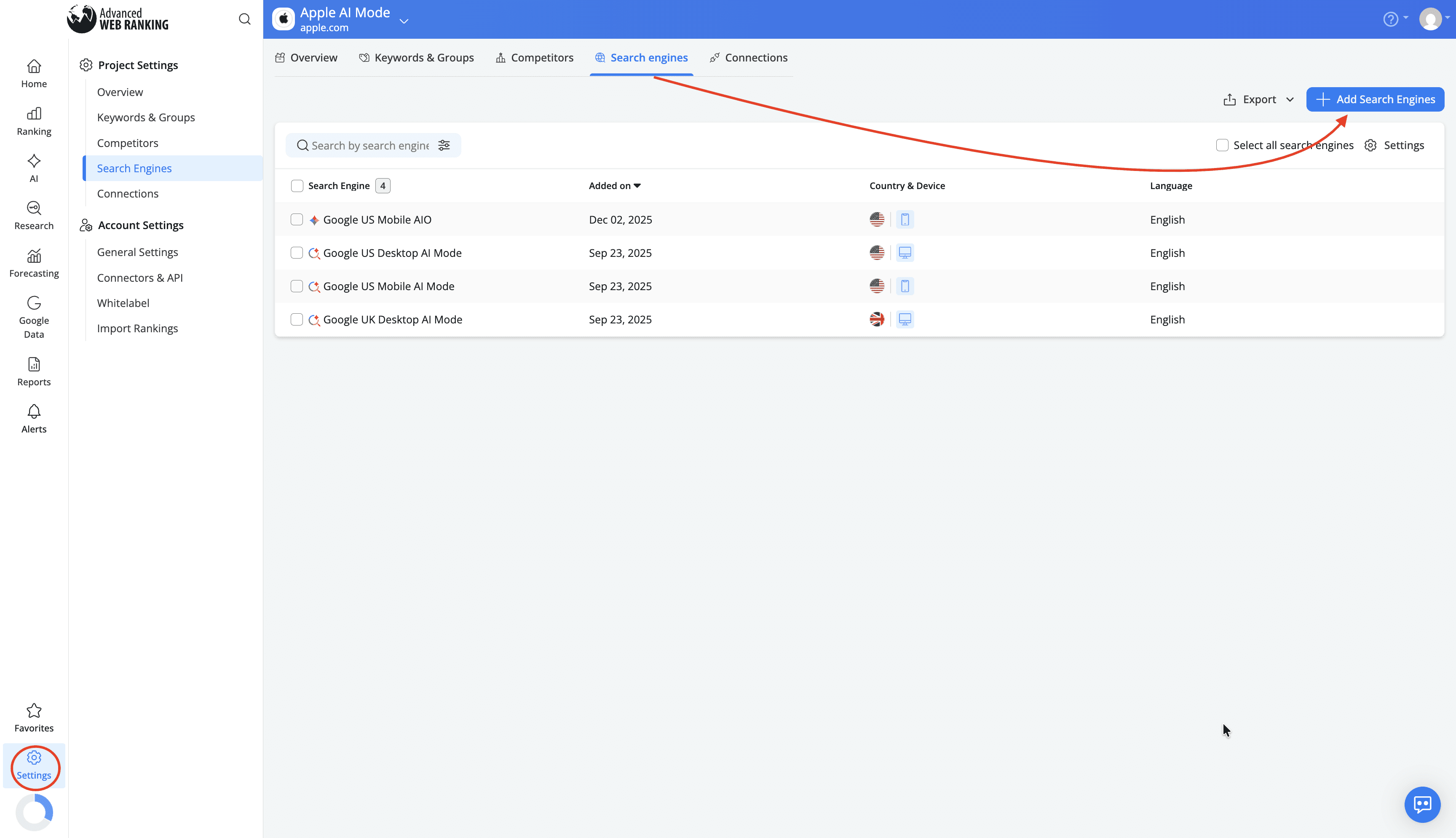
In the search engine setup, choose one of the supported countries as your target location and select Perplexity from the list of available search engines.
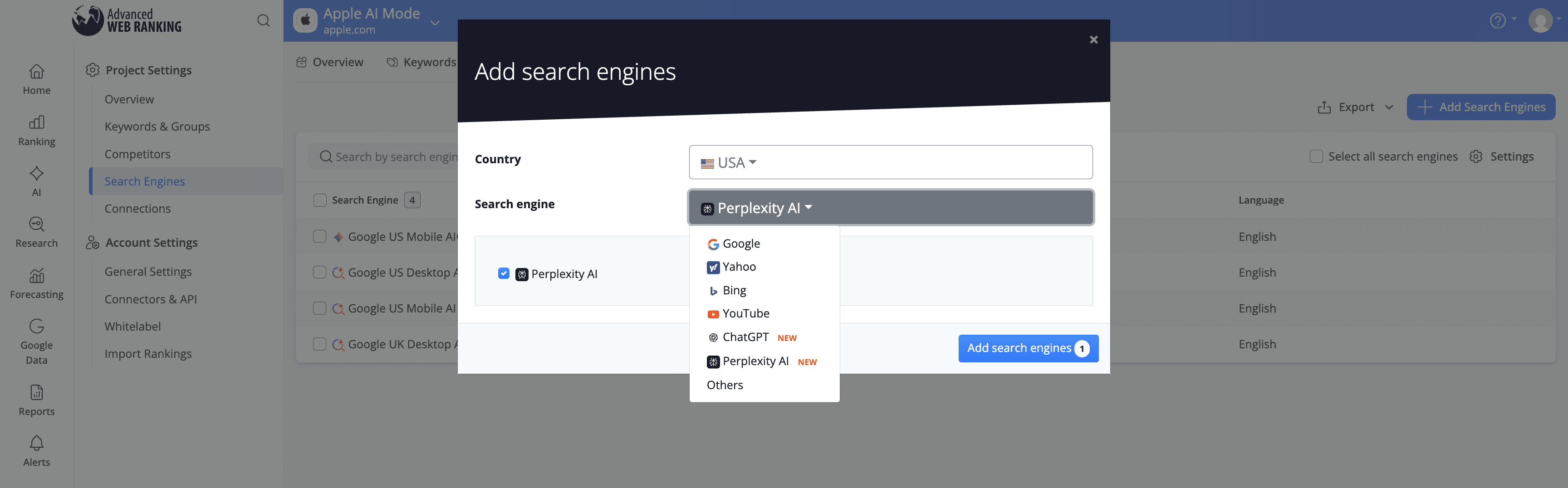
Perplexity tracking is available for the following countries at the moment:
United States
Germany
France
Italy
Japan
Netherlands
United Kingdom
Australia
Brazil
Canada
Switzerland
Spain
Portugal
If you are interested in tracking Perplexity for a country that isn’t part of this list, reach out to our customer support team and we will gladly add it.
Once added, Advanced Web Ranking will begin collecting data, which becomes available after the next scheduled update or after triggering an on-demand data refresh.
Tracking Perplexity consumes keyword units in the same way as any standard search engine in AWR.
What type of data is collected for Perplexity?
For each tracked keyword, AWR collects and displays the list of URLs that appear in the “Sources” section of Perplexity responses.
The key types of data you can analyze for Perplexity include:
Ranking Data
You can see your website’s position among the sources cited in Perplexity responses, along with any position changes between updates.
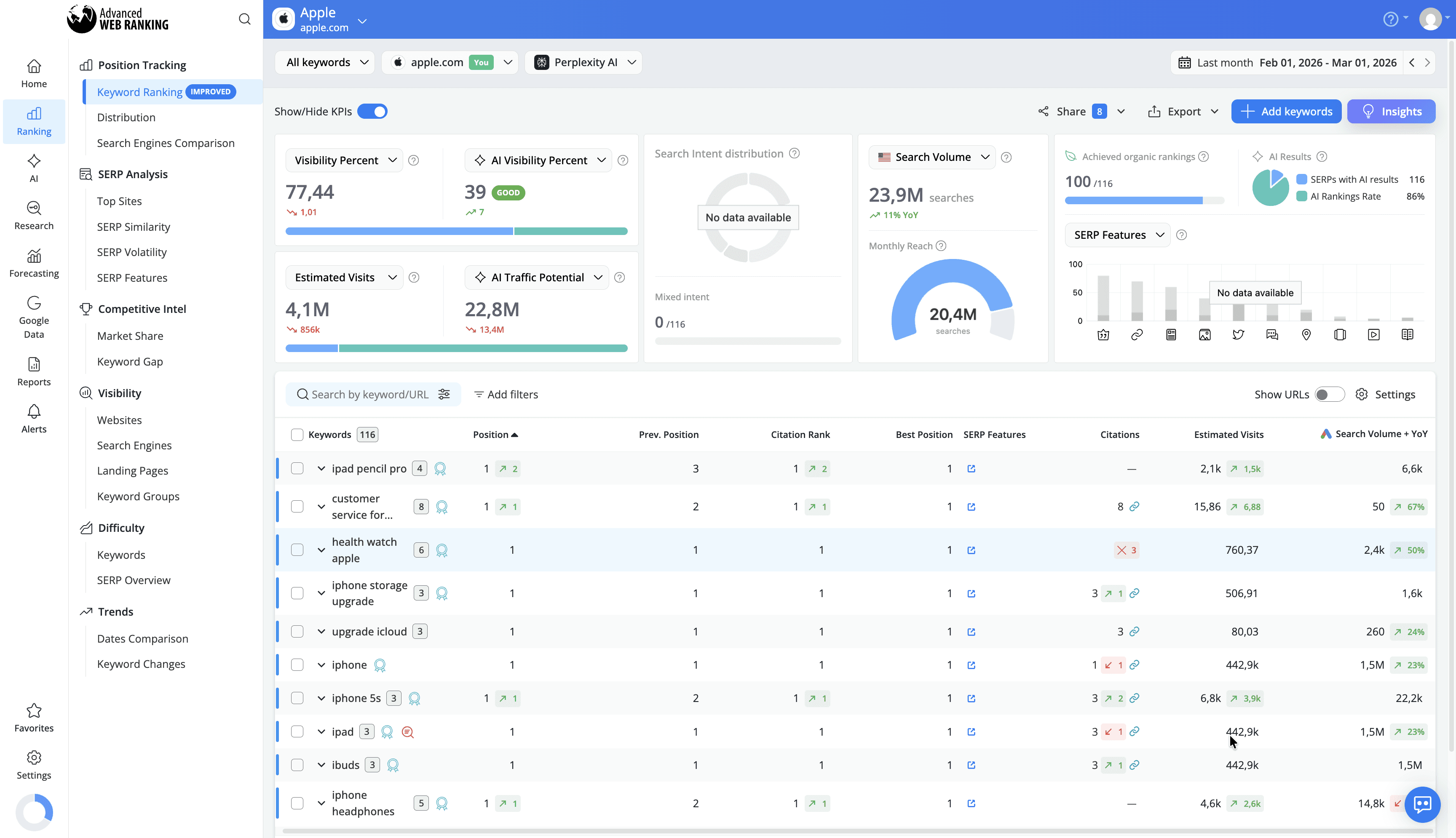
This helps you monitor how your presence evolves over time, evaluate the impact of your optimizations, and identify opportunities to improve your visibility in AI-driven search results.
Top Sites & SERP Snapshot
AWR provides a complete breakdown of all sources referenced in Perplexity responses in the Top Sites reports along with a snapshot of the actual Perplexity page.
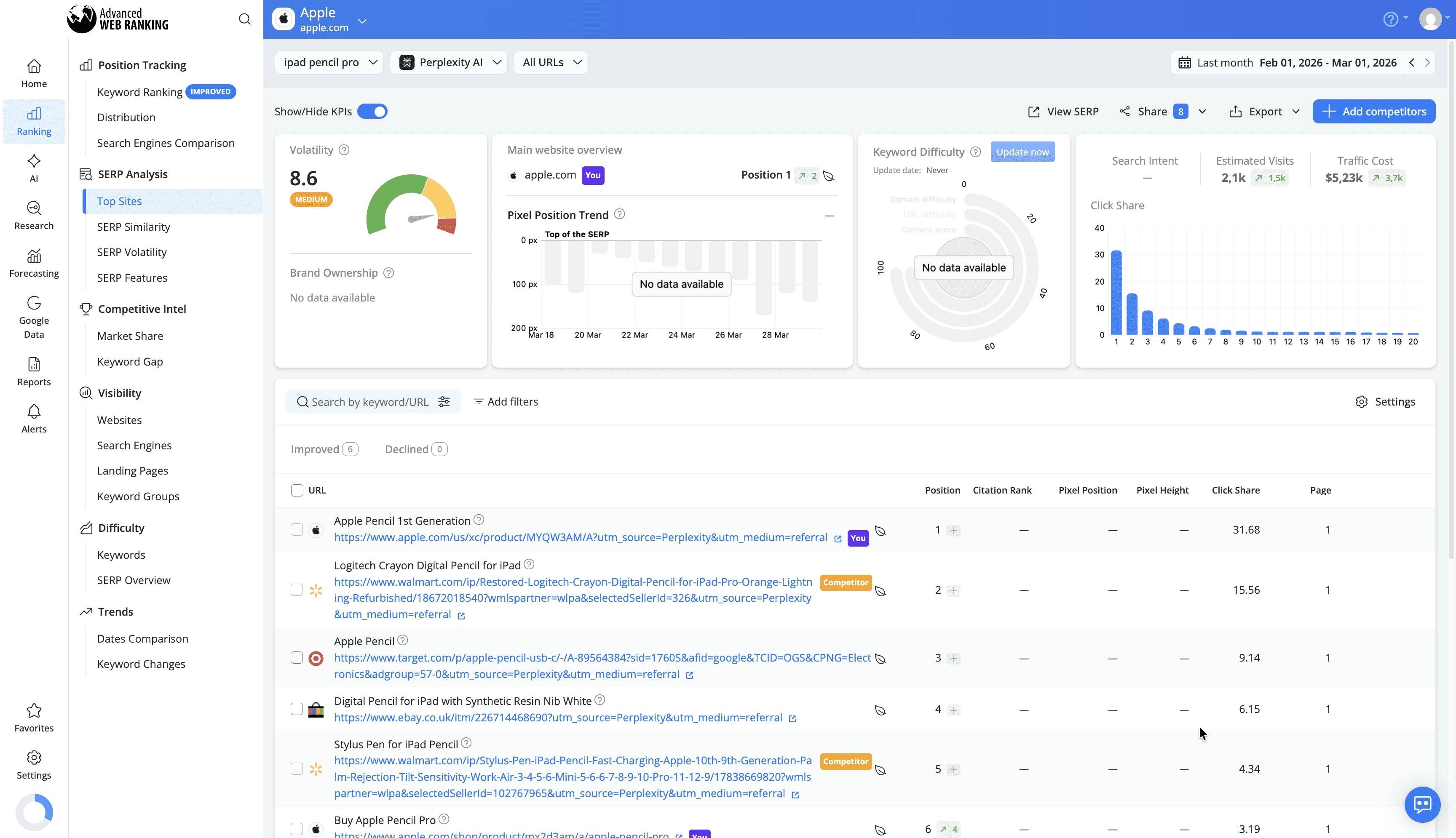

This gives you immediate insight into how your content is presented, helping you evaluate its visibility and refine it to improve user engagement and click-through rates.
AI Keyword Performance
The AI Keyword Performance report helps you understand how your brand performs within AI-generated results. It shows whether Perplexity uses your website or your tracked competitors as sources, along with your position in the list of cited sources.
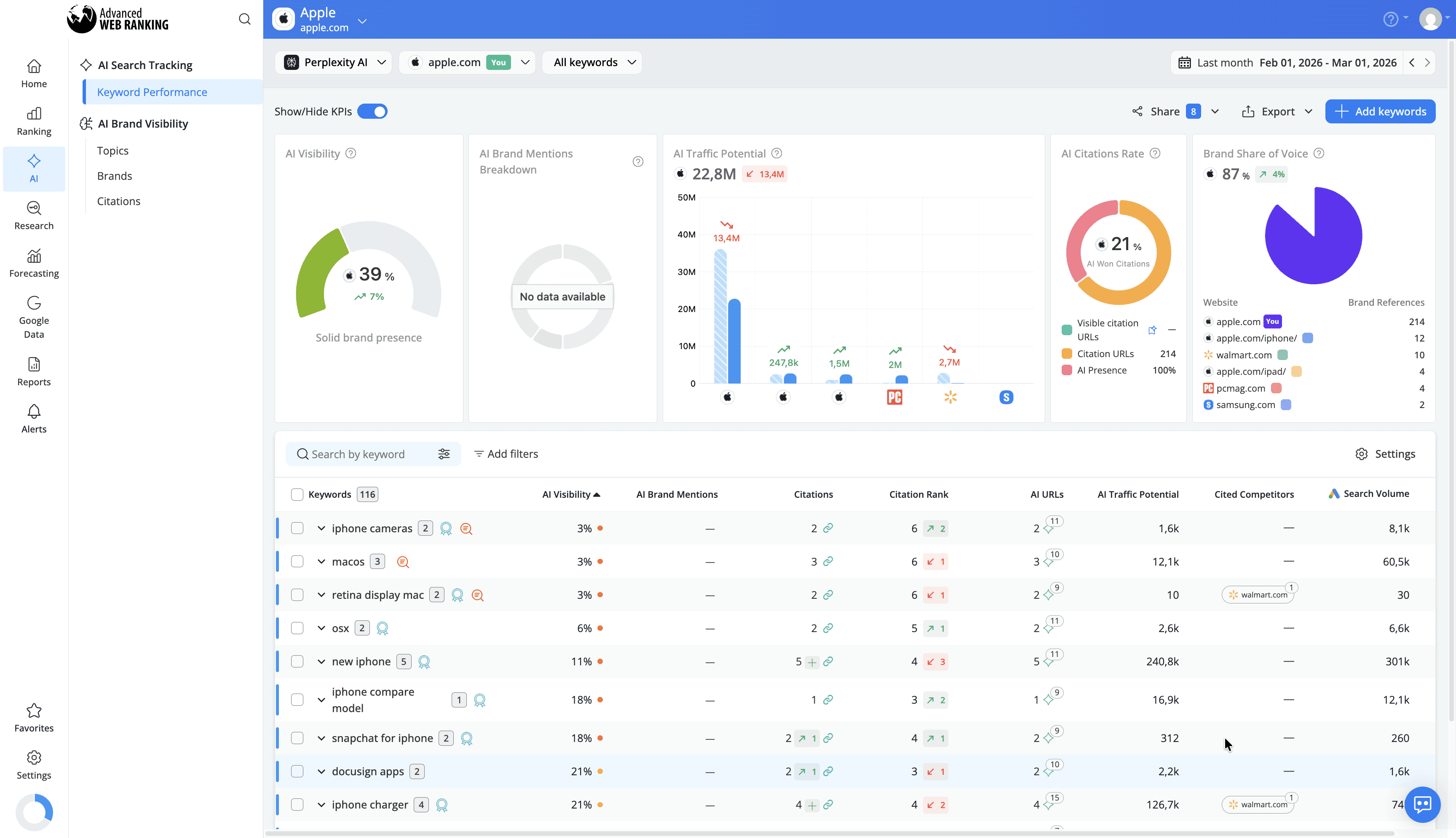
You also get access to metrics such as AI Visibility, which reflects your presence in AI results, and AI Traffic Potential, which estimates the potential traffic you could gain based on your inclusion in AI-generated responses.
Visibility Data
Gain a complete picture of your site’s performance in Perplexity. AWR tracks both ranking positions and visibility share, helping you understand how your website compares to other referenced sources and uncover opportunities to increase your presence.
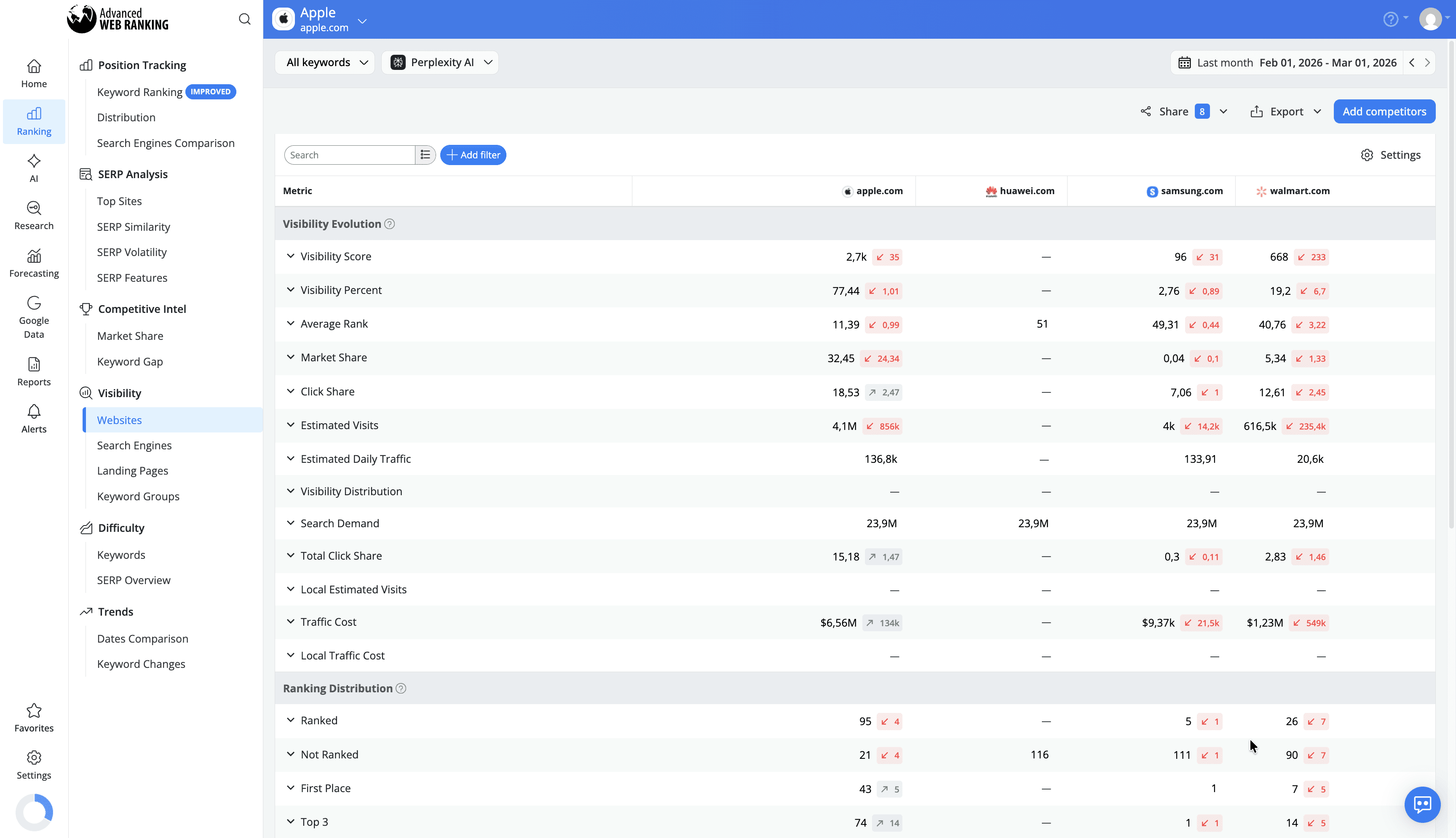
Competitive Analysis
Identify which competitors are consistently cited in Perplexity responses. AWR highlights how visibility is distributed across sources, helping you compare your performance, monitor changes over time, and adjust your strategy accordingly.
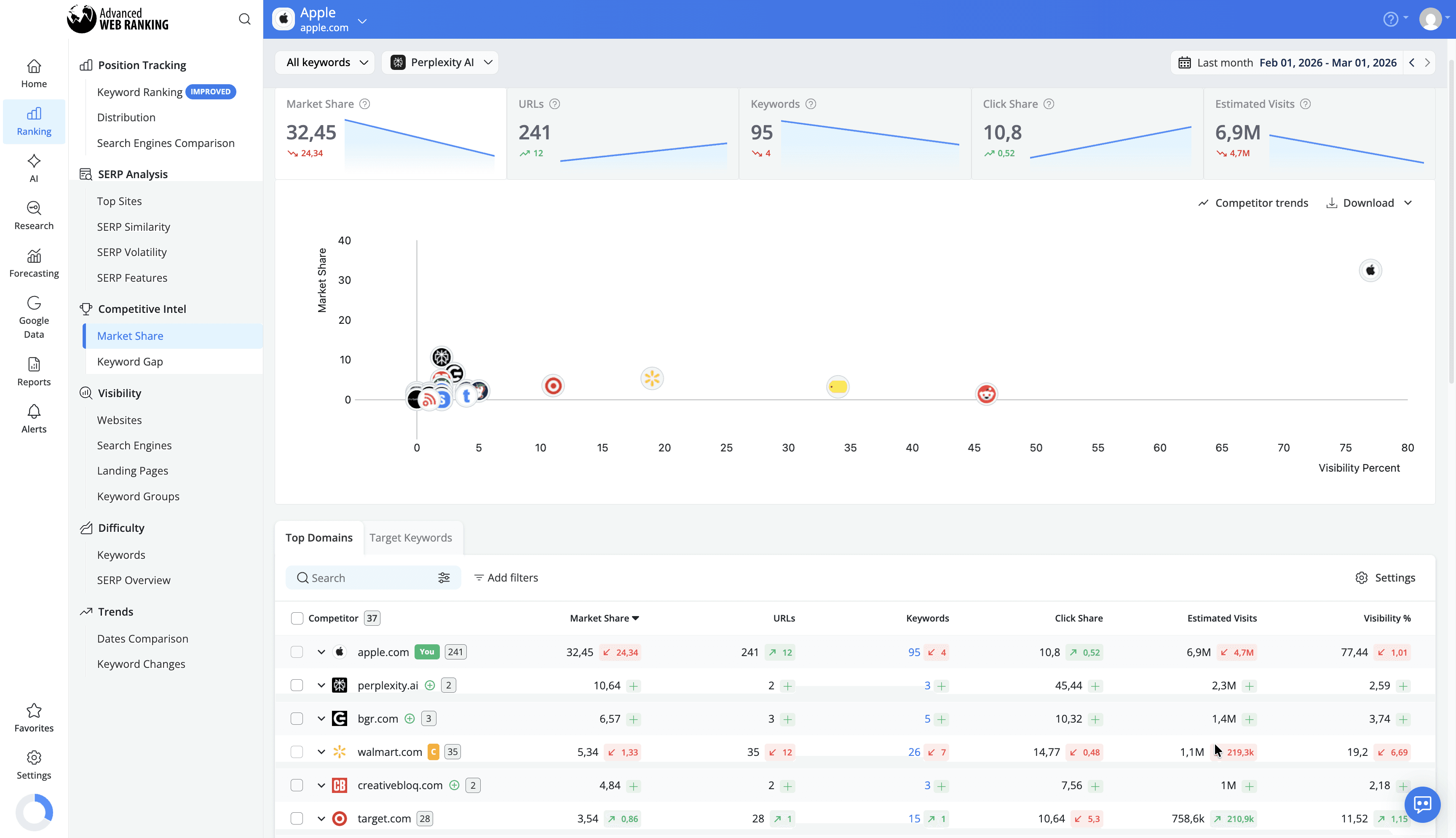
Why Should You Track Your Website’s Performance in AI Search Engines Results?
AI-powered search engines are reshaping how users discover and engage with content. This introduces a new layer of visibility, where information can influence decisions even without traditional clicks. Tracking your performance helps ensure your content remains visible and competitive in this evolving search landscape.
Here’s why tracking your website’s performance in AI search engines matters:
Measure your AI-driven visibility
Understand if and how often your website is included in AI-generated responses, and how prominently it appears.Benchmark your presence against competitors
Identify which websites are consistently cited and compare your visibility across shared queries.Uncover content optimization opportunities
Learn which topics, formats, and pages are more likely to be selected by AI models, so you can refine your content strategy.Monitor performance over time
Track position changes, visibility share, and shifts in AI citations to identify trends and respond proactively.Strengthen your brand presence in AI search
Even without clicks, being referenced in AI-generated results increases your credibility and keeps your brand top of mind.Stay aligned with evolving search behavior
As users rely more on AI-generated answers, tracking helps you adapt your strategy to match how content is discovered and consumed.
How to Compare Website Performance in Traditional Search vs. AI-Driven Search
With Advanced Web Ranking’s Search Engine Comparison report, you can evaluate how your website performs across both traditional search engines, such as Google and Bing, and AI-driven search engines like Google AI Mode, ChatGPT, or Perplexity.
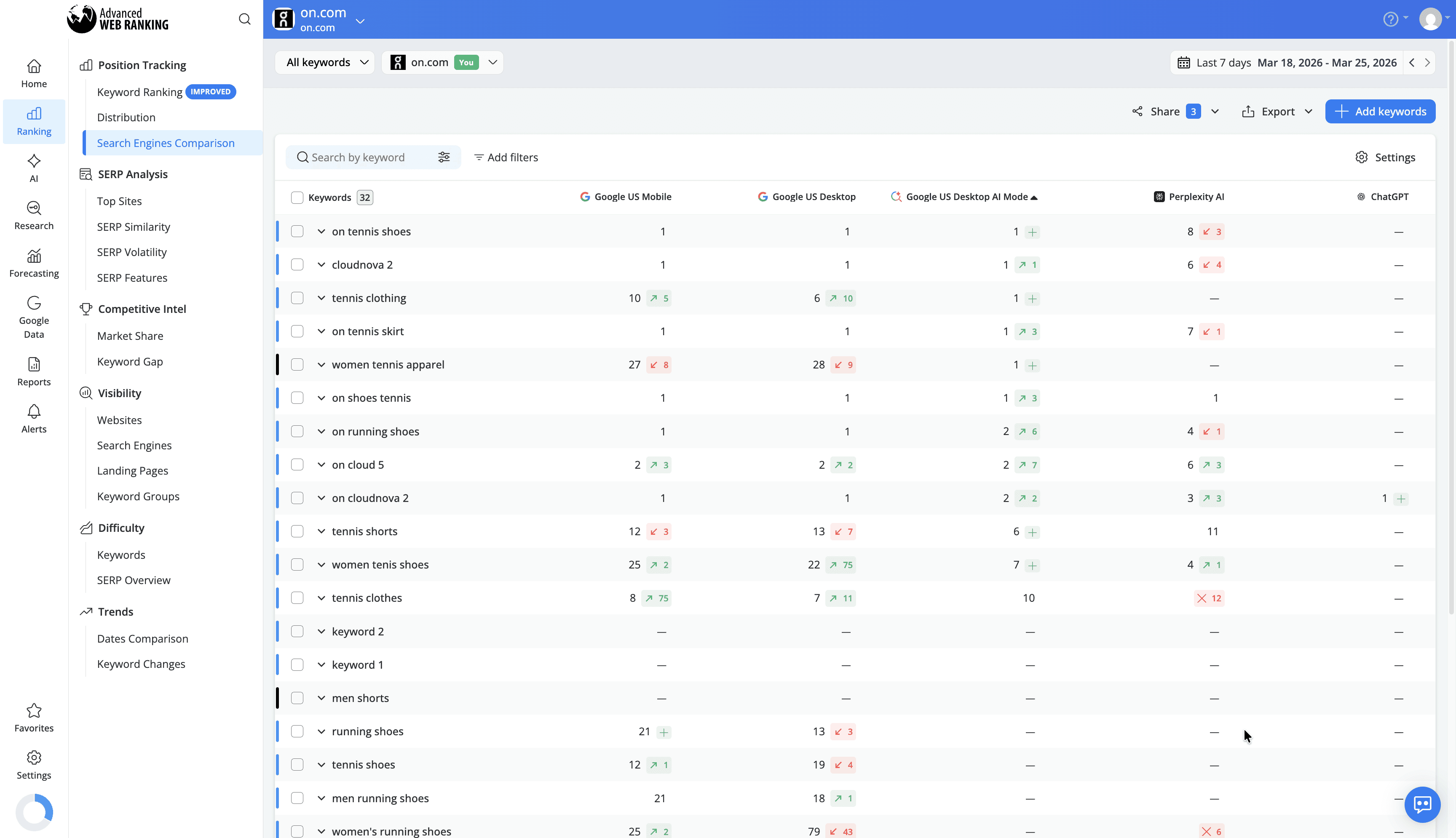
This side-by-side comparison helps you quickly spot where your website is performing well and where there’s room for improvement. By understanding these differences, you can adapt your SEO strategy to increase your chances of being selected as a reliable source in AI-generated results.
Conclusion
AI-powered search is reshaping how users discover and interact with information, moving beyond traditional rankings toward AI-generated answers that highlight selected sources. As a result, understanding how your website performs in these search engines is becoming essential.
With the right data, you can refine your strategy, focus on content that resonates with AI systems, and strengthen your visibility in this evolving search landscape, ensuring your website remains relevant as search continues to change.
Do you have any other questions? Don’t hesitate to get in touch and we will keep building the FAQ.
stay in the loop