
The Search Session Advent ·
4 December
AI citations are receipts, not the goal

Myriam Jessier
Search Engine Optimization Executive at Pragm
Why Myriam’s idea matters
When an AI answer lists your client’s page as a source, it feels like a win. It is easy to count, easy to put in a chart and easy to show in the monthly report.
Myriam says a citation is only a receipt. It proves the AI found and read your client’s page. It does not prove that anyone saw the brand name, picked your client over a competitor or clicked through to buy.
So check what the citation led to. Did the answer name your client’s brand in the text, recommend it, or only link to it in a list of sources that most people never open? Being named in the answer is what connects AI visibility to your client’s revenue, and it is what their finance team will ask about.
Put Myriam’s idea into practice
Try with AWR
Check whether AI names your client or only links to them
Using AWR’s Answers report
Step 1
AWR creates brand references for your client’s domain and for every competitor as soon as you add your client’s website URL.

Check them in Project Settings › Overview under Brand names, and in Project Settings › Competitors for the competitors.

Add every spelling and product name you want counted: AWR only counts exact matches, so “Samsung” and “Samsung Electronics” have to be added separately.

Step 2
In the Answers report, click an answer to see where your client was mentioned in the Brand mentions section.

Click any website to see whether your client was mentioned through a plain text mention or an inline link.

Step 3
Click Add filters › Mentioned. Under Mentioned as, pick Named to see the answers that name your client in the text (plain text mentions), select your client’s brand and click Apply. Then switch to Linked to see the answers that link to your client’s site (inline links).
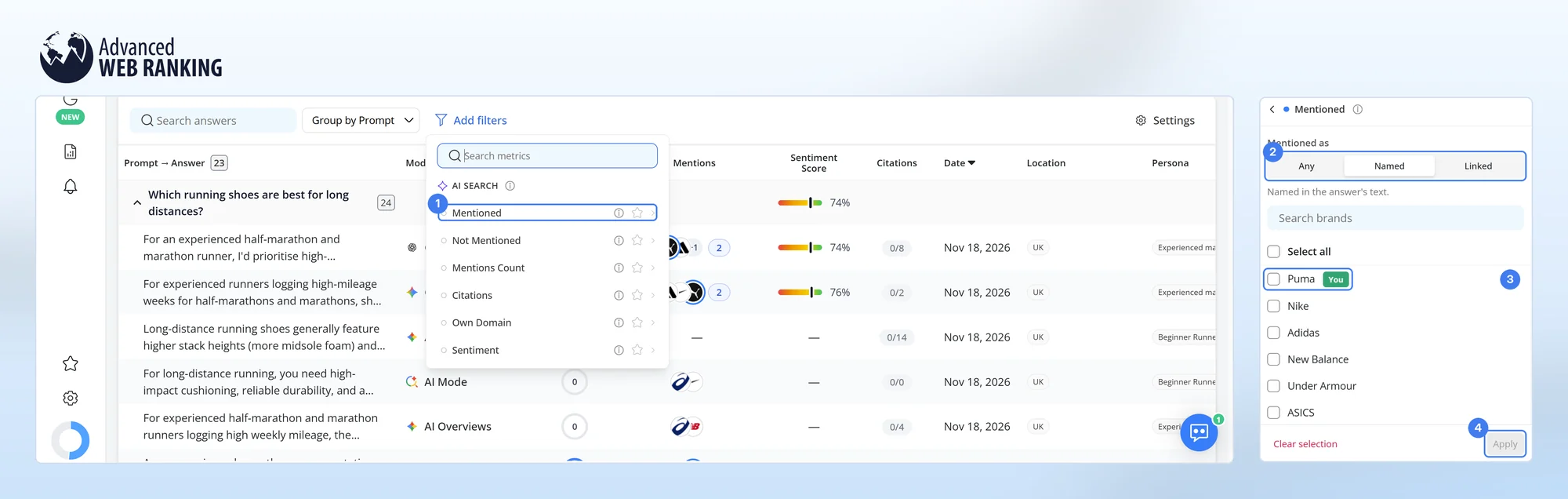
Learn more here: AI Brand Mentions: See When Your Brand is Mentioned, Linked, or Cited in AI Search
More from Myriam
This idea is a small taste of what Myriam Jessier brings to search. The full conversation with Gianluca Fiorelli is worth hearing, and Myriam’s work is worth following.
← Back to the calendar